Files: No indication you can search files
There is nothing in Files' user interface that indicates you can actually search files. This can be a source of confusion for users, who will believe there is no such feature implemented.
Bounty: https://www.bountysource.com/issues/19860024-no-indication-you-can-search-files
Want to back this issue? Post a bounty on it! We accept bounties via Bountysource.
 codygarver
All 17 comments
I propose adding a "gear menu" like the one in other apps to store advanced features. Then we can move the "show hidden files" (which doesn't belong in a context menu as it acts on all tabs) and the "refresh" (which is rarely useful other than as a trigger for procrastination) features into this menu and add a "lens" search button to the address bar in place of the former. It'll also serve as an additional extension point for plugins.
 ghost
on 24 Oct 2017
ghost
on 24 Oct 2017
UX team have determined that any solution to this should not involve adding extra icons to the header bar.
 jeremypw
on 21 Apr 2018
jeremypw
on 21 Apr 2018
Something we talked about the other day in Slack is showing the searchbar automatically when you're in the home directory. This would mean that the first time you open Files or when you open a new tab you see this affordance:

 danrabbit
on 21 Apr 2018
danrabbit
on 21 Apr 2018
Something we talked about the other day in Slack is showing the searchbar automatically when you're in the home directory.
Just to be clear, that isn't meant as a complete solution to this issue, right? I mean, what about when you're in another directory?
 waldyrious
on 11 May 2018
waldyrious
on 11 May 2018
I think @danrabbit's suggestion regarding search on home folder makes sense
An additional affordance would be to change the Home icon (see below) into a Search icon upon hover

 steakscience
on 31 Aug 2018
steakscience
on 31 Aug 2018
What about a Search selection on the context menu?
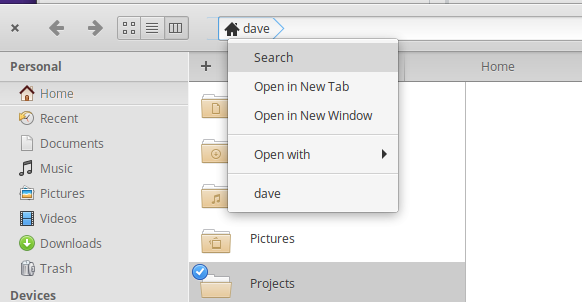
 dtshudy
on 21 Sep 2018
dtshudy
on 21 Sep 2018
@dtshudy I think the problem with that is that the option is hidden away an extra step. You need to go all the way to the home button, at which point you don't know what you can do. Then, you need to right click.
steakscience
on 22 Sep 2018
@SixFingeredAmish The right click menu is currently available on each of the breadcrumbs and knows the context.
dtshudy
on 22 Sep 2018
Can anyone show me a good example of what Elementary considers a detailed design?
dtshudy
on 28 Sep 2018
Before this issue balloons out of control, I want to clearly define the scope: there is currently no indication that you can search in Files. I think the minimum-viable way forward that the design team agrees on is switching to a search entry in the Home folder. Since this is the default view in the app, shows up in new tabs, and shows up when tabs are closed, I think it sufficiently solves this issue in the simplest way.
For further search-related discussion, feel free to open issues with specific problems or solutions.
 cassidyjames
on 28 Sep 2018
cassidyjames
on 28 Sep 2018
I personally think that showing search bar interferes with the bread crumb interface.
What about showing another action_icon? The tooltip for this button could be a a place to show the Ctrl + F keyboard shortcut. It could even be a place to explain that you can simply start typing to search.
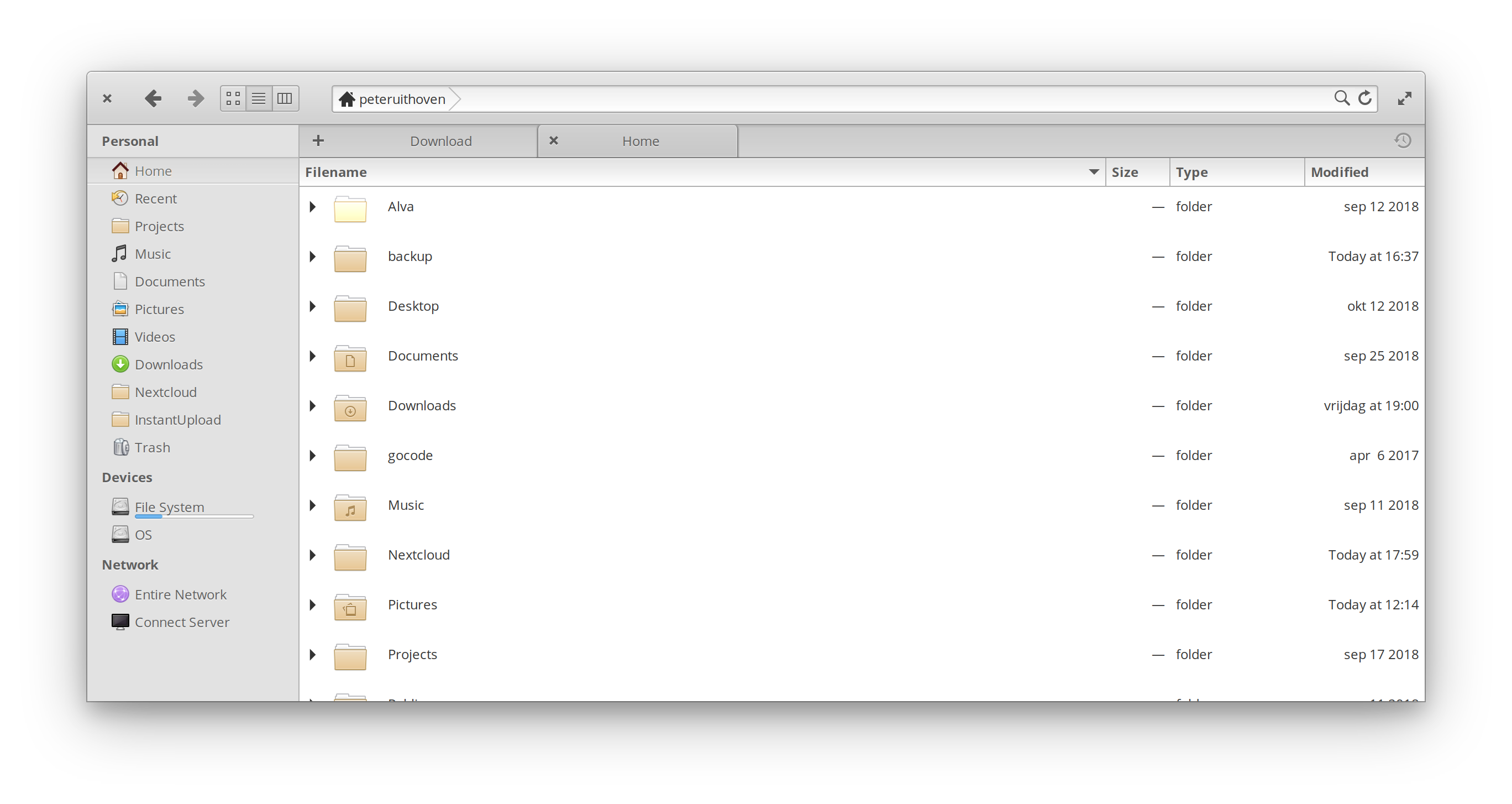
 peteruithoven
on 23 Oct 2018
peteruithoven
on 23 Oct 2018
The native Gtk.Entry widget that the pathbar is based on can only show one action icon at the right so it would take some refactoring.
jeremypw
on 23 Oct 2018
At least, I would like it to be included in the directory's context menu actions:
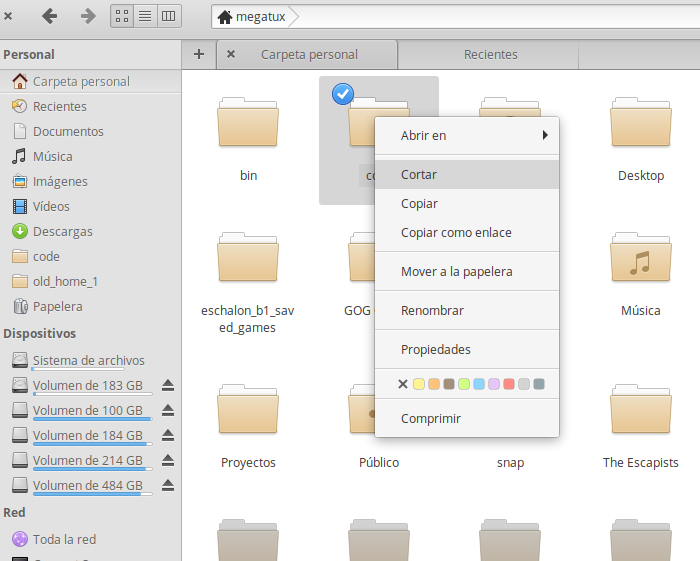
 megatux
on 29 Nov 2018
megatux
on 29 Nov 2018
@megatux : Best create a new issue about this as this one is closed.
jeremypw
on 29 Nov 2018
@jeremypw while I agree that including an entry for searching in the context menu is outside the scope of this issue, I actually think its closure was premature, since the original issue was only partially addressed (the search hint is only visible when viewing the home folder, but not any other path).
IMO we should either reopen this issue, or make an explicit (and justified) decision not to support other paths. (I'd have guessed that a generic fix would be simpler to implement than one that applied to a specific location, but perhaps that's not the case.)
waldyrious
on 29 Nov 2018
Sorry, didn't notice it was closed, because the resolution was pretty bad, IMHO. A special condition only displayed for $HOME but that works everywhere? :/
If we want people use Files to search, I think an action_icon is the best solution. If not, people will frustrate and start installing alternatives like Synapse, FSearch, etc.
megatux
on 29 Nov 2018
This issue was 'fixed' in accordance with the views of the UX team. If other means of exposing the search capability are desired I think separate focused issues should be raised.
jeremypw
on 29 Nov 2018
Related issues
 sprite-1
·
4Comments
sprite-1
·
4Comments
 rodrigoaraujolima92
·
5Comments
rodrigoaraujolima92
·
5Comments
 tintou
·
6Comments
tintou
·
6Comments
 Gabriel-p
·
6Comments
Gabriel-p
·
6Comments
 Djaler
·
5Comments
Djaler
·
5Comments
Most helpful comment
I propose adding a "gear menu" like the one in other apps to store advanced features. Then we can move the "show hidden files" (which doesn't belong in a context menu as it acts on all tabs) and the "refresh" (which is rarely useful other than as a trigger for procrastination) features into this menu and add a "lens" search button to the address bar in place of the former. It'll also serve as an additional extension point for plugins.