Filepond: Upload files directly to S3 with server signing using Laravel
For brevity sake, I won't be including steps on how to create a S3 bucket, set up of CORS configuration and how to setup the aws sdk in your laravel project. If you want to do that, kindly visit this link
Code updated to reflect @rikschennink's comment
    FilePond.registerPlugin(
        FilePondPluginFileValidateSize,
        FilePondPluginFileValidateType
    );
    // create a FilePond instance at the input element location
    const pond = new FilePond.create(document.querySelector("#filepond"), {
        maxFiles: 1,
        allowPaste: false,
        maxFileSize: "3MB",
        acceptedFileTypes: ['image/png', 'image/jpeg'],
        server: {
            timeout: 99999999,
            process: function (fieldName, file, metadata, load, error, progress, abort) {
                var filepondRequest = new XMLHttpRequest();
                var filepondFormData = new FormData();
                fetch("/audio/signed", {
                    headers: {
                        "Content-Type": "application/json",
                        "Accept": "application/json",
                        "X-Requested-With": "XMLHttpRequest",
                        "X-CSRF-Token": $('input[name="_token"]').val()
                    },
                    method: "post",
                    credentials: "same-origin",
                    body: JSON.stringify({
                       fileName: metadata.fileInfo.filenameWithoutExtension,
                       fileExtension: metadata.fileInfo.fileExtension
                    })
                })
                    .then(function (response) {
                        return response.json();
                    })
                    .then(function (json) {
                        file.additionalData = json.additionalData;
                        // append the FormData() in the order below. Changing the order
                        // would result in 403 bad request error response from S3.
                        // No other fields are needed apart from these ones. Appending extra
                        // fields to the formData would also result in error responses from S3.
                        for (var field in file.additionalData) {
                            filepondFormData.append(field, file.additionalData[field]);
                        }
                        filepondFormData.append("file", file);
                        filepondRequest.upload.onprogress = function (e) {
                            progress(e.lengthComputable, e.loaded, e.total);
                        };
                        filepondRequest.open("POST", json.attributes.action);
                        filepondRequest.onload = function () {
                            load(`${ file.additionalData.key }`);
                        };
                        filepondRequest.send(filepondFormData);
                    });
                return {
                    abort: (function () {
                        filepondRequest.abort();
                        abort();
                    });
                };
            }
        }
    });
    pond.on("addfile", function (error, file) {
        if (error) {
            return;
        }
         // Set file metadata here in order to retrieve it in the custom process function
         // file attributes like fileExtension and filenameWithoutExtension
         // are not availabe in the file object in the custom process function
        file.setMetadata('fileInfo', {
            filenameWithoutExtension: file.filenameWithoutExtension,
            fileExtension: file.fileExtension
        });
    });
@rikschennink
The arguments of the progress callback in the custom progress function are not clear enough. Computable is a boolean; what are curent and total? Should current always be set to 0? Should total always be 1024 or set to the size of the file being uploaded? I ask because when total is set to 1024 or file.size, the upload progress is always miscalculated so upload progress always reaches 100% before file upload is actually complete.
Now to the Laravel code. Below is the Controller that contains the signed method which is called when the audio/signed route is hit.
<?php

namespace App\Http\Controllers\Web;

use Aws\S3\S3Client;
use Aws\S3\PostObjectV4;
use Illuminate\Http\Request;
use App\Http\Controllers\Controller;
use Illuminate\Support\Facades\Storage;

class AudioController extends Controller
{
    protected $client;

    public function __construct(S3Client $client)
    {
        $this->client = $client;
    }

    /**
     * Generate a presigned upload request.
     *
     * @param $request
     * @return \Illuminate\Http\JsonResponse
     */
    public function signed(Request $request)
    {
        $options = [
            ['bucket' => config('services.s3.bucket')],
            ['starts-with', '$key', env('AUDIO_PATH')]
        ];

       // Rename the file before being uploaded
        $filename = md5($request->fileName . microtime()) . '.'. $request->fileExtension;
        $postObject = new PostObjectV4(
            $this->client,
            config('services.s3.bucket'),
            ['key' => env('AUDIO_PATH') . $filename,],
            $options,
            '+1 minute'
        );

        $this->formInputs = $postObject->getFormInputs();
        return response()->json([
            'attributes' => $postObject->getFormAttributes(),
            'additionalData' => $postObject->getFormInputs()
        ]);
    }
}
Finally, the documentation needs to be clearer. I found some callback names unintuitive. The custom process, revert, and fetch functions have an error callback. I was expecting them to have a success callback but it is named load.
 simioluwatomi
All 9 comments
Thanks for the example!
For some weird reason the file object here is different from the one in the onaddfile callback. Therefore file attributes like fileExtension, filename, filenameWithoutExtension return null here
The file param of the process method contains the native file object, access to the file item is restricted inside the process method. You could then set properties or run functions that would contradict or interfere with the current processing of the file.
The arguments of the progress callback in the custom progress function are not clear enough.
This is similar to the values exposed by the onprogress event of the XMLHttpRequest object. https://developer.mozilla.org/en-US/docs/Web/API/XMLHttpRequest/Using_XMLHttpRequest#Monitoring_progress
You can pass the total file size to total and use the progress event to update the currently loaded size. FilePond will then show the progress. Calling progress(false) will automatically switch the loading indicator to infinite mode.
Also, for some weird reason, the load callback takes only strings as a parameter. In this particular case, uniqueFileId should be file.additionalData.key as S3 sends responses only in headers. The only way that can be supplied to the load callback is
Pass it like this, it currently accepts either a string ( id ) or an object. So the key is probably a number and the code doesn't facilitate those.
load(`${ file.additionalData.key }`);
Finally, the documentation needs to be clearer. I found some callback names unintuitive. The custom process, revert, and fetch functions have an error callback. I was expecting them to have a success callback but it is named load.
It's named load because that's what it's called when using XMLHttpRequest.
https://developer.mozilla.org/en-US/docs/Web/Events/load
I appreciate the feedback and will try to improve the docs, but there's only so much hours in a day so any ideas and improvements are welcome. The docs are open source as well so you can easily make improvements: https://github.com/pqina/filepond-docs
Please note that your current setup doesn't work when uploading multiple files because the XMLHttpRequest object is created outside of the pond instance. It's a single object used by every process call, it's better to instantiate it ( and the FormData object ) inside the process method.
If you need the filenameWithoutExtension and fileExtension values inside the process method you can use the setMetadata method and add them to the file object inside the "addfile" callback. They are then available in the metadata parameter.
pond.on('addfile', function (error, file) {
    if (error) {
        return;
    }
    file.setMetadata('info', {
        filenameWithoutExtension: file.filenameWithoutExtension,
        fileExtension: file.fileExtension
    });
});
These changes should make the code functional for multi-file upload mode.
 rikschennink
on 10 Jun 2018
rikschennink
on 10 Jun 2018
@rikschennink Thanks for your comment. I have made changes to the code to reflect your suggestions
You can pass the total file size to total and use the progress event to update the currently loaded size. FilePond will then show the progress.
Could you provide an example of how to do this? My javascript skills are not at ninja level yet.
Please note that your current setup doesn't work when uploading multiple files because the XMLHttpRequest object is created outside of the pond instance. It's a single object used by every process call, it's better to instantiate it ( and the FormData object ) inside the process method.
Spot on. I noticed that if I revert a successful upload then perform another upload, the second file does not get uploaded. Your suggestion fixes that.
I will definitely take a look at the docs and fix some typos.
simioluwatomi
on 10 Jun 2018
Could you provide an example of how to do this? My javascript skills are not at ninja level yet.
Adding this before filepondRequest.open should work:
filepondRequest.upload.onprogress = e => {
    progress(e.lengthComputable, e.loaded, e.total);
}
Adding this before filepondRequest.open should work:
filepondRequest.upload.onprogress = e => {
    progress(e.lengthComputable, e.loaded, e.total);
}
Unfortunately, this
- makes it impossible to cancel any uploads in progress
- file preview turns green (indicating upload is complete) just before upload starts, then reverts to the default grey color when upload starts. When uploading progress gets to 100%, file progress doesn't change to
Upload complete;
// Can call the error method if something is wrong, should exit after
error('oh my goodness');
Could you please provide a sample implementation?
Thank you!
simioluwatomi
on 14 Jun 2018
You're calling load immediately without waiting for the upload to finish. Also there's stray progress after the fetch closes, that needs to be removed.
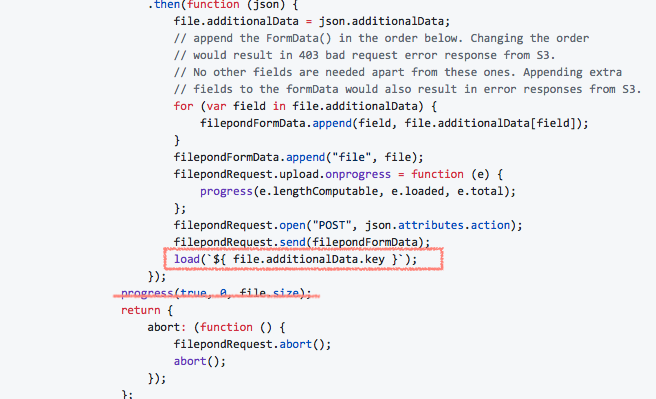
Add this before the filepondRequest.send()
filepondRequest.onload = function () {
    load(`${ file.additionalData.key }`);
};
More information on the XMLHttpRequest object.
https://developer.mozilla.org/en-US/docs/Web/API/XMLHttpRequestEventTarget/onload
rikschennink
on 15 Jun 2018
Thank you for your patience, really appreciate. I am also working on the docs to make them extremely easy to understand for novices like me. Would send a PR soon!!!
simioluwatomi
on 15 Jun 2018
No problem! PR's on the docs are very much appreciated! Thanks in advance :-)
rikschennink
on 15 Jun 2018
Hi @simioluwatomi , please would you mind sharing the final code you use that worked for s3 presigned uploads?
 Kendysond
on 17 Oct 2020
Kendysond
on 17 Oct 2020
@Kendysond the code is what you have as my first post in the issue which I clearly indicated has been amended to reflect all comments in the issue. So I believe the code up there works
simioluwatomi
on 21 Oct 2020
Related issues
 WifiDubt
·
6Comments
WifiDubt
·
6Comments
 lvidrashchuk
·
3Comments
lvidrashchuk
·
3Comments
 oldrich-s
·
5Comments
oldrich-s
·
5Comments
 madrussa
·
6Comments
madrussa
·
6Comments
 paul-siteway
·
4Comments
paul-siteway
·
4Comments
Most helpful comment
Thank you for your patience, really appreciate. I am also working on the docs to make them extremely easy to understand for novices like me. Would send a PR soon!!!