Filament: How to render into a transparent RenderTarget/Texture?
I create a View and set a RenderTarget which contains a color and depth attachment.
The texture for the color attachment is created like:
fila_texture = filament::Texture::Builder()
      .width(settings.width)
      .height(settings.height)
      .levels(1)
      .usage(filament::Texture::Usage::COLOR_ATTACHMENT | filament::Texture::Usage::SAMPLEABLE)
      .format(filament::Texture::InternalFormat::RGBA16F)
      .build(settings.ctx->getEngineRef());
I've set the clear color using ClearOptions of the Renderer to an arbitary color with an alpha of 0.
Is this the correct way of rendering into a transparent buffer?
I'm asking because the result I get seems to have an alpha of 1.0.
 roxlu
roxlu
All 33 comments
You also need view->setBlendMode(View::BlendMode::TRANSLUCENT);.
 romainguy
on 13 Jul 2020
romainguy
on 13 Jul 2020
I'm setting the blendmode to TRANSLUCENT now.
The buffer is transparent, but it's not cleared.
I'm setting the clear options like this:
    filament::Renderer::ClearOptions opt;
    opt.clearColor[0] = r;
    opt.clearColor[1] = g;
    opt.clearColor[2] = b;
    opt.clearColor[3] = a;
    opt.clear = true;
    opt.discard = true;

    fila_renderer->setClearOptions(opt);
Update: it does clear when I have only one View
roxlu
on 13 Jul 2020
How many views do you have and how do they relate to each other? Some clears won't happen and need to be done explicitly with a skybox for instance. @pixelflinger for more info
romainguy
on 13 Jul 2020
Currently I was testing with two views.
re: how they are related... I have one renderer and created two views; what relation can they have?
I render using that standared beginFrame(); renderer->render(view1); renderer->render(view2); endFrame().
roxlu
on 13 Jul 2020
Are the views side by side, on top of each other...?
romainguy
on 13 Jul 2020
I'm rendering them on top of each other.
roxlu
on 13 Jul 2020
I need to understand better what you're trying to do? could you send some screenshots maybe?
Are you trying to render several Views on top of each other with translucency INTO an opaque buffer at the end? Or, are you trying to render into a buffer, such that it is itself translucent? These two things are orthogonal.
I'm assuming you're trying to draw several translucent views into a transparent buffer, such that at the end this buffer can itself be blended onto of something else. Am I correct?
If so, your setup seems reasonable.
When you say the "buffer is not cleared", what do you mean, how do you know? Do you mean it's not cleared at all, or its alpha is not set to 0? When you're drawing only one view, things are working as expected? i.e. you are able to draw a single translucent view into the transparent buffer?
Are the 2 View composited properly? (Except for the resulting alpha being wrong?).
I think screenshot would really help understand. Thanks.
Note: above I use "transparent" to mean that alpha=0, and translucent to mean alpha<1.0
 pixelflinger
on 14 Jul 2020
pixelflinger
on 14 Jul 2020
_I need to understand better what you're trying to do?_
My goal is to render several views into FBOs, then use the color attachment texture in an arbitrary way as a 2D texture in my own renderer. This could mean they are rendered with another shader using a quad. I want to use Renderer::render(view) to generate a texture that I can use in my own engine.
- I create one
Renderer - I create two translucent
Views - I create two
RenderTargets and for eachViewI callsetRenderTarget(target) RenderTargethas a depth + image attachment
_could you send some screenshots maybe?_
Although it depends on the final application how I want to use these color textures, this is one example I'm testing with. The background is one view, the helmet model is used in the rectangle with red border.
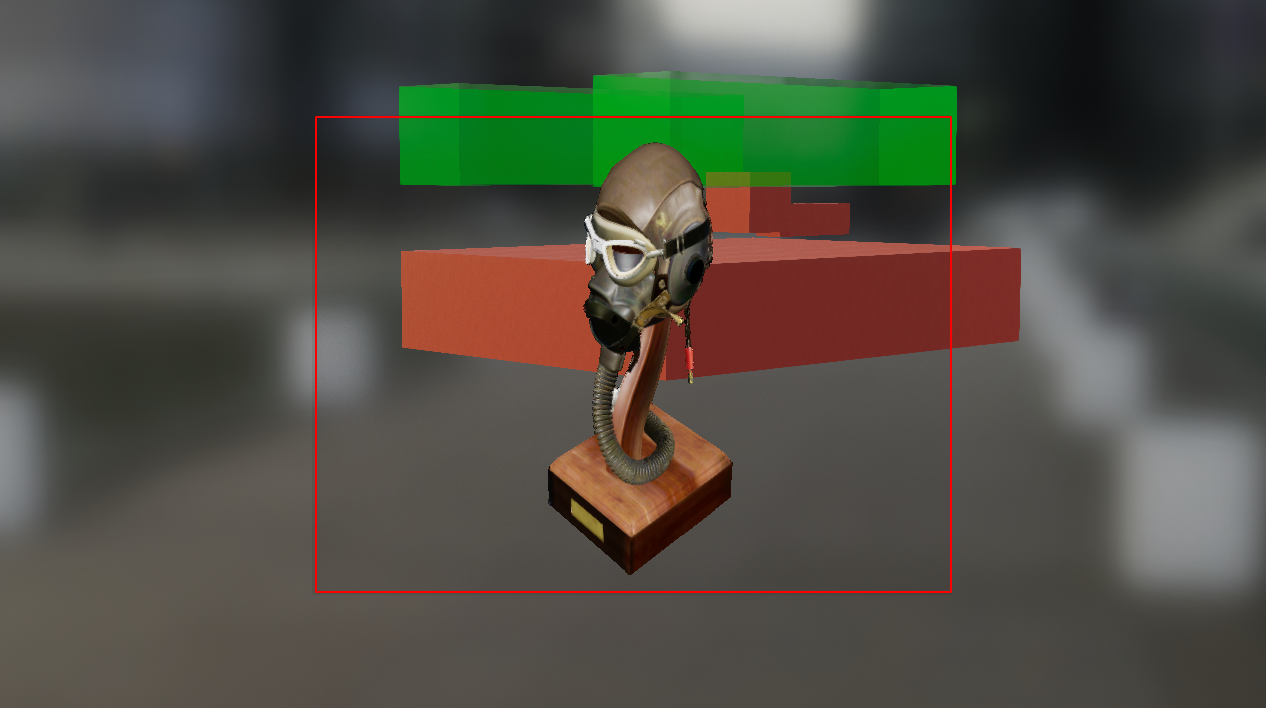
_Are you trying to render several Views on top of each other with translucency INTO an opaque buffer at the end? Or, are you trying to render into a buffer, such that it is itself translucent? These two things are orthogonal._
I want to render each view into it's own buffer/texture which is translucent.
_When you say the "buffer is not cleared", what do you mean, how do you know?_

FWIW, disabling this line fixes the issue:
mClearFlags &= ~TargetBufferFlags::COLOR;
Ah... yes, it's because you have a different render target for each view, but there is only a single Renderer.
Yeah, I think the API is not very well defined in that case. The Renderer represents a "window" (a swapchain really), and the clear flags apply to that. It's not well defined, I realize, what happens or is supposed to happen when a View has its own render target. I think our API is a bit weak here.
I will think more about it.
In the meantime, I think "correct" solution (for now) is to use a skybox on each view that will clear the background to 0,0,0,0.
pixelflinger
on 14 Jul 2020
Note that the Skybox API now lets you specify a constant color. It was created for that purpose(-ish :).
romainguy
on 14 Jul 2020
_In the meantime, I think "correct" solution (for now) is to use a skybox on each view that will clear the background to 0,0,0,0._
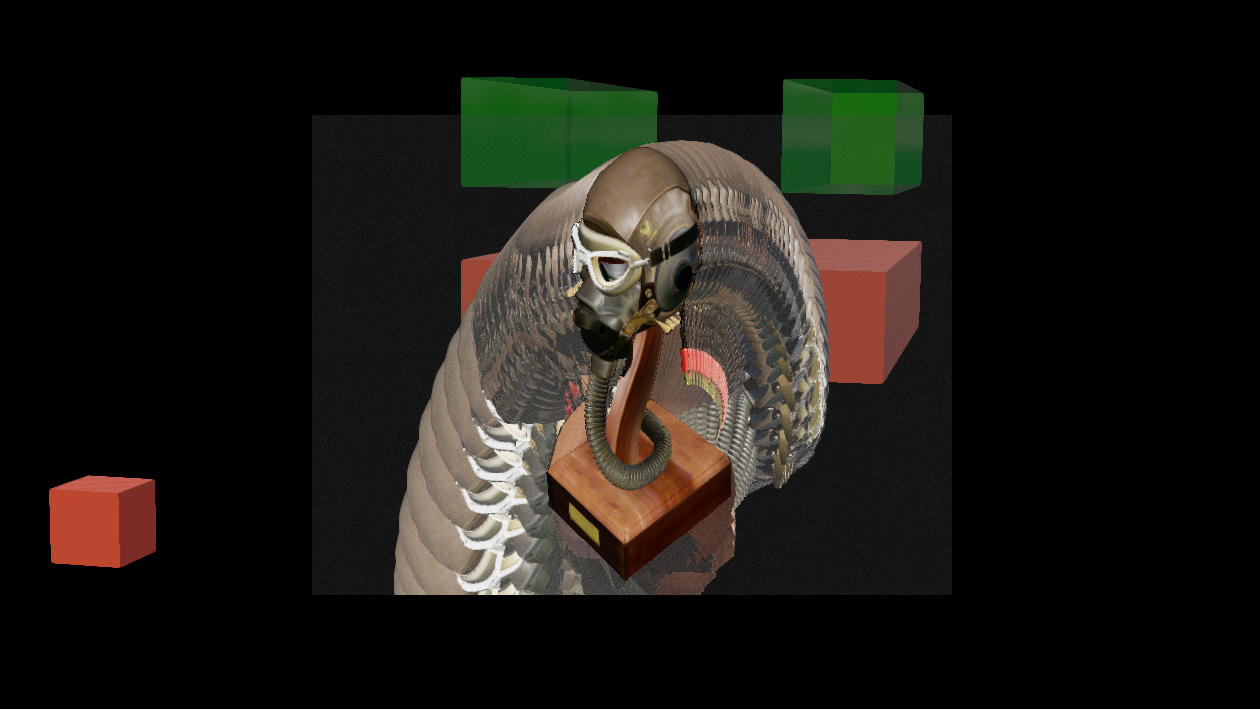
Maybe I'm doing something wrong. I've got the same setup and I create a Skybox like:
fila_skybox = filament::Skybox::Builder()
  .color({0.0, 0.0, 0.0, 0.0})
  .build(ctx->getEngineRef());

fila_scene->setSkybox(fila_skybox);
Which results in:
roxlu
on 15 Jul 2020
Is there any update on this issue?
 ast3rX
on 29 Jul 2020
ast3rX
on 29 Jul 2020
Hi @romainguy @pixelflinger any thoughts on this?
Following the suggestions does not fix the issue. I would love to discuss how to fix this.
roxlu
on 3 Aug 2020
After a quick look at the code, I do not see how the skybox could not work like that -- it's really just a regular renderable. So two questions:
- are you by any chance using layers, and the skybox is not in a visible layer?
- could you try with an obvious color like {1,0,1,1} to see if the skybox is drawn at all?
pixelflinger
on 3 Aug 2020
@pixelflinger Sorry for the delay, I'm currently refactoring my code and therefore I can't create a test case. When I ready I can create a test case if necessary.
FYI: I'm using my branch which allows me to retrieve the OpenGL framebuffer color attachment texture id. I use Filament for rendering and use the generated texture in my application that already has another GL context. I use the context sharing feature of Filament. Could this cause the issue?
I can see if I can create a simple test case that we can use to fix this unless you know this must work already?
roxlu
on 5 Aug 2020
I created another video that shows the issue. I create two completely different scenes with their own skybox, cameras, views, nodes, framebuffer etc. They do use the same Renderer instance.
1. Opaque skybox color, see https://imgur.com/a/ORDY6ui

2. Transparent skybox color, see https://imgur.com/a/0GcoLjY

roxlu
on 5 Aug 2020
@roxlu about using a shared context, you'll have synchronization issues unless you can use gl fences.
You can actually achieve the same thing using Texture::Builder& import(intptr_t id). It might be just a tiny bit cleaner -- but works the same way.
Thank you for creating the test.
I still don't understand what can cause that. In this test, what do you set the skybox color to exactly? (is it 0,0,0,0?) -- I'm just wondering why the background is dimmed.
pixelflinger
on 10 Aug 2020
Thanks for the hint about the import feature, I have to check that out.
The dimmed color seems to be some sort of accumulated value that increments each frame. Maybe it’s a fragment color with a very low value and because the buffer is not cleared it slowly gets darker. In the video you can see that it becomes darker each frame. The color I used was 0,0,0,0.
Thanks for giving this a bit more attention; I understand that this is not what you get when you create two views? Do you have a test case I can download to see what happens? If not I can make a test case when I find a bit of time.
roxlu
on 12 Aug 2020
I am noticing the same behavior when using the new SDK with the skybox. I render two views on top of each other (displaying a manipulator geometry on top of the main scene), and transparency on the top view doesn't seem to be working as expected. The results I was getting were similar to the examples above. It looks like the previous frames of the transparent top view didn't get cleared.
This was working as expected in the earlier filament versions. I would consider this as a regression at the moment.
ast3rX
on 12 Aug 2020
@roxlu are your views in BlendMode::TRANSLUCENT?
I'm very puzzled, if views are indeed in BlendMode::TRANSLUCENT then we always automatically clear their background to 0 -- so in fact, you shouldn't even need the skybox.
pixelflinger
on 13 Aug 2020
@pixelflinger sorry for the late reply, didn't see a notification about this message.
Yes I'm setting BlendMode::TRANSLUCENT.
FWIW, this is how I add the color texture to my framebuffer:
    tex->fila_texture = filament::Texture::Builder()
      .width(settings.width)
      .height(settings.height)
      .levels(1)
      .usage(filament::Texture::Usage::COLOR_ATTACHMENT | filament::Texture::Usage::SAMPLEABLE)
      .format(filament::Texture::InternalFormat::RGBA16F)
      .build(settings.ctx->getEngineRef());

    tex->attachment_point = filament::RenderTarget::AttachmentPoint::COLOR;
Maybe we can do a call where I can share my screen / code?
Update 1
Ok, this is interesting. I was trying a couple of things and I noticed that when I change the clearColor in https://github.com/google/filament/blob/main/filament/src/Renderer.cpp#L275 to something like 1,1,0,1 it has no effect. Maybe this is not the right place to change this, but I would expect that it had some effect.
Update 2
When I add a glClear(GL_COLOR_BUFFER_BIT) at this point, right after binding the fbo, https://gist.github.com/roxlu/49ecce546e5e11e48a9795cb2f4b9e67#file-opengldriver-cpp-L2100, it works as expected and I can render two views where the top view is transparent.
roxlu
on 13 Aug 2020
MAYBE SOLUTION
Ok, after diving into OpenGLDriver.cpp I found the issue. As one of the comments above mentioned that setting the blend mode of the View to BlendMode::TRANSLUCENT and using a transparent Skybox color would make the output buffer transparent. Which I guess it does, but it's not the whole story.
So I did exactly that, but also removing the call to Renderer::setClearOptions(). Because it seems that the default ClearOptions::clear is set to false, these lines will remove the color flags which means that the color buffer isn't cleared (at least this is my understanding).
At this point it makes totally sense, but not so much from the API. E.g. I've got two views with two different render targets, how would I make one transparent and the other opaque? Also setting the ClearOptions also sets the clear color, or at least that was my understanding. I think an improvement would be to add a function enableClearingOfColorBuffer() or something like that.
Update 1
Ok so this almost works. I went ahead an started creating a couple more views; Some of these views are hidden and shown on demand. I noticed that when I do this, that the color buffer is sometimes not cleared; this might be caused because I'm not rendering my view (as it got hidden by my application). I think this could be fixed by simply performing a clear when I want to render my views. I haven't seen a function that allows me to manually clear a view. Any thoughts how to do this?
roxlu
on 14 Aug 2020
Okay I think I understand the bug:
- we always clear the color buffer when the view is set to
BlendMode::TRANSLUCENT - we only clear the swapchain for the first view -- the intention here is that other view will be drawn on top
- we blend all
BlendMode::TRANSLUCENTviews into the swapchain
the trouble is, in your case the "swapchain" is different for each view, so what I believe is happening is:
draw the first view, its rendertarget is cleared (because it is considered the swapchain), the intermediate color buffer is cleared too (because of
BlendMode::TRANSLUCENT), finally this intermediate buffer is blended into the rendertarget. All goes well.draw the 2nd view, its rendertarget is not cleared (because it's the 2nd view), the intermediate color buffer is cleared (because of
BlendMode::TRANSLUCENT), finally this intermediate buffer is blended into the rendertarget -- which has not been cleared.
So a few observations first. In your case, you shouldn't set the views to BlendMode::TRANSLUCENT because in reality the view is not blended over the rendertarget ('cause its a different rendertarget each time).
Now the problem is that because it's not BlendMode::TRANSLUCENT, the colorbuffer won't be cleared, but you can fix that by using a skybox with color of (0,0,0,0). Because the view won't be blended, it won't matter that the rendertarget wasn't cleared -- we'll erase it anyways. This will also be more efficient.
So in short, can you try this:
- don't set the views to
BlendMode::TRANSLUCENT - add a skybox with color (0,0,0,0)
Side note:
- I agree that there is a bug, we should be clearing the 2nd view's rendertarget, however, setting things up with
BlendMode::TRANSLUCENTin your case will add a lot of overhead.
I think a rule of thumb is that `BlendMode::TRANSLUCENTshouldn't be used when the view has a custom rendertarget.
pixelflinger
on 14 Aug 2020
I think a rule of thumb is that
BlendMode::TRANSLUCENTshouldn't be used when the view has a custom rendertarget.
Unless you draw multiple views in the same custom render target right? (say a 3D scene + ImGui on top)
romainguy
on 14 Aug 2020
Thanks. I tried your suggestions but when I don't set the mode to translucent the result is not transparent, it's black (the skybox color). Where is the buffer cleared when I follow your suggestion, maybe I can check if it's cleared and the issue is maybe cause by something else.
roxlu
on 14 Aug 2020
The skybox is just a regular object in the scene (only it's drawn after the opaques and before the transparents).
But I think now you are hitting another bug :-\
If you go around line 302 in Renderer.cpp, there is this:
const bool translucent = mSwapChain->isTransparent() || blending;
In your case, the rendertarget is "translucent", but won't be marked as such. That's definitely a bug.
You can try to hack this with:
const bool translucent = true || blending;
in reality the true'should be replaced by a test based on the whether the rendertarget has an alpha channel.
Basically everywhere we're using mSwapChain is a potential bug when using a custom rendertarget. I will try to clean this up soon.
pixelflinger
on 14 Aug 2020
in reality the true'should be replaced by a test based on the whether the rendertarget has an alpha channel.
Except when we use RGBA16F for opaque because RGB16F is not available on that device :/
romainguy
on 14 Aug 2020
In your case, the rendertarget is "translucent", but won't be marked as such. That's definitely a bug.
You can try to hack this with:
const bool translucent = true || blending;
Yes! That works! That also seems to fix the issue where target wasn't cleared when I stopped rendering it because my app made the element hidden (using some app logic).
roxlu
on 14 Aug 2020
phew... okay at least we understand what's going on :-)
pixelflinger
on 15 Aug 2020
@pixelflinger do you have thoughts on how to fix this? A first thought I have is to add a View::isTransparent() feature.
roxlu
on 16 Aug 2020
Please let us know how this goes!
pixelflinger
on 19 Aug 2020
@pixelflinger I didn't see a notification for your fix. Thanks for looking into this. I made some changes in my own version as a quickfix but noticed that that doesn't work on Windows. I suspect that is has to do with Platform::SwapChain* PlatformWGL::createSwapChain(uint32_t width, uint32_t height, uint64_t& flags) @pixelflinger wdyt?
I'm now going to make sure I'm using your branch. I'll post the results shortly.
roxlu
on 31 Aug 2020
@pixelflinger I just merged and tested your fix and it's working. I tested on Windows and Linux.
It's good to note that you have to make sure to set the filament::SwapChain::CONFIG_TRANSPARENT flag when creating the swap chain.
roxlu
on 31 Aug 2020
Related issues
 MHDante
·
4Comments
MHDante
·
4Comments
 Y0hy0h
·
5Comments
Y0hy0h
·
5Comments
 jiqimaogou
·
6Comments
jiqimaogou
·
6Comments
 molysgaard
·
6Comments
molysgaard
·
6Comments
 cx20
·
5Comments
cx20
·
5Comments