Describe the bug
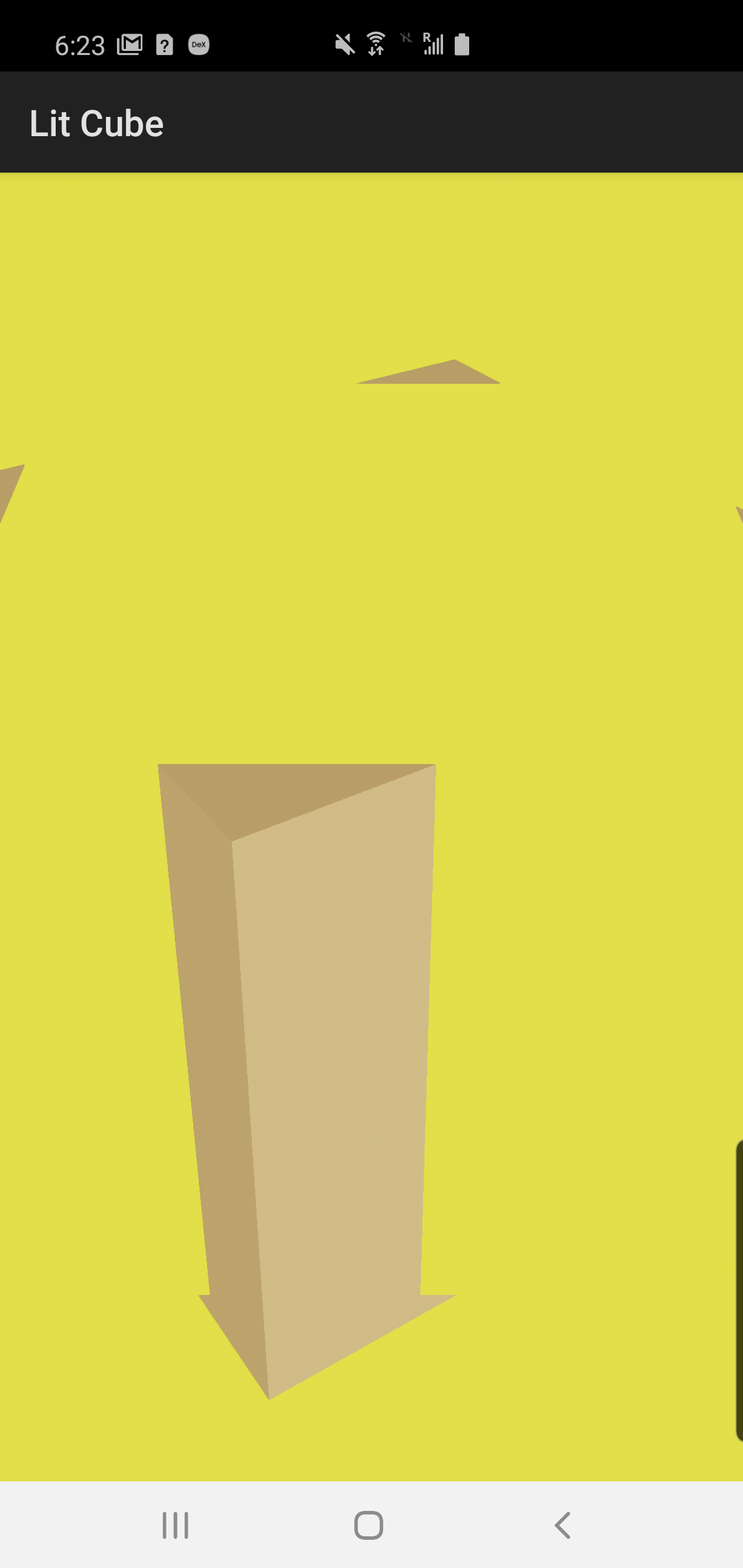
When there's a "camera" plane, transparent occluder, and regular object in the scene, following issue occurs (yellow - camera plane, gray - clearcolor):

Render priorities: camera plane 0, transparent occluder 4 and regular geometry 5.
An important note that is depth culling is disabled for camera plane, bug disappears:
To Reproduce
Apply included patch and run lit-cube sample:
diff --git a/android/samples/sample-lit-cube/src/main/java/com/google/android/filament/litcube/MainActivity.kt b/android/samples/sample-lit-cube/src/main/java/com/google/android/filament/litcube/MainActivity.kt
index 80d4664f..ab6bd3ea 100644
--- a/android/samples/sample-lit-cube/src/main/java/com/google/android/filament/litcube/MainActivity.kt
+++ b/android/samples/sample-lit-cube/src/main/java/com/google/android/filament/litcube/MainActivity.kt
@@ -24,15 +24,17 @@ import android.view.Choreographer
 import android.view.Surface
 import android.view.SurfaceView
 import android.view.animation.LinearInterpolator
-
 import com.google.android.filament.*
-import com.google.android.filament.RenderableManager.*
-import com.google.android.filament.VertexBuffer.*
+import com.google.android.filament.IndexBuffer.Builder.IndexType
+import com.google.android.filament.RenderableManager.PrimitiveType
+import com.google.android.filament.VertexBuffer.AttributeType
+import com.google.android.filament.VertexBuffer.VertexAttribute
 import com.google.android.filament.android.DisplayHelper
 import com.google.android.filament.android.UiHelper
-
 import java.nio.ByteBuffer
 import java.nio.ByteOrder
+import java.nio.FloatBuffer
+import java.nio.ShortBuffer
 import java.nio.channels.Channels

 class MainActivity : Activity() {
@@ -42,6 +44,14 @@ class MainActivity : Activity() {
         init {
             Filament.init()
         }
+
+        val CAMERA_VERTICES = floatArrayOf(-1.0f, 1.0f, 1.0f, -1.0f, -3.0f, 1.0f, 3.0f, 1.0f, 1.0f)
+        val CAMERA_UVS = floatArrayOf(0.0f, 0.0f, 0.0f, 2.0f, 2.0f, 0.0f)
+        val CAMERA_INDICES = shortArrayOf(0, 1, 2)
+        const val VERTEX_COUNT = 3
+        const val POSITION_BUFFER_INDEX = 0
+        const val UV_BUFFER_INDEX = 1
+        const val FLOAT_SIZE_IN_BYTES = java.lang.Float.SIZE / 8
     }

     // The View we want to render into
@@ -66,13 +76,19 @@ class MainActivity : Activity() {
     // Should be pretty obvious :)
     private lateinit var camera: Camera

-    private lateinit var material: Material
-    private lateinit var materialInstance: MaterialInstance
-    private lateinit var vertexBuffer: VertexBuffer
-    private lateinit var indexBuffer: IndexBuffer
+    private lateinit var cubeMaterial: Material
+    private lateinit var cubeMaterialInstance: MaterialInstance
+    private lateinit var cubeVertexBuffer: VertexBuffer
+    private lateinit var cubeIndexBuffer: IndexBuffer
+    private lateinit var occluderMaterial: Material
+    private lateinit var cameraVertexBuffer: VertexBuffer
+    private lateinit var cameraIndexBuffer: IndexBuffer
+    private lateinit var cameraMaterial: Material

     // Filament entity representing a renderable object
-    @Entity private var renderable = 0
+    @Entity private var cubeRenderable = 0
+    @Entity private var occluderRenderable = 0
+    @Entity private var cameraRenderable = 0
     @Entity private var light = 0

     // A swap chain is Filament's representation of a surface
@@ -118,7 +134,10 @@ class MainActivity : Activity() {
     }

     private fun setupView() {
-        scene.skybox = Skybox.Builder().color(0.035f, 0.035f, 0.035f, 1.0f).build(engine)
+        renderer.clearOptions = renderer.clearOptions.also {
+            it.clearColor = floatArrayOf(0.5f, 0.5f, 0.5f, 1.0f)
+            it.clear = true
+        }

         // NOTE: Try to disable post-processing (tone-mapping, etc.) to see the difference
         // view.isPostProcessingEnabled = false
@@ -133,27 +152,44 @@ class MainActivity : Activity() {
     private fun setupScene() {
         loadMaterial()
         setupMaterial()
-        createMesh()
+        createCubeMesh()
+        createCameraMesh()

-        // To create a renderable we first create a generic entity
-        renderable = EntityManager.get().create()
-
-        // We then create a renderable component on that entity
-        // A renderable is made of several primitives; in this case we declare only 1
-        // If we wanted each face of the cube to have a different material, we could
-        // declare 6 primitives (1 per face) and give each of them a different material
-        // instance, setup with different parameters
+        cubeRenderable = EntityManager.get().create()
+        RenderableManager.Builder(1)
+                .priority(5)
+                .boundingBox(Box(0.0f, 0.0f, 0.0f, 1.0f, 1.0f, 0.01f))
+                .geometry(0, PrimitiveType.TRIANGLES, cubeVertexBuffer, cubeIndexBuffer, 0, 6 * 6)
+                .material(0, cubeMaterialInstance)
+                .build(engine, cubeRenderable)
+        scene.addEntity(cubeRenderable)
+
+        occluderRenderable = EntityManager.get().create()
         RenderableManager.Builder(1)
-                // Overall bounding box of the renderable
-                .boundingBox(Box(0.0f, 0.0f, 0.0f, 1.0f, 1.0f, 1.0f))
-                // Sets the mesh data of the first primitive, 6 faces of 6 indices each
-                .geometry(0, PrimitiveType.TRIANGLES, vertexBuffer, indexBuffer, 0, 6 * 6)
-                // Sets the material of the first primitive
-                .material(0, materialInstance)
-                .build(engine, renderable)
+                .priority(4)
+                .boundingBox(Box(0.0f, 0.0f, 0.0f, 1.0f, 1.0f, 0.01f))
+                .geometry(0, PrimitiveType.TRIANGLES, cubeVertexBuffer, cubeIndexBuffer, 0, 6 * 6)
+                .material(0, occluderMaterial.defaultInstance)
+                .build(engine, occluderRenderable)
+        scene.addEntity(occluderRenderable)
+        val occluderTransformMatrix = FloatArray(16)
+        Matrix.setIdentityM(occluderTransformMatrix, 0)
+        Matrix.translateM(occluderTransformMatrix, 0, 0.0f, 0.1f, 0.1f)
+        engine.transformManager.setTransform(engine.transformManager.getInstance(occluderRenderable), occluderTransformMatrix)
+
+        cameraRenderable = EntityManager.get().create()
+        RenderableManager.Builder(1)
+                .castShadows(false)
+                .receiveShadows(false)
+                .culling(false)
+                // Always draw the camera feed last to avoid overdraw
+                // .priority(7)
+                .priority(0) // YES!
+                .geometry(0, RenderableManager.PrimitiveType.TRIANGLES, cameraVertexBuffer, cameraIndexBuffer)
+                .material(0, cameraMaterial.defaultInstance)
+                .build(engine, cameraRenderable);
+        scene.addEntity(cameraRenderable)

-        // Add the entity to the scene to render it
-        scene.addEntity(renderable)

         // We now need a light, let's create a directional light
         light = EntityManager.get().create()
@@ -184,26 +220,73 @@ class MainActivity : Activity() {
     }

     private fun loadMaterial() {
-        readUncompressedAsset("materials/lit.filamat").let {
-            material = Material.Builder().payload(it, it.remaining()).build(engine)
+        readUncompressedAsset("materials/camera.filamat").let {
+            cameraMaterial = Material.Builder().payload(it, it.remaining()).build(engine)
+        }
+        readUncompressedAsset("materials/cube.filamat").let {
+            cubeMaterial = Material.Builder().payload(it, it.remaining()).build(engine)
+        }
+        readUncompressedAsset("materials/occluder.filamat").let {
+            occluderMaterial = Material.Builder().payload(it, it.remaining()).build(engine)
         }
     }

     private fun setupMaterial() {
         // Create an instance of the material to set different parameters on it
-        materialInstance = material.createInstance()
+        cubeMaterialInstance = cubeMaterial.createInstance()
         // Specify that our color is in sRGB so the conversion to linear
         // is done automatically for us. If you already have a linear color
         // you can pass it directly, or use Colors.RgbType.LINEAR
-        materialInstance.setParameter("baseColor", Colors.RgbType.SRGB, 1.0f, 0.85f, 0.57f)
+        cubeMaterialInstance.setParameter("baseColor", Colors.RgbType.SRGB, 1.0f, 0.85f, 0.57f)
         // The default value is always 0, but it doesn't hurt to be clear about our intentions
         // Here we are defining a dielectric material
-        materialInstance.setParameter("metallic", 0.0f)
+        cubeMaterialInstance.setParameter("metallic", 0.0f)
         // We increase the roughness to spread the specular highlights
-        materialInstance.setParameter("roughness", 0.3f)
+        cubeMaterialInstance.setParameter("roughness", 0.3f)
+    }
+
+    private fun createCameraMesh() {
+        val indexBufferData = ShortBuffer
+                .allocate(CAMERA_INDICES.size)
+                .put(CAMERA_INDICES)
+                .rewind()
+        cameraIndexBuffer = IndexBuffer.Builder()
+                .indexCount(CAMERA_INDICES.size)
+                .bufferType(IndexType.USHORT)
+                .build(engine)
+        cameraIndexBuffer.setBuffer(engine, indexBufferData)
+
+        val vertexBufferData = FloatBuffer
+                .allocate(CAMERA_VERTICES.size)
+                .put(CAMERA_VERTICES)
+                .rewind()
+        cameraVertexBuffer = VertexBuffer.Builder()
+                .vertexCount(VERTEX_COUNT)
+                .bufferCount(2)
+                .attribute(
+                        VertexAttribute.POSITION,
+                        POSITION_BUFFER_INDEX,
+                        AttributeType.FLOAT3,
+                        0,
+                        CAMERA_VERTICES.size / VERTEX_COUNT * FLOAT_SIZE_IN_BYTES)
+                .attribute(
+                        VertexAttribute.UV0,
+                        UV_BUFFER_INDEX,
+                        AttributeType.FLOAT2,
+                        0,
+                        CAMERA_UVS.size / VERTEX_COUNT * FLOAT_SIZE_IN_BYTES)
+                .build(engine)
+        cameraVertexBuffer.setBufferAt(engine, POSITION_BUFFER_INDEX, vertexBufferData)
+
+        val cameraUvBuffer = ByteBuffer.allocateDirect(CAMERA_UVS.size * FLOAT_SIZE_IN_BYTES)
+                .order(ByteOrder.nativeOrder())
+                .asFloatBuffer()
+                .put(CAMERA_UVS)
+                .rewind()
+        cameraVertexBuffer.setBufferAt(engine, UV_BUFFER_INDEX, cameraUvBuffer)
     }

-    private fun createMesh() {
+    private fun createCubeMesh() {
         val floatSize = 4
         val shortSize = 2
         // A vertex is a position + a tangent frame:
@@ -276,7 +359,7 @@ class MainActivity : Activity() {
                 .flip()

         // Declare the layout of our mesh
-        vertexBuffer = VertexBuffer.Builder()
+        cubeVertexBuffer = VertexBuffer.Builder()
                 .bufferCount(1)
                 .vertexCount(vertexCount)
                 // Because we interleave position and color data we must specify offset and stride
@@ -288,7 +371,7 @@ class MainActivity : Activity() {

         // Feed the vertex data to the mesh
         // We only set 1 buffer because the data is interleaved
-        vertexBuffer.setBufferAt(engine, 0, vertexData)
+        cubeVertexBuffer.setBufferAt(engine, 0, vertexData)

         // Create the indices
         val indexData = ByteBuffer.allocate(6 * 2 * 3 * shortSize)
@@ -302,11 +385,11 @@ class MainActivity : Activity() {
         indexData.flip()

         // 6 faces, 2 triangles per face,
-        indexBuffer = IndexBuffer.Builder()
+        cubeIndexBuffer = IndexBuffer.Builder()
                 .indexCount(vertexCount * 2)
                 .bufferType(IndexBuffer.Builder.IndexType.USHORT)
                 .build(engine)
-        indexBuffer.setBuffer(engine, indexData)
+        cubeIndexBuffer.setBuffer(engine, indexData)
     }

     private fun startAnimation() {
@@ -320,7 +403,7 @@ class MainActivity : Activity() {
             override fun onAnimationUpdate(a: ValueAnimator) {
                 Matrix.setRotateM(transformMatrix, 0, a.animatedValue as Float, 0.0f, 1.0f, 0.0f)
                 val tcm = engine.transformManager
-                tcm.setTransform(tcm.getInstance(renderable), transformMatrix)
+                tcm.setTransform(tcm.getInstance(cubeRenderable), transformMatrix)
             }
         })
         animator.start()
@@ -350,12 +433,12 @@ class MainActivity : Activity() {

         // Cleanup all resources
         engine.destroyEntity(light)
-        engine.destroyEntity(renderable)
+        engine.destroyEntity(cubeRenderable)
         engine.destroyRenderer(renderer)
-        engine.destroyVertexBuffer(vertexBuffer)
-        engine.destroyIndexBuffer(indexBuffer)
-        engine.destroyMaterialInstance(materialInstance)
-        engine.destroyMaterial(material)
+        engine.destroyVertexBuffer(cubeVertexBuffer)
+        engine.destroyIndexBuffer(cubeIndexBuffer)
+        engine.destroyMaterialInstance(cubeMaterialInstance)
+        engine.destroyMaterial(cubeMaterial)
         engine.destroyView(view)
         engine.destroyScene(scene)
         engine.destroyCamera(camera)
@@ -364,7 +447,7 @@ class MainActivity : Activity() {
         // (components), not the entity itself
         val entityManager = EntityManager.get()
         entityManager.destroy(light)
-        entityManager.destroy(renderable)
+        entityManager.destroy(cubeRenderable)

         // Destroying the engine will free up any resource you may have forgotten
         // to destroy, but it's recommended to do the cleanup properly
diff --git a/android/samples/sample-lit-cube/src/main/materials/camera.mat b/android/samples/sample-lit-cube/src/main/materials/camera.mat
new file mode 100644
index 00000000..187018dd
--- /dev/null
+++ b/android/samples/sample-lit-cube/src/main/materials/camera.mat
@@ -0,0 +1,28 @@
+material {
+    "name" : "Camera",
+    "parameters" : [
+        {
+           "type" : "samplerExternal",
+           "name" : "cameraTexture"
+        }
+    ],
+    "requires" : [
+        "uv0"
+    ],
+    "vertexDomain" : "device",
+    "depthWrite" : false,
+    // NOTE: Disabling depth culling fixes the issue, yet this means that depth buffer value is probably
+    // gets into overflow/underflow values by transparent occluder geometry?
+    // depthCulling: false,
+    "shadingModel" : "unlit",
+    "doubleSided" : true
+}
+fragment {
+    void material(inout MaterialInputs material) {
+        prepareMaterial(material);
+
+        // vec4 color = texture(materialParams_cameraTexture, getUV0());
+        // material.baseColor.rgb = inverseTonemapSRGB(color.rgb);
+        material.baseColor = vec4(1.0, 1.0, 0.0, 1.0);
+    }
+}
diff --git a/android/samples/sample-lit-cube/src/main/materials/lit.mat b/android/samples/sample-lit-cube/src/main/materials/cube.mat
similarity index 100%
rename from android/samples/sample-lit-cube/src/main/materials/lit.mat
rename to android/samples/sample-lit-cube/src/main/materials/cube.mat
diff --git a/android/samples/sample-lit-cube/src/main/materials/occluder.mat b/android/samples/sample-lit-cube/src/main/materials/occluder.mat
new file mode 100644
index 00000000..6b788a65
--- /dev/null
+++ b/android/samples/sample-lit-cube/src/main/materials/occluder.mat
@@ -0,0 +1,6 @@
+material {
+    name : transparent_occluder,
+    shadingModel : unlit,
+    colorWrite : false,
+    depthWrite : true,
+}
Expected behavior
Since rendering priority is set that camera plane is rendered first, it's color data should not be affected by transparent occluder.
 alexey-pelykh
All 19 comments
@romainguy we've had a similar issue that was always present yet it was fixed with https://github.com/google/filament/commit/2adfb259c6feecbea8c3ed3a0f5bc46aea1c3ec7
Also, it would be important to note that if regular geometry is blending: transparent, the issue also disappears.
alexey-pelykh
on 19 Apr 2020
What device does this happen on?
 romainguy
on 19 Apr 2020
romainguy
on 19 Apr 2020
Samsung Galaxy S10 5G, and I think Pixel 3 as well, let me do a quick check.
alexey-pelykh
on 19 Apr 2020
I wonder if the issue is that the depth buffer isn't cleared. That would be a more reasonable explanation than a depth overflow/underflow.
Note that even when the bug is fixed you should disable depth culling on your camera plane. There's no reason to have it.
romainguy
on 19 Apr 2020
Pixel 3 has the issue as well, consistent with S10 5G.
Note taken about the camera plane, thanks for the hint!
alexey-pelykh
on 19 Apr 2020
disable depth culling on your camera plane
Only for cases when camera plane is rendered first, otherwise the depth test is needed.
alexey-pelykh
on 20 Apr 2020
I can reproduce on a Pixel 4 as well.
romainguy
on 20 Apr 2020
The error doesn't happen on the emulator. The resolution of the "gray" cube changes with the number of MSAA samples. It's really weird.
romainguy
on 20 Apr 2020
Another fix is to change the Z position of the camera triangle's vertices from 1.0 to 0.9.
romainguy
on 20 Apr 2020
Another fix is to disable depthCulling on the occluder.
romainguy
on 20 Apr 2020
@pixelflinger Your turn, I'm out of ideas. In GAPID I can see that drawing the yellow triangle works, drawing the occluder works, the color buffers get corrupted when drawing the second cube (the lit one).
romainguy
on 20 Apr 2020
From what we can tell this is a hierarchical Z bug in the Adreno GL driver. We double checked our stream of GL commands as well as the shaders and everything looks correct on our end. I would recommend using the workaround of disabling depth testing on the camera triangle (it's not necessary anyway).
romainguy
on 21 Apr 2020
To add more context to this:
- It's a regression, yet I'm not sure since when. On latest version that was used in Sceneform 1.15 everything was ok, yet after we upgraded Filament to 1.5.2 there were two issues: one is this, other one was fixed by https://github.com/google/filament/commit/2adfb259c6feecbea8c3ed3a0f5bc46aea1c3ec7. Major note on this that visually issues look absolutely the same, with same "big black pixels", presumably of MSAA sample size as @romainguy suggested
- Making regular geometry a
blending: transparentalso "fixes" the issue. - If I recall correctly, in earlier versions there was no use of "secondary" framebuffer that was painted onto the main one (or something was different since in GAPID I could see every draw call ideally). After playing with GAPID to change the rendertarget via Edit mode, I can conclude that colorbuffer of secondary framebuffer looks normal, and when it's being rendered onto the main framebuffer, part of it is not rendered (maybe due to failing depth test?), so we see the clearcolor of the main framebuffer "through" the pixels of secondary framebuffer.
alexey-pelykh
on 21 Apr 2020
Regarding last point: one of assumptions was that something zeroes out the A channel of those pixels in secondary framebuffer, yet right now I'm almost confident that it's not.
alexey-pelykh
on 21 Apr 2020
Making regular geometry a blending: transparent also "fixes" the issue.
To rephrase this: https://github.com/google/filament/commit/2adfb259c6feecbea8c3ed3a0f5bc46aea1c3ec7 fixed the issue for regular geometry with transparency (e.g. tiger model) yet did not for the opaque objects (like these cubes). Since the visual feedback of the issues is very similar, and opaque objects are handled differently in post-processing, maybe it's something related.
alexey-pelykh
on 21 Apr 2020
- The other issue is completely different. I checked just to make sure that we don't abort the vertex shader or produce bad results but even a vertex shader that does
gl_Position = mesh_positionreproduces the bug here - Yes, there are multiple workarounds, most of which I've highlighted above.
- Filament has always (since before it was even public) used a secondary framebuffer. Disabling that secondary framebuffer also doesn't help with this bug. The content of that first framebuffer is wrong, the issue does not come from the post processing step.
The size of the artifact here changes depending on things like MSAA, we are fairly confident it's an issue with early Z rejection (and it would explain why the artifact looks the way it does). And we've only been able to reproduce this on Qualcomm GPUs so far.
romainguy
on 21 Apr 2020
Out of pure curiosity, how did you manage to force GAPID to see the secondary framebuffer during replay on Android device? For anything except "0", it always shows "framebuffer not there" for me
alexey-pelykh
on 21 Apr 2020
The problem is that GAPID apparently doesn't know how to handle RGBA16F buffers anymore. The easiest way to work around this is to change the rendering quality of your View's hdrColorBuffer to QualityLevel.LOW. It will force Filament to use an RGB888 buffer instead and GAPID will work. You can also completely disable post-processing to get rendering directly into the surface's framebuffer.
romainguy
on 21 Apr 2020
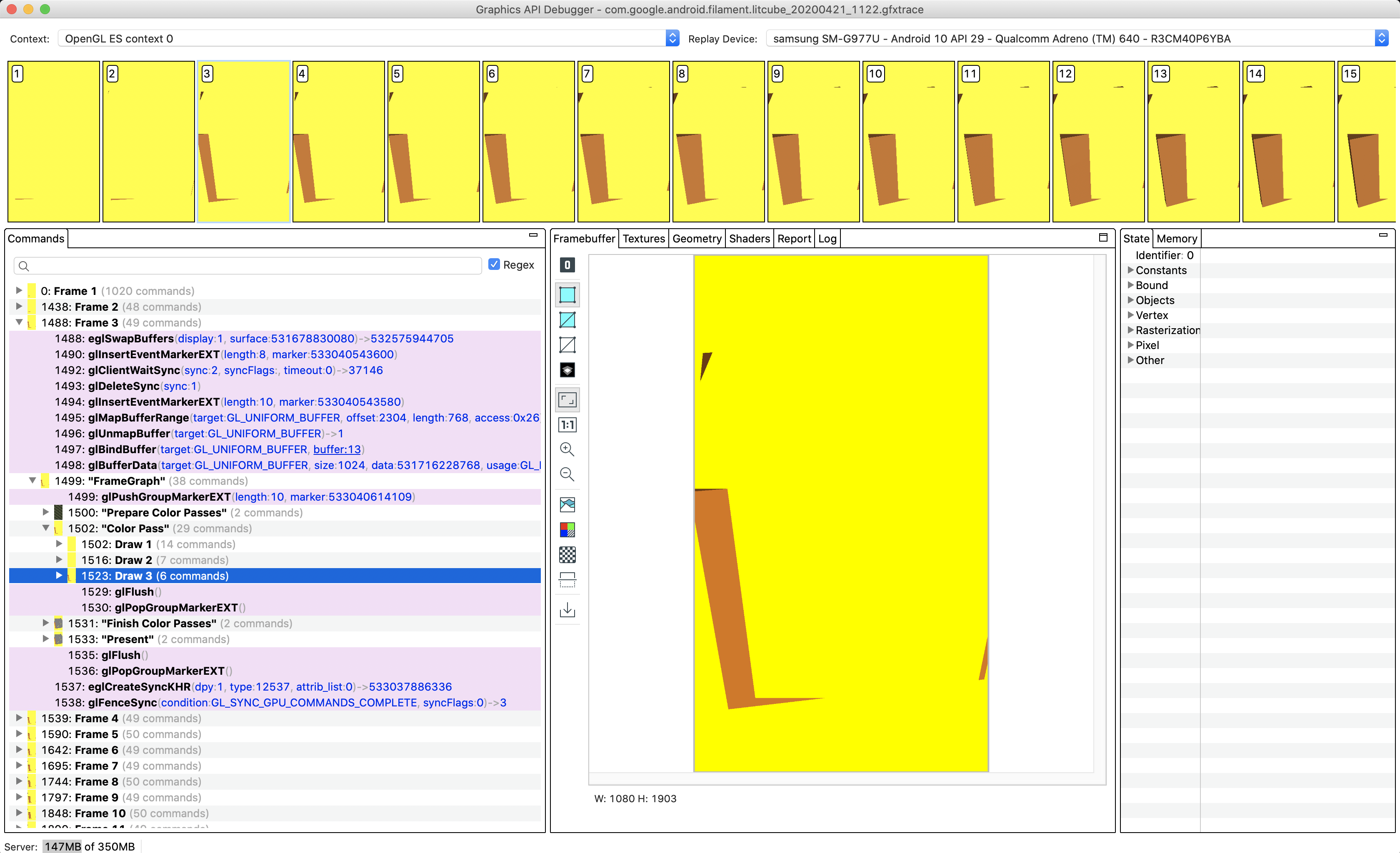
Disabling that secondary framebuffer also doesn't help with this bug.
Indeed, disabling post-processing does not affect the bug, and it's not visible in GAPID if to turn off post-processing and set quality to low, that's what confused me:
Sorry for confusion :)
alexey-pelykh
on 21 Apr 2020
Related issues
 but0n
·
8Comments
but0n
·
8Comments
 ferry-creator
·
4Comments
ferry-creator
·
4Comments
 cx20
·
8Comments
cx20
·
8Comments
 dakom
·
5Comments
dakom
·
5Comments
 hemantkadamata
·
3Comments
hemantkadamata
·
3Comments
Most helpful comment
The problem is that GAPID apparently doesn't know how to handle
RGBA16Fbuffers anymore. The easiest way to work around this is to change the rendering quality of yourView'shdrColorBuffertoQualityLevel.LOW. It will force Filament to use anRGB888buffer instead and GAPID will work. You can also completely disable post-processing to get rendering directly into the surface's framebuffer.