Filament: How to apply flat shading to glTF model?
Is your feature request related to a problem? Please describe.
I tried loading a simple polygon glTF model using Filament.
I was expecting to be flat shading, but the result was smooth shading.
I want to apply flat shading to this model like the glTF Loader in three.js.
Describe the solution you'd like
Three.js + Fox.gltf result: Flat-shading

Filament + Fox.gltf result: Smooth-shading?

 cx20
cx20
All 8 comments
If the fox vertices are shared by their neighboring triangles (i.e. it has a non-trivial index buffer), I'm not sure we'd want the loader to perform a topological transformation. Do you know if the fox is welded in this way?
As far as I can tell, the only thing the glTF spec has to say is this:
Implementation note: When normals are not specified, client implementations should calculate flat normals.
Hmm.
 prideout
on 31 Jan 2020
prideout
on 31 Jan 2020
You can use a flat interpolation in the material: https://google.github.io/filament/Materials.html#materialdefinitions/materialblock/vertexandattributes:interpolation
 romainguy
on 31 Jan 2020
romainguy
on 31 Jan 2020
This will double our ubershader count but it's probably worth it, given the popularity of this look. :-\
Some relevant glTF discussion here:
https://github.com/KhronosGroup/glTF/issues/1605
Btw thanks for the bug report @cx20 ! I think this is an important one.
prideout
on 31 Jan 2020
More details: this mesh has no index buffer (which is good, it means would not need a flat variant of ubershader). It has no normals, so given the (ahem) "implementation note" we need to either add a derivatives mode in our shaders, or add some functionality to our SurfaceOrientation helper that does a bunch of cross-products. I think we'll probably do both, I'll probably get started on the latter next week.
Also, in our defense, this sample was added to the conformance suite only yesterday :)
Side note: the flat GLSL qualifier is not available in WebGL 1.0 but thankfully exists in 2.0.
prideout
on 31 Jan 2020
You can use a
flatinterpolation in the material: https://google.github.io/filament/Materials.html#materialdefinitions/materialblock/vertexandattributes:interpolation
@romainguy Thank you for letting me know that material has settings.
However, I looked into how to change the Material settings after loading the glTF file, but unfortunately couldn't find it. Can you tell me if there is a sample that seems to be helpful?
I tried the following code, but it didn't work because getting material returned null.
const entities = asset.getEntities();
const rm = engine.getRenderableManager();
const instance = rm.getInstance(entities.get(0));
rm.getMaterialInstanceAt(instance, 0).setFloatParameter("interpolation", 1.0); // smooth:0 / flat:1
Flat interpolation is not a dynamic property, it can only be set in the mat file or from MaterialBuilder. Our glTF library does not yet support this property, but please note two things:
- Flat interpolation wouldn't help this particular model, since this model has no normals and is already unwelded.
- Flat shading is currently ill-defined and controversial in the glTF spec. This is a new conformance model that is still under development; see Ed's first reply to my comment on his PR.
prideout
on 3 Feb 2020
@prideout Thank you for the advice. I just realized that Flat interpolation cannot be used as a dynamic property and that the specification of Flat interpolation in the glTF model is ambiguous.
cx20
on 3 Feb 2020
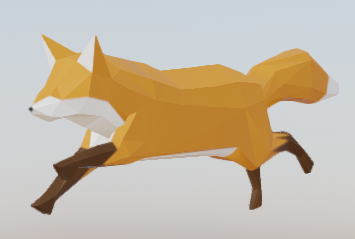
I have confirmed that the Fox model is displayed in Flat shading in the latest version of Filament. Thanks!
Filament + Fox.gltf result:
cx20
on 11 Feb 2020
Related issues
cx20
·
5Comments
 dakom
·
5Comments
dakom
·
5Comments
 jiqimaogou
·
6Comments
jiqimaogou
·
6Comments
 rfebbo
·
8Comments
rfebbo
·
8Comments
 but0n
·
8Comments
but0n
·
8Comments