Fightpandemics: Location filter not fit into the screen[Mobile-Android]
Steps to create:
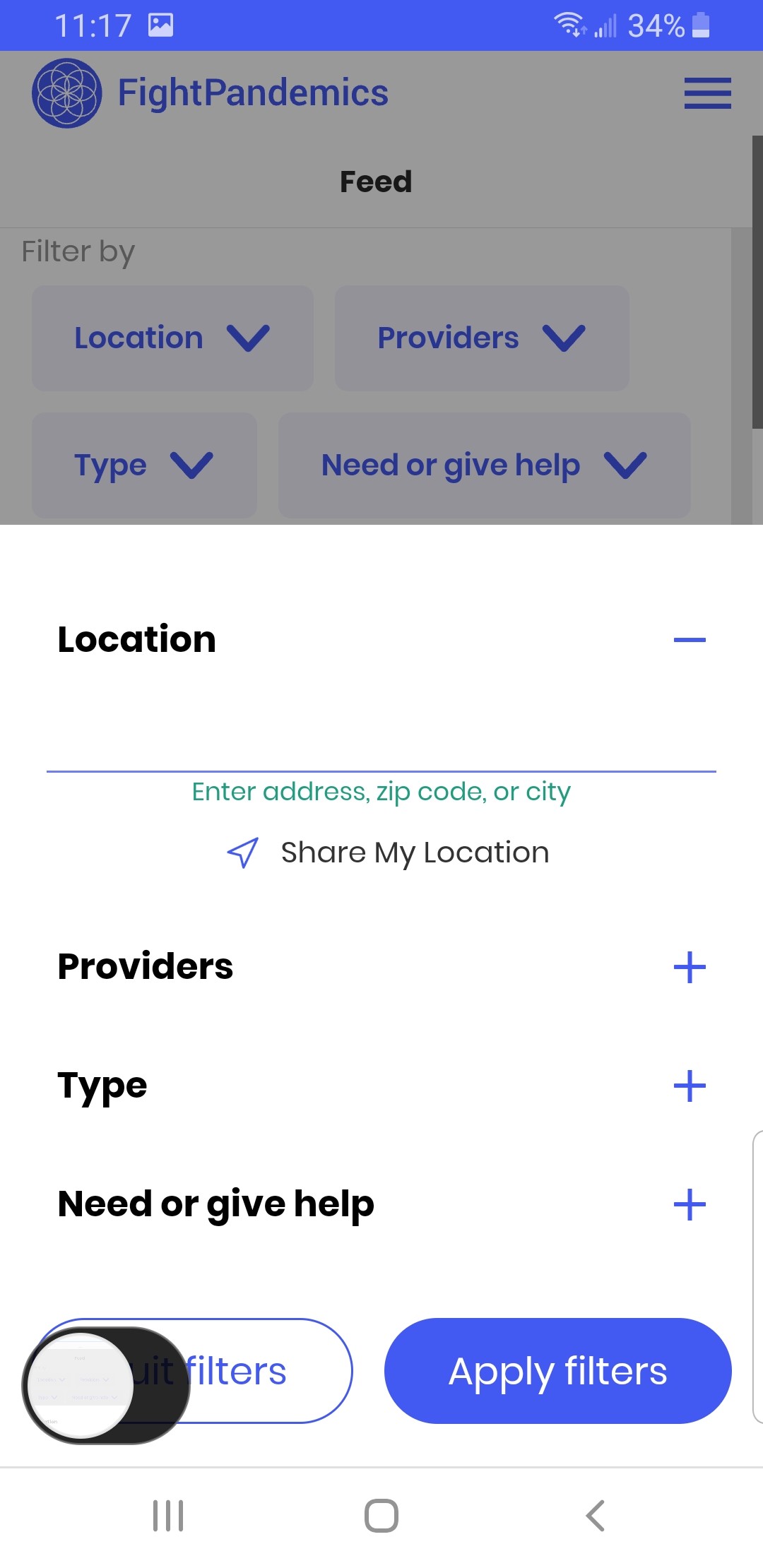
1.click on view help board.
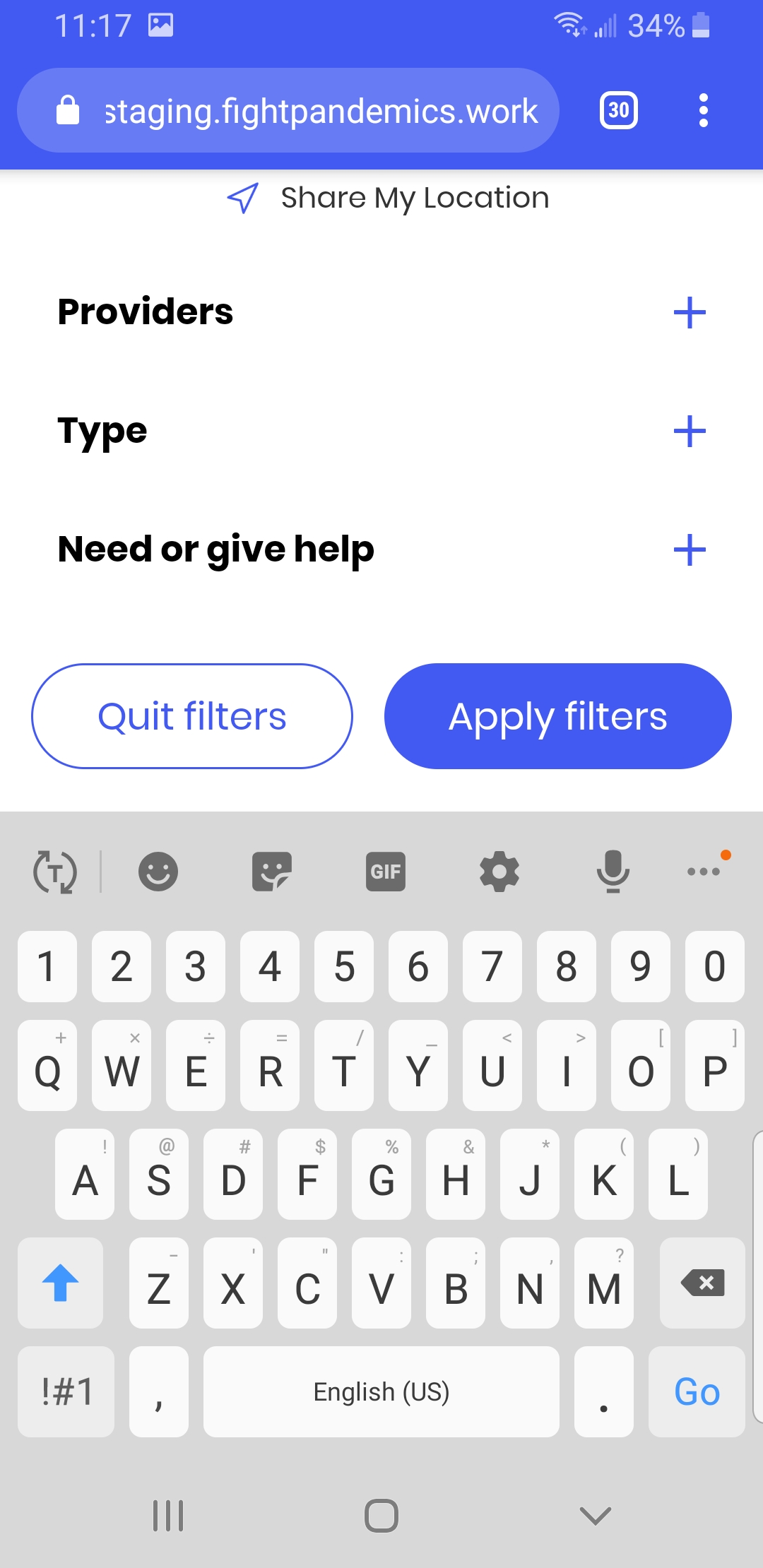
2.click on location.
3.If we open keypad while trying to provide the address manually.The location box is cut on top.Not able to track what we are typing.
 nivetheatha
All 14 comments
Hi @nivetheatha . What specific device, browser and even keyboard app are you working with? I could not recreate in dev tools or my own phone (Samsung Galaxy A20, Chrome as well as Samsung browser, Samsung keyboard)
 joshmorel
on 9 Jul 2020
joshmorel
on 9 Jul 2020
@joshmorel I am using Samsung Galaxy, chrome browser 83,Samsung keyboard.
nivetheatha
on 9 Jul 2020
Thanks @nivetheatha . I'll look more into it tomorrow
joshmorel
on 9 Jul 2020
@joshmorel let me know if you are not able to recreate it.
nivetheatha
on 9 Jul 2020
Hi @nivetheatha - couldn't reproduce in dev tools because they don't pop up a keyboard.
Couldn't reproduce in my own phone because it must be greater in height than yours. Do you know your screen height (or which specific samsung model)?
Are you able to scroll the screen back up to view the input? Just trying to figure out how critical it is... It would affect a subset of devices with a small screen height.
Now that I understand the issue a little more, I think we can rename this to something more generic like "Feed filters are not usable on small screen heights [Mobile]"
joshmorel
on 11 Jul 2020
@joshmorel Mine is Samsung Galaxy s8 and height of the phone is 5.8 inch.
Not able to scroll up to view the location.
I put this specific title because I am not able to see only location. Other filters I can able to track. If you want I can edit the title.
nivetheatha
on 11 Jul 2020
Thanks @nivetheatha
My viewport device height is 892px while yours is 740px which is actually similar to a lot of phones. Keyboard size factors in here as well. Not sure how iPhone works out here - do you have one or another QA?
Maybe we need something like Browser Stack to more easily troubleshoot these kinds of things...
joshmorel
on 11 Jul 2020
@joshmorel here are my testing results. let me know if you need screenshots.
OnePlus 7 Pro / viewport 412 x 892 - Only the word "Location" is cut off. Still can see what I'm typing.
Google Pixel / viewport 360 x 640 - Same issue. Can't see the editing field.
iPhone XR / viewport 414 x 896 - No issue. Everything is visible.
iPhone 6S Plus / viewport 414 x 736 - No issue. Everything is visible.
 hellynyc
on 13 Jul 2020
hellynyc
on 13 Jul 2020
Thanks @hellynyc that's enough info for us to work on this.
joshmorel
on 13 Jul 2020
iphone XR is good
 sheeba1
on 13 Jul 2020
sheeba1
on 13 Jul 2020
I'm going to tweak the spacing so it works on most devices ("Location" header may be cut off for smaller ones with large keyboards). I have an idea for a more comprehensive solution but I need input from design (I will ask in slack channel).
joshmorel
on 13 Jul 2020
@nivetheatha @hellynyc can you test on this branch - https://featureimprove-filters-height-responsiveness.fightpandemics.xyz/feed
I checked in free version of BrowserStack and it seems like it will be okay. The smaller devices might have "Location" label cut off but you can still type.
A longer term solution - I asked for input on my idea in design channel https://fightpandemics.slack.com/archives/C010P7A17V3/p1594739244490800
joshmorel
on 14 Jul 2020
@joshmorel I tested on the same 4 devices mentioned above, and it looks good. Like you said, it cuts off slightly on the smaller device, but still can see what I'm typing.
hellynyc
on 14 Jul 2020
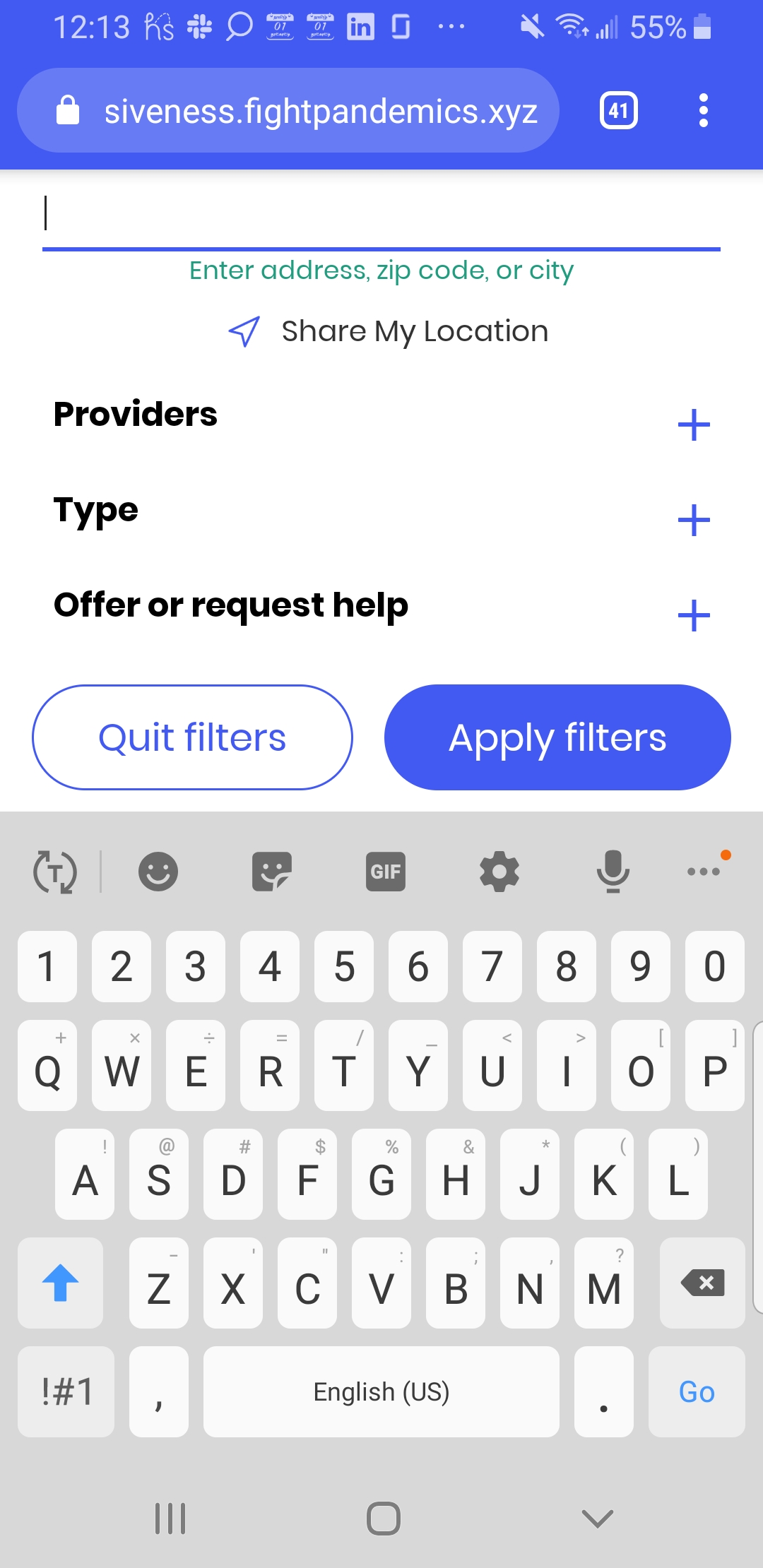
@joshmorel Only word location is cut off.I can able to track what I am typing.
nivetheatha
on 14 Jul 2020
Related issues
 BMariscal
·
9Comments
BMariscal
·
9Comments
 idjevm
·
5Comments
idjevm
·
5Comments
 rabbi08
·
10Comments
rabbi08
·
10Comments
 dfrancks
·
10Comments
dfrancks
·
10Comments
 galeza
·
10Comments
galeza
·
10Comments