New user trying to move to Ferdi from Franz and, while I was able to import my Franz account and it lists all the services on the left, nothing is working. I have Microsoft Teams and Slack services only and they're all just stuck on loading. If I do get a Teams service to load, it shows my chat list but none of the messages on the right-hand side.
Steps to reproduce the behavior:
- Open Ferdi. Login with Franz account.
- Wait for services to load.
- Continue to wait for services to load.
- Panic.
Expected behavior
At minimum, expected behavior is to carry over from Franz and load services just like in that app since this is a fork.
Screenshots


Desktop:
- macOS Catalina
- Ferdi v5.4.3
- Server Used: https://api.getferdi.com
Additional context
I have attempted to remove all my services and re-add them but this doesn't change anything. Removing the Teams services has actually set me back as I can no longer get Teams to actually load.
 dpkonofa
All 30 comments
I've been able to get the Slack channels running by upgrading to the latest Ferdi (v5.4.4 beta 3) and deleting my entire imported account and recreating from scratch but Teams services are still not loading.
dpkonofa
on 17 Mar 2020
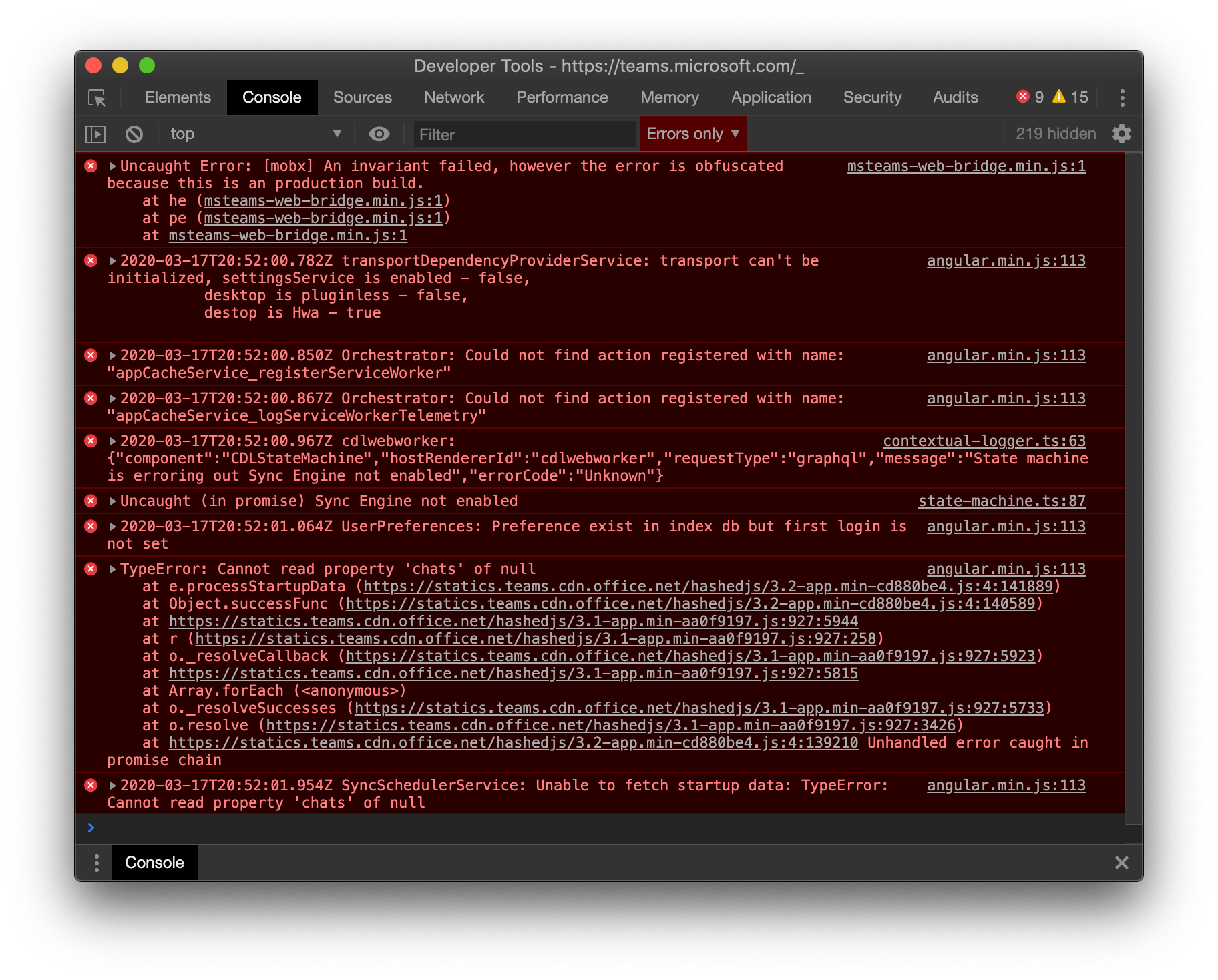
Here's what I'm getting from the Service Dev Tools:
dpkonofa
on 17 Mar 2020
Reinstalled Franz and Teams is working within that app so it looks like the issue might be with Ferdi specifically...
dpkonofa
on 17 Mar 2020
We are sorry that you have such a bad experience switching to Ferdi - we try to make transition as easy as possible.
About MS Teams: Have you got the the login screen and logged in or does this happen even before that?
Unfortunately, I don't currently have access to a Teams account so I cannot test this locally but it looks like I get to the login screen fine.
 vantezzen
on 18 Mar 2020
vantezzen
on 18 Mar 2020
@vantezzen - I am able to login without issue but, once the screen that says "Loading Microsoft Teams..." comes up, it just sits there until I eventually get what's in my 2nd screenshot.
dpkonofa
on 18 Mar 2020
Another thing... I have only been able to get to it twice but, occasionally, I will see the screen to download the Microsoft Teams app prior to the loading screen. It shows up briefly and then disappears.
dpkonofa
on 18 Mar 2020
Is anyone able to use MS Teams currently with Ferdi? It seems like basic functionality for Services from Franz to work on Ferdi. :-/
dpkonofa
on 25 Mar 2020
I also have problems with MS Teams in Ferdi. The service is loaded correctly and a login works for me, but after my login new messages are not shown. Only older one (since my first login)
 doschupp
on 25 Mar 2020
doschupp
on 25 Mar 2020
That's farther than I get. I've only ever gotten messages to show the first time I added the service. After that, I just get the loading screen no matter what.
dpkonofa
on 26 Mar 2020
Having the same issue. Going to View -> Toggle Service Developer Tools -> Clear Storage -> Clear site data and reloading Teams seems to fix the not receiving messages error. I usually have to do it once per day.
 fr3nd
on 26 Mar 2020
fr3nd
on 26 Mar 2020
@dpkonofa Both @vantezzen and I don't use MS Teams and unfortunately currently have no credentials to test this. We weren't able to establish an easy fix by looking at the shared logs, so it would need deeper investigation. We will see what we can do and how we can further investigate this error, otherwise anyone concerned and interested is welcome to help us find a fix for this.
Thanks for your understanding.
 kytwb
on 26 Mar 2020
kytwb
on 26 Mar 2020
I’m happy to help however I can, I’m just not even sure where to start. I’m even happy to act as a proxy to test Teams and report back, screen share, or anything necessary.
dpkonofa
on 26 Mar 2020
Having the same issue. Going to
View -> Toggle Service Developer Tools -> Clear Storage -> Clear site dataand reloading Teams seems to fix the not receiving messages error. I usually have to do it once per day.
Tried this with no success. Still gets stuck on Loading and doesn't even prompt me for a login.
dpkonofa
on 26 Mar 2020
Having the same issue. Going to
View -> Toggle Service Developer Tools -> Clear Storage -> Clear site dataand reloading Teams seems to fix the not receiving messages error. I usually have to do it once per day.
This seems to work for me as well, after this change I'm able to see the ongoing chats again + able to join TEAMS meetings via the Calendar option in the TEAMS GUI.
Main issue for me was twofold:
- New notifications were shown, but loading chatwindows only showed historic conversations;
- Joining a TEAMS meeting from the calendar did not work
After clearing the data I can do both things again. Not sure if both issues need to be split from a reporting and bugfixing perspective.
 gabordewit
on 27 Mar 2020
gabordewit
on 27 Mar 2020
Is there a way to reset the Teams service completely besides removing it and re-adding? I've removed it and re-added to no avail and I can't get past the panel where it says "We're sorry, we've run into an issue" no matter how many times I clear the cache, local storage, or anything else in either dev tools or dev tools for the service. 😢
dpkonofa
on 27 Mar 2020
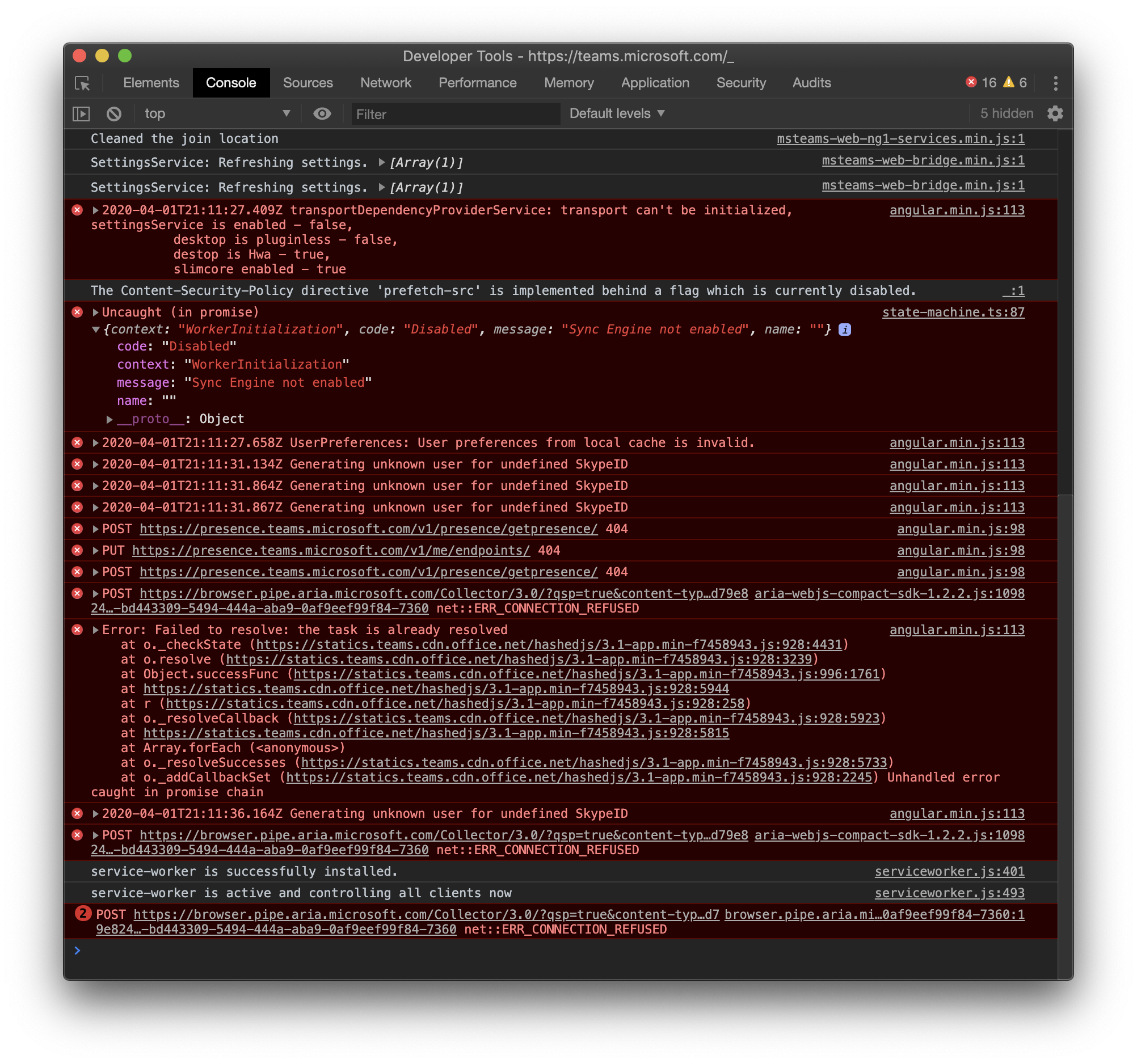
I'm getting a slightly different error message in the console debug window then @dpkonofa
Did anyone solve this issue by now? This is really the only thing that keeps me away from switching from "All-in-One Messenger" to "Ferdi".
 fklement
on 1 Apr 2020
fklement
on 1 Apr 2020
Not as far as I know. The devs don't have Teams credentials to test so, unless someone has an org that can get them an account, I don't think there's going to be much movement here. Thanks for the tip on "All-in-One", though. I've been looking for an alternative since Franz works but doesn't do video/audio permissions correctly and Ferdi's Teams support is broken.
dpkonofa
on 1 Apr 2020
Unfortunately I'm having the same problem here as well. Same exact loading screen and then:

Console:

To clarify, to clear site data as per @dpkonofa's instructions, there's an extra step: View -> Toggle Service Developer Tools -> Application -> Clear Storage -> Clear site data:

Unfortunately that doesn't do anything for me, even with a reload afterward.
 ylluminate
on 3 Apr 2020
ylluminate
on 3 Apr 2020
Thanks for adding that. I’m surprised more Teams users aren’t commenting. I tried logging in with another Teams account and had the same issue so this is now reproducible.
dpkonofa
on 3 Apr 2020
Hi, I have the same issue when I start up Ferdi. In Franz it has always worked & about a month ago I started using Ferdi. I didn't transfer my account from Franz, but started with a new one in Ferdi and added all my services manually. Since then, Teams has never worked when I started Ferdi. I was able to log in, but then it stops working. But I did get it working this way:
- log in to Teams (or just start up Ferdi if you had logged in during a previous session)
- right click the Teams service & choose 'Disable service'.
- right click the Teams service & choose 'Enable service'.
- you should be good to go ;) Hopefully this can help some of you out!
 ckkoen
on 9 Apr 2020
ckkoen
on 9 Apr 2020
I didn't to have this problem before, but with the latest update (5.5.0-gm) I now do too. I already removed the service and re-added it and the login screen worked fine, but the actual service itself just doesn't want to show..
 TechnicJelle
on 19 Apr 2020
TechnicJelle
on 19 Apr 2020
@ggblbl We are aware of the regression in 5.5.0-gm, this is being addressing in https://github.com/getferdi/ferdi/issues/536 for v5.5.0.
Thanks for bearing with us! 🙏
kytwb
on 19 Apr 2020
I’m using 5.4.3 and not the 5.5-GM release. How far back did the regression go?
dpkonofa
on 19 Apr 2020
Just updated to 5.5.0 and the issue still persists. Hopefully this gets resolved soon. Still confused why I have 0 issues in Franz but can't get this to work at all, on multiple machines, through Ferdi.
dpkonofa
on 28 Apr 2020
I'm also running the 5.5.0 stable and for me it has been solved. I did do an uninstall + install of Ferdi instead of just updating it. I then had to re-login to every service I have. I don't know if that makes any difference.
ckkoen
on 28 Apr 2020
I did too, unfortunately. I’m on a Mac so I used AppCleaner to make sure all the .plist files and Library folders were removed also. Still no luck. I also downloaded the latest Teams recipe from the recipes repo on here and swapped that out but it still just sits there loading. 😭😭
dpkonofa
on 28 Apr 2020
This issue has been automatically marked as stale because it has not had recent activity. Please check if this issue is still relevant and please close it if it's not. This will make sure that our open issues are actually of use and reduce the list of obsolete issues. Thank you for your contributions.
![stale[bot] picture](https://avatars3.githubusercontent.com/in/1724?v=4&s=40) stale[bot]
on 27 Jun 2020
stale[bot]
on 27 Jun 2020
Still relevant. Just tested yesterday and it's still not working.
dpkonofa
on 30 Jun 2020
Not sure what changed but Microsoft Teams suddenly started loading this morning after Microsoft sent out a status update saying that the platform was down and the issue had been resolved. It now works without any issues and all the functions work. Fingers crossed that this is permanent... I wonder if the issue was on their end this whole time. :-/
dpkonofa
on 7 Jul 2020
This issue has been automatically marked as stale because it has not had recent activity. Please check if this issue is still relevant and please close it if it's not. This will make sure that our open issues are actually of use and reduce the list of obsolete issues. Thank you for your contributions.
stale[bot]
on 5 Sep 2020
Related issues
 avielc
·
3Comments
avielc
·
3Comments
 ammarmalhas
·
3Comments
ammarmalhas
·
3Comments
 sschaefa
·
3Comments
sschaefa
·
3Comments
 adithshenoy
·
3Comments
adithshenoy
·
3Comments
 ylluminarious
·
4Comments
ylluminarious
·
4Comments
Most helpful comment
We are sorry that you have such a bad experience switching to Ferdi - we try to make transition as easy as possible.
About MS Teams: Have you got the the login screen and logged in or does this happen even before that?
Unfortunately, I don't currently have access to a Teams account so I cannot test this locally but it looks like I get to the login screen fine.