Ferdi: Can't open links in Gmail (popup blocker)
Describe the bug
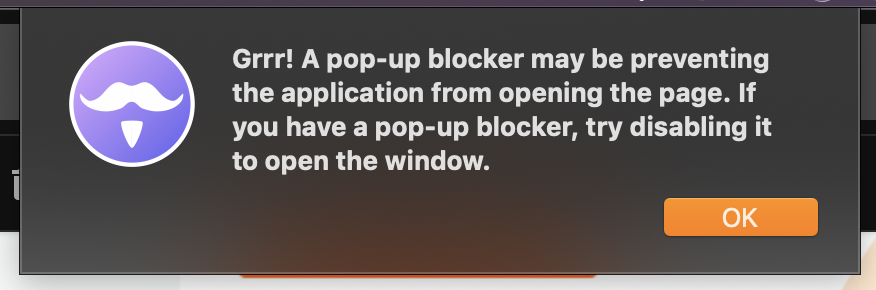
When i left click on a link in gmail, i have a popup telling me that i may have a popup blocker thus not to been able to open the browser.
I can however right click on the link, select 'open link in browser' in the context menu and the default browser open (or 'copy link' and past it directly in my browser)
To Reproduce
click on a link in any mail in gmail
- Go to a mail
- Click on a link
- See error
Expected behavior
open the page in my default browser
Screenshots

Desktop (please complete the following information):
- OS: Win 10 pro
- Browser : Ferdi
- Version : 5.4.0
Additional context
I have this bug since the auth problem cited in #264 and made the change on my UA witch is now
module.exports = Franz =>
  class Gmail extends Franz {
    overrideUserAgent() {
      return 'Mozilla/5.0 (Windows NT 10.0; Win64; x64; rv:72.0) Gecko/20100101 Firefox/72.0';
    }
  };
But the problem happen even with every other UA provided in #264
I do not have any problems with other services (left click open the browser normaly
 Dunkh4n
All 49 comments
Does this happen in all mails? I suspect this could be something similar to what happened in #36 with Skype (Skype used an unusual technique to open links). I am currently looking into if I can find what technique GMail is using to open links - if anyone wants to search too and share their finding they are welcome to.
Searching for the error message inside GMail's sources shows that this messages gets thrown inside a highly obfuscated "Wic.prototype.openWindow" function.
 vantezzen
on 23 Jan 2020
vantezzen
on 23 Jan 2020
yes, it's happen in all mails..
Dunkh4n
on 23 Jan 2020
Ok, I tried debugging how this works but I can't get the function mentioned above to trigger - no matter what link I click it always just uses the default link behaviour - so I can't debug this problem any further.
vantezzen
on 24 Jan 2020
I switched today from Franz and experience the same issue. I also had the same login problem and had to change the user agent string. I have 2 Gmail services and both have this problem. Happy to provide more info if need be.
Desktop
- OS: MacOS 10.15.2
- Browser: Ferdi
- Version: 5.4.3.994
 mokipedia
on 2 Feb 2020
mokipedia
on 2 Feb 2020
i just fixed my issue by switching the user agent string again, this time to:
Mozilla/5.0 (Macintosh; Intel Mac OS X 10_15_2) AppleWebKit/537.36 (KHTML, like Gecko) Chrome/79.0.3945.130 Safari/537.36
(which is what my current chrome is sending out).
Then I restarted Ferdi, just to make sure (seems like reloading multiple times may or may not yield success, so I just restart it when I change a recipe)
mokipedia
on 2 Feb 2020
@mokipedia worked for me as well. Thanks!
 nicosebastian93
on 2 Feb 2020
nicosebastian93
on 2 Feb 2020
The User agent changes will also be shipped with Ferdi 5.4.4 automatically - so you won't have to change that manually.
vantezzen
on 2 Feb 2020
@mokipedia worked for me as well. Thanks!
Dunkh4n
on 6 Feb 2020
Linking to https://github.com/getferdi/ferdi/issues/264 for reference.
 kytwb
on 4 Mar 2020
kytwb
on 4 Mar 2020
As mentioned in #264, I am having this issue now after installing and reinstalling 5.4.4.
I did not notice it happening until this last week, around the same time I upgraded to Mac OS 10.15.3.
 lisaq
on 12 Mar 2020
lisaq
on 12 Mar 2020
I'm also experiencing this.
kytwb
on 12 Mar 2020
My fix still works (also for beta, updated to beta and hat the same problem again), as gmail seems to not like firefox too much. However Franz' fix for dynamic chrome version looks promising (beta)
mokipedia
on 10 Apr 2020
Updated to 5.5.0-gm today and the service reloaded. Having the same problem again.
Fix from above still works though.
mokipedia
on 19 Apr 2020
I'm also having the same issue. I had it with 5.4 betas, as well as the 5.5.0-gmx, and still now the the official 5.5.0
 lupalby
on 27 Apr 2020
lupalby
on 27 Apr 2020
workaround: Control + click (or whatever equivalent is on osX) will open the link in a browser with no issues.
 mundo03
on 29 Apr 2020
mundo03
on 29 Apr 2020
Same issue here!
 CptDinosaur
on 1 May 2020
CptDinosaur
on 1 May 2020
I have the same issue.
 jrpeck1989
on 1 May 2020
jrpeck1989
on 1 May 2020
I had the same issue on Ubuntu 18.04.4 LTS running installed version ferdi_5.5.0_amd64.deb.
Changing the code in ~/.config/Ferdi/recipes/gmail/index.js to the following fixed my issue (the new user-agent is the one used by chromium).
var os = require('os')
module.exports = Franz =>
class Gmail extends Franz {
overrideUserAgent() {
return "Mozilla/5.0 (X11; Linux x86_64) AppleWebKit/537.36 (KHTML, like Gecko) Ubuntu Chromium/80.0.3987.163 Chrome/80.0.3987.163 Safari/537.36";
}
};
 boekkooi-fresh
on 1 May 2020
boekkooi-fresh
on 1 May 2020
Just upgraded to latest 5.5.0 on macOS 10.14.6 - still happening on gmail - fix above works, but thought this was going to be released as standard from 5.4.4 ?
 danielleos
on 2 May 2020
danielleos
on 2 May 2020
Using:
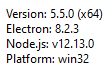
For those using Windows, the same fix works, but it is a different location and the contents of the file are slightly different:
Location:
C:\Users[your user here]\AppData\Roaming\Ferdi\recipes\gmail
File:
var os = require('os')
module.exports = Franz =>
class Gmail extends Franz {
overrideUserAgent() {
if (os.platform() == 'linux')
return "Mozilla/5.0 (X11; Linux x86_64; rv:72.0) Gecko/20100101 Firefox/72.0"
else
return "Mozilla/5.0 (X11; Linux x86_64) AppleWebKit/537.36 (KHTML, like Gecko) Ubuntu Chromium/80.0.3987.163 Chrome/80.0.3987.163 Safari/537.36";
}
};
(change the SECOND return line to match what is above - the code above is the file AFTER I made the changes).
 ray-odoo
on 4 May 2020
ray-odoo
on 4 May 2020
Thanks @ray-odoo. That fixed it for me on Windows, running v5.5.0.
 tnaseem
on 8 May 2020
tnaseem
on 8 May 2020
Yep 5.5.0 on Linux, still having the issue. Is there a plan to fix it in the next release, so non tech people, who can't follow the workaround patch benefit from it as well?
 llabusch93
on 26 May 2020
llabusch93
on 26 May 2020
I have pushed a fix in the recipes which can be viewed here https://github.com/getferdi/recipes/pull/194
. Till the PR gets merged, replace the recipe's index.js file with this file.
 mahadevans87
on 1 Jun 2020
mahadevans87
on 1 Jun 2020
Still an issue on Ferdi 5.5.0 on Mac. Non tech savvy dumlock here hoping this gets fixed in the normal release asap.
 Tulosi
on 16 Jul 2020
Tulosi
on 16 Jul 2020
Have the same problem, too. Mac with Catalina 10.15.5 (19F101) and Ferdi Version 5.5.0 (5.5.0.2116).
 webserviceXXL
on 21 Jul 2020
webserviceXXL
on 21 Jul 2020
Same problem here. Catalina and last Ferdi version.
 kabronero
on 22 Jul 2020
kabronero
on 22 Jul 2020
Same issue here (Ferdi 5.5.0 on Ubuntu 20.04), although pressing and holding ctrl while clicking opens the link.
 brunofunnie
on 29 Jul 2020
brunofunnie
on 29 Jul 2020
Same problem as others. Win10, ctrl-click opens these for me though.
Using the proposed fix seems to work, too
 twhiting9275
on 1 Aug 2020
twhiting9275
on 1 Aug 2020
The solution posted by @boekkooi-fresh (Linux) and @ray-odoo (Windows) is also working for Mac.👍
On Mac, the path for the file is: /Users/$USER/Library/Application Support/Ferdi/recipes/gmail/index.js
var os = require('os')
module.exports = Franz =>
class Gmail extends Franz {
overrideUserAgent() {
if (os.platform() == 'linux')
return "Mozilla/5.0 (X11; Linux x86_64; rv:72.0) Gecko/20100101 Firefox/72.0"
else
return "Mozilla/5.0 (X11; Linux x86_64) AppleWebKit/537.36 (KHTML, like Gecko) Ubuntu Chromium/80.0.3987.163 Chrome/80.0.3987.163 Safari/537.36";
}
};
For me, using the solution posted above broke keyboard shortcuts while composing emails in Gmail. A working fix for me, is below.
var os = require('os')

module.exports = Franz =>
  class Gmail extends Franz {
    overrideUserAgent() {
      if (os.platform() == 'linux')
        return "Mozilla/5.0 (X11; Linux x86_64; rv:72.0) Gecko/20100101 Firefox/72.0"
      else
        return "Mozilla/5.0 (Macintosh; Intel Mac OS X 10_15_5) AppleWebKit/537.36 (KHTML, like Gecko) Chrome/84.0.4147.89 Safari/537.36"
        // original
        // return "Mozilla/5.0 (Macintosh; Intel Mac OS X 10.15; rv:72.0) Gecko/20100101 Firefox/72.0";
    }
  };
My guess is that by adding in X11; Linux x64_64, Gmail binds shortcuts to Ctrl instead of Cmd.
 carsondarling
on 3 Aug 2020
carsondarling
on 3 Aug 2020
Mac 5.5.0, I get the "Grrr" alert on Gmail links. @carsondarling patch worked! thanks
 dzg
on 13 Aug 2020
dzg
on 13 Aug 2020
5.6.0-beta.2 on Mac, Gmail links open in a popup, with or without the patch from @carsondarling
My preference would be for links to open in my default browser.
 patrickrushton
on 24 Aug 2020
patrickrushton
on 24 Aug 2020
5.6.0-beta.2 on Mac, Gmail links open in a popup, with or without the patch from @carsondarling
My preference would be for links to open in my default browser.
Hi @patrickrushton, that's not related to this bug, see #842
mokipedia
on 24 Aug 2020
I'm running into this too on Mac 5.5.0. I don't want to deal with patching all of my services manually (I use 6 different gmails and gcalendars and google keeps etc) so I'll switch back to Franz for now. Hopefully this is fixed soon!
 aphexcx
on 29 Aug 2020
aphexcx
on 29 Aug 2020
Hi @aphexcx, understandable. However you patch the recipe, not the service. So 1 change per type (gmail, gcal, keep) and then restart ferdi should do it.
mokipedia
on 29 Aug 2020
Not sure if #942 is a duplicate. I only experience the popup error when clicking the print or new window icon in Gmail. None of the workarounds here resolve it.
 stevengliebe
on 4 Sep 2020
stevengliebe
on 4 Sep 2020
I'm getting this error as well on version 5.5.0 .. Mac Catalina.
 amykluber
on 8 Sep 2020
amykluber
on 8 Sep 2020
@carsondarling's solution fixed the problem for me on macOS Catalina, Ferdi 5.5.0.
It also fixed another very weird issue I was having: when typing a message in Gmail using my external Bluetooth keyboard, pressing the Command key (labeled Alt on the keyboard, but configured on my system to act as Command) would indent the text, which made it impossible to copy/paste or to even switch applications without messing up the message. When using the laptop keyboard, everything worked fine. With the change suggested above, this problem is also gone, to my great relief :)
 zzamboni
on 10 Sep 2020
zzamboni
on 10 Sep 2020
Hi! Is there a solution to be able to click links on latest MacOS and Windows (10) ? I can't figure out anything else than copying of the links to chrome... which breaks usability.
 nevvkid
on 24 Sep 2020
nevvkid
on 24 Sep 2020
I consider this to be a serious UX bug.
This was already reported in January.
Is anyone actively working on a fix for this issue?
I suggest that this ticket be tagged as urgent, and possibly with needs-help.
 jottr
on 24 Sep 2020
jottr
on 24 Sep 2020
@nevvkid @jottr in the meantime, you could try @carsondarling's workaround posted above. It completely fixed the problem for me: https://github.com/getferdi/ferdi/issues/321#issuecomment-668207379
zzamboni
on 24 Sep 2020
Thanks @zzamboni.
I'd like to squash this bug for good - before I start working on a fix, I'd like to know if someone else is already working on one.
jottr
on 24 Sep 2020
@jottr I was working on this previously. I shall take this up if you haven't started. It seems the PR https://github.com/getferdi/recipes/pull/194 never got into recipes. Once that is available for download, I believe the issue should get resolved.
mahadevans87
on 25 Sep 2020
This happened again to me on Linux with Ferdi 5.5.0.
Changing the user agent string to Mozilla/5.0 (X11; Linux x86_64) AppleWebKit/537.36 (KHTML, like Gecko) Chrome/86.0.4240.111 Safari/537.36 fixed the issue (for now):
var os = require('os')
module.exports = Franz =>
class Gmail extends Franz {
overrideUserAgent() {
if (os.platform() == 'linux')
return "Mozilla/5.0 (X11; Linux x86_64) AppleWebKit/537.36 (KHTML, like Gecko) Chrome/86.0.4240.111 Safari/537.36"
else
return "Mozilla/5.0 (Macintosh; Intel Mac OS X 10_15_5) AppleWebKit/537.36 (KHTML, like Gecko) Chrome/84.0.4147.89 Safari/537.36"
// original
// return "Mozilla/5.0 (Macintosh; Intel Mac OS X 10.15; rv:72.0) Gecko/20100101 Firefox/72.0";
}
};
 Saboteur777
on 30 Oct 2020
Saboteur777
on 30 Oct 2020
https://github.com/getferdi/recipes/pull/194, which should have fixed this issue, was released with Ferdi 5.6.0-beta.3 or above. We will hopefully release 5.6.0 soon so this fix will be shipped with it.
vantezzen
on 30 Oct 2020
Hi,
I'm sorry, but beside having the issue everyone is describing, I have no idea where this code has to be put.
I did try to google, but I don't know where to start as it is unclear to me if I have to put the code in Ferdi or in Chrome.
Can anyone please explain or maybe give a proper link?
Hopefully this might help others, too. tnx!
 heysimo
on 16 Nov 2020
heysimo
on 16 Nov 2020
Hi @heysimo,
it is fairly easy to understand once you get the hang of it:
- Ferdi is an electron app, which is basically a Chromium wrapper inside a Windows / Mac / Linux application. It has nothing to do with Chrome Browser, other than they both use Chromium to run JS and Render Websites under the hood.
- Ferdi is written in Javascript and you can read and edit its files. For your purposes, you want to edit a 'recipe', which is basically a sort of configuration file(s) for each service Ferdi knows.
- They are found, depending on your OS here:
- Mac: ~/Library/Application Support/Ferdi/recipes/
- Windows: %appdata%/Ferdi/recipes/
- Linux: ~/.config/Ferdi/recipes/
- In this folder, you will find recipes for gmail, whatsapp and more. Go to the recipe you want to edit and look at the JavaScript files you see there (should be 2).
- index.js -> includes transformations and configs for the service itself, like user-agent, ... (This is the file you are looking for)
- webview.js -> hooks into the content of the service itself, like gmail and whatsapp and adds functionality like: link behavior, unread count in Franz/Ferdi, adds css if wanted, ..
- there are other files in there too, you can read about more it, for example here (googled it): https://blog.jakelee.co.uk/super-simple-guide-to-adding-a-new-ferdi-service-recipe/
mokipedia
on 16 Nov 2020
Hi @heysimo,
it is fairly easy to understand once you get the hang of it:
- Ferdi is an electron app, which is basically a Chromium wrapper inside a Windows / Mac / Linux application. It has nothing to do with Chrome Browser, other than they both use Chromium to run JS and Render Websites under the hood.
- Ferdi is written in Javascript and you can read and edit its files. For your purposes, you want to edit a 'recipe', which is basically a sort of configuration file(s) for each service Ferdi knows.
They are found, depending on your OS here:
- Mac: ~/Library/Application Support/Ferdi/recipes/
- Windows: %appdata%/Ferdi/recipes/
- Linux: ~/.config/Ferdi/recipes/
In this folder, you will find recipes for gmail, whatsapp and more. Go to the recipe you want to edit and look at the JavaScript files you see there (should be 2).
- index.js -> includes transformations and configs for the service itself, like user-agent, ... (This is the file you are looking for)
- webview.js -> hooks into the content of the service itself, like gmail and whatsapp and adds functionality like: link behavior, unread count in Franz/Ferdi, adds css if wanted, ..
- there are other files in there too, you can read about more it, for example here (googled it): https://blog.jakelee.co.uk/super-simple-guide-to-adding-a-new-ferdi-service-recipe/
Can't thank you enough, really.
Fixed the issue straight away.
Amazing!
heysimo
on 16 Nov 2020
I just found out the below code to fix the popup blocker issue.
var os = require('os')

module.exports = Franz =>
  class Gmail extends Franz {
    overrideUserAgent() {
      if (os.platform() == 'linux')
        return "Mozilla/5.0 (X11; Linux x86_64; rv:72.0) Gecko/20100101 Firefox/72.0"
      else
        return "Mozilla/5.0 (Macintosh; Intel Mac OS X 10_15_5) AppleWebKit/537.36 (KHTML, like Gecko) Chrome/84.0.4147.89 Safari/537.36"
        // original
        // return "Mozilla/5.0 (Macintosh; Intel Mac OS X 10.15; rv:72.0) Gecko/20100101 Firefox/72.0";
    }
  };
 onechaiplease
on 25 Nov 2020
onechaiplease
on 25 Nov 2020
Related issues
 Jendker
·
3Comments
Jendker
·
3Comments
 alegiglio
·
3Comments
alegiglio
·
3Comments
 ammarmalhas
·
3Comments
ammarmalhas
·
3Comments
 probablykasper
·
4Comments
ammarmalhas
·
3Comments
probablykasper
·
4Comments
ammarmalhas
·
3Comments
Most helpful comment
For me, using the solution posted above broke keyboard shortcuts while composing emails in Gmail. A working fix for me, is below.
My guess is that by adding in
X11; Linux x64_64, Gmail binds shortcuts toCtrlinstead ofCmd.