Ferdi: Google Issues Megathread ("Browser or app may not be secure")
As seen in https://github.com/getferdi/ferdi/issues/263, https://github.com/getferdi/ferdi/issues/229 and https://github.com/getferdi/ferdi/issues/140, Google (and maybe other services) are regularly making changes to prevent usage of their services within some browsers/apps. It seems this detection is based on the user agent. If we had remote update of services (still pending via https://github.com/getferdi/server/issues/14), we could update the user agent used in the recipe to periodically overcome this, but ultimately the updated user agent will be somewhat blocked. This is why it would be useful for each user to be able to override the user agent used by a specific service in the service settings, so each user can use whatever user agent works for them (and avoid using the same user agent for all Ferdi user via a recipe update).
 kytwb
kytwb
All 75 comments
In the meantime, if you're experiencing the following screen for Google services (here Gmail):

You can open ~/Library/Application\ Support/Ferdi/recipes/gmail/index.js (on macOS, path may differ based on your platform) and manually override the user agent there. The following seems to be working as suggested per @packermann76 here:
module.exports = Franz =>
  class Gmail extends Franz {
    overrideUserAgent() {
      return "Mozilla/5.0 (Macintosh; Intel Mac OS X 10.15; rv:71.0) Gecko/20100101 Firefox/71.0";
    }
  };
So replace:
// just pass through Franz
module.exports = Franz => Franz;
with:
module.exports = Franz =>
  class Gmail extends Franz {
    overrideUserAgent() {
      return "Mozilla/5.0 (Macintosh; Intel Mac OS X 10.15; rv:71.0) Gecko/20100101 Firefox/71.0";
    }
  };
Great, thanks!
Also, can you clarify what the process is for Google Voice?
I assume we edit this ~/Library/Application\ Support/Ferdi/recipes/ex-google-voice/index.js similarly? Seeing as it is a little different, just wanting to be sure:
"use strict";
module.exports = Franz => Franz;
 ylluminate
on 18 Dec 2019
ylluminate
on 18 Dec 2019
@ylluminate yes, you can use the same code snippet for Google Voice.
kytwb
on 18 Dec 2019
Alright, just wanted to be sure that recipes\ex-google-voice was indeed the equivalent to recipes/gmail and also to check on the differential line: "use strict";
ylluminate
on 18 Dec 2019
So this is a little odd. Let me walk through what I did here:
$ emacs ~/Library/Application Support/Ferdi/recipes/ex-google-voice/index.js
# inserted the above and ended up with these contents for index.js:
"use strict";
//module.exports = Franz => Franz;
module.exports = Franz =>
  class Gmail extends Franz {
    overrideUserAgent() {
      return "Mozilla/5.0 (Macintosh; Intel Mac OS X 10.15; rv:71.0) Gecko/20100101 Firefox/71.0";
    }
  };
I then, in Ferdi, (1) reloaded the tab and (2) received the same result:

Is there a way to view user-agent string and such for a Ferdi tab/app instance?
ylluminate
on 18 Dec 2019
You can open View > Toggle Service Developer Tools, and in the network tab, you should be able to see your user agent in some requests headers:
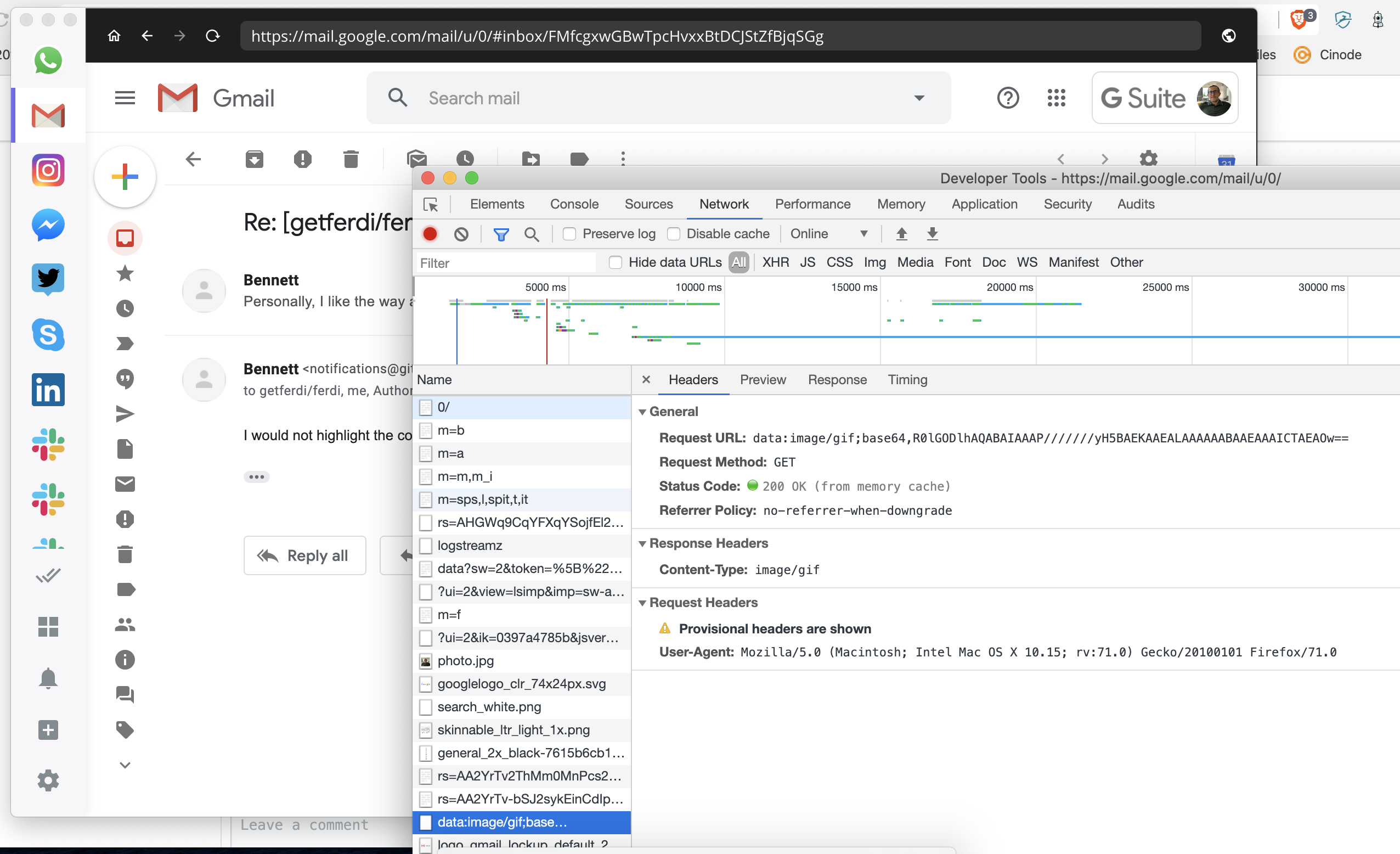
You might want to rename the class in your snippet to fit the service (not sure if that has any impact/cause any conflict if you're also having a Gmail service up):
module.exports = Franz =>
    class GoogleVoice extends Franz {
        overrideUserAgent() {
            return "Mozilla/5.0 (Macintosh; Intel Mac OS X 10.15; rv:71.0) Gecko/20100101 Firefox/71.0";
        }
    };
By the way, I recommend you use your own user agent; you can view your user agent by visiting https://www.whatsmyua.info/ in your regular browser.
kytwb
on 18 Dec 2019
Thanks, oddly after a few more refreshes it worked. But, also oddly, the Dark Mode didn't kick in until another 2 more reloads even though at one point above you can see it did seem to show up...
ylluminate
on 18 Dec 2019
@ylluminate Good to know it worked in the end 🙏 There is still some inconsistencies with UDM which will be addressed via https://github.com/getferdi/ferdi/issues/158. Similarly, I believe there is quite some things that could be enhanced to make the user experience better and avoid having to refresh multiple times for the correct state of things to be displayed (probably some race condition due to some bad implementation).
We will address all those as we go! 💪
kytwb
on 19 Dec 2019
I'm really glad to hear this. I'm trying to add another Gmail account and of all things, it's going nuts on me this time. Each time I attempt to login I get the insecure browser message and then after I reload it via the right click of the left tab icon and hit reload, it then only goes to this page:

Sadly then when I click "Sign in" in the upper right, it then opens the auth page within my default web browser and of course never actually authenticates. A cmd-left_arrow and subsequent reloads never get me back to the login page... only a deletion of the service and readd will get it, but after 5 times of trying I can't seem to get the agent override to kick in (?).
(... and yeah, of course you'll notice too that Dark Mode isn't even showing up on this at this stage for this service/page.)
ylluminate
on 20 Dec 2019
You can open ~/Library/Application\ Support/Ferdi/recipes/gmail/index.js (on macOS, path may differ based on your platform)
Anyone an idea of what the relevant folder might be on Ubuntu?
 keunes
on 20 Dec 2019
keunes
on 20 Dec 2019
@keunes Have you tried, from the Terminal:
# "nuclear" search (goes through your entire filesystem with root/admin privs):
$ sudo find / | grep -i "recipes/gmail"
to see if you can find it?
Of course I suspect you can limit this to your user folder as well since I doubt it stores anything outside of that scope:
$ find ~ | grep -i "recipes/gmail"
# OR
$ find ~/.* | grep -i "recipes/gmail"
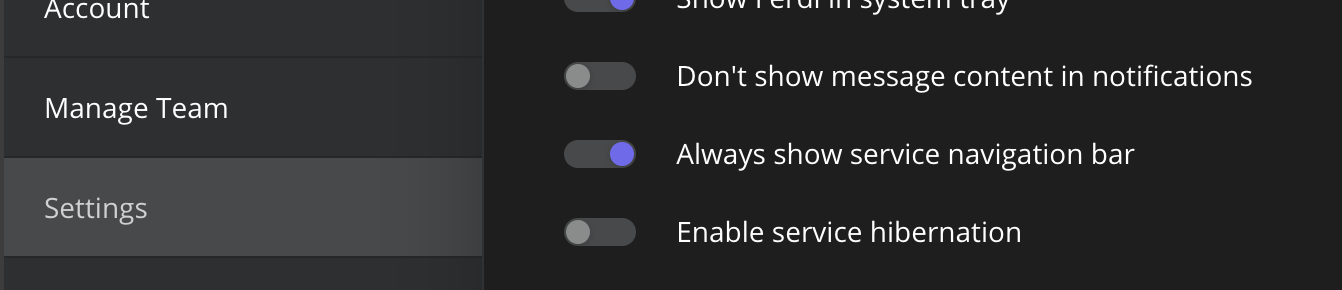
@ylluminate what you can do to remediate to this is to toggle on Always show service navigation bar temporarily, that should help you navigate where you need without having to recreate the service.
@keunes it should be the following per platform:
Mac: ~/Library/Application Support/Ferdi/recipes
Windows: %appdata%/Ferdi/recipes
Linux: ~/.config/Ferdi/recipes
Thanks @kytwb for the solution here!
It works, but Gmail is giving a warning: "Gmail heeft verificatieproblemen. Sommige functies werken mogelijk niet. Probeer in te loggen om het probleem op te lossen." [Gmail has verification issues. Some functions may not work. Try to log in to solve the problem.] Anyone else experiencing this too?
EDIT: someone created an issue about this: #274
keunes
on 21 Dec 2019
@keunes did you override the user agent of your Google service with the user agent you see on https://www.whatsmyua.info/?
kytwb
on 23 Dec 2019
This was encountered before in https://github.com/getferdi/ferdi/issues/140 and fixed by updating the user agent of the service.
kytwb
on 23 Dec 2019
I use 5.4.1 beta 3 now and tried this fix with the user agent; I used the user agent from my regular browser, where it works, too. The error message remains, though. I tried adding a new instance of gmails after updating the index.js accordingly.
 VOOM108
on 23 Dec 2019
VOOM108
on 23 Dec 2019
@VOOM108 Thank you for the feedback. Just for reference, I'm reposting a screenshot of the error message that you are experiencing:

I did experience the original error in this thread (This browser or app may be not secure) but did fix it by overriding the user agent and, then, did not experience the error message you're mentioning. I will try to reproduce once more and advise. Mind sharing the user agent you are using?
kytwb
on 23 Dec 2019
First I copied the one from this thread, at the moment I use:
module.exports = Franz =>
  class Gmail extends Franz {
    overrideUserAgent() {
      return "Mozilla/5.0 (Windows NT 10.0; Win64; x64) AppleWebKit/537.36 (KHTML, like Gecko) Chrome/79.0.3945.88 Safari/537.36";
    }
  };
VOOM108
on 23 Dec 2019
@keunes did you override the user agent of your Google service with the user agent you see on https://www.whatsmyua.info/?
Yes, indeed - the one of my daily browser.
Mind sharing the user agent you are using?
// just pass through Franz
module.exports = Franz =>
  class Gmail extends Franz {
    overrideUserAgent() {
      return "Mozilla/5.0 (X11; Ubuntu; Linux x86_64; rv:71.0) Gecko/20100101 Firefox/71.0";
    }
  };
I'm getting the same "having authentication problems" error, even with an overridden UA. Watching the network requests in dev tools, the error shows up after a failed GET request to https://people-pa.clients6.google.com/v2/people/lookup?<params> (cleaned because it includes account-specific info). It throws a 401 and this response:
{
  "error": {
    "code": 401,
    "message": "Request had invalid authentication credentials. Expected OAuth 2 access token, login cookie or other valid authentication credential. See https://developers.google.com/identity/sign-in/web/devconsole-project.",
    "status": "UNAUTHENTICATED"
  }
}
I monitored the network requests in Chrome and the same request (successful) is pulling the identities to show in the account switch options you get when you click your account in the top right corner. Here's a probably-useless trimmed and redacted shot of the response:
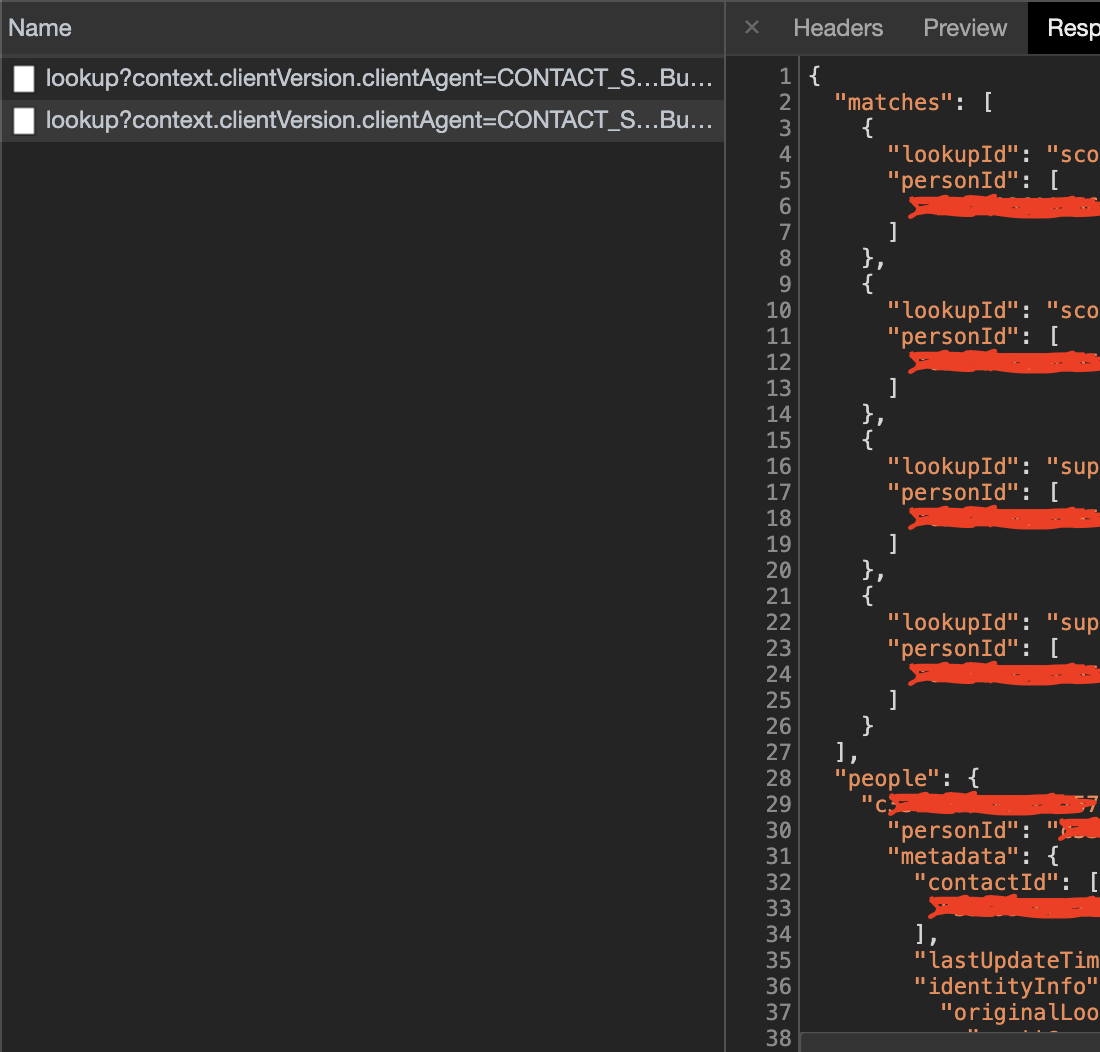
The first request is an OPTIONS request, which strangely doesn't ever happen within Ferdi.
 squatto
on 24 Dec 2019
squatto
on 24 Dec 2019
I compared the request headers in dev tools in Ferdi and Chrome, and there are a few differences. I'm not sure if they make a difference in the request and are causing the 401, but they're more pieces to the puzzle...
accept-language
- Ferdi:
en-US - Chrome:
en-US,en;q=0.9
- Ferdi:
origin
- Ferdi: _not present_
- Chrome:
https://mail.google.com
x-client-data
- Ferdi: _not present_
- Chrome: _base64-encoded value_
There are some values that are obviously going to be different (authorization and cookie).
I've included the raw request headers below. Account-specific values and all encoded values have been replaced with <cleaned>.
Ferdi Request Headers
:authority: people-pa.clients6.google.com
:method: GET
:path: /v2/people/lookup?context.clientVersion.clientAgent=CONTACT_STORE&context.clientVersion.clientType=GMAIL_WEB_DOMAIN&context.clientVersion.clientVersion=contact_store_<cleaned>&id=<cleaned>&mergedPersonSourceOptions.includedProfileStates=CORE_ID&mergedPersonSourceOptions.personModelParams.personModel=CONTACT_CENTRIC&profileLookupOptions.emailLookupOption=INCLUDE_EMAIL_LOOKUP_KEY&requestMask.includeContainer=CONTACT&requestMask.includeContainer=PROFILE&requestMask.includeContainer=DOMAIN_CONTACT&requestMask.includeContainer=DOMAIN_PROFILE&requestMask.includeContainer=AFFINITY&requestMask.includeField=person.name%2Cperson.photo%2Cperson.email%2Cperson.phone%2Cperson.email.certificate%2Cperson.metadata&requestMask.imageUrlType=FIFE_URL&type=EMAIL&key=<cleaned>&%24unique=<cleaned>
:scheme: https
accept: */*
accept-encoding: gzip, deflate, br
accept-language: en-US
authorization: SAPISIDHASH <cleaned>
cookie: SID=<cleaned>; __Secure-3PSID=<cleaned>; HSID=<cleaned>; SSID=<cleaned>; APISID=<cleaned>; SAPISID=<cleaned>; __Secure-HSID=<cleaned>; __Secure-SSID=<cleaned>; __Secure-APISID=<cleaned>; __Secure-3PAPISID=<cleaned>; SEARCH_SAMESITE=<cleaned>; NID=<cleaned>=<cleaned>; 1P_JAR=<cleaned>; SIDCC=<cleaned>
referer: https://mail.google.com/mail/u/0/
sec-fetch-mode: cors
sec-fetch-site: same-site
user-agent: Mozilla/5.0 (Macintosh; Intel Mac OS X 10_15_1) AppleWebKit/537.36 (KHTML, like Gecko) Chrome/79.0.3945.88 Safari/537.36
x-clientdetails: appVersion=5.0%20(Macintosh%3B%20Intel%20Mac%20OS%20X%2010_15_1)%20AppleWebKit%2F537.36%20(KHTML%2C%20like%20Gecko)%20Chrome%2F79.0.3945.88%20Safari%2F537.36&platform=MacIntel&userAgent=Mozilla%2F5.0%20(Macintosh%3B%20Intel%20Mac%20OS%20X%2010_15_1)%20AppleWebKit%2F537.36%20(KHTML%2C%20like%20Gecko)%20Chrome%2F79.0.3945.88%20Safari%2F537.36
x-goog-api-key: <cleaned>
x-goog-authuser: 0
x-goog-encode-response-if-executable: base64
x-javascript-user-agent: google-api-javascript-client/1.1.0
x-requested-with: XMLHttpRequest
Chrome Request Headers
:authority: people-pa.clients6.google.com
:method: GET
:path: /v2/people/lookup?context.clientVersion.clientAgent=CONTACT_STORE&context.clientVersion.clientType=GMAIL_WEB_DOMAIN&context.clientVersion.clientVersion=contact_store_<cleaned>&id=<cleaned>&mergedPersonSourceOptions.includedProfileStates=CORE_ID&mergedPersonSourceOptions.personModelParams.personModel=CONTACT_CENTRIC&profileLookupOptions.emailLookupOption=INCLUDE_EMAIL_LOOKUP_KEY&requestMask.includeContainer=CONTACT&requestMask.includeContainer=PROFILE&requestMask.includeContainer=DOMAIN_CONTACT&requestMask.includeContainer=DOMAIN_PROFILE&requestMask.includeContainer=AFFINITY&requestMask.includeField=person.name%2Cperson.photo%2Cperson.email%2Cperson.phone%2Cperson.email.certificate%2Cperson.metadata&requestMask.imageUrlType=FIFE_URL&type=EMAIL&key=<cleaned>&%24unique=<cleaned>
:scheme: https
accept: */*
accept-encoding: gzip, deflate, br
accept-language: en-US,en;q=0.9
authorization: SAPISIDHASH <cleaned>
cookie: SID=<cleaned>; __Secure-3PSID=<cleaned>; HSID=<cleaned>; SSID=<cleaned>; APISID=<cleaned>; SAPISID=<cleaned>; __Secure-HSID=<cleaned>; __Secure-SSID=<cleaned>; __Secure-APISID=<cleaned>; __Secure-3PAPISID=<cleaned>; SEARCH_SAMESITE=<cleaned>; NID=<cleaned>=<cleaned>; 1P_JAR=<cleaned>; SIDCC=<cleaned>; S=<cleaned>=<cleaned>
origin: https://mail.google.com
referer: https://mail.google.com/mail/u/0/
sec-fetch-mode: cors
sec-fetch-site: same-site
user-agent: Mozilla/5.0 (Macintosh; Intel Mac OS X 10_15_1) AppleWebKit/537.36 (KHTML, like Gecko) Chrome/79.0.3945.88 Safari/537.36
x-client-data: <cleaned>
x-clientdetails: appVersion=5.0%20(Macintosh%3B%20Intel%20Mac%20OS%20X%2010_15_1)%20AppleWebKit%2F537.36%20(KHTML%2C%20like%20Gecko)%20Chrome%2F79.0.3945.88%20Safari%2F537.36&platform=MacIntel&userAgent=Mozilla%2F5.0%20(Macintosh%3B%20Intel%20Mac%20OS%20X%2010_15_1)%20AppleWebKit%2F537.36%20(KHTML%2C%20like%20Gecko)%20Chrome%2F79.0.3945.88%20Safari%2F537.36
x-goog-api-key: <cleaned>
x-goog-authuser: 0
x-goog-encode-response-if-executable: base64
x-javascript-user-agent: google-api-javascript-client/1.1.0
x-requested-with: XMLHttpRequest
@squatto thank you for digging in! 💯
kytwb
on 24 Dec 2019
Changing the UA does not work on my end. I've tried the snippet posted here as well as the values I get from https://www.whatsmyua.info/. I've tried 10 reloads and I still get the dreaded "Couldn't sign you in" window. No way to log into any of my Google services. What's the next step?
 incace
on 26 Dec 2019
incace
on 26 Dec 2019
Im having this problem too, none of the gmail clients or services that ferdi support will let me sign in.
 ZeroCool940711
on 28 Dec 2019
ZeroCool940711
on 28 Dec 2019
@ZeroCool940711 changing the UA doesn't work either for you?
@incace which version are you using?
The latest beta use Electron 7 which comes with an updated version of Chromium, not sure if that would help.
kytwb
on 30 Dec 2019
@kytwb I tried changing the UA and it didnt work, Im using the latest release not the beta version as im having some weird bug with the Spell Checker on the latest beta version, even if I disable the spell checker it still shows when im typing even if what Im typing is written correctly which is annoying.
ZeroCool940711
on 30 Dec 2019
Same banner error with "Gmail is having authentication problem..." with Ferdi Version 5.4.1-beta.4 (5.4.1-beta.4.952) on macOS Catalina 10.15.2 (19C57) and a custom UA.
By the way I hope than this error is really correlated with the User Agent as implied by the closing of #274
 ericse
on 31 Dec 2019
ericse
on 31 Dec 2019
I didn't want to replace each file's contents so I wrote a script to go through the google service recipes and replace the contents with the user-agent fix. I do not believe the the class name of the service matters as it is a curried function.
Use at your own risk, but should just be able to copy/paste in to terminal. Click Raw and copy. Then paste. Spaces are important.
 HarderBetterFasterStronger
on 8 Jan 2020
HarderBetterFasterStronger
on 8 Jan 2020
Is anyone having success in terms of Ferdi no longer having these troubles after executing @HarderBetterFasterStronger's script?
ylluminate
on 9 Jan 2020
Summarizing as I was initially very confused by this thread:
There are currently two different issues being discussed here:
- if you are getting _"This browser or app may not be secure. Learn more. Try using a different browser"_, you can solve it by changing the UA. You can do so manually like so, preferably by copying the user-agent of your own web browser. You can also use @HarderBetterFasterStronger 's script, which will perform that change for all Google recipes.
- it looks like an alternate/related fix might be to toggle "Always show service navigation bar" temporarily to help you force the recipe to navigate to the Gmail login page.
- if you are getting _"Gmail is having authentication problems. Some features may not work. Try logging in to fix the problem."_, we do not yet have a fix. @squatto did an excellent deep dive here which suggests there might be more at play than just setting the User Agent.
 TheKevJames
on 14 Jan 2020
TheKevJames
on 14 Jan 2020
That header fix only lead to gmail showing me a nice page just redirecting to gmail in my default browser.
Not able to use gmail within Ferdi atm!
 DasJott
on 22 Jan 2020
DasJott
on 22 Jan 2020
@TheKevJames Thank you for the summary! 🙌 Someone opened a new issue regarding the second point via https://github.com/getferdi/ferdi/issues/320; we will address this issue there (cc @ericse).
@DasJott In the settings, you can turn on Always show service navigation bar and see if you can properly navigate where you need in your Gmail service.
kytwb
on 22 Jan 2020
@kytwb I tried. If I enter the url for my inbox, it immediately redirects back to https://www.google.com/intl/de/gmail/about/
No Chance to use GMail from within Ferdi so long.
DasJott
on 27 Jan 2020
@DasJott try entering the URL for the login page? I'm able to get to the following page pretty easily in Ferdi:

Instead of the Gmail sign-in link, maybe the Google Accounts signin link works for you? This link.
TheKevJames
on 27 Jan 2020
Changing User Agent is not working for me at all @kytwb
 ALi3naTEd0
on 28 Jan 2020
ALi3naTEd0
on 28 Jan 2020
Well I think @HarderBetterFasterStronger solved it for me. I was still trying to use My UA that had Chrome in it and it always failed with "Try using different browser". But then I've used his script UA that used Firefox and voila everything works. Thanks!
So everybody having the problem use this as UA and you should be good:
"Mozilla/5.0 (Macintosh; Intel Mac OS X 10.15; rv:71.0) Gecko/20100101 Firefox/71.0"
 janjurek
on 31 Jan 2020
janjurek
on 31 Jan 2020
I can confirm, this UA currently works for me. It looks like our best option is to try to keep the user agent for Google Apps up-to date.
I just published a new release for all Google recipes (https://github.com/getferdi/recipes/commit/6ff794422f296f5370299e497792ee91eccb8dc6) which should be shipped with the next version of Ferdi.
 vantezzen
on 31 Jan 2020
vantezzen
on 31 Jan 2020
This is fantastic, how soon until we can see a release and test this out @vantezzen?
ylluminate
on 31 Jan 2020
I think we'll release a new beta version in the next few days.
vantezzen
on 31 Jan 2020
@vantezzen I updated my script to use @vantezzen user-agent as it works better than mine.
https://gist.github.com/HarderBetterFasterStronger/ae9e853d739b856a367592f0a105a8f8
@squatto The secondary issue with this whole thing is what you mentioned about that API not being able to be hit which results in contact names not being resolved. The current API returns:
{
    "error": {
        "errors": [
            {
                "domain": "global",
                "reason": "authError",
                "message": "Invalid Credentials",
                "locationType": "header",
                "location": "Authorization"
            }
        ],
        "code": 401,
        "message": "Invalid Credentials"
    }
}
The reason I have pinpointed (or I think I have pinpointed) as to why this is happening, is due to the request omitting the origin header which should be set to https://hangouts.google.com
As soon as that header is set, the request will go through (I am using postman to test). I have not been able to test if it fixes the entire flow thereafter, but that would be another step in fixing this whole thing.
I was looking in to Ferdi code to see if there was for a plugin to be able to override the origin header in way like it is done in overrideUserAgent() but I did not see anything obvious. My brief investigation got me thinking maybe it could be passed to <ElectronWebView> like
https://github.com/getferdi/ferdi/blob/c8e7dabde3086ec2f051e8be9e1fbfd66faba321/src/components/services/content/ServiceWebview.js#L76, but I am not sure 🤷♂️
tl;dr I updated my script to use @vantezzen. I think if we can override the origin header similarly to user-agent, then we would be able to get those contact names back.
HarderBetterFasterStronger
on 11 Feb 2020
Ubuntu 18.04 (actually system 76's version of it called pop os)
Using ferdi 5.4.3
Electron 7.1.6
Node.js v12.8.1
Platform linux
Tried modifying the .config/Ferdi/recipes/ex-google-voice/index.js (and the hangout one)
By using https://www.whatsmyua.info/ which produces (for me)
Mozilla/5.0 (X11; Linux x86_64) AppleWebKit/537.36 (KHTML, like Gecko) Chrome/80.0.3987.87 Safari/537.36
replaced entire file to be:
"use strict";

module.exports = Franz =>
    class GoogleVoice extends Franz {
        overrideUserAgent() {
            return "Mozilla/5.0 (X11; Linux x86_64) AppleWebKit/537.36 (KHTML, like Gecko) Chrome/80.0.3987.87 Safari/537.36";
        }
    };
Still getting following error:
This browser or app may not be secure. Learn more
Try using a different browser. If you’re already using a supported browser, you can refresh your screen and try again to sign in.
Any tips of tricks are appreciated. Thank you for your work here. I am new to Ferdi and have high hopes for it.
 izk8
on 14 Feb 2020
izk8
on 14 Feb 2020
Ubuntu 18.04 (actually system 76's version of it called pop os)
Using ferdi 5.4.3
Electron 7.1.6
Node.js v12.8.1
Platform linuxTried modifying the
.config/Ferdi/recipes/ex-google-voice/index.js(and the hangout one)
By using https://www.whatsmyua.info/ which produces (for me)
Mozilla/5.0 (X11; Linux x86_64) AppleWebKit/537.36 (KHTML, like Gecko) Chrome/80.0.3987.87 Safari/537.36replaced entire file to be:
"use strict";

module.exports = Franz =>
    class GoogleVoice extends Franz {
        overrideUserAgent() {
            return "Mozilla/5.0 (X11; Linux x86_64) AppleWebKit/537.36 (KHTML, like Gecko) Chrome/80.0.3987.87 Safari/537.36";
        }
    };
Still getting following error:
This browser or app may not be secure. Learn more
Try using a different browser. If you’re already using a supported browser, you can refresh your screen and try again to sign in.Any tips of tricks are appreciated. Thank you for your work here. I am new to Ferdi and have high hopes for it.
The whole idea here is we are faking the user-agent header that is sent to to Google, to be something else. By going to that website, I believe it is telling you your actual user-agent. I would just try replacing Mozilla/5.0 (X11; Linux x86_64) AppleWebKit/537.36 (KHTML, like Gecko) Chrome/80.0.3987.87 Safari/537.36 with Mozilla/5.0 (Macintosh; Intel Mac OS X 10.15; rv:72.0) Gecko/20100101 Firefox/72.0
HarderBetterFasterStronger
on 14 Feb 2020
@HarderBetterFasterStronger I believe you are brilliant sir. I was thinking the same thing, wondering 'why fake what is actually here"? Now it all clicks. Thank you sir.
izk8
on 14 Feb 2020
@HarderBetterFasterStronger thanks for investigating 🙏 unfortunately, I don't see a way to pass origin to the ElectronWebView (inherits webview attributes). We should be able to add the origin using this API requestHeaders but I'm not sure where to get the value? or should it be used/set on a per recipe basis?
kytwb
on 15 Feb 2020
@kytwb Shouldn't the origin header always be location.origin? So we wouldn't need a setting for each recipe but could simply use that.
As far as I can see, we would have to proxy XMLHttpRequest and fetch inside the ServiceWebviews so that we manually set the origin to location.origin for each request the page want to make.
vantezzen
on 21 Feb 2020
@kytwb Is this feature request actually still needed? It looks like no user is actually interested in changing their user agent, it's just Google that requires a different user agent which we can now push as normal Ferdi updates as recipe updates are implemented.
The discussions in this issue are only about #263 and not the need to add the suggested setting.
vantezzen
on 24 Feb 2020
@vantezzen I believe the assertion that the main goal of getting it working is the primary concern here - although I could see possibly wanting to change agents and other variables down the road for various reasons (privacy might be a desirable reason so as to alter this + proxy settings, etc. at some point).
ylluminate
on 24 Feb 2020
@vantezzen I still think it's a nice to have; if I remember correctly, Rambox or some other offers the ability to do so as well.
kytwb
on 24 Feb 2020
Linking to Franz very own megathread around Google products login issues for reference: https://github.com/meetfranz/franz/issues/1573.
kytwb
on 4 Mar 2020
If you have overridden your user agent and you _still_ feel like you're stuck in an endless loop with this issue, give this a try and see if it helps. I was able to get gmail showing up again in Ferdi by doing this:
1) Make sure you are showing the service navigation bar (see this comment for instructions)
2) Paste this URL into the address bar and press enter: https://accounts.google.com/Logout
3) You will be logged out of your Google account _in that browser only_ (not in standalone instances of Chrome/Firefox/Safari/etc.)
4) If you are taken to the "Choose an account" screen and the account that you signed into is listed, click "Remove an account", click the account, and click "Yes, remove"
5) You should be taken back to the email address input. Log in and you _hopefully_ are taken to gmail 🙏
6) If you are redirected to the "Google Account" page, paste this URL in the address bar and press enter: https://mail.google.com/mail/u/0/#inbox
Again, this will only work if you have changed your user agent!
For reference, here is my working ~/Library/Application Support/Ferdi/recipes/gmail/index.js:
module.exports = Franz =>
  class Gmail extends Franz {
    overrideUserAgent() {
      return "Mozilla/5.0 (Macintosh; Intel Mac OS X 10.15; rv:72.0) Gecko/20100101 Firefox/72.0";
    }
  };
@squatto have you tried to use the new custom JS functionality instead?:

ylluminate
on 5 Mar 2020
None of this seems to work if the todo partition is being used. That or I am not placing this in the correct place.
Where I am placing the new user-agent override:
/recipes/todoist/webview.js
EDIT: todoist works when added as a service but not when added to the todos partition even with the google login.
 StephenDini
on 10 Mar 2020
StephenDini
on 10 Mar 2020
I'm having problems with links in Google services in beta; I get a message:
Grrr! A popup blocker may be preventing the application from opening the page. If you have a popup blocker, try disabling it to open the window.
Let me know if this is related or if I should make a separate issue.
Version: Version 5.4.4-beta.2
Mac OS: 10.15.3
 lisaq
on 10 Mar 2020
lisaq
on 10 Mar 2020
@lisaq That error has been reported in #321 before but the user said that 5.4.4 fixed it for him - so we might need to reopen the issue if you are still experiencing this.
vantezzen
on 10 Mar 2020
@vantezzen I'm having the same issue as reported by @lisaq.
Version: Version 5.4.3 (5.4.3.994)
Mac OS: 10.15.3
 miguelcastilho
on 18 Mar 2020
miguelcastilho
on 18 Mar 2020
latest beta does not fix it for me.
 vaddala
on 24 Mar 2020
vaddala
on 24 Mar 2020
In the meantime, if you're experiencing the following screen for Google services (here Gmail):
You can open
~/Library/Application\ Support/Ferdi/recipes/gmail/index.js(on macOS, path may differ based on your platform) and manually override the user agent there. The following seems to be working as suggested per @packermann76 here:module.exports = Franz => class Gmail extends Franz { overrideUserAgent() { return "Mozilla/5.0 (Macintosh; Intel Mac OS X 10.15; rv:71.0) Gecko/20100101 Firefox/71.0"; } };
This worked for me! 👍 Tested on Windows 10 and MacOS 10.15.3
 klouisbrother
on 24 Mar 2020
klouisbrother
on 24 Mar 2020
For Windows users, the path is
C:\Users\[USERNAME]\AppData\Roaming\Ferdi\recipes\gmail\index.js
 dorukkarinca
on 27 Mar 2020
dorukkarinca
on 27 Mar 2020
@dorukkarinca, correct (as kytwb already noted: https://github.com/getferdi/ferdi/issues/264#issuecomment-567910283)
For FlatPak on Linux: ~/.var/app/com.getferdi.Ferdi/config/Ferdi/recipes
keunes
on 28 Mar 2020
There is a recent thread regarding this issue: https://github.com/meetfranz/franz/issues/1584
 asymetricbalance
on 28 Mar 2020
asymetricbalance
on 28 Mar 2020
It looks like Franz's developer is currently working on a fix for this, too: https://github.com/meetfranz/franz/commit/d7840ba75146e709deb8a37b1d8f362d89c4b3dd
vantezzen
on 3 Apr 2020
It looks like Franz's developer is currently working on a fix for this, too: meetfranz/franz@d7840ba
I made a Franz build from that Franz beta branch to test it out. I can confirm that it's working for Gmail, Google Hangouts, Google Calendar on Mac OSX. (Hangouts contact names now resolve too). Glancing at the changes quickly, it looks pretty straightforward in terms of bringing in the changes to Ferdi
HarderBetterFasterStronger
on 9 Apr 2020
@HarderBetterFasterStronger Franz 5.5.0-beta.2 was merged and shipped via Ferdi v5.5.0-gm.
kytwb
on 19 Apr 2020
Warning: On Windows, this update turns Ferdi into a blank canvas so proceed with care.

On the bright side, if you run into this, it is easy to revert to v5.4.3 without data loss.
UPDATE: I solved this issue, see #596.
dorukkarinca
on 19 Apr 2020
@dorukkarinca Thanks for the heads up! This doesn't not seem to happen on every install though, we will have to investigate via https://github.com/getferdi/ferdi/issues/596 to identify the root issue 🙏 Thank you for the report and sorry for the inconvenience.
kytwb
on 19 Apr 2020
@kytwb @HarderBetterFasterStronger Does this change actually make a difference for Gmail when the Gmail recipe uses overrideUserAgent()?
After updating to 5.5.0-gm, I'm getting the Gmail requires cookies to be enabled error. Changed back overrideUserAgent() to Opera's user agent, which is what had set it to before the update, and it seems to work for me:
Mozilla/5.0 (Macintosh; Intel Mac OS X 10_14_6) AppleWebKit/537.36 (KHTML, like Gecko) Chrome/80.0.3987.149 Safari/537.36 OPR/67.0.3575.115
 probablykasper
on 19 Apr 2020
probablykasper
on 19 Apr 2020
@probablykasper It works well here on macOS, at least for now. Unfortunately I don't think this will be a sustainable solution. I am still for the enhancement proposition of being able to change user agents through the settings as to avoid further more iterations on user agents related issues. This could be a good first issue for the bounty program discussed at https://github.com/getferdi/ferdi/issues/592.
kytwb
on 19 Apr 2020
@kytwb I'm on macOS as well (10.14.6), not sure what could cause it. But yeah, it does tend to stop working over time
probablykasper
on 19 Apr 2020
This issue has been automatically marked as stale because it has not had recent activity. Please check if this issue is still relevant and please close it if it's not. This will make sure that our open issues are actually of use and reduce the list of obsolete issues. Thank you for your contributions.
![stale[bot] picture](https://avatars3.githubusercontent.com/in/1724?v=4&s=40) stale[bot]
on 18 Jun 2020
stale[bot]
on 18 Jun 2020
Yup, still an issue
keunes
on 2 Jul 2020
Ferdi 5.5.0 (Electron 8.3.0) Node.js v12.13.0 AppImage on Linux works again for Google Hangouts
 mareknovotny
on 6 Aug 2020
mareknovotny
on 6 Aug 2020
Still an issue, I get the message from google that the browser is insecure so I can't sign in. I can use Gmail but can't use Google drive or sign in to apps with google (Such as TickTick)
 Coderdude112
on 17 Aug 2020
Coderdude112
on 17 Aug 2020
Still having this problem with Ferdi 5.6.0-beta.2 and Gmail. It should be reiterated that changing your Google account to allow less secure apps to access it does NOT help: https://myaccount.google.com/u/2/lesssecureapps
ylluminate
on 26 Sep 2020
This issue has been automatically marked as stale because it has not had recent activity. Please check if this issue is still relevant and please close it if it's not. This will make sure that our open issues are actually of use and reduce the list of obsolete issues. Thank you for your contributions.
stale[bot]
on 26 Nov 2020
Bump. Still an issue
Coderdude112
on 26 Nov 2020
Related issues
 maciesse
·
3Comments
maciesse
·
3Comments
 ammarmalhas
·
3Comments
ammarmalhas
·
3Comments
 webworker01
·
3Comments
webworker01
·
3Comments
 ylluminarious
·
4Comments
kytwb
·
3Comments
ylluminarious
·
4Comments
kytwb
·
3Comments
Most helpful comment
In the meantime, if you're experiencing the following screen for Google services (here Gmail):
You can open
~/Library/Application\ Support/Ferdi/recipes/gmail/index.js(on macOS, path may differ based on your platform) and manually override the user agent there. The following seems to be working as suggested per @packermann76 here: