Ferdi: Reload services prompt never goes away
Describe the bug
Prompt for "Your services have been updated. [Reload services]" constantly appears and never goes away after clicking "Reload services"
To Reproduce
Steps to reproduce the behavior:
- Load Ferdi
- See the prompt
- Click "Reload services"
- Goto step 2
Expected behavior
It happens once and stops.
Desktop (please complete the following information):
- Version 5.3.4-beta.6
 webworker01
All 34 comments
Thanks for the report @webworker01, we will investigate.
 kytwb
on 4 Oct 2019
kytwb
on 4 Oct 2019
Hello @webworker01 , could you please try to do the following:
- In Ferdi's menubar, under "View" click "Toggle Developer Tools"
- In the now opened Developer Tools, in the top row, click "Network" (you may have to click on the two arrows to see it)
- In Ferdi's menubar, under "View" click "Reload Ferdi". You will now see all network requests that Ferdi is executing in the developer tools
- Wait a moment until the name of one of the requests is "Update"
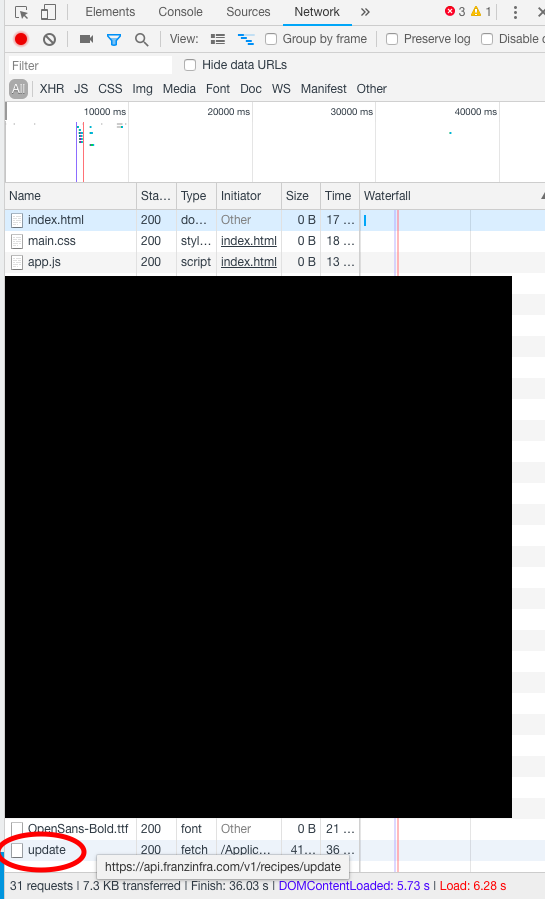
- Please take a screenshot of the list of requests that get execute after this request (if any)
- Click on the
updaterequest and on the right panel, click "Preview" - Take a screenshot of this page as well
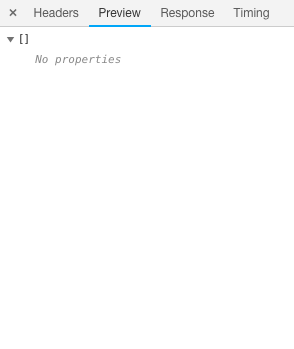
- Now, please send these two screenshots as a reply to this issue.
 vantezzen
on 4 Oct 2019
vantezzen
on 4 Oct 2019
Nothing appeared after update, but the preview for the update request always shows skype. I had it disabled, tried enabling it but the Reload services loop persists. 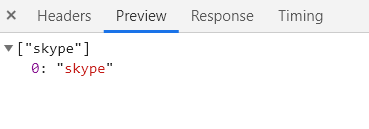
webworker01
on 4 Oct 2019
Hmm ok, I still havn't quite figured our how Franz's API update works, I'll look into that.
vantezzen
on 4 Oct 2019
Coud you please also do this:
- Open the Developer Tools as described above
- This time, open "Console" instead of "Network"
- Click "Reload Services" and wait it has fully loaded
- Right-click anywhere in the Developer Tools Console and select "Save As..."
- Save this file anywhere on your PC, copy its content and upload it to http://pastebin.com (you don't need an account there to do that)
- Send your new Pastebin URL here
It looks like your Ferdi client might have problems installing the service updates. This shows us what error there are.
vantezzen
on 5 Oct 2019
Just as a head up I have the same problem.
Here's my Consol log. It's set to last for a week so copy it in case you need it for later.
https://pastebin.com/ND80M62c
Just tell me if something's wrong or if I can delete the paste since I don't know if it has any real sensitive data in there.
 Gaboris
on 5 Oct 2019
Gaboris
on 5 Oct 2019
Same problem here. Update returns an array with one single element referencing Skype
["skype"]
   0: "skype"
After deleting Skype service, notification stops coming out.
 nessunluogo
on 9 Oct 2019
nessunluogo
on 9 Oct 2019
This is now appearing for android messages.
webworker01
on 30 Oct 2019
Same problem here, but no update request in the Dev Tools.
Skype is disabled.
 grmon
on 31 Oct 2019
grmon
on 31 Oct 2019
Same issue here. No Skype service installed. I have 8 of my own recipes installed along with calendar, keep, gmail, trello, whatsapp, messenger, and android messages. I've wiped all of them and am adding back one by one to try and see if there is a specific one causing the problem. I was thinking it might be one of the recipes inside my dev folder. So far after wiping everything, the reload services banner did NOT come back when I restarted Ferdi. I will post back on my findings.
UPDATE
So far can't figure it out and don't have the time to investigate more. Instead, I just ended up hiding the bar with CSS in devtools. Not a real solution.
 incace
on 7 Nov 2019
incace
on 7 Nov 2019
I just started having this issue on 5.4.0
 AbsolofDarkness
on 2 Dec 2019
AbsolofDarkness
on 2 Dec 2019
In my case, It's always happened every time I got a notification from any services. I'm on 5.4.0
 dialytica
on 5 Dec 2019
dialytica
on 5 Dec 2019
Seeing the same issues on the latest beta build: 5.4.1-beta.2 on windows 10. Don't have skype installed, mainly see it with Discord, slack and Gitter (only services I am using currently).
 tensor-programming
on 8 Dec 2019
tensor-programming
on 8 Dec 2019
Same here - using latest version and see the reload message all the time
 phi0529
on 10 Dec 2019
phi0529
on 10 Dec 2019
same problem here - tried to reinstall but no good.
 dremacedo
on 10 Dec 2019
dremacedo
on 10 Dec 2019
If you experience this bug please try this:
On Windows:
- Press
Windows Key + Rto open the "Run" dialog - Type
%appdata%and hitEnterto open your appdata folder - Continue below
On Linux:
- Navigate to
~/.config - Continue below
On Mac:
- In the Finder menu bar, click on Go > Library
- Navigate to
Application Support - Continue below
Continue:
- Navigate to
Ferdi/recipes - Delete all folders that are inside this folder
- Restart Ferdi
This will force Ferdi to reinstall all recipes to their latest version.
If you still getting this error this means that Ferdi's recipe repository is not up to date with Franz's one. In this case Ferdi will ask Franz's servers if there are updates - which they will ask they are. Ferdi will then try to update the recipe using its own database - meaning it will still get the older recipe. After the update it will again ask Franz's servers if there are updates ending in an endless loop.
We will be working on an update script for our recipe repository that will automatically update the repository from Franz's one but for now this script doesn't exist yet.
If you are experiencing this error, you can eather switch to Ferdi's servers or manually update the recipe.
To manually update the recipe:
- Find out what recipe you have to update
- Download the recipe from
https://api.franzinfra.com/v1/recipes/download/ID, replacingIDwith the ID of the recipe. - Extract the file, e.g. using 7zip. You should now have a folder with these files:
- index.js
- package.json
- webview.js
- icon.png
- and some more, depending on your recipe
- Copy the extracted folder's content (the files mentioned above) into the recipe's subfolder in Ferdi's recipe folder that you opened above. You should already see the files in there - simply overwrite them
vantezzen
on 10 Dec 2019
If you are experiencing this error, you can eather switch to Ferdi's servers or manually update the recipe.
Switching to Ferdi's servers (migrating Franz's account) solved for me.
nessunluogo
on 10 Dec 2019
Switching to Ferdi's servers (migrating Franz's account) solved for me.
Thanks that was what I needed - migrated my account to Ferdi - problem solved!
phi0529
on 11 Dec 2019
I've just added a new update script to the recipe repository so we can always ship the latest recipes with Ferdi's releases. This will only be pushed with the next release though.
vantezzen
on 11 Dec 2019
Clearing out the recipes folder worked for me! Will be eagerly awaiting for the next release.
AbsolofDarkness
on 11 Dec 2019
This issue has been automatically marked as stale because it has not had recent activity. Please check if this issue is still relevant and please close it if it's not. This will make sure that our open issues are actually of use and reduce the list of obsolete issues. Thank you for your contributions.
![stale[bot] picture](https://avatars3.githubusercontent.com/in/1724?v=4&s=40) stale[bot]
on 31 Mar 2020
stale[bot]
on 31 Mar 2020
I just had this issue, and https://github.com/getferdi/ferdi/issues/98#issuecomment-564136409 appears to have resolved it. Thanks!
 camiller2
on 31 Mar 2020
camiller2
on 31 Mar 2020
Just had this issue in v5.4.3, fixed it deleting recipes and restarting. For me the outdated recipe was from WhatsApp.
EDIT: Turns out it didn't fix itself so easily, every time I start Ferdi keeps happening, so I have to delete recipes always if I want to hide that prompt.
 Aramatis
on 4 Apr 2020
Aramatis
on 4 Apr 2020
I think it happened to me because I edited darkmode.css.
 acook
on 14 Apr 2020
acook
on 14 Apr 2020
Deleting recipes and restarting didn't fix the problem. The prompt is still popping-up.
 behinime
on 20 Apr 2020
behinime
on 20 Apr 2020
I just had this issue, and #98 (comment) appears to have resolved it. Thanks!
Yeah...I lied. It worked for a while but has kept coming back up again.
camiller2
on 20 Apr 2020
I'm having this issue.
On windows 10 x64.
Ferdi version: 5.4.3 (x64)
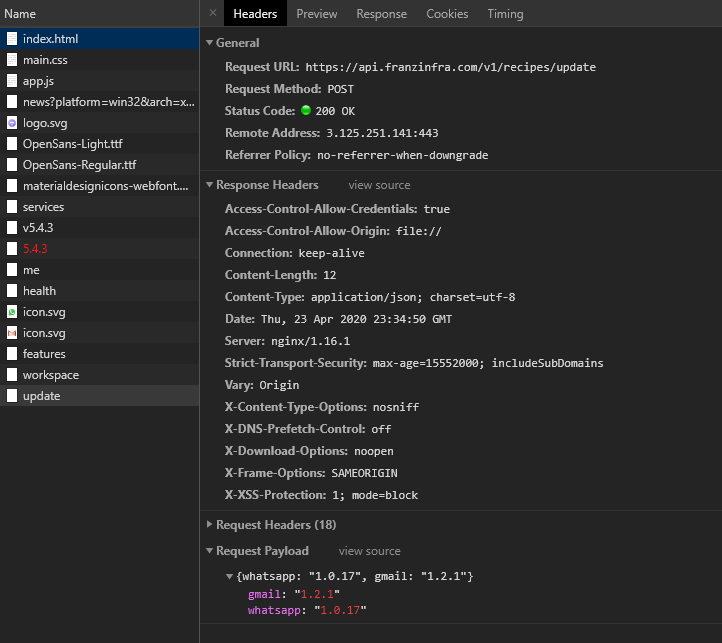
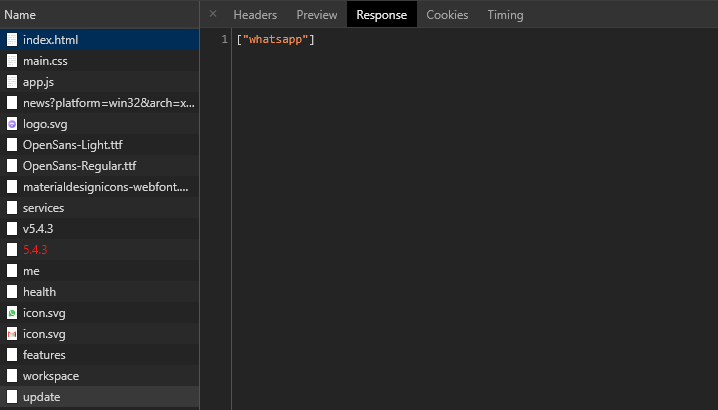
Watching the network tab, in the developer tools, it seems to come from an update from the whatsap recipe:
 spersico
on 24 Apr 2020
spersico
on 24 Apr 2020
Yep I was mistaken too. After deleting everything it came back soon after.
I don't have Whatsapp or Skype.
acook
on 25 Apr 2020
I've been having the same issue for a long time now, but I've just got to investigate it now. It happens with Whatsapp for me,
 daedgoco
on 29 Apr 2020
daedgoco
on 29 Apr 2020
This issue has been automatically marked as stale because it has not had recent activity. Please check if this issue is still relevant and please close it if it's not. This will make sure that our open issues are actually of use and reduce the list of obsolete issues. Thank you for your contributions.
stale[bot]
on 28 Jun 2020
I'm not currently seeing this issue. Was this actually fixed or has there been a lack of service updates that have masked this bug temporarily?
acook
on 29 Jun 2020
This issue has been automatically marked as stale because it has not had recent activity. Please check if this issue is still relevant and please close it if it's not. This will make sure that our open issues are actually of use and reduce the list of obsolete issues. Thank you for your contributions.
stale[bot]
on 28 Aug 2020
FYI this is still a consistent issue for me.
camiller2
on 2 Sep 2020
I have this issue, but I have an empty array ([]) as an response for update request and removing recipes folder does not help. The bottom bar with Your services have been updated. [Reload services] appears after ~1 min after every launch.
 mskrip
on 30 Sep 2020
mskrip
on 30 Sep 2020
Related issues
 alegiglio
·
3Comments
alegiglio
·
3Comments
 sschaefa
·
3Comments
sschaefa
·
3Comments
 PeSader
·
3Comments
PeSader
·
3Comments
 probablykasper
·
4Comments
probablykasper
·
4Comments
 YourWishes
·
3Comments
YourWishes
·
3Comments
Most helpful comment
If you experience this bug please try this:
On Windows:
Windows Key + Rto open the "Run" dialog%appdata%and hitEnterto open your appdata folderOn Linux:
~/.configOn Mac:
Application SupportContinue:
Ferdi/recipesThis will force Ferdi to reinstall all recipes to their latest version.
If you still getting this error this means that Ferdi's recipe repository is not up to date with Franz's one. In this case Ferdi will ask Franz's servers if there are updates - which they will ask they are. Ferdi will then try to update the recipe using its own database - meaning it will still get the older recipe. After the update it will again ask Franz's servers if there are updates ending in an endless loop.
We will be working on an update script for our recipe repository that will automatically update the repository from Franz's one but for now this script doesn't exist yet.
If you are experiencing this error, you can eather switch to Ferdi's servers or manually update the recipe.
To manually update the recipe:
https://api.franzinfra.com/v1/recipes/download/ID, replacingIDwith the ID of the recipe.