Ferdi: Investigate excessive resources usage
A lot of Franz users are complaining about or leaving the boat because of reported high resources (CPU/memory/power) usage by the app. It could be interesting to investigate. Assigning to me for now, but feel free to jump in and share your leads, attempts and/or thought process.
Related: this comment on Reddit, https://github.com/meetfranz/franz/issues/1317, https://github.com/meetfranz/franz/issues/1351, https://github.com/meetfranz/franz/issues/966, https://github.com/meetfranz/franz/issues/997, https://github.com/meetfranz/franz/issues/1070, https://github.com/meetfranz/franz/issues/1090, https://github.com/meetfranz/franz/issues/15, https://github.com/meetfranz/franz/issues/184, https://github.com/meetfranz/franz/issues/24, https://github.com/meetfranz/franz/issues/459, https://github.com/meetfranz/franz/issues/480.
 kytwb
kytwb
All 35 comments
We could add a Hibernate Feature if the memory consumption comes from the service webviews.
 vantezzen
on 20 Sep 2019
vantezzen
on 20 Sep 2019
@vantezzen Good idea, opened https://github.com/getferdi/ferdi/issues/75. Still willing to take a more in-depth look at things under high usage to see if there is things we can do better performance-wise.
kytwb
on 24 Sep 2019
I've now added dizer's electron-process-manager(22047a3) that will report memory usage of the application via the process manager that can be opened through the settings. You will need to reinstall the dependencies for this to work.
Using this process manager you should be able to find where the excessive memory usage comes from.
vantezzen
on 7 Oct 2019
I believe performance will be better if BrowserViews are used instead of webviews. Not sure how big of a difference it would make, but definitely worth looking into.
 probablykasper
on 12 Oct 2019
probablykasper
on 12 Oct 2019
I saw this by scrolling trough Franz issue https://github.com/meetfranz/franz/issues/1661
Muon (GPU based Electron on a diet ) https://github.com/ImVexed/muon
 Makazzz
on 7 Nov 2019
Makazzz
on 7 Nov 2019
@Makazzz The lightweight Electron alternatives usually have very limited capabilities, especially when it comes to the Electron API. This one in particular seems to barely even have an API, as well as the rendering engine missing tons of features
probablykasper
on 7 Nov 2019
Ah Ok, thanks @probablykasper. I don't really know anything "technical" with electron etc. so I post what I found just in case.
Makazzz
on 7 Nov 2019
@vantezzen it's not only about memory usage, but also excessive CPU usage "in idle" - but you are probably already aware of that.
I used rambox/hamsket for a while and they seem to have better control over cpu/memory resources, but your dark theme are super cool and I decided to try ferdi - really wanted my google chat dark
 falkenhawk
on 27 Nov 2019
falkenhawk
on 27 Nov 2019
a simple comparison just for the record... both apps started few minutes ago, opened the same screen in google chat. Both apps in background (not minimized). Ferdi has only one service configured: google chat. Hamsket has 3 active services: google chat, gitter and messenger. Ferdi is processing something all the time, eating 8-10% cpu, whereas hamsket is at 0% most of the time and sometimes goes up to 1.5% max.
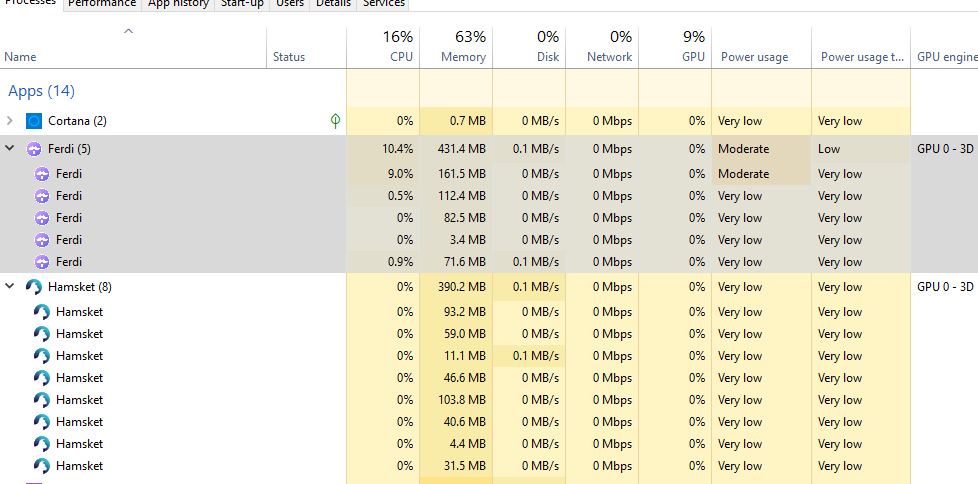
10% cpu usage at idle is maybe not a big problem, but it's still significant (it should be rather close to 0%). I have yet to experience that freezes / cpu 100% etc. known from Franz - let me know if I can help with any more detailed debug data
falkenhawk
on 27 Nov 2019
uhh it seems it's connected with "dark mode" in my case (#71) - when the dark mode for google chat is applied dynamically through darkreader (darkmode.css file does not exist). When I disable dark mode for that service and restart it, idle CPU usage drops down to 0.1-0.5% ....
falkenhawk
on 27 Nov 2019
Since updating to v.5.4 (and then 5.4.1-beta.2.910) for Mac (10.14.6), the app's CPU usage is hovering around 20%+ constantly. Disabling dark mode did not have any impact for me, unfortunately.
The computer is almost unusable while Ferdi is up (with 6 services). Also bumps the WindowServer process' CPU usage up 14% (~20% while running versus 3.5% when Ferdi is not running).
_Edit: In comparison, downgrading back to 5.3.0, Ferdi hovers around 6.5% CPU for the same services._
 ste7enm
on 3 Dec 2019
ste7enm
on 3 Dec 2019
Just to add to the above, the process Ferdi Helper (GPU) is hovering around 22% CPU with the above-mentioned version for Mac.
If I disable the GPU acceleration in the settings, the Ferdi Helper (GPU) process uses 99% CPU.
(Not spikes, these are consistent during operation or even when the app is "idle" but on screen.)
When the app is minimized but running, Ferdi Helper (GPU) goes down to 0.8% CPU usage. It also positively and significantly impacts "WindowServer" when minimized (from ~20% to ~4%).
MacBook Pro (15-inch, 2018), 2.9 GHz Intel Core i9, 32 GB 2400 MHz DDR4, Radeon Pro 555X 4 GB / Intel UHD Graphics 630 1536 MB.
ste7enm
on 10 Dec 2019
I'm having some serious trouble on Catalina (10.15.2) with Ferdi chewing around 25-35% cpu usage continuously within WindowServer. When I hide Ferdi the CPU usage similarly drops off for WindowServer... thus I'm concluding that Ferdi has some kind of a bug with driving WindowManager when it's visible.
My problem is that I _NEED_ Ferdi to be visible all the time and thus hiding the app is just not possible with my workflow.
Here's the output of the top CPU consumers in the Process Manager when main window visible:
GIF when visible
When I minimize JUST the main window (and leave up Process Manager) the GPU usage drops significantly:
GIF when minimized
Any further troubleshooting we can do?
 ylluminate
on 5 Jan 2020
ylluminate
on 5 Jan 2020
Does this happen equally, regardless of what services you have open/showing at the time?
Could you try only having 1-2 services loaded, e.g. by creating a new workspace with one service in it and switching to that (disabling "Keep all services loaded" in settings). This should show us if the high GPU load comes from the Ferdi wrapper or if we need to look at the webviews.
vantezzen
on 5 Jan 2020
Does this happen equally, regardless of what services you have open/showing at the time? [...]
Thanks for looking into it, @vantezzen – here are the results of my non-scientific test:
Services open | Ferdi Helper (GPU) % CPU | Ferdi Helper (Renderer) % CPU | WindowServer % CPU
------------- | --------------------------- | ------------------------------- | ------------------------
Ferdi app hidden (6 services loaded) | 0.8% | 1.8% | 2.9%
6 services loaded, Telegram in foreground | 5.2% | 15.6% | 14.7%
5 services loaded, Telegram in foreground, removed Hangouts Chat | 14.3% | 5.8% | 12.6%
4 services loaded, Telegram in foreground, removed Android Messages | 14% | 5.7% | 12.2%
3 services loaded, Telegram in foreground, removed Slack (1/3) | 13.4% | 5.3% | 12%
2 services loaded, Telegram in foreground, removed Slack (2/3) | 13.9% | 5.7% | 11.7%
1 service loaded, Telegram, removed Slack (3/3) | 0% | 0.7% | 1.6%
1 service loaded, Slack | 10.2% | 5.9% | 6.3%
Obviously, these fluctuate and there are more extreme spikes. But for contrast, with Ferdi hidden and Chrome open with 19 tabs, WindowServer idles between 2 and 4%. So that's the drawing a web page in 4K load comparison, sort of... Even hidden, the "Ferdi" process itself with 6 services idles around 10% CPU.
Interesting to note that it might be the Slack integration that's really causing the kerfuffle though.
ste7enm
on 7 Jan 2020
BTW, it would be helpful if you could add process manager access in a more convenient location such as under "Window" or "View" in macOS so that we can flip it on more quickly vs going into settings.
I didn't see a "Keep all services loaded" in Settings. The only thing similar is this:

And if I edit a workspace individually I see this:

So when I switch to an empty workspace with the above config I do see that GPU responds quite well:
GIF of Process Manager for empty workspace
I do notice a similarly significant drop in WindowServer as well with an empty workspace and hiding / showing when this empty workspace is active seems to yield no appreciable differential in CPU consumption...
ylluminate
on 7 Jan 2020
This issue has been automatically marked as stale because it has not had recent activity. Please check if this issue is still relevant and please close it if it's not. This will make sure that our open issues are actually of use and reduce the list of obsolete issues. Thank you for your contributions.
![stale[bot] picture](https://avatars3.githubusercontent.com/in/1724?v=4&s=40) stale[bot]
on 31 Mar 2020
stale[bot]
on 31 Mar 2020
@stale please don't
falkenhawk
on 31 Mar 2020
@falkenhawk It's not going to be closed, we're just trying to prioritize things a bit better now that we have a higher amount of open issues. Thanks for your understanding! 🙏
kytwb
on 31 Mar 2020
Same issue with other similar apps, i think it is because using embedded browsers.
 SalahAdDin
on 13 Apr 2020
SalahAdDin
on 13 Apr 2020
@SalahAdDin Yes, ElectronJS is notorious for using lots of system resources but we can still see what we can do to not excessively use additional resources when we don't use them (e.g. by implementing features like service hibernation). This issue is mainly here so we keep looking into what can be done to improve performance as much as possible.
vantezzen
on 13 Apr 2020
Thanks for the service hibernation feature! It's a nice feature to have.
Still it does not fit my use case: just 4 services that are frequently used and thus cannot be hibernated. I could hibernate them using a log timeout but then I would have free resources when I'm not working.. not that useful ^_^
My concern is RAM usage (I understand that also idle CPU consumption is an issue), even on machines with 16 and 32 GB of RAM a lot of it is used.
A single service can use 15.7% after a couple of days:
4416 foobar 20 0 4129104 2,408g 225844 S 19,4 15,7 910:37.43 ferdi
Can something like --js-flags="--max-old-space-size=4096" be specified for services?
I also found this article interesting:
http://seenaburns.com/debugging-electron-memory-usage/
Thanks and have a nice day!
Francesco
 isgroup
on 17 Apr 2020
isgroup
on 17 Apr 2020
I just had an idea, let me know what do you think :)
A way to reduce memory leaks in services hungry JS? Reload the service!
The hibernation feature already has an inactivity counter. It could be reused to trigger a service reload that from my tests frees plenty of memory. Also the user experience in terms of losing unsent messages or posts would not be impacted (much more? at all?) in comparison to hibernation or normal, always-on, method.
@kytwb @vantezzen @probablykasper @Makazzz @falkenhawk What do you think?
isgroup
on 19 Apr 2020
Compared to Franz or Rambox Ferdi seems to use less CPU time, but still uses around 120% CPU on an Intel i7 notebook with the following services:
Trello, Zenkit To Do, WhatsApp, Gmail account 1, Gmail account 2, Threema. Xing, Google Translate, Yandex Translate, Leo Dict, Hangouts
Disabling the last two Leo Dict and Hangouts reduces CPU load to ~50%.
But what is an issue in my case is the battery consumption - Rambox adds around 2 W, Franz even more. Without Leo Dict and Hangouts Ferdi only adds 1 W or less to the power consumption when running my notebook on battery. But still this reduces the remaining time on battery.
Is there a way to hibernate just some services but not all?
Is there any other way to reduce battery consumption?
 spi43984
on 25 Apr 2020
spi43984
on 25 Apr 2020
Is there a way to hibernate just some services but not all?
Our next release (5.5.0) and in current beta versions (5.5.0-gm.2) there is a new toggle in each service settings with which you can disable hibernation for individual services while keeping it enabled for the rest. In the current stable version this isn't yet possible though.
Is there any other way to reduce battery consumption?
You can use Ferdi Workspaces, which will only load the services that are in the current workspace.
vantezzen
on 25 Apr 2020
Is there a way to hibernate just some services but not all?
Our next release (5.5.0) and in current beta versions (5.5.0-gm.2) there is a new toggle in each service settings with which you can disable hibernation for individual services while keeping it enabled for the rest. In the current stable version this isn't yet possible though.
Installed 5.5.0-gm2. Configured hibernation for most services. Power consumption looks much better now.
Is there any other way to reduce battery consumption?
You can use Ferdi Workspaces, which will only load the services that are in the current workspace.
Will use hibernation for most of the services instead.
Some of the services (like Hangouts or dict.leo.org) need more power than others - is there a trick to reduce their power demand by adapting their recipes?
spi43984
on 25 Apr 2020
Some of these issues may be service related and need to look at process manager to see if it is a service misbehaving. I am seeing constant high CPU and constant high Idle Wake Ups/s in process manager (200+) for the Zendesk service (agent interface). What is interesting is that I can replicate it when using Zendesk in Chrome (83) on both Linux and Windows (less severe) and it does not happen on Firefox. I will open a ticket with Zendesk to see what they say.
 integrigy
on 21 May 2020
integrigy
on 21 May 2020
I'm seeing consistent excessive CPU usage from Ferdi here. Specifically, it's the audio process that seems to be hogging CPU, even when no audio is playing, here's a Ferdi task manager screenshot of the specific process:
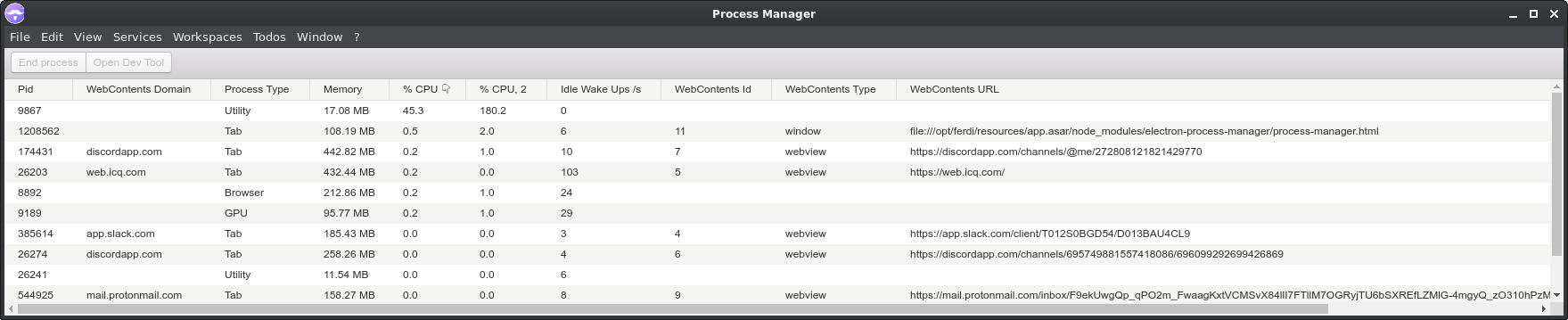
Screenshot of the process from the system task manager, you can see it's using more CPU than a virtual machine that has several Chrome tabs open lol:
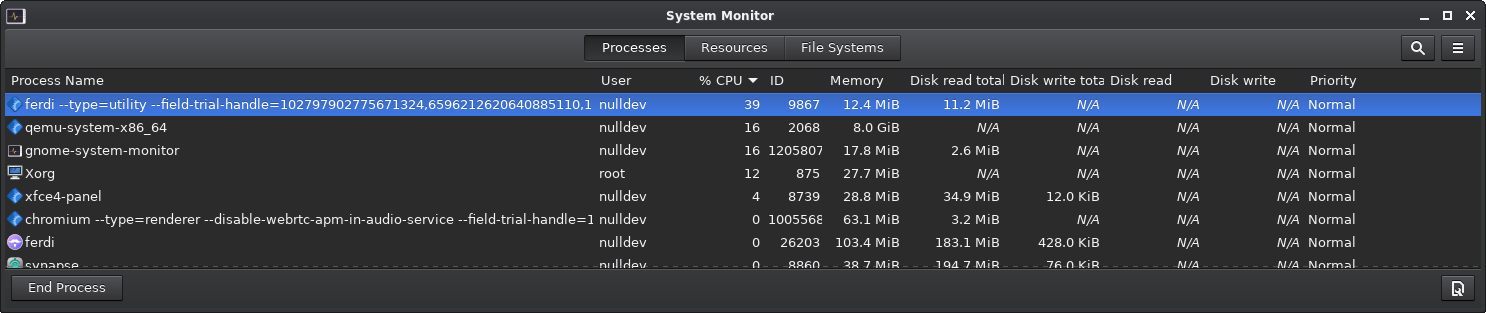
Here's the full command line of the process: /opt/ferdi/ferdi --type=utility --field-trial-handle=102797902775671324,6596212620640885110,131072 --enable-features=WebComponentsV0Enabled --disable-features=SpareRendererForSitePerProcess --lang=en-GB --service-sandbox-type=audio --shared-files=v8_snapshot_data:100
I'm running Linux and I have the following services configured: Discord, ICQ, ProtonMail, Slack.
I can kill the process, but it breaks audio in Ferdi (obviously).
 null-dev
on 14 Jun 2020
null-dev
on 14 Jun 2020
Hello! I'm also experiencing heavy CPU usage. First I thought it's the dark mode, as Dark Reader might shred little CPUs in Firefox. But it doesn't do any difference.
While using 8 services, Ferdi is idling at ~20-25% CPU usage. While using Rambox, the same 8 services (and 3 additional ones) are idling at around 6-8% CPU usage.
This is a major difference, but also shows that similar services can handle it quite well.
If you need any more information, please don't hesitate to ask what I have to do :) I'd really want to switch to Ferdi, but Rambox uses way less resources for now.
Running it on an i9-9900K on Manjaro i3 (everything up to date).
EDIT: Rambox even settles down at 2% CPU usage
 Trollwut
on 26 Jun 2020
Trollwut
on 26 Jun 2020
You can use Ferdi Workspaces, which will only load the services that are in the current workspace.
This is actually not true. I have separate workspaces for Work and Personal. When i am in the Work workspace and open up the processor manager in Ferdi's advanced options, it shows all the services from my Personal workspace loaded as well.
EDIT: Correction... this actually is possible, but not enabled by default. For this to work, you have to go into Settings > General and then uncheck "Keep all workspaces loaded"
 michaeldrouin
on 9 Jul 2020
michaeldrouin
on 9 Jul 2020
I'm seeing consistent excessive CPU usage from Ferdi here. Specifically, it's the audio process that seems to be hogging CPU, even when no audio is playing, here's a Ferdi task manager screenshot of the specific process:
Screenshot of the process from the system task manager, you can see it's using more CPU than a virtual machine that has several Chrome tabs open lol:
Here's the full command line of the process:
/opt/ferdi/ferdi --type=utility --field-trial-handle=102797902775671324,6596212620640885110,131072 --enable-features=WebComponentsV0Enabled --disable-features=SpareRendererForSitePerProcess --lang=en-GB --service-sandbox-type=audio --shared-files=v8_snapshot_data:100I'm running Linux and I have the following services configured:
Discord, ICQ, ProtonMail, Slack.I can kill the process, but it breaks audio in Ferdi (obviously).
This is the exact same problem with me as well (Ferdi 5.5.0)
The audio process , after a while, will hog the CPU
After killing the process, cpu load dropped straight away.
 sufehmi
on 26 Aug 2020
sufehmi
on 26 Aug 2020
Same issue here. Brand new Linux laptop with Ubuntu 20 and Ferdi keeps 8 core CPU AMD Ryzen 5 busy with almost 50% constantly. Tried all the tricks above with not much luck.
Using process manager to identify two tabs with quite some JS included, responsible for best part of the load. Disabling those services drops CPU to 5-10%, but still this is intense when Ferdi is in the background. Running on battery, this is draining quickly.
 jurgenhaas
on 27 Aug 2020
jurgenhaas
on 27 Aug 2020
Ubuntu 20.04 Dell XPS13 here, Ferdi almost makes it impossible to use the ultrabook when opened.
It does not happen on MacBook Pro 2017.
 maricatovictor
on 27 Sep 2020
maricatovictor
on 27 Sep 2020
This issue has been automatically marked as stale because it has not had recent activity. Please check if this issue is still relevant and please close it if it's not. This will make sure that our open issues are actually of use and reduce the list of obsolete issues. Thank you for your contributions.
stale[bot]
on 26 Nov 2020
The hibernation feature helps but Ferdi is still very greedy on resources
 pinage404
on 27 Nov 2020
pinage404
on 27 Nov 2020
Related issues
 ammarmalhas
·
3Comments
ammarmalhas
·
3Comments
 avielc
·
3Comments
avielc
·
3Comments
 pktiuk
·
3Comments
probablykasper
·
4Comments
pktiuk
·
3Comments
probablykasper
·
4Comments
 alegiglio
·
3Comments
alegiglio
·
3Comments
Most helpful comment
We could add a Hibernate Feature if the memory consumption comes from the service webviews.