Fenix: [Bug] Large regression in MAIN/VIEW start up due to Nimbus network IO
On our FNPRMS testing dashboard:
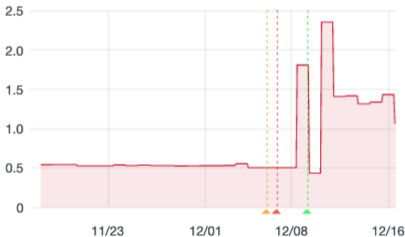
We regressed from ~0.5s to ~1.4s. Let's find the root cause and fix it.
Steps to reproduce
Expected behavior
Actual behavior
Device information
- Android device: ?
- Fenix version: ?
This may be caused by the new strict mode violation https://github.com/mozilla-mobile/fenix/issues/16984 or the other network main thread issues we've seen with experiments. #16901
Tracking bug for nimbus-sdk team: https://jira.mozilla.com/browse/SDK-157
 mcomella
All 8 comments
I was about to open a new issue regarding huge lag in startup, but this could be it. In my testing, it seems to be caused by some internet related code that blocks Fenix from loading.
- If internet is off, Fenix opens absolutely fine.
- Same if internet is on and working fast. Fenix opens quickly here as well.
- But if your internet is extremely slow or your device is not yet fully connected (connected to LAN but not to WAN) Fenix seems to wait on a white screen indefinitely until it establishes a successful connection. This sometimes also causes a crash (which, annoyingly, can't be submitted because it only happens when internet is buggy, and once you open Fenix successfully, it can't be reproduced).
Somewhat related to this, the same thing happens with bookmarks loading from the address bar and addons loading in the addons menu. They open fine if internet is on and also when it is off, but take a long time to load if it is very slow. There is some blocking code there as well (probably related to thumbnail/icon generation).
Fenix version: Nightly 201214 17:00 (Build #2015781387)
 opusforlife2
on 17 Dec 2020
opusforlife2
on 17 Dec 2020
I see something related with the following steps:
- Launch browser (with tabs to restore)
- Browser screen opens
- Click on tabs tray
- Click on "Add tab" button
- Home screen opens
The first time the home screen launches with a noticeable delay. All further launches of the home screen are faster. I can also confirm that in airplane mode this problem is gone.
 pocmo
on 17 Dec 2020
pocmo
on 17 Dec 2020
I created an emulator with network set to GPRS (to make the problem more visible).
I took profiles from the moment I pressed on "add tab" until the home screen was visible.
This is from master: https://share.firefox.dev/34DS5Rl
The main thread seems to be blocked on org.mozilla.experiments.nimbus.NimbusClient.getExperimentBranch for almost 2 seconds in this scenario.
I did completely disable Nimbus locally and took another profile:
https://share.firefox.dev/3r08CbA
The big block is gone and also visually it is much faster.
pocmo
on 17 Dec 2020
Launch browser (with tabs to restore)
As an additional data point, I have no tabs to restore. The problem still occurs on startup.
opusforlife2
on 17 Dec 2020
Linking to tickets in Nimbus to address this:
https://jira.mozilla.com/browse/SDK-157 (prevent getExperimentBranch from blocking)
https://jira.mozilla.com/browse/SDK-158 (speed up the Nimbus constructor)
 csadilek
on 17 Dec 2020
csadilek
on 17 Dec 2020
As an additional data point, I have no tabs to restore. The problem still occurs on startup.
Yeah, this is the same code path. Actual app startup is just harder to profile/debug. 👍
pocmo
on 18 Dec 2020
We disabled Nimbus for now until we have a fix. So the main perf. regression here should be gone in Nightly 201221 17:00.
csadilek
on 21 Dec 2020
Confirmed fixed!
opusforlife2
on 22 Dec 2020
Related issues
 thelazyoxymoron
·
3Comments
thelazyoxymoron
·
3Comments
 abodea
·
3Comments
abodea
·
3Comments
 Chris01277
·
3Comments
Chris01277
·
3Comments
 andreicristianpetcu
·
3Comments
csadilek
·
3Comments
andreicristianpetcu
·
3Comments
csadilek
·
3Comments
Most helpful comment
I was about to open a new issue regarding huge lag in startup, but this could be it. In my testing, it seems to be caused by some internet related code that blocks Fenix from loading.
Somewhat related to this, the same thing happens with bookmarks loading from the address bar and addons loading in the addons menu. They open fine if internet is on and also when it is off, but take a long time to load if it is very slow. There is some blocking code there as well (probably related to thumbnail/icon generation).
Fenix version: Nightly 201214 17:00 (Build #2015781387)