Fenix: [Bug] After opening a link from the homescreen, [Back] no longer returns to the homescreen
Steps to reproduce
- Save a link to the home screen
- Open the link from the home screen
- Press the Android "back" array
Expected behavior
- Android switches back to the home screen where the link was activated (as in 0.68)
Actual behavior
- Firefox remains open with a default tab
Device information
- Android device: Nexus 6 (Android 7.1.1)
- Fenix version: 79.0.5
 davidmegginson
All 17 comments
Would this be fixed by the same approach in #12062 ? Or is it a separate bug @ekager ?
 liuche
on 3 Sep 2020
liuche
on 3 Sep 2020
Would this be fixed by the same approach in #12062 ? Or is it a separate bug @ekager ?
I should be clear that I mean the phone's home screen, not Firefox's. The old behaviour, when you opened a link from the phone home screen, was that the back button would close Firefox and return to the phone homescreen (not to Firefox).
davidmegginson
on 3 Sep 2020
Separate bug from #12062
 ekager
on 9 Sep 2020
ekager
on 9 Sep 2020
May have been fixed. Seems to be working as specified in expected behavior.
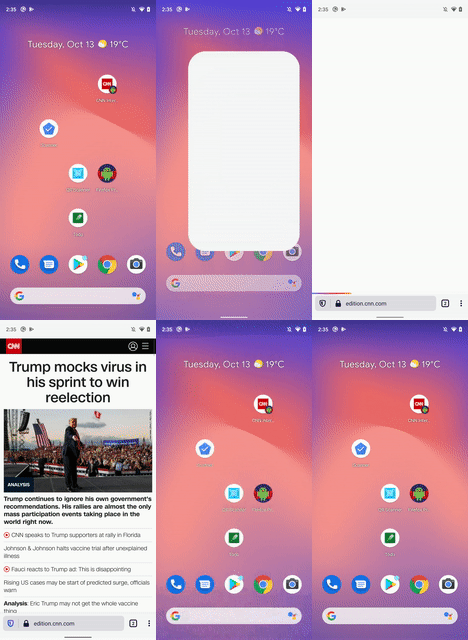
Tested on Pixel 3 XL (Android 10)

 codrut-topliceanu
on 13 Oct 2020
codrut-topliceanu
on 13 Oct 2020
@codrut-topliceanu I am able to reproduce the issue on Nightly 10/12 with Nexus 6 (Android 7.1.1) and Samsung Galaxy Note 10 (Android 10).
 sflorean
on 13 Oct 2020
sflorean
on 13 Oct 2020
May have been fixed. Seems to be working as specified in expected behavior.
I see the proper behaviour if it's a web app with A2HS support (FF menu option says "Install"), but the bug exists if it's a web link saved to the home screen (FF menu option says "Add to Home screen").
davidmegginson
on 13 Oct 2020
I think I figured it out. The issue is reproducible if you still have the link you saved to homescreen already open in a tab.
Steps to reproduce
- Save a link to your device's home screen
- Open the link from the home screen while still having the same website open in a tab in Fenix
- Press the Android "back" button
codrut-topliceanu
on 14 Oct 2020
I think I figured it out. The issue is reproducible if you still have the link you saved to homescreen already open in a tab.
Steps to reproduce
* Save a link to your device's home screen

* Open the link from the home screen while still having the same website open in a tab in Fenix

* Press the Android "back" button
Thanks, @codrut-topliceanu . In fact, I can reproduce the bug in the current production release (81.1.4) even if I don't have any tabs open in Firefox before I press a saved bookmark on the Android homescreen. Perhaps it's different in the nightlies.
davidmegginson
on 14 Oct 2020
@davidmegginson
At the moment, as I mentioned in my previous comment, I can only reproduce the behaviour you specified when Fenix already has the tab open and then I open the same link from a shortcut on the homescreen. I have spoken with @sflorean and these are indeed her findings as well. Otherwise if the tab was not already opened pressing back will take the user to the android homescreen just as in the specified expected behaviour.
This behaviour is the outcome of the fix for this issue : https://github.com/mozilla-mobile/fenix/issues/5201 where every time the user pressed on the shortcut a new tab would open. This fix searches Fenix's open tabs and if it finds one with the same URL it just selects it without opening any other tabs and this indeed is intended behaviour as per this comment.
These findings are the result of tests on Pixel 4(Android 11), Pixel 3XL(Android 10), Motorola Moto E4 (Android 7.1), OnePlus 6 (Android 9), Samsung Galaxy Note 3 (Android 5), and using beta builds 76, 77, 79 and latest in store.
I have also taken a look at 0.68 -Fennec-(which I probably should have done sooner) and the behaviour there is as follows:
The user can have one normally open tab and one homescreen shortcut opened tab and any further attempts to open from the homescreen will just overwrite the second tab. Pressing back from the normally open tab takes you to Fennec's start page while pressing back from the homescreen shortcut opened one will terminate the tab and return the user to the android homescreen.
If this latter behaviour is what we want for Fenix I will start working on it. I'd also like some UX input on this if that's ok.
codrut-topliceanu
on 20 Oct 2020
@codrut-topliceanu - how many presses does it take you to get back to the Android homescreen? If I start with a saved link, the first backbutton press takes me to the Firefox homescreen, and the second one (now) takes me to the Android homescreen. If I do it with a saved Facebook link, it actually takes three presses (perhaps Facebook does a redirect when I open the link).
davidmegginson
on 21 Oct 2020
@davidmegginson Just one, as shown in the gif I made. (I use Android 10 gestures for navigating, you can see an arrow appear on the right side of the screen appear that signals the back gesture)
codrut-topliceanu
on 22 Oct 2020
Is this also cold start depended?
- Open a new tab
- Save to Android homescreen
- Put the app in the background and open the Android home screen shortcut
---> I see home (or back stack) when pressing android back button
When I kill the app and tap on the Android home screen shortcut and then press android back, I go back to the android home screen.
 topotropic
on 4 Nov 2020
topotropic
on 4 Nov 2020
In any case, when people use the Android back button we should follow the expected behavior as described above
Expected behavior
* Android switches back to the home screen where the link was activated (as in 0.68)
Not sure how to handle backstack in this case though – but we can open a separate issue for that. Thanks!
topotropic
on 4 Nov 2020
@topotropic You're right! It's also cold start dependant. I suppose when fenix is killed and you click on the homescreen shortcut there aren't any open Sessions with that url already ( even if there were before killing fenix) so it opens a new tab. Pressing back takes you to android homescreen because this is a shortcut started tab.
In any case, when people use the Android back button we should follow the expected behavior as described above
Easiest fix for this would be to always create a new tab when clicking on a homescreen shortcut, but that would reintroduce this bug.
Not sure how to handle backstack in this case though – but we can open a separate issue for that. Thanks!
I think we might need to decide here as it directly ties to the current behavior.
I see several way we could handle this :
- Keep it as is (+ fix cold start to keep behavior consistent) -> when clicking on shortcut we open a new tab unless it exists in which case we switch to it.
- Always open a tab when clicking on homescreen shortcut -> that would reintroduce this bug.
- Fennec way -> when clicking on shortcut we check to see if there is already a tab that has been opened in the same way, if there isn't we create one, if there is we switch to that one (these tabs' "origin" will be classified as
homescreen). AND when pressing back from an opened tab we check to see if its "origin" ishomescreento find out if we should take the user to android's homescreen or to fenix's start page.
Please let me know if I'm missing something.
codrut-topliceanu
on 4 Nov 2020
Thanks for the summary.
The Fennec way makes sense here too – I assume that we ignore the backstack and take people back to the Android home screen when they open a site from there, correct?
I noticed that the cold start behavior in Fennec behaves slightly differently, so when you open a site from Android home, kill the app and open the same site from home again, Fennec creates a new tap. If it's feasible, it would be great to align the behaviour and follow your proposal independent of the app's status (cold star or just in background)
when clicking on shortcut we check to see if there is already a tab that has been opened in the same way, if there isn't we create one, if there is we switch to that one (these tabs' "origin" will be classified as
homescreen). AND when pressing back from an opened tab we check to see if its "origin" ishomescreento find out if we should take the user to android's homescreen or to fenix's start page.
On a site note, I noticed that we close a tab that was opened through a shortcut when people use the Android back button (same in Fennec). Maybe introduced as solution to this issue https://github.com/mozilla-mobile/fenix/issues/5201. From a UX point of view the app shouldn't to any destructive actions (like closing tabs) when people use a back button. Should I file a separate issue for that? Thanks!
topotropic
on 5 Nov 2020
@topotropic I think we are in agreement. I’ll summarise what I think/understand we should do, please let me know if this sounds ok as I may have misunderstood your comment. I apologise for the fact that I keep asking about this, I just want to be sure I get it right.
- First and foremost cold start or just in-background behaviors should always be the same.
- I will add an
originto each tab to designate where it was started from ( homescreen or from inside fenix) - When pressing BACK from a tab I will check the tab’s
originto find out what behavior should occur.
Pressing back from a tab:
- if you are on a tab opened from Fenix that has history -> pressing BACK will navigate you back in history (as expected)
- if you are on a tab opened from Fenix that has NO history -> pressing BACK will NOT close the tab take you to the Fenix start page.
- if you are on a tab opened from Android homescreen that has history -> pressing BACK will navigate you back in history (as expected)
- if you are on a tab opened from Android homescreen that has NO history -> pressing BACK will NOT close the tab and take you to the Android homescreen <-
“From a UX point of view the app shouldn't to any destructive actions (like closing tabs) when people use a back button”
Clicking on a link from the Android homescreen:
- if Fenix does not already have a tab with the same url -> we create a new tab with origin = homescreen
- if Fenix already has a tab with the same url BUT with origin == fenix - > we create a new tab with origin = homescreen
- if Fenix already has a tab with the same url AND with origin == homescreen - > that tab is selected
I've numbered all the points so it is easy to reference any of them to discuss it further.
codrut-topliceanu
on 9 Nov 2020
Received feedback during sprint planning.
codrut-topliceanu
on 19 Nov 2020
Related issues
topotropic
·
3Comments
 clitetailor
·
3Comments
clitetailor
·
3Comments
 abodea
·
3Comments
abodea
·
3Comments
 softvision-miralobontiu
·
3Comments
softvision-miralobontiu
·
3Comments
 andreicristianpetcu
·
3Comments
andreicristianpetcu
·
3Comments
Most helpful comment
@topotropic I think we are in agreement. I’ll summarise what I think/understand we should do, please let me know if this sounds ok as I may have misunderstood your comment. I apologise for the fact that I keep asking about this, I just want to be sure I get it right.
originto each tab to designate where it was started from ( homescreen or from inside fenix)originto find out what behavior should occur.Pressing back from a tab:
“From a UX point of view the app shouldn't to any destructive actions (like closing tabs) when people use a back button”Clicking on a link from the Android homescreen:
I've numbered all the points so it is easy to reference any of them to discuss it further.