Fenix: [UX] Order/Ranking of search suggestions
User Story
As a user, I want the most useful search suggestions to show up first when I enter a keyboard (keywords vs. history vs. bookmarks vs. open tabs vs. synced tabs)
Acceptance Criteria
- I see the most useful suggestions first (UX to determine the order/ranking of keywords vs. history vs. bookmarks vs. open tabs vs. synced tabs)
- I don't see duplicates (e.g. if I have the same site bookmarked AND in an open tab, it only shows up once in my search suggestions.
 vesta0
All 7 comments
With one exception, we should duplicate desktop’s order/ranking rule.
The exception is as follows:
Show search keywords suggestions ahead of browsing history, bookmarks, open tabs, synced tabs, etc.
- On desktop, this setting may be turned off so other suggestions are interleaved with search keywords
- On mobile, we optimise for search as a primary use case, so search keywords always appear first – ahead of others
As I understand it, desktop’s order/ranking rule roughly looks like the following:
| Scenario | Item 1 | Item 2 | What to prioritise and show/hide |
| --- | --- | --- | --- |
| 1 | Open tab | Synced tab | Open tab is prioritised ahead of Synced tab. Show both. |
| 2 | Synced tab | Bookmark | Synced tab is prioritised ahead of Bookmark. Show both. |
| 3 | Open tab | Bookmark | Open tab is shown. Bookmark is not shown. |
Clarifying question for @Verdi:
- Do you agree that, on mobile, search keywords should _always_ be shown ahead of all other suggestions?
- Is there a particular order of how history items are interleaved amongst bookmarks, open tabs, synced tabs, etc.? I think we are missing a frecency piece here. Is there a piece of code from desktop, that we can deploy on Fenix?
- On scenario 3, why is Bookmark hidden? I assume it’s so that people don’t accidentally open a Bookmark in a new tab, if an Open tab already exists
- On scenarios 1 & 2, why are we showing Synced tabs when a duplicate URL is already open (scenario 1) or already exist as a bookmark (scenario 2)? Is it because Synced tabs are “good to know that they exist”, even if they’re not immediately useful?
 brampitoyo
on 19 Aug 2020
brampitoyo
on 19 Aug 2020
@brampitoyo I am testing the new search experience in nightly and hadn't gotten around to filing this, but I came across your comment here.
Steps to reproduce:
- go to apple.com
- end up at https://www.apple.com
- long press on address bar, select copy
- close tab
- tap address bar; clear existing url if present
- paste
What happens:
The first result is a search query for https://www.apple.com
Expected result:
First result should be the site I typed in.
This is really unexpected that I would be served a search result instead of the actual url I typed in.
Thoughts?
 yoasif
on 20 Aug 2020
yoasif
on 20 Aug 2020
Hi @brampitoyo,
Why should search always be prioritised as the primary use case on mobile? The address/search/awesomebar has essentially the same functions on mobile and desktop, i.e. to type a web address or search term and it's helpful (and a few people use this frequently) to know if an open or synced tab or bookmark already exists. That's how I use it on desktop and I don't _think_ I'm unusual in that regard - most people's primary use of the awesomebar is not to navigate between their tabs and bookmarks but to go to new addresses and search for things.
So if most people on desktop use the awesomebar mainly for searching yet Firefox does sometimes prioritise other sources, then why shouldn't mobile do the same?
I'm sure Mozilla have telemetry which can confirm this, so if you find it then please share the summary.
Cheers 🙂
 madb1lly
on 21 Aug 2020
madb1lly
on 21 Aug 2020
@brampitoyo @madb1lly
With one exception, we should duplicate desktop’s order/ranking rule
I don't think it's an exception. On desktop search suggestions are also shown ahead of all other suggestion types by default. These are the default settings of the desktop Firefox:
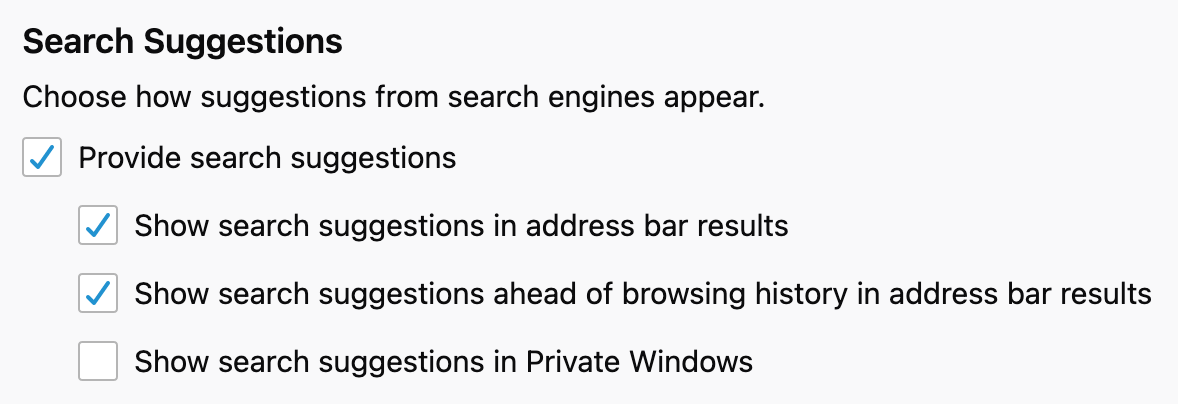
I think it makes sense to add an option for that in Fenix as well.
 cadeyrn
on 21 Aug 2020
cadeyrn
on 21 Aug 2020
Just writing to say that I’m still aware of this issue.
Once #13955 have figured out how desktop solves this problem, we can either copy desktop’s approach outright, or implement a subset of the order/ranking rule.
Be aware that the table I posted above on https://github.com/mozilla-mobile/fenix/issues/13912#issuecomment-675827395 is greatly simplified. It’s correct in principle. But I think the full rule is more complicated than that.
The goal of this project is so that, whatever Firefox device you search on, if your history/bookmarks/tabs are synced, you will get identical search results. Your local open tabs are of course different across devices, and that’s fine if it shows differently. But for everything else – history items, bookmarks, synced tabs, search keywords – we want results to be identical.
Having identical results means an easier time to get to information that you’ve accessed in the past, no matter which device you’re on – as long as you’ve chosen to sync those information, of course.
brampitoyo
on 16 Sep 2020
@lime124 can you please help determine next steps on this?
 bifleming
on 1 Oct 2020
bifleming
on 1 Oct 2020
It looks like the next step is the spike Bram mentioned that needs to be completed.
 lime124
on 13 Nov 2020
lime124
on 13 Nov 2020
Related issues
 clitetailor
·
3Comments
clitetailor
·
3Comments
 bbinto
·
3Comments
bbinto
·
3Comments
 csadilek
·
3Comments
csadilek
·
3Comments
 phileastv
·
3Comments
phileastv
·
3Comments
 AndiAJ
·
3Comments
AndiAJ
·
3Comments
Most helpful comment
Just writing to say that I’m still aware of this issue.
Once #13955 have figured out how desktop solves this problem, we can either copy desktop’s approach outright, or implement a subset of the order/ranking rule.
Be aware that the table I posted above on https://github.com/mozilla-mobile/fenix/issues/13912#issuecomment-675827395 is greatly simplified. It’s correct in principle. But I think the full rule is more complicated than that.
The goal of this project is so that, whatever Firefox device you search on, if your history/bookmarks/tabs are synced, you will get identical search results. Your local open tabs are of course different across devices, and that’s fine if it shows differently. But for everything else – history items, bookmarks, synced tabs, search keywords – we want results to be identical.
Having identical results means an easier time to get to information that you’ve accessed in the past, no matter which device you’re on – as long as you’ve chosen to sync those information, of course.