Fenix: Clear icons when clearing private data
See https://github.com/mozilla-mobile/android-components/issues/7766 for details.
We added BrowserIcons.clear() to make it possible to remove all icons from disk and memory.
 pocmo
pocmo
All 7 comments
Question for UX: From a user's perspective, which of the two options from the Delete browsing data fragment you would associate with clearing the favicons:
- Browsing history and site data
- Cached images and files
I would personally go with the first, since that is the one that I associate with removing all trace of me visiting a website.
 BranescuMihai
on 4 Aug 2020
BranescuMihai
on 4 Aug 2020
Assigning @AmyYLee for UX follow-up
 apbitner
on 12 Aug 2020
apbitner
on 12 Aug 2020
Question for UX: From a user's perspective, which of the two options from the
Delete browsing datafragment you would associate with clearing the favicons:* Browsing history and site data * Cached images and filesI would personally go with the first, since that is the one that I associate with removing all trace of me visiting a website.
@betsymi on this one since it's about strings. I personally think of the second option because I think of favs as part of cached images.
 AmyYLee
on 14 Aug 2020
AmyYLee
on 14 Aug 2020
I do love a good string debate! I am going to recommend Browsing history and site data because I find the language simpler and easier to understand. "Cached" veers on the side of jargony. While it may be more specific, I'd rather veer on the side of removing all traces.
 betsymi
on 18 Aug 2020
betsymi
on 18 Aug 2020
Hey @betsymi, @AmyYLee , just to confirm, because it came up in review,
Clearing the icons should happen when the user selects
- "Browsing history and site data"
or - "Cached images and files"
?
 Mugurell
on 27 Aug 2020
Mugurell
on 27 Aug 2020
Browsing history and site data
betsymi
on 27 Aug 2020
Hi all,
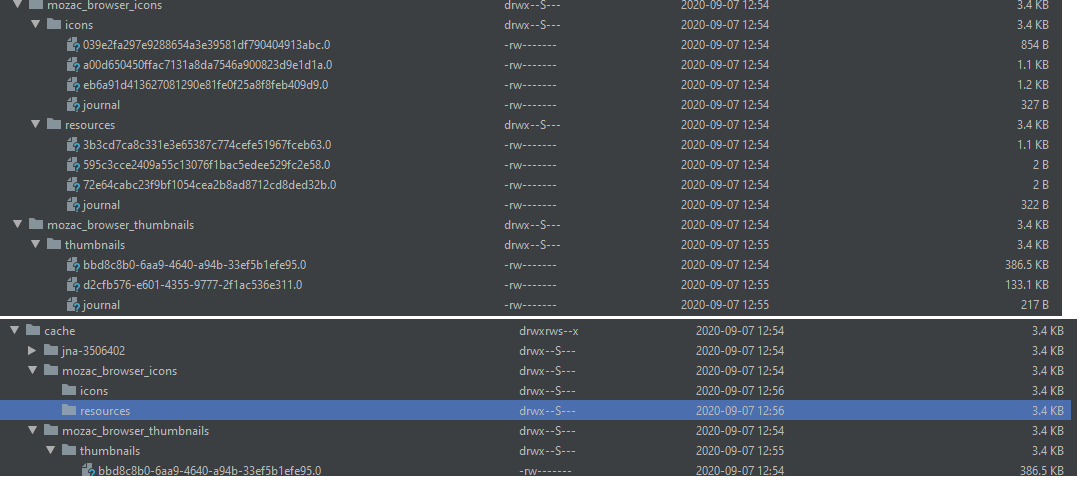
Verified as fixed on a debug build from 9/7 (AC: 58.0.20200906130403, b6c304b2a) on Samsung Galaxy Tab S6 (Android 9).
In the screenshots below, the first image represents the mozac_browser_icons before the deletion, and the second screenshot is after deletion. I've only selected to delete "Browsing history and site data" from the "Delete browsing data" page.
 softvision-miralobontiu
on 7 Sep 2020
softvision-miralobontiu
on 7 Sep 2020
Related issues
 abodea
·
3Comments
abodea
·
3Comments
 andreicristianpetcu
·
3Comments
andreicristianpetcu
·
3Comments
abodea
·
3Comments
andreicristianpetcu
·
3Comments
andreicristianpetcu
·
3Comments
andreicristianpetcu
·
3Comments
abodea
·
3Comments
andreicristianpetcu
·
3Comments