Fenix: Make buttons for "Mic/voice" and "x" icon dynamically appear/disappear
Please go through the previous issue #12656 for context on why this issue's behaviour should be implemented instead of the one I suggested in the issue #12656.
Right now it doesn't feel intuitive as the other apps on Android doesn't place the button for voice typing in the middle. In the issue #12656 have argued about it at length. so if you don't feel like implementing the behavior suggested in #12656 then I think this should be implemented. Please refer the Chrome browser's behavior for context.
I actually am not in support of the issue #12656 (swapping icons of voice "x" icon in the address bar) behavior and I strongly suggest you to make the behavior like how Chrome browser does (see the attached GIF). And if you argue that how the users users will type using in address bar using voice when the voice button disappears dynamically while typing then I'll say that there's always the voice button of keyboard (Gboard and SwiftKey support this) through which they can always type through voice.
Make the both the buttons for "Mic/voice" and "x" icon for clearing the typed text in the address bar dynamically appear and disappear based on the context of if the user is typing or doing something else like how other Google apps like Play Store, Chrome Browser, Google Maps. Even WhatsApp that has two buttons in the typing field makes only the "attachment" button appear while making the "Camera" button disappear altogether while typing. And makes the "Voice" button available in a seperate section on the right side of the typing field the typing field so users don't end up clicking the buttons they didn't intend to.
There should be only one button at any given time while something is being typed into the address bar otherwise the users might click the other buttons accidently!
_Please refer this comment explaining why I think there should be only one button while typing something in the address bar:_ https://github.com/mozilla-mobile/fenix/issues/12656#issuecomment-660396395 and I strongly suggest you to go with this issue's behaviour of dynamically making the buttons appear (while not typing) and disappear (while typing). As users may end up tapping the one button (Voice button for example) while they intend to tap the other button ("x" mark) and vice-versa!
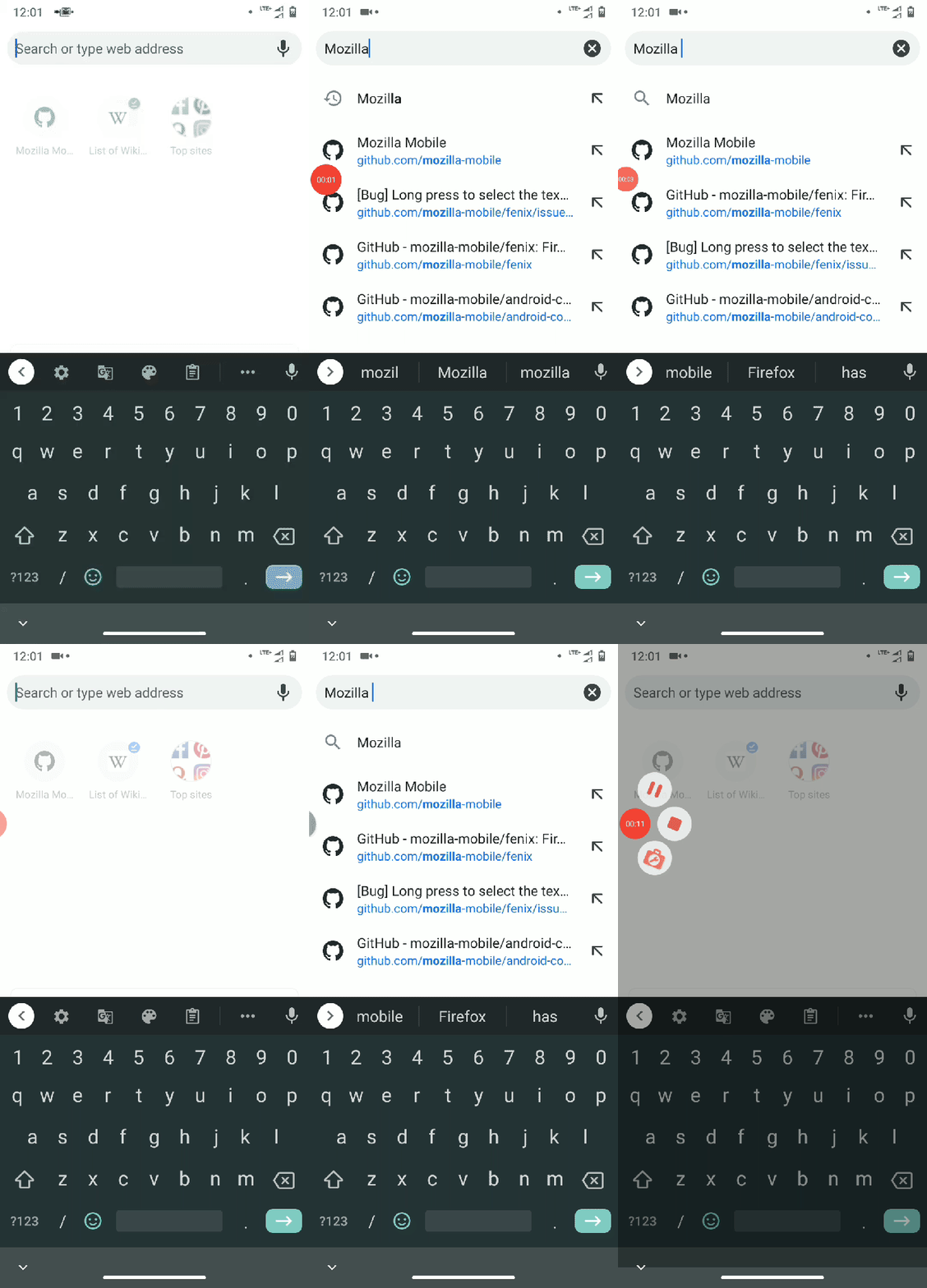 UNITO-UNDERSCORE!120923!
 UNITO-UNDERSCORE!120202!
Thanks. :grinning:
 ghost
ghost
All 2 comments
@brampitoyo for feedback
 AmyYLee
on 20 Jul 2020
AmyYLee
on 20 Jul 2020
I agree @ShatteredPixel.
I think that the Mic icon is not necessary to show after a keyword has been entered into the address bar.
Why?
People are less likely to think “I want to search for… [type type type]” then change their mind and suddenly want to voice search. Instead, they make the keyword vs. voice search decision _before_ anything is entered into the address bar.
To sum up, I agree with your proposal:
- If the address bar is empty – before anything is entered into the address bar: show Mic icon
- After something is entered into the address bar: hide Mic icon
Since the Mic icon is hidden any time the Clear/x icon is shown, there no need for the behaviour you suggested in #12656.
 brampitoyo
on 21 Jul 2020
brampitoyo
on 21 Jul 2020
Related issues
 lindongbin
·
3Comments
lindongbin
·
3Comments
 abodea
·
3Comments
abodea
·
3Comments
 andreicristianpetcu
·
3Comments
andreicristianpetcu
·
3Comments
 AndiAJ
·
3Comments
AndiAJ
·
3Comments
 ekager
·
3Comments
ekager
·
3Comments
Most helpful comment
I agree @ShatteredPixel.
I think that the Mic icon is not necessary to show after a keyword has been entered into the address bar.
Why?
People are less likely to think “I want to search for… [type type type]” then change their mind and suddenly want to voice search. Instead, they make the keyword vs. voice search decision _before_ anything is entered into the address bar.
To sum up, I agree with your proposal:
Since the Mic icon is hidden any time the Clear/x icon is shown, there no need for the behaviour you suggested in #12656.