Fenix: [Bug] Language screen should display its "Follow Device Language" label **in the device language**
Steps to reproduce
- Open settings
- Change the language to Basque (or any foreign language that you don't understand). This is really easy to do by accident, if you mis-tap the "Language" menu item a few times (and the last tap hits some arbitrary language option).
- Now try to get Fenix back to your preferred language. (in particular, try to get it back to matching the device language)
Expected behavior
The first menu option for "Use the device language" (which is a high-probability use case) should be shown in the device language, to maximize the likelihood that the user will be able to read & understand that option.
Actual behavior
The first menu option is simply shown as "Erabili gailuaren hizkuntza". Unless the user speaks Basque, they're unlikely to tap that menu item because who knows what it does. If they're English-speaking, the only safe-feeling option is to anxiously scroll through the list until you find English (several screen-heights down) and tap that; this is unnecessary extra work and anxiety when the first menu item is what they really want if only they could understand what it says.
Device information
- Android device: Pixel 3
- Fenix version: Nightly 200701
 dholbert
All 6 comments
Note: "Use the device language" can also be shown in the currently-selected language [Basque in my case], as it currently is. My suggestion here is that it should also be shown in the device language (e.g. on a second line, as seems to happen for every other entry in this list).
dholbert
on 2 Jul 2020
Here's a screenshot showing how this looks (after selecting Basque):
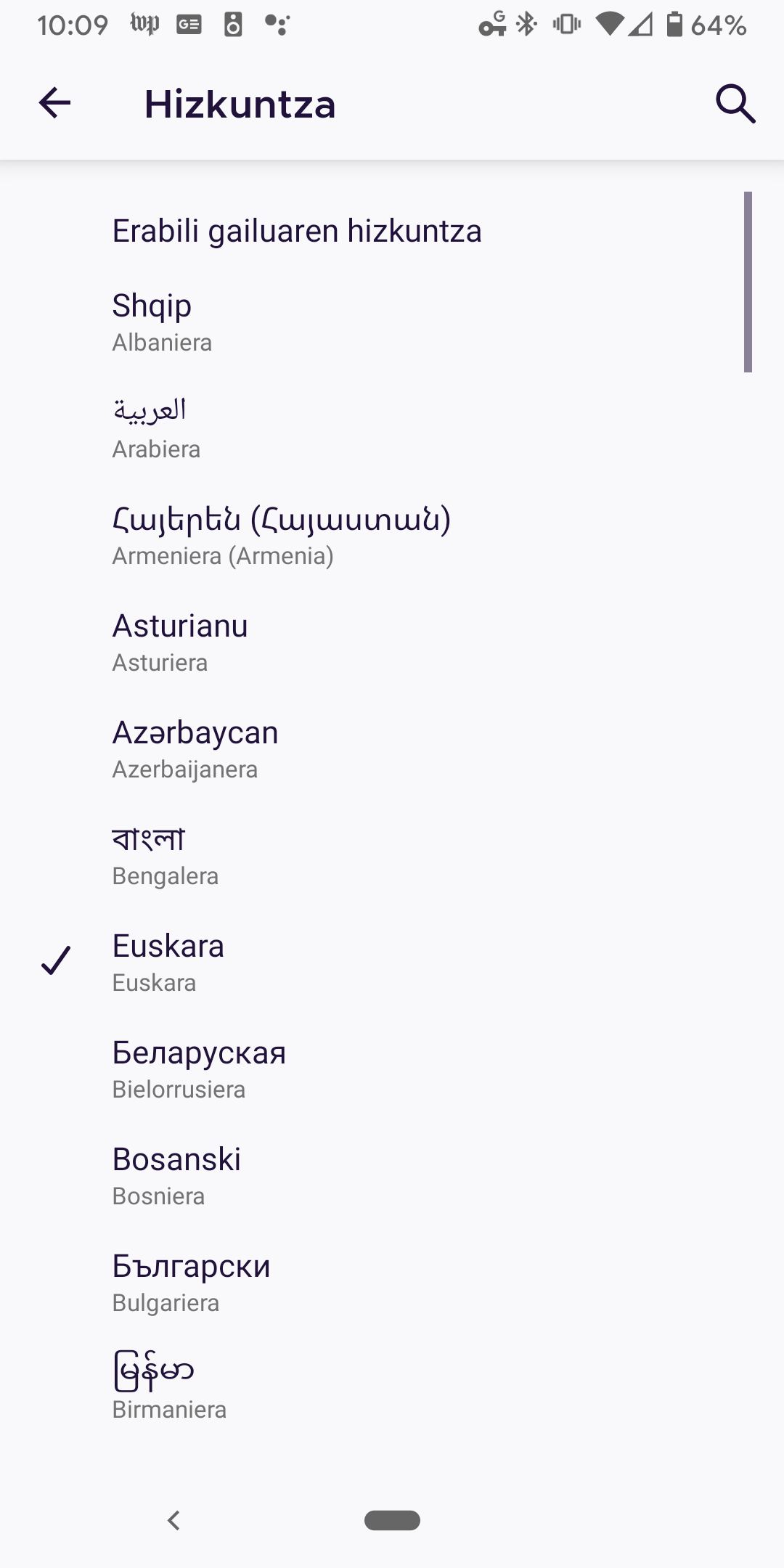
Unless the user has carefully studied this menu, they have no way of knowing what do do here (other than scroll frantically looking for "English" or their preferred language); there's no way for them to know that the first menu item is likely really what they want.
dholbert
on 2 Jul 2020
@dholbert You can easily find the language you want to select by using the search menu in the action bar (top bar). Also, follow device language is always the first option in the list, no matter what language is currently selected.
 mcarare
on 3 Jul 2020
mcarare
on 3 Jul 2020
Also, follow device language is always the first option in the list, no matter what language is currently selected.
That's true but if you don't know it then it won't help you. Yes, there is also a search field but I agree that this specific menu item should follow the device language to reduce user frustration.
 cadeyrn
on 3 Jul 2020
cadeyrn
on 3 Jul 2020
You can easily find the language you want to select by using the search menu in the action bar (top bar).
I'm not sure about "easily". :) Personally I hadn't noticed that magnifying glass -- and even if I had noticed it, I wouldn't have felt comfortable tapping it, because it's labeled something like "Լեզու" as shown in the screenshot below. And I'm not especially confident about what's going to happen if I tap a button that's apparently-labelled "Լեզու" (particularly if I've just caused all of my browser-text to become unreadable and I'm trying my best not to tap unknown buttons/widgets which might make things worse).
Screenshot showing the top bar, after I've selected Armenian as the language:

follow device language is always the first option in the list, no matter what language is currently selected.
Echoing @cadeyrn, this is handy once you know it. But for users who change their language by accident (which again, is really easy to do - just tapping once on "Language" and then basically tap anywhere on the screen), they will not know this & will simply be staring at a screen of unreadable text, if they can even find their way back to this Language picker in the first place.
dholbert
on 3 Jul 2020
Also, searching is impossible after you change to certain languages #12487
 s-ankur
on 14 Jul 2020
s-ankur
on 14 Jul 2020
Related issues
 bbinto
·
3Comments
bbinto
·
3Comments
 andreicristianpetcu
·
3Comments
andreicristianpetcu
·
3Comments
 ekager
·
3Comments
ekager
·
3Comments
 abodea
·
3Comments
abodea
·
3Comments
 thelazyoxymoron
·
3Comments
thelazyoxymoron
·
3Comments