Steps to reproduce
Click a link on an android device with firefox preview as the default browser
Expected behavior
Load in a webpage rather fast
Actual behavior
The browser opens and stalls on a white screen for more than 5 seconds
Device information
- Android device: Pixel 3XL
- Android version: 10
- Fenix version:Nightly 200626 06:01 (Build #21780613)
 SlowNicoFish
All 11 comments
Could you please share an example website for testing?
 hakkikaancaliskan
on 26 Jun 2020
hakkikaancaliskan
on 26 Jun 2020
I tried this link in a custom tab with some extensions installed
https://auth.voxmedia.com/login?community_id=372&return_to=https://www.theverge.com/
HTTPS Everywhere
Decentraleyes
Privacy badger
Ublock Origin
SlowNicoFish
on 26 Jun 2020
One guess is that HTTPS Everywhere extension might cause a slowdown.
But I really have no idea
SlowNicoFish
on 26 Jun 2020
Works fine here...trying disabling all add ons and try again
Maybe some add on causing issue. I feel privacy badger is the culprit
 sheikh-azharuddin
on 26 Jun 2020
sheikh-azharuddin
on 26 Jun 2020
Alright. Seems to work without extensions. I'm gonna try to isolate the extension
SlowNicoFish
on 26 Jun 2020
HTTPS Everywhere and pricacy badger both look like they could be the cause. When both these add ons are acivated there seem to be a slowdown
SlowNicoFish
on 26 Jun 2020
HTTPS Everywhere has more filter than ublock and when you select more filter on ublock no need to use privacy badger.
uBlock + Decentraleyes is my suggestion.
hakkikaancaliskan
on 26 Jun 2020
HTTPS Everywhere and pricacy badger both look like they could be the cause. When both these add ons are acivated there seem to be a slowdown
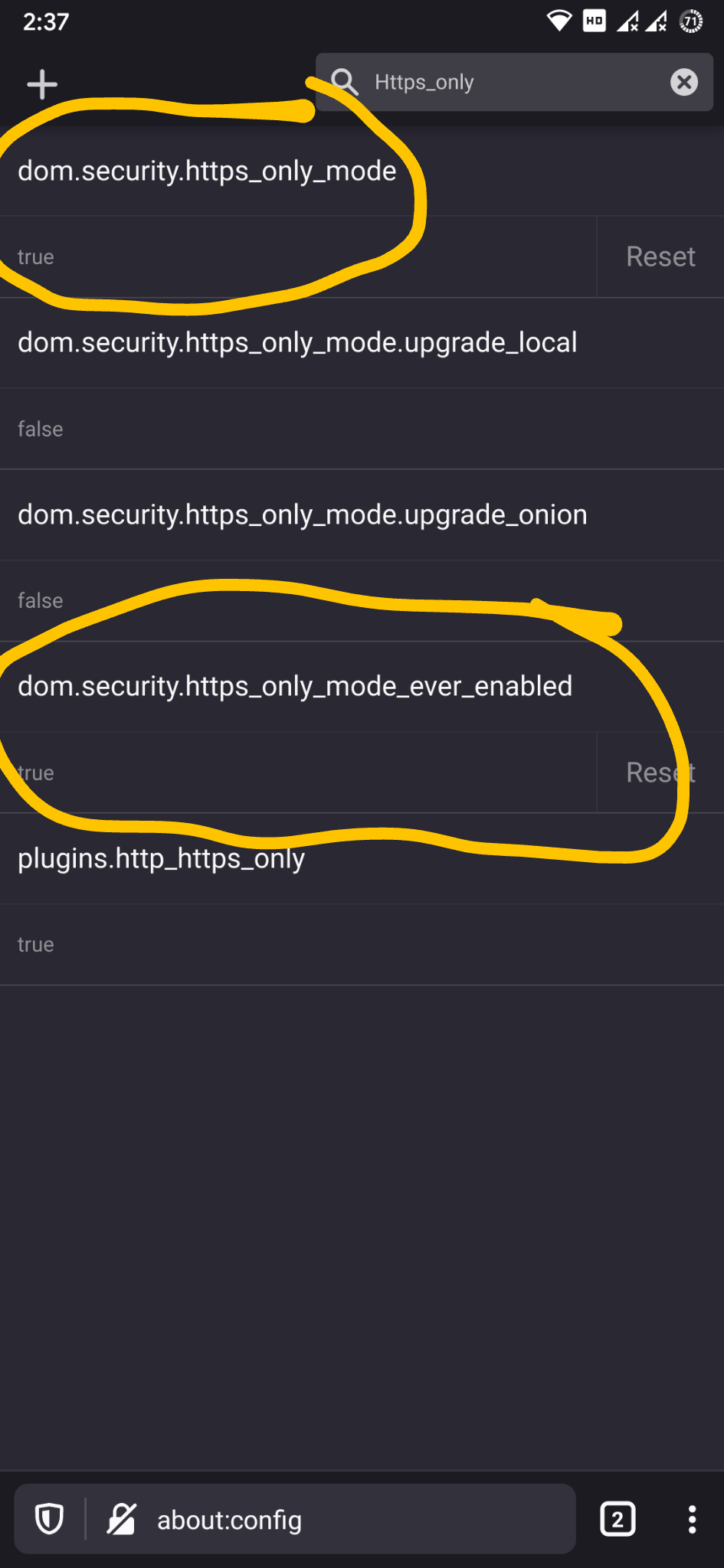
I found privacy badger to be culprit in most of the pages...for example in some websites where you can sign with Google account using OAuth it fails.... I don't use https everywhere as firefox already has awesome preference to handle that not sure why they are not promoting it...while https everywhere does not handle all http to https default preference setting does.
Set both preference setting to true.
sheikh-azharuddin
on 26 Jun 2020
Duplicate of #11890
 RealGJ
on 27 Jun 2020
RealGJ
on 27 Jun 2020
@RealGJ does your bug #11890 also have to do with privacy badger?
 ekager
on 29 Jun 2020
ekager
on 29 Jun 2020
@ekager yes. I do use privacy badger. However, I tried after uninstalling privacy badger too, and issue is still there
RealGJ
on 1 Jul 2020
Related issues
 softvision-miralobontiu
·
3Comments
softvision-miralobontiu
·
3Comments
 clitetailor
·
3Comments
clitetailor
·
3Comments
 andreicristianpetcu
·
3Comments
andreicristianpetcu
·
3Comments
 abodea
·
3Comments
abodea
·
3Comments
 phileastv
·
3Comments
phileastv
·
3Comments
Most helpful comment
I found privacy badger to be culprit in most of the pages...for example in some websites where you can sign with Google account using OAuth it fails.... I don't use https everywhere as firefox already has awesome preference to handle that not sure why they are not promoting it...while https everywhere does not handle all http to https default preference setting does.
Set both preference setting to true.
