Fenix: [Bug] Private mode doesn't play nicely with sites added to home screen
Steps to reproduce
- Add a site to home screen in private mode
- Open the site from your android home
Expected behavior
- Site opens in whatever mode you are currently in
Actual behavior
- Site opens in normal mode
Device information
- Android device: Galaxy S9
- Fenix version: Android Nightly 1/30/20
 sblatz
All 10 comments
@sblatz Is this supposed to work in private?
 mcarare
on 30 Jan 2020
mcarare
on 30 Jan 2020
I'm not 100% sure. It feels weird to me that it switches to private mode, but let me ask @NotWoods 😄
sblatz
on 30 Jan 2020
I don't think we've defined this anywhere. I'm currently working on tweaking the PWA site controls notification to indicate if a PWA is in private mode. Personally, I think that the PWA should match whichever mode you were in when you installed it, and update the menu design to make that more clear.
 NotWoods
on 30 Jan 2020
NotWoods
on 30 Jan 2020
Let's track updating the site controls notification here for now. Later we should ask the UX team for a menu prompt design (maybe integrate a private mode checkbox into https://github.com/mozilla-mobile/android-components/issues/5883).
Notification alterations:
- Instead of the Firefox logo, show the private mode mask
- Instead of "PWA Name", show "PWA Name (Private Mode)". (ie:
Twitter (Private Mode)). - Instead of the PWA color, use the private mode color.
NotWoods
on 11 Feb 2020
@NotWoods you can assign this to me 😄
 TitanNano
on 12 Feb 2020
TitanNano
on 12 Feb 2020
Just to be clear, as the discussion focused on PWA only eventually, the request here is about both PWA and page shortcuts added to the phone's home screen. Not only about PWA (which are less often available than plain web pages that can be turned into shortcuts, actually).
Thank you
 klint
on 5 Mar 2020
klint
on 5 Mar 2020
@sblatz my patch landed, what's the next step here?
TitanNano
on 6 May 2020
@TitanNano Let's have QA verify and close this out. Thanks 😄
sblatz
on 7 May 2020
Hi all,
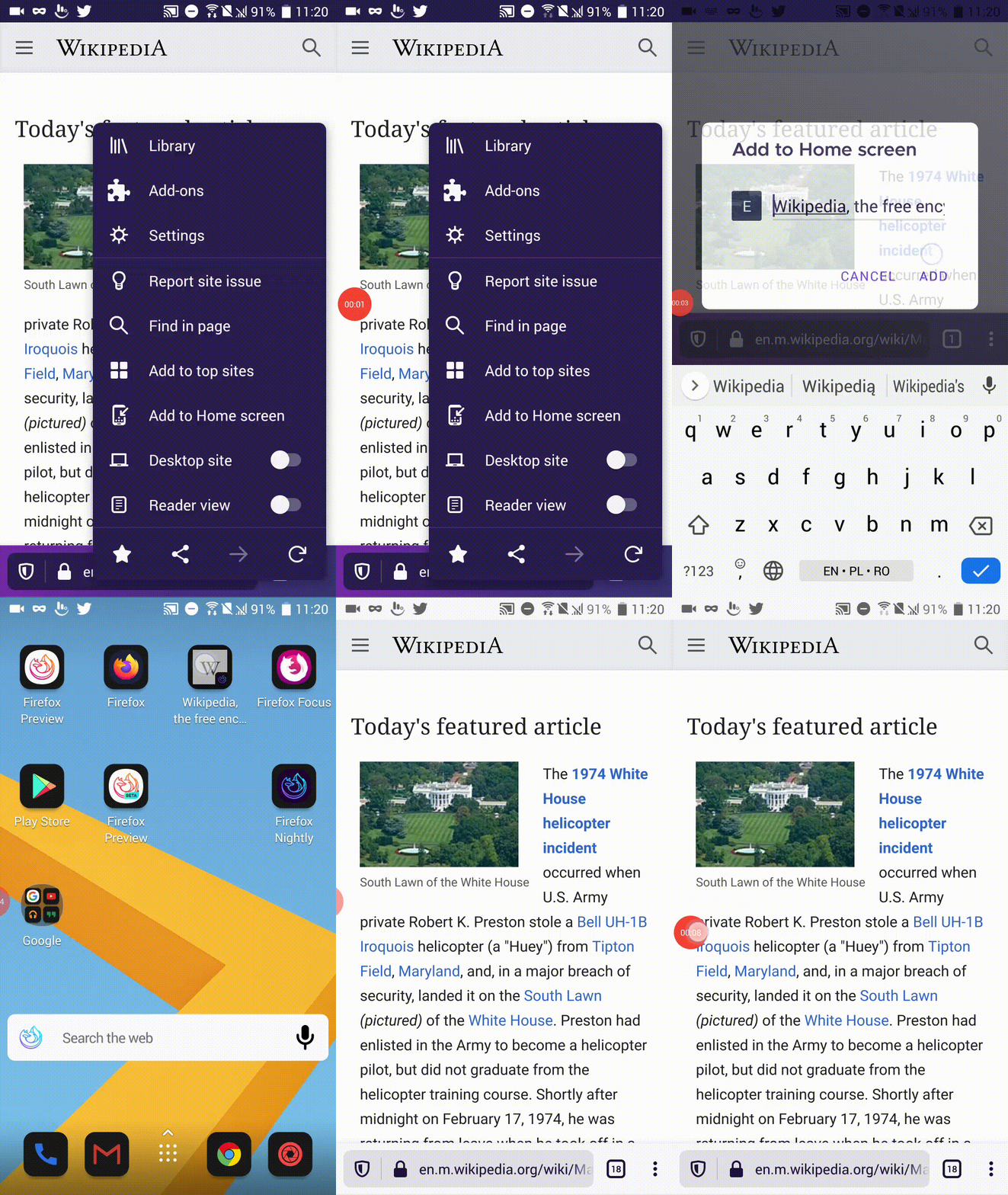
This issue is not fixed yet. The page added to the homescreen from private mode, opens in normal mode. Tested on the latest Nightly build from 5/8 @6:06 AM with OnePlus 5T (Android 9), One Plus A3 (Android 6.0.1), Samsung Galaxy Tab A6 (Android 5.1.1), and HTC 10 (Android 8).
 softvision-miralobontiu
on 8 May 2020
softvision-miralobontiu
on 8 May 2020
@softvision-miralobontiu @sblatz see https://github.com/mozilla-mobile/fenix/issues/7996#issuecomment-584892912 my patch only changed the site control notification, getting the PWA to actually launch in private mode seems to be part of https://github.com/mozilla-mobile/android-components/issues/5883. So this is not really testable yet as PWAs are still always in standard mode.
TitanNano
on 8 May 2020
Related issues
 bbinto
·
3Comments
bbinto
·
3Comments
 Chris01277
·
3Comments
Chris01277
·
3Comments
 lindongbin
·
3Comments
lindongbin
·
3Comments
 andreicristianpetcu
·
3Comments
andreicristianpetcu
·
3Comments
andreicristianpetcu
·
3Comments
andreicristianpetcu
·
3Comments