Fenix: [Bug] The Android back button deletes the current tab
Steps to reproduce
1) Open N>=1 tabs.
2) Open an (N+1)-th tab and switch to it.
3) Press the "back" button of your Android phone.
Expected behavior
Nothing should happen.
Actual behavior
The (N+1)-th tab is closed, deleted from the list of open tabs, and the N-th tab (more generally: the previous tab in the list) is opened.
Device information
- Android device: Nokia 5 (model TA-1024) with up-to-date Android 9 (Android One program)
* Fenix version: 191115 06:01 (build 13190607)
If there is no parent tab we should not close the tab. If there is a parent tab we should close it.
 concastinator
All 17 comments
It's also reproducable in the current stable release, 2.3.0. Firefox Preview 2.2.0 works as expected.
@vesta0 Could this regression be set to the top of the priority list, please? The stable release is already affected and it causes data loss - there is no way to recover the tabs! Thank you!
 cadeyrn
on 15 Nov 2019
cadeyrn
on 15 Nov 2019
If I'm understanding correctly this was an intentional change of behavior we added. See #2629 and #2483 for bugs filed with the opposite behavior desired.
 ekager
on 15 Nov 2019
ekager
on 15 Nov 2019
If it's intentional then the "undo" snackbar is missing. Closing a tab via the home screen (an explicit action by the user) can be reverted via a snackbar. In this case Fenix decides to close the tab, it's not my explicit decision. So the "undo" snackbar is even more important in this case.
I wasn't aware that Firefox and Chrome also close the tab when pressing the back button because with Firefox Focus as my previous default browser I didn't use these browsers that much and I almost never had more than one open tab before Fenix. But I noticed that Fenix replaces the current tab with a totally unrelated tab. Neither the old Firefox nor Chrome switch to an unrelated tab, both open the home screen. For me the behaviour of Fenix to switch to an unrelated tab doesn't make sense at all and it's part of the reason why I thought the current behaviour is a bug.
cadeyrn
on 15 Nov 2019
Ah okay I understand.
In https://github.com/mozilla-mobile/fenix/pull/5332 we added the functionality in Fenix to select a parent if it exists one last back press, but it will select a non-parent tab if none exists on last back-press.
It looks like we have a few options of remedies here:
- Expose something like session
hasParentin AC so that we know which tabs have a parent and go to home screen if there is not a parent tab. - Show an undo snackbar when we remove a tab on the last backpress on a tab with no history.
We can do 2 for now, but 1 will require more work.
Cc @csadilek do you think 1 is something we could reasonably expose through our session?
Adding the needs UX feedback label for more feedback on the options
ekager
on 16 Nov 2019
In my opinion, the Android back button should do the following to a tab:
1) if that tab has a browsing history, go one step back in it;
2) if it has no history, do nothing (which I find logical);
3) alternatively, if it has no history, go back to the list of tabs (less logical, but acceptable).
In any case, a tab removal should NOT be performed, as it is an action that is both irreversible and unexpected to the user.
Popping up an "undo tab deletion" message can only be a temporary fix: messages of these type are displayed very briefly (1 second maybe?), which might not be enough for the user to react.
Therefore, I prefer removing the chunk of code that deletes the tab. Any deletion should be explicitly invoked by the user, since it is easily irreversible.
concastinator
on 16 Nov 2019
Showing a non-parent tab is potentially confusing – it would be great if we could go for option 1
Expose something like session hasParent in AC so that we know which tabs have a parent and go to home screen if there is not a parent tab.
https://github.com/mozilla-mobile/fenix/issues/6620#issuecomment-554575259
We also plan to introduce a dedicate tab tray https://github.com/mozilla-mobile/fenix/issues/1063 so that would mean, we'd replace "home" with "new tab" mentioning it, in case this has an impact.
 topotropic
on 18 Nov 2019
topotropic
on 18 Nov 2019
Cc @csadilek do you think 1 is something we could reasonably expose through our session?
@ekager we're actively migrating away from browser-session, but this should already by accessible through the browser store:
val hasParent = context.components.core.store.state.findTab(tabId)?.parentId != null
 csadilek
on 18 Nov 2019
csadilek
on 18 Nov 2019
@ekager @csadilek I implemented
go to home screen if there is not a parent tab.
by using the existing hasParentSession.
Let me know if you already worked on this locally or I should leave a PR.
 mawen7
on 18 Nov 2019
mawen7
on 18 Nov 2019
Feel free to open a PR @mawen7
ekager
on 18 Nov 2019
Done #6675 :)
mawen7
on 18 Nov 2019
I'm not sure what to do with this ticket now (obviously with my labeling frenzy).
We now return to home if a tab doesn't have a parent which makes this a bit less confusing IMO, but this ticket was originally about the deletory action of pressing back on a tab and having it close without an undo snackbar. With the way the undo snackbars and sessions work, I think even adding the undo action would be fairly difficult to implement.
ekager
on 19 Nov 2019
@topotropic I think we do need further UX feedback about the behavior of removing a tab on back press with no history (and not just going to home). We added that behavior from issue https://github.com/mozilla-mobile/fenix/issues/2629 but it's unclear if there was ever a clear UX stance on that behavior.
ekager
on 19 Nov 2019
Tacking on to this conversation. I just filed https://github.com/mozilla-mobile/fenix/issues/7412 (which I didn't realize was a dup) as I found this behavior really confusing.
The back button is not usually a destructive action and I was surprised when my tab went away just from hitting back once. It makes sense when I've launched the app through an external link and it navigates me away, but when I'm browsing in the app back should take me to where I previously was (the home screen) and not destroy my session.
 sblatz
on 30 Dec 2019
sblatz
on 30 Dec 2019
@lime124 We are looking for final UX feedback on this. Product recommendation is that the back button should never destroy a tab. Tapping the back button should just minimize the tab and take the user back to home screen.
 vesta0
on 7 Jan 2020
vesta0
on 7 Jan 2020
The implemented feature that closes a tab when it's opened from another tab is correct. Addressed in https://github.com/mozilla-mobile/fenix/issues/2483.
When the tab doesn't have a parent tab, we should not close it when a user navigates back via the Android back button.
topotropic
on 8 Jan 2020
When the tab doesn't have a parent tab, we should not close it when a user navigates back via the Android back button.
Would like to match the updated spec. See #7537
mawen7
on 8 Jan 2020
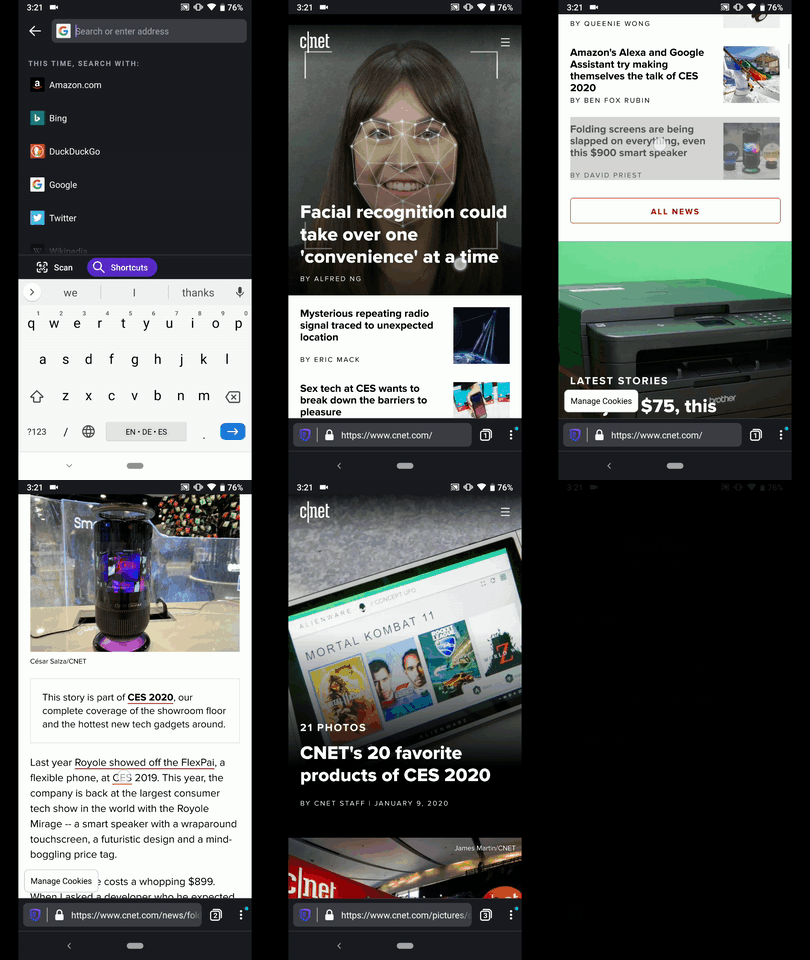
Hi, verified as fixed on the latest Nightly Build #20100616 from 01/10 using the following devices:
• Google Pixel 3a (Android 9)
• Huawei Mate 20 Lite (Android 8.1.0)
• LG G7 fit (android 8.1)
• Samsung Galaxy S7 (Android 7)
• OnePlus A3 (Android 6.0.1)
• LG Nexus 4 (Android 5.1.1)
✔️ Closes a tab when it's opened from another tab
✔️ The tab doesn't have a parent tab, should not be closed
► Video
 AndiAJ
on 10 Jan 2020
AndiAJ
on 10 Jan 2020
Related issues
vesta0
·
3Comments
 lindongbin
·
3Comments
lindongbin
·
3Comments
 robsmith11
·
3Comments
robsmith11
·
3Comments
 phileastv
·
3Comments
phileastv
·
3Comments
 andreicristianpetcu
·
3Comments
andreicristianpetcu
·
3Comments
Most helpful comment
Tacking on to this conversation. I just filed https://github.com/mozilla-mobile/fenix/issues/7412 (which I didn't realize was a dup) as I found this behavior really confusing.
The back button is not usually a destructive action and I was surprised when my tab went away just from hitting back once. It makes sense when I've launched the app through an external link and it navigates me away, but when I'm browsing in the app back should take me to where I previously was (the home screen) and not destroy my session.