Fenix: [UX] "Delete and Open" notification button is confusing
The persistent notification for private tabs has a button labeled "Delete and Open". Deleting a private tab makes sense to me, opening a private tab makes sense to me, but the concept of opening something that has been deleted is confusing at first glance.
- Android device: Google Pixel 2
- Fenix version: 2.3.0
related issue: #5733

 jayschwa
All 14 comments
An improvement could be to make the label say "Delete open tabs", and upon tapping that text, we delete the tabs, the text goes away, and the user can tap "Open" to open the app.
 darkwing
on 12 Nov 2019
darkwing
on 12 Nov 2019
cc @AmyYLee
 NotWoods
on 22 Nov 2019
NotWoods
on 22 Nov 2019
The persistent notification for private tabs has a button labeled "Delete and Open". Deleting a private tab makes sense to me, opening a private tab makes sense to me, but the concept of opening something that has been deleted is confusing at first glance.
* Android device: Google Pixel 2

* Fenix version: 2.3.0
@mheubusch - Not sure if you would suggest alternative copy here? on FF Focus we use "erase and open"
The intent of this button is allowing the user to clear their private tabs before opening the app if they don't want their private tabs to be shown upon opening the app.
An improvement could be to make the label say "Delete open tabs", and upon tapping that text, we delete the tabs, the text goes away, and the user can tap "Open" to open the app.
I think adding an additional tap is not ideal here nor is having a button disappear on tap.
 AmyYLee
on 22 Nov 2019
AmyYLee
on 22 Nov 2019
Last time I used it, I just wanted to close private tabs without opening Fenix. It was unclear that tapping the notification would delete the tabs so I clicked on "Delete and Open" and then closed the app.
With two buttons below the notification, the focus is on the actions of the buttons.
When other apps have a notification with buttons, they usually use tap on the notification to open the app and buttons to do other actions (such as reply or mark as read for messaging apps).
I think it would be less confusing to have "Open" on tap and "Delete" and "Delete and Open" as buttons.
Chrome notification doesn't have buttons so it doesn't bring any confusion but brings less features.
 Dunexus
on 22 Nov 2019
Dunexus
on 22 Nov 2019
My personal opinion is that the notification is trying to do too many things. Regular tabs don't have a notification for opening them, so why should private tabs? I think the main purpose of the notification is "Abort!", and having multiple actions muddles that purpose and also adds potential for the user to "misclick" and do an action they didn't want (e.g. open the tabs instead of nuking them). I prefer Chrome's simpler approach of just having the notification nuke private tabs and nothing else.
jayschwa
on 22 Nov 2019
Some background information below.
This dialogue was ported over from Firefox Focus.
Initially, we only had one action:
- Delete private tabs
Panic, self-destruct button. Equivalent to “Kill app”.
Then we added a secondary action to save time:
- Delete and open
Equivalent to “Restore app with zero tab”.
Then we added a third action which is not destructive at all:
- Open
Equivalent to “Restore app with all tabs”.
If I were to redo this feature for Firefox Preview, which is a general-purpose browser, I might consider:
- Renaming “Delete private tabs” to “Close private tabs” – with implied acknowledgement that users know: when private tabs are closed, your data is nuked.
- Removing “Delete and open”, because users can go to PBM tab manager and tap the garbage bin icon. This two-step process is not as convenient as tapping on a notification, I agree. However, it doesn’t need to be convenient, because it’s not a primary action.
- Removing “Open”, because Android system app switcher already handles opening the app. There’s no need to replicate it.
TL;DR
I would vote for only having one action: “Close private tabs”. When it’s pressed, your data is nuked. Want to reopen Firefox Preview after erasing? That’s what the home screen or app switcher is for.
 brampitoyo
on 25 Nov 2019
brampitoyo
on 25 Nov 2019
Hi,
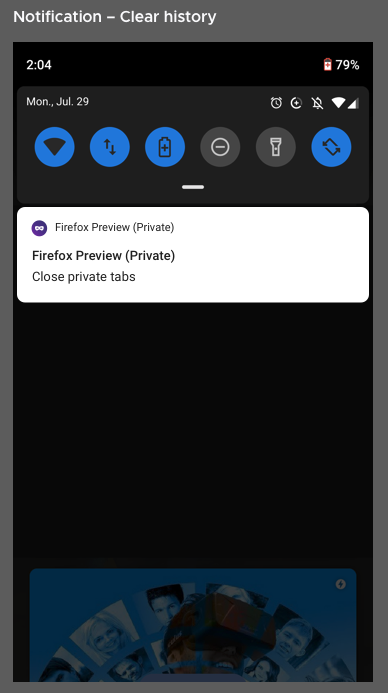
After discussion with @brampitoyo, here is the updated Notification menu. With one action only on tap: Close private tabs. Please note the name of the notification also needs updating "Firefox Preview (Private)
Thanks!
AmyYLee
on 25 Nov 2019
@AmyYLee I've found that the mask inside the circle icon is difficult to see as its displayed at a very small size in the notification bar. Can we change it to just the mask, as the gradient isn't preserved anyways?
NotWoods
on 25 Nov 2019
@AmyYLee & @brampitoyo Note that we cannot change the title displayed next to the icon, that text is the app name, and it's supplied by the system.

 mcarare
on 26 Nov 2019
mcarare
on 26 Nov 2019
@AmyYLee I've found that the mask inside the circle icon is difficult to see as its displayed at a very small size in the notification bar. Can we change it to just the mask, as the gradient isn't preserved anyways?
@NotWoods Yes that works for me. Please use the purple used for the circle for the mask colour (Dark theme should have a lighter purple that we are currently using as well).
AmyYLee
on 26 Nov 2019
@NotWoods Yes that works for me. Please use the purple used for the circle for the mask colour (Dark theme should have a lighter purple that we are currently using as well).
@AmyYLee This will also change the icon icon that appears in the system status bar.

mcarare
on 26 Nov 2019
@NotWoods Yes that works for me. Please use the purple used for the circle for the mask colour (Dark theme should have a lighter purple that we are currently using as well).
@AmyYLee This will also change the icon icon that appears in the system status bar.
Works for me. Thanks
AmyYLee
on 26 Nov 2019
Thanks for the quick feedback @AmyYLee ! 😄
mcarare
on 26 Nov 2019
Verified as fixed on the latest Nightly build 191202 with Google Pixel 2 (Android 9), Google Pixel 3 (Android Q), and Nexus 5 (Android 6.0.1).
The private notification has only the option to "Close private tabs". When tapping on it, the private opened tabs are closed, and the app isn't opened.
 softvision-miralobontiu
on 2 Dec 2019
softvision-miralobontiu
on 2 Dec 2019
Related issues
 andreicristianpetcu
·
3Comments
andreicristianpetcu
·
3Comments
 abodea
·
3Comments
abodea
·
3Comments
 clitetailor
·
3Comments
andreicristianpetcu
·
3Comments
clitetailor
·
3Comments
andreicristianpetcu
·
3Comments
 phileastv
·
3Comments
phileastv
·
3Comments
Most helpful comment
Works for me. Thanks