Fenix: [Bug] Open from private mode notification should always open the private mode homescreen
Steps to reproduce
- Open a tab in private browsing.
- Switch to normal browsing home.
- Minimize the app.
- On the private tabs notification, tap Open.
Expected behavior
The private mode home is displayed showing the private tabs.
Actual behavior
The normal browsing mode is displayed.
Device information
- Android device: Galaxy Tab 3 (Android 8)
- Fenix version: Nightly 10/2, 2.1.0-rc3.
related issue: #6470
 sv-ohorvath
All 5 comments
Hi, I've just checked on the latest Nightly Build #13010606 using the following devices:
• Google Pixel 3a XL (Android 9)
• Huawei Mate 20 Lite (Android 8.1.0)
• Samsung Galaxy S7 (Android 7)
• OnePlus A3 (Android 6.0.1)
• LG Nexus 4(Android 5.1.1)
✔️ Tap Open from the notification works.
❌ Tap on Delete and Open doesn't work. The open PB tabs are closed, on the other hand the user isn't redirected to PB.
► Video
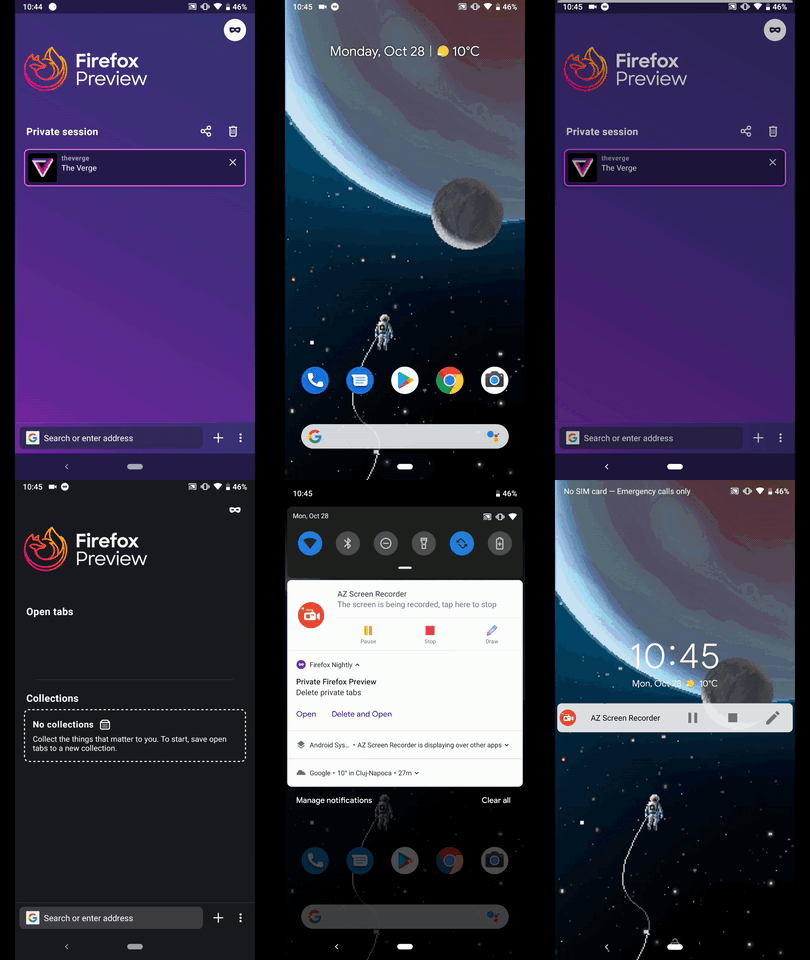
@NotWoods & @BranescuMihai - I would kindly ask you to review the above. :blush:
I'll remove the QA needed label until further clarifications.
 AndiAJ
on 28 Oct 2019
AndiAJ
on 28 Oct 2019
Reproducible on v 2.3.0-rc.2 using a Huawei MediaPad M3 Lite 10 (Android 7)
AndiAJ
on 30 Oct 2019
@AndiAJ Yes, for some reason, I thought of the behaviour as in Chrome, where delete also closes the incognito mode. But for us, the button says Delete and Open, so you're right. Will add a fix for it!
EDIT: Although the fix for this is easy, I am a bit in doubt provided that the code specifically closes all private tabs. Also, as a user, I feel like once I'm done with the private browsing, when I click Delete and open, I want to delete all private tabs and go to normal mode. Further discussion on this is here
How should we proceed?
 BranescuMihai
on 4 Nov 2019
BranescuMihai
on 4 Nov 2019
As @AmyYLee wrote in https://github.com/mozilla-mobile/fenix/issues/6470#issuecomment-558324237:
…here is the updated Notification menu. With one action only on tap: Close private tabs.
This makes the “Open” action no longer relevant.
 brampitoyo
on 25 Nov 2019
brampitoyo
on 25 Nov 2019
In this case I'll go ahead and close this issue.
Thx @brampitoyo ! :relaxed:
AndiAJ
on 26 Nov 2019
Related issues
 andreicristianpetcu
·
3Comments
andreicristianpetcu
·
3Comments
 ekager
·
3Comments
ekager
·
3Comments
 lindongbin
·
3Comments
andreicristianpetcu
·
3Comments
lindongbin
·
3Comments
andreicristianpetcu
·
3Comments
 softvision-miralobontiu
·
3Comments
softvision-miralobontiu
·
3Comments