Fenix: [Bug] Browser grabs focus on text field I didn't select
Steps to reproduce
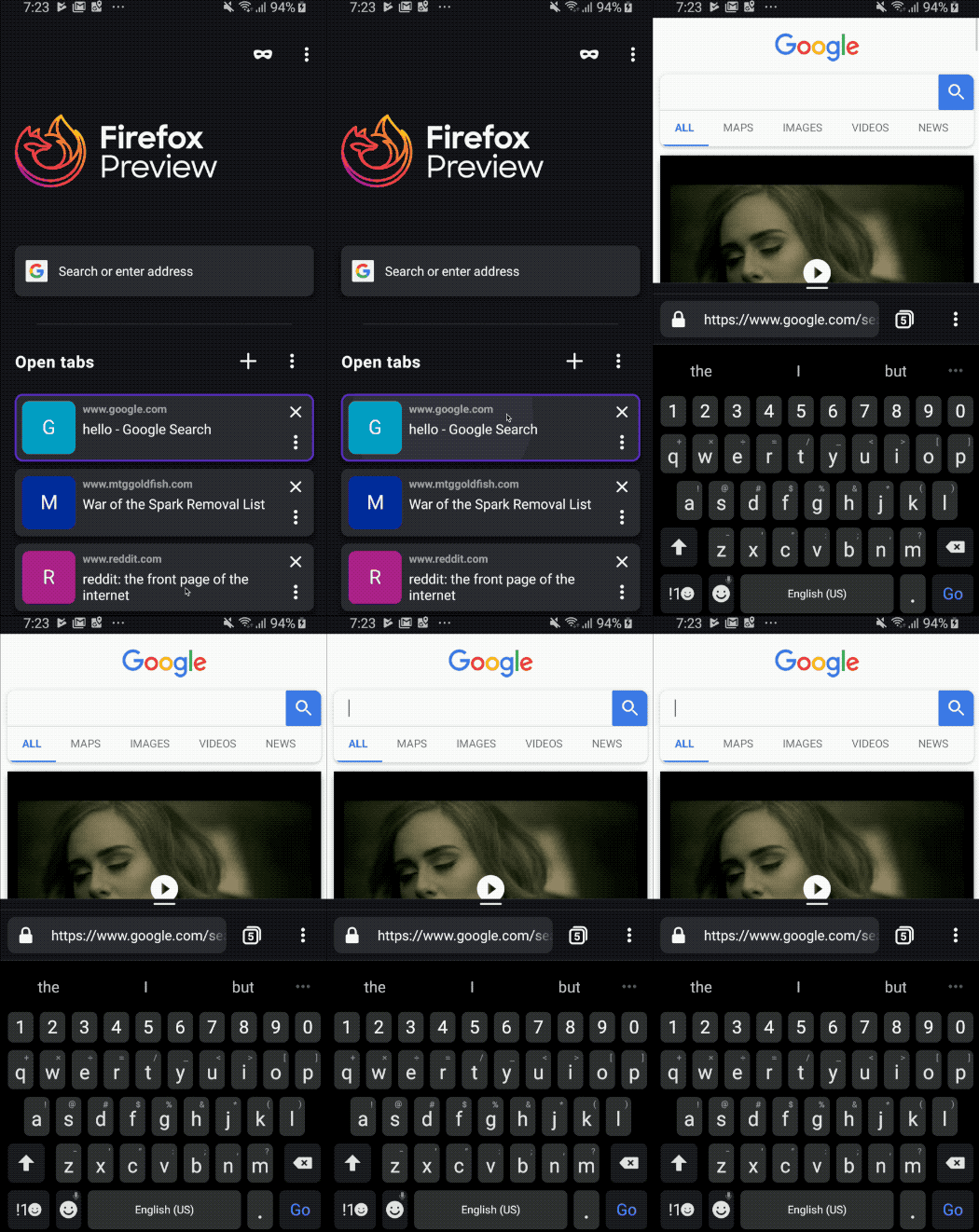
- Load a google search
- Home fragment
- Open tab
Expected behavior
- Tab opens without text box selected
Actual behavior
- Sometimes the text box gets selected
@cpeterso is this a known issue with GV or something on our side?
 sblatz
All 14 comments
How often does this happen? I've tried about ten times (on my Moto G5) and I'm not able to reproduce this focus issue. Does the search box have focus when you switch back to Fenix's home screen? Are you using a non-default Android keyboard?
This is probably a GV issue or maybe Google JS "helpfully" setting input focus.
 cpeterso
on 26 Apr 2019
cpeterso
on 26 Apr 2019
@cpeterso I was able to get better STR:
- Navigate to Google
- Select the search bar
- Press the "dismiss keyboard" button
- Close the app
- Open the app
This triggers the search field to be focused and keyboard displayed.
I'm not sure if this is a separate issue, but one of the sites I check frequently will have focus by default (though it will not show the keyboard). Demo below.

sblatz
on 30 Apr 2019
I was about to reply that the Google keyboard issue looks like something Google is doing (because they serve a different search experience to Fennec/GV than to Chromium-based browsers). But the mtggoldfish.com keyboard issue looks like the same problem. I'll file a GV bug.
cpeterso
on 30 Apr 2019
After composing a detailed GV bug report, I know think the mtggoldfish.com keyboard problem is actually a (side effect of a) feature: Fenix and Fennec are preserving the page state while Chromium-based browsers I tested all force a page reload. If you enter a random search phrase in the mtggoldfish.com search field (without searching) and then close and reopen the browser, only Fenix and Fennec preserve the search phrase you typed.
At this point, I'm not convinced these google.com or mtggoldfish.com behaviors are bugs, but I'm open to suggestions. 😃
cpeterso
on 30 Apr 2019
@cpeterso I think it is fine to preserve the term in the search bar, but why are we maintaining focus on it 🤔
sblatz
on 30 Apr 2019
@cpeterso I think it is fine to preserve the term in the search bar, but why are we maintaining _focus_ on it
In the google.com case, I'm pretty sure Google is programmatically setting the input focus to the search field. That's what they do on desktop. Google serves a different (reduced) search experience to Gecko browsers, so we can't compare Gecko's google.com UX apples-to-apples with Chrome.
The mtggoldfish.com case is more interesting. If you close the app while the page's search field still has input focus (even if the keyboard was manually closed), then we keep focus there when the app is reopened (and we open the keyboard). If you tap input focus outside of the search field before closing/reopening the app, then we don't open the keyboard. However, I do see how this might be an annoying user experience.
Also, mtggoldfish.com's search field appears to automatically steal input focus on page load, but in such a way that we don't open the keyboard. On desktop, you can just start typing to enter search terms in the search field.
I'll ask someone from the Fenix UX team for input here. (I added both the "Needs UX Feedback" and "UX review needed" labels; I don't know which is appropriate.) Perhaps we should _always_ close the keyboard when switching to the Fenix app?
cpeterso
on 1 May 2019
I think it's potentially confusing and not necessary to preserve the keyboard state here – I ran in all kinds of weird issues while testing this (keyboard remains active while switching to home, keyboard reappears when opening a new tab, going back to page where keyboard was originally active and starting to scroll...).
Let's always close the keyboard when navigating to Fenix home.
 topotropic
on 3 May 2019
topotropic
on 3 May 2019
Thanks, @topotropic! I've come around and accept this keyboard behavior is a bug. :) Fennec has the same keyboard behavior as Chrome. This problem only affects GV-powered apps like Fenix, RB, and Focus+GV so it's presumably a GV bug.
I filed a new GV bug: https://bugzilla.mozilla.org/show_bug.cgi?id=1548934
cpeterso
on 3 May 2019
@vesta0 - I resolved the GV bug as WONTFIX. @snorp says we want the current behavior (keeping the keyboard open), which is the same behavior as Fennec. Advanced keyboards maintain state for suggestions and spellcheck. That state would be lost if we forcibly closed the keyboard when switching between apps. @bluemarvin says Fennec specifically _added_ code to ensure the keyboard stayed open.
If you still think closing the keyboard when switching apps is the new behavior we want, we can talk with @snorp.
cpeterso
on 10 May 2019
@cpeterso The original reported issue is not addressed here: when someone manually closes the keyboard she shows intent to not fill out the form (even if the browser still has the field in focus) and when she returns to the page we show the keyboard nevertheless, ignoring her intent, and she has to close it again.
topotropic
on 10 May 2019
@cpeterso thanks for the thorough investigation. Can you let us know if the above comment by @topotropic is related/addressed?
 vesta0
on 14 May 2019
vesta0
on 14 May 2019
The original reported issue is not addressed here: when someone manually closes the keyboard she shows intent to not fill out the form (even if the browser still has the field in focus) and when she returns to the page we show the keyboard nevertheless, ignoring her intent, and she has to close it again.
You are correct. I'll open a new GV bug specifically about the mtggoldfish.com opening the keyboard when it had never been open:
cpeterso
on 15 May 2019
Another example of this: https://github.com/mozilla-mobile/fenix/issues/3556#issue-458049315
sblatz
on 21 Jun 2019
The main issue of the keyboard poping up when switching tabs seems to be resolved. https://mtggoldfish.com/ is calling focus to the search box, this seems like expected behavior that there is a cursor in that case.
 kbrosnan
on 25 Aug 2020
kbrosnan
on 25 Aug 2020
Related issues
 softvision-miralobontiu
·
3Comments
softvision-miralobontiu
·
3Comments
 thelazyoxymoron
·
3Comments
thelazyoxymoron
·
3Comments
 csadilek
·
3Comments
csadilek
·
3Comments
 bbinto
·
3Comments
bbinto
·
3Comments
 andreicristianpetcu
·
3Comments
andreicristianpetcu
·
3Comments