Fenix: FNX-443 ⁃ Make search suggestions a user opt-in option in private mode
I believe it will make the private mode a little more private. Even Chrome disables search suggestions on private mode. Fenix should follow, probably.
User Story
As a user, I want the option to disable search suggestions in private mode only.
Acceptance Criteria
- [ ] Move search suggestions setting to bottom of list
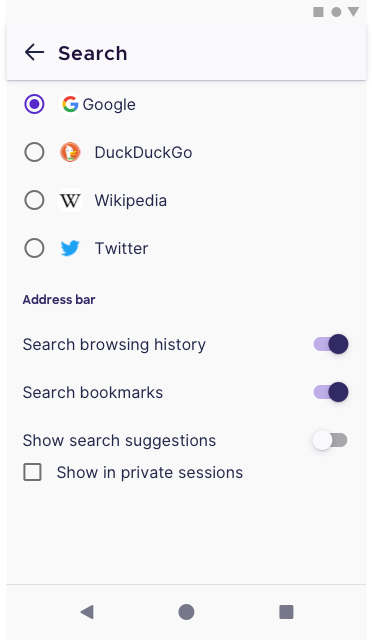
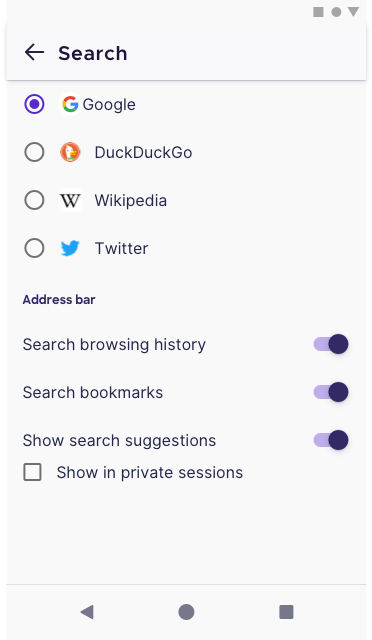
- [ ] Add setting to disable search suggestions in private mode while still getting search suggestions in regular mode.
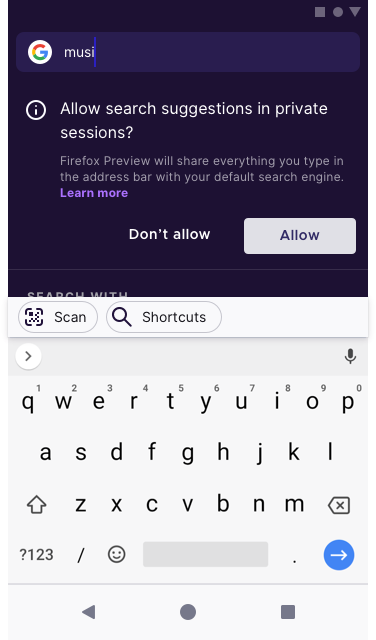
- [ ] Add contextual hint (see mock) for private mode search suggestions
EDIT (@sblatz):
- Search suggestions are disabled by default in private mode
- I get the option to toggle them on in the search screen (as an onboarding type message as seen in Focus)
Let's make sure we also consider how this conflicts with the current toggles in the search screen that are global settings.
 Lululalu
All 25 comments
I think it'd be better to have a preference for private mode search engine, a la Brave with the same toggle we have already for showing search suggestions working independently depending on the browsing mode.
Went ahead and opened: #1076
 yoasif
on 19 Mar 2019
yoasif
on 19 Mar 2019
How about we do this similar to what we've done in Focus?
First time, users enter a search term in private browsing, show a prompt to enable/disable search suggestions, and this choice can be toggled under settings > search.
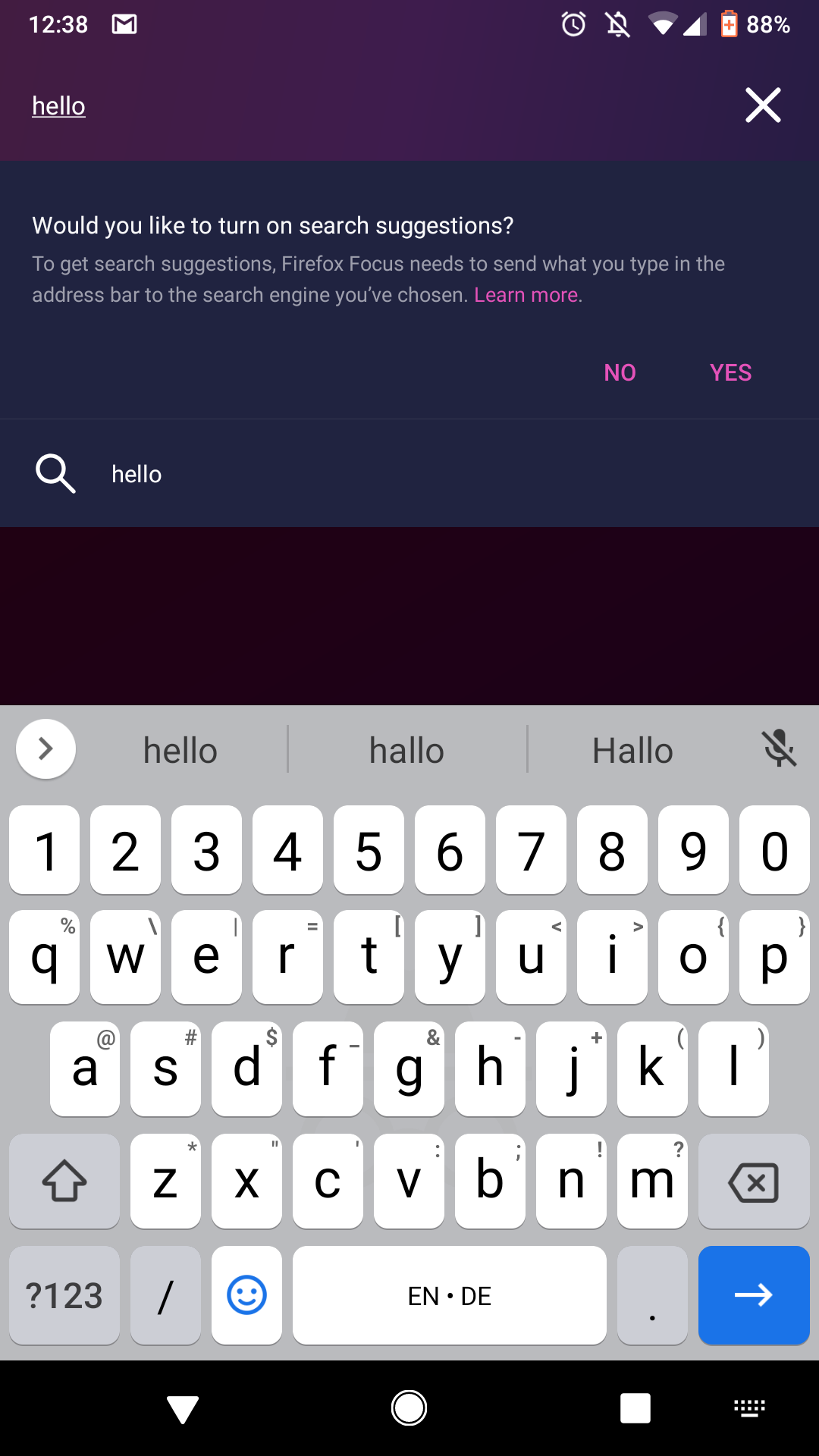
/cc @topotropic and @brampitoyo
 bbinto
on 20 Mar 2019
bbinto
on 20 Mar 2019
Definitely retain search suggestions or at most give an option to turn off. Private browsing is more so about keeping data private locally on the device rather than (ineffectively) ensurelibg private data handling by websites.
 joebloggs7657
on 9 Jul 2019
joebloggs7657
on 9 Jul 2019
removing the ux label - this is on our radar already as it's part of Q3 plans.
 lime124
on 23 Jul 2019
lime124
on 23 Jul 2019
As a +1, I was very surprised to get search suggestions in private mode, which means that what I type goes to the search engine. This isn't the case in Firefox/Android, and as far as I know there's even no way to turn it on in that browser.
I'd be super happy to be able to disable this in Fenix!
 julienw
on 26 Aug 2019
julienw
on 26 Aug 2019
@lime124 can we re-use the Focus designs for this one? Attached above.
 vesta0
on 1 Oct 2019
vesta0
on 1 Oct 2019
Discussed with the UX team. We can re-use the Focus design for the notification but UX will spend 1-2 hours on wireframe for toggle/setting.
vesta0
on 1 Oct 2019
FYI for Amy - Verdi very recently worked on some settings for private mode on desktop.
Also this ticket (as sblatz points out in comment 0) will cover a bit of redesign on the search engine setting page to organize/group the various settings/options and make it more clear what is doing what.
lime124
on 4 Oct 2019
Here is the flow. Copy has been approved by @jpfaller
Please be mindful of the spacing between the toggle and checkbox. They have been intentionally designed so it's closer together to indicate that these are related items. Let me know if you have any questions. Thanks!
 AmyYLee
on 7 Oct 2019
AmyYLee
on 7 Oct 2019
UPDATE: We might want to add another item into this screen as we re-org Settings. Stay tuned.
AmyYLee
on 9 Oct 2019
@AmyYLee should we also have a prompt like the one below for the very first time user searches in private browsing?
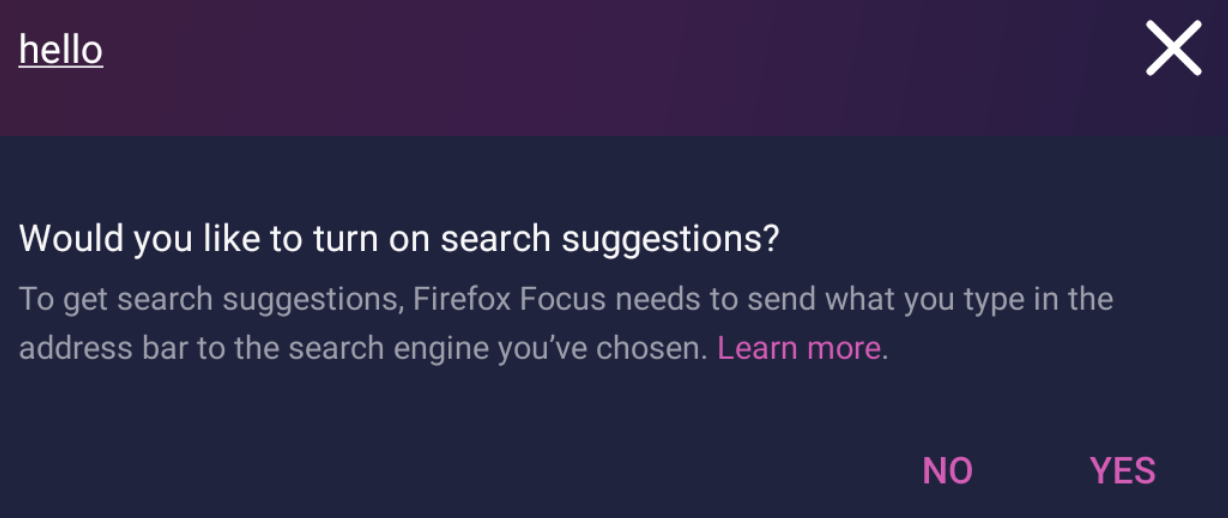
vesta0
on 10 Oct 2019
@AmyYLee should we also have a prompt like the one below for the very first time user searches in private browsing?
Yes we should include that. I'll add it into the spec. @jpfaller Can you review the copy above and see if we need to revise it for Fenix? NI @mheubusch in Jeff's absence.
AmyYLee
on 10 Oct 2019
on track to be completed by end of day tomorrow - though dependent on strings.
lime124
on 10 Oct 2019
HI,
Here is the spec. It's ready for engineering with the exception that the strings need to be reviewed by @mheubusch in this portion (see screenshot below). Also a question for Michelle and @vesta0 , do we need a new sumo page for "Learn more"? or should I omit this part? There is a Learn more sumo page for Focus search suggestions.
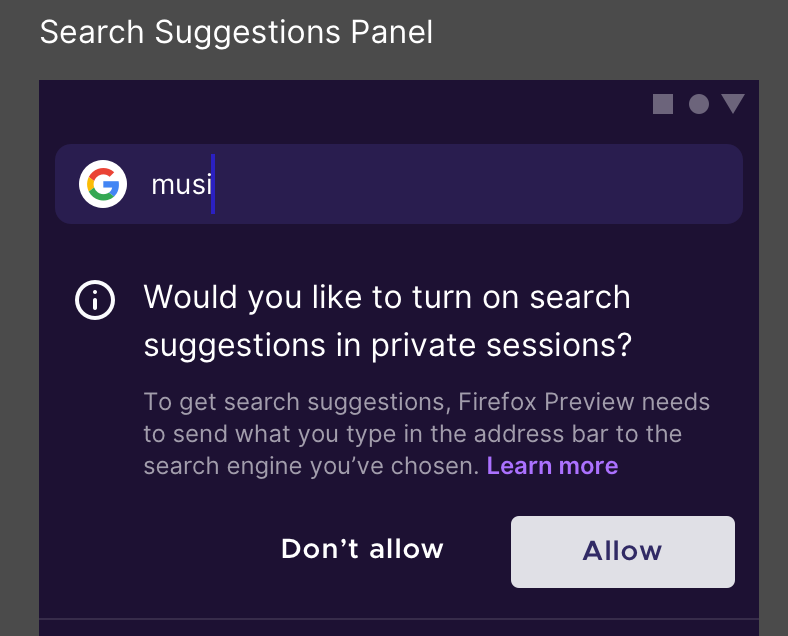
AmyYLee
on 11 Oct 2019
Recommended text:
Allow search suggestions in private sessions?
Firefox Preview will share everything you type in the address bar with your default search engine. Learn more
Note: Learn more links to ttps://support.mozilla.org/en-US/kb/how-search-firefox-preview
 mheubusch
on 11 Oct 2019
mheubusch
on 11 Oct 2019
@vesta0 Added the needs:sumo label for support with updating the copy at https://support.mozilla.org/en-US/kb/how-search-firefox-preview with a note that search settings now allow you to enable and disable search suggestions in private browsing when you have have enabled them in normal browsing. @AmyYLee can provide the settings panel showing this update.
mheubusch
on 11 Oct 2019
Screens for Sumo:
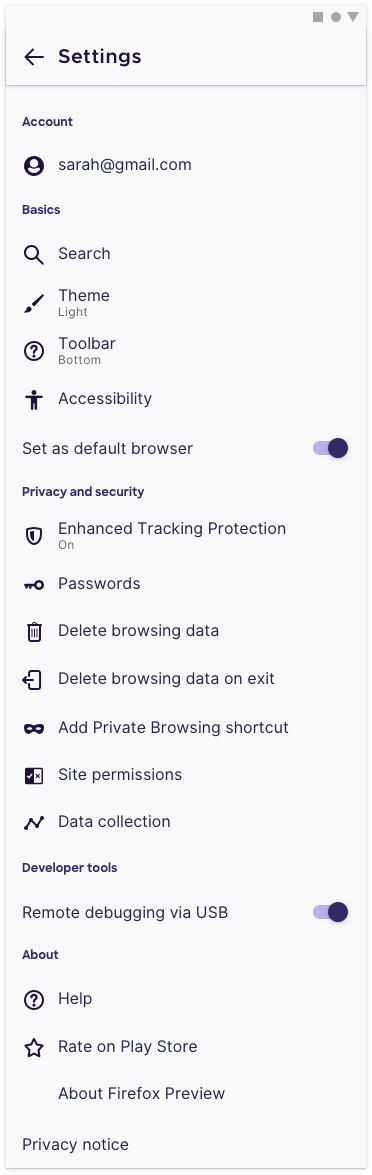
AmyYLee
on 11 Oct 2019
@sblatz Final Spec: https://share.goabstract.com/e4322cfc-9036-4fbc-b417-5ac7df581b19?mode=design&sha=9fe9a001eabfa8ac0898d9f298791ead964230a5
AmyYLee
on 11 Oct 2019
@AmyYLee This is what the current screen looks like:
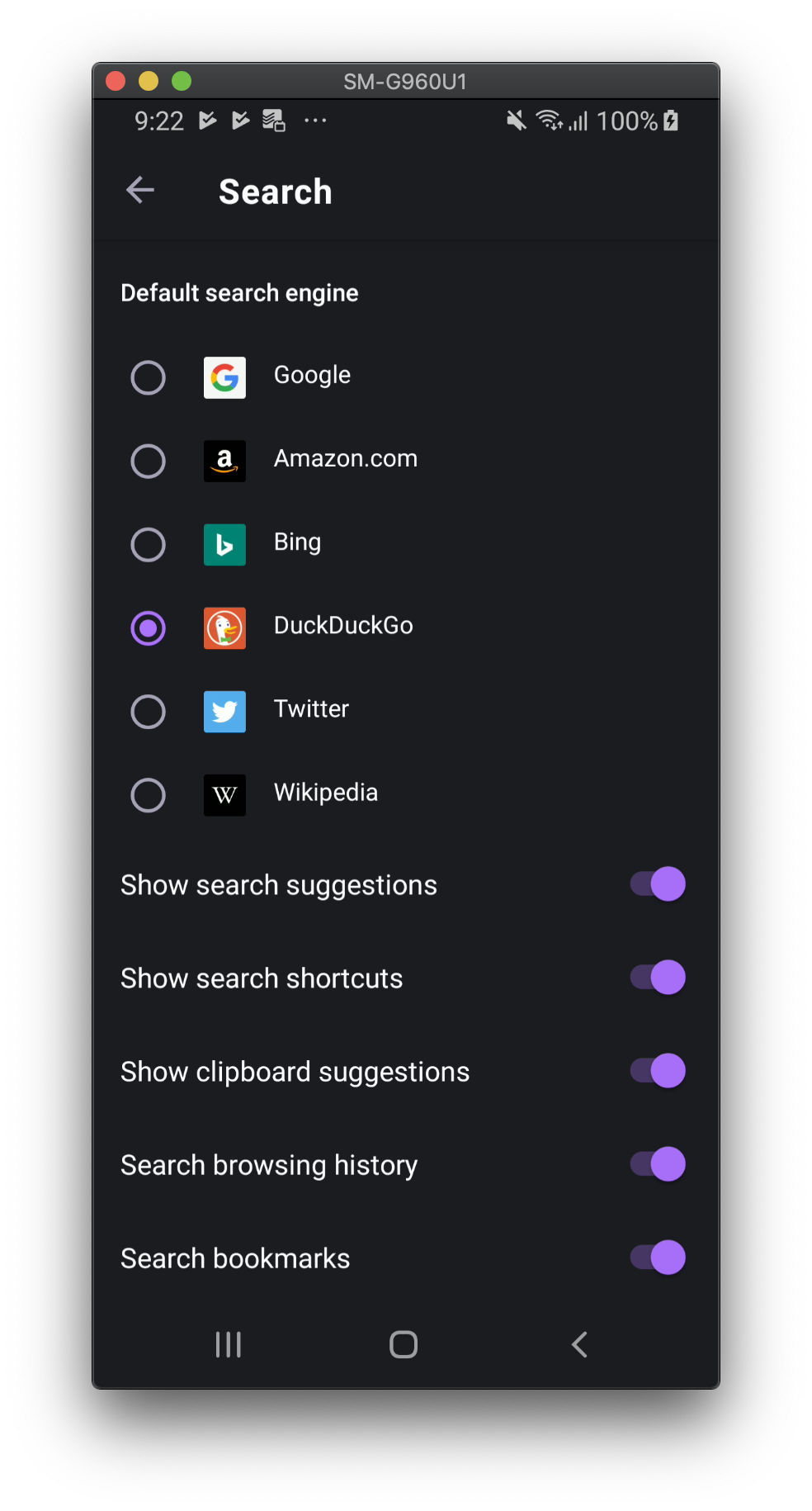
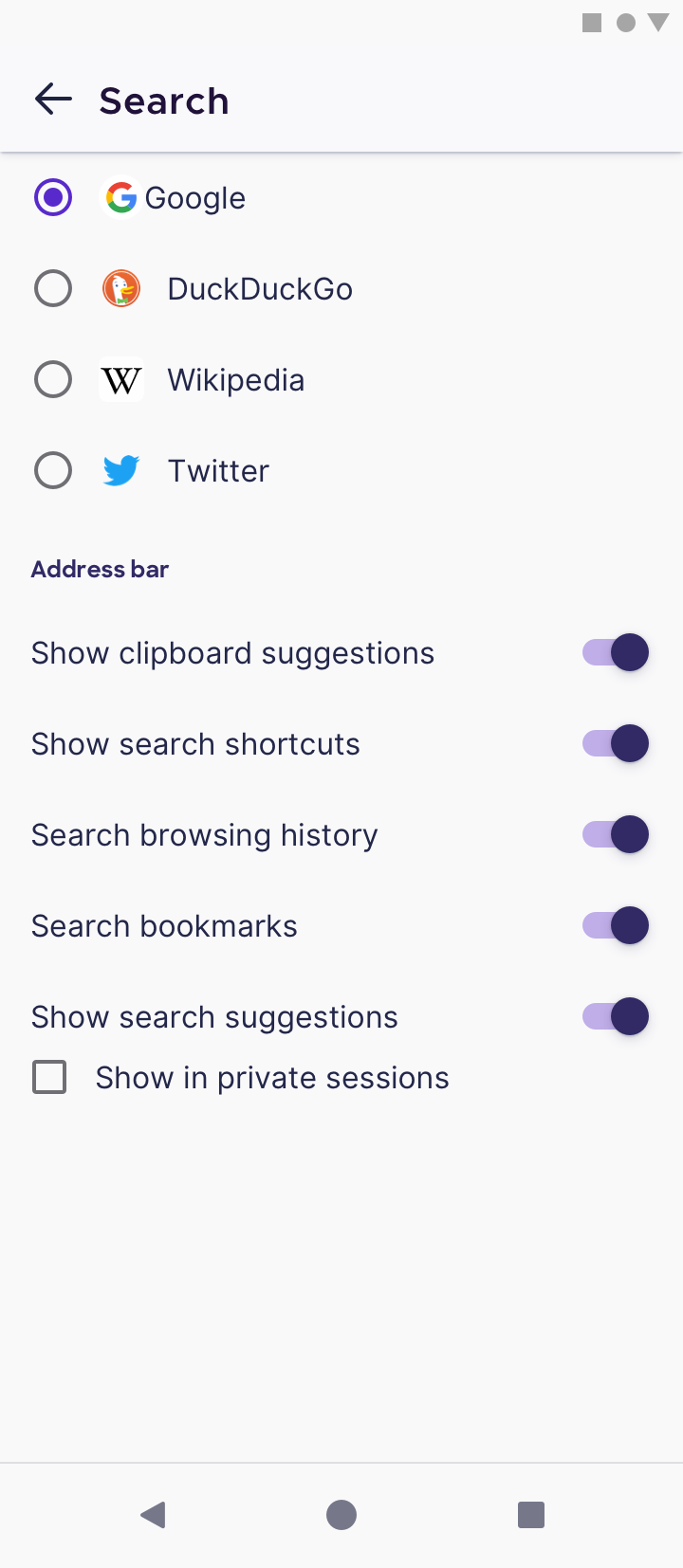
Should we move "show search suggestions" to the bottom of the list to accommodate that checkbox?
Also I'm a bit worried that three types of toggles on that screen might feel a bit busy. What are your thoughts on that? (checkbox, toggle, and circle selection)
 sblatz
on 14 Oct 2019
sblatz
on 14 Oct 2019
@sblatz Hi, let's stick to toggles because it's the move obvious in terms of On/Off. I've also added header just above the toggles to break up the two sections. Please move search suggestions to the bottom of the list to accommodate the checkbox. Thanks!
AmyYLee
on 16 Oct 2019
@AmyYLee Do we want to show the hint the first time the user opens the search in private, or after he starts typing (the "Fill link from clipboard" disappears at that moment)?
For the first option, do we want to show it below or above "Fill link from clipboard"?
TY!
 mcarare
on 12 Nov 2019
mcarare
on 12 Nov 2019
@mcarare Hi, can we have this show the first time the user starts typing? This is the same as Focus. Thanks
AmyYLee
on 12 Nov 2019
Hi all!
Verified that:
- when searching in private mode, the user is asked to allow or not search suggestions in private mode,
- when search suggestions are denied, there are no more suggestions in private mode,
- users can modify seeing search suggestions in private mode from Settings-Search.
Tested on the latest Nightly build 11/25 with Google Pixel 3 (Android Q), and Huawei P9 Lite (Android 7).
 softvision-miralobontiu
on 25 Nov 2019
softvision-miralobontiu
on 25 Nov 2019
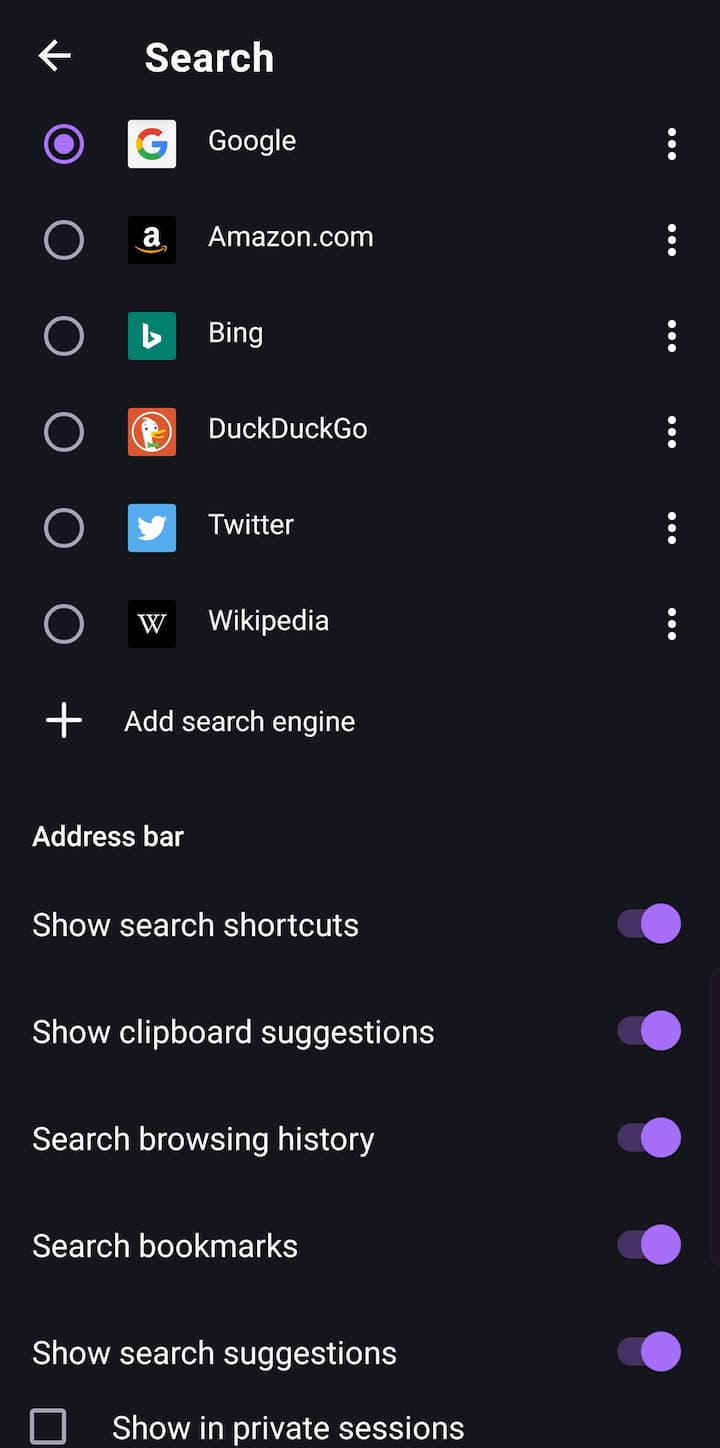
(Uncropped screenshot, scrolled down as far as I could)
Ive noticed the spacing for this features setting is a bit cramped.
Didn't know if this should go in a new issue or not.
Model: Samsung S10+ (SM-G975U)
Nightly build id: 72.0a1 20191202091209
 bepvte
on 10 Dec 2019
bepvte
on 10 Dec 2019
@bepvte Would you be able to file a new issue for this?
My first suggestion, then, is to check whether the spacing of this Search sub-section matches the spacing of all other item under Settings (in general).
If they both match, then it’s not an issue. If they don’t match (ie. somehow this sub-section looks more cramped than other pages within Settings), then we’ll fix it.
Thanks!
 brampitoyo
on 11 Dec 2019
brampitoyo
on 11 Dec 2019
Related issues
 AndiAJ
·
3Comments
AndiAJ
·
3Comments
 abodea
·
3Comments
abodea
·
3Comments
 lindongbin
·
3Comments
lindongbin
·
3Comments
 andreicristianpetcu
·
3Comments
andreicristianpetcu
·
3Comments
 thelazyoxymoron
·
3Comments
thelazyoxymoron
·
3Comments
Most helpful comment
How about we do this similar to what we've done in Focus?
First time, users enter a search term in private browsing, show a prompt to enable/disable search suggestions, and this choice can be toggled under settings > search.
/cc @topotropic and @brampitoyo