fast-text-field input doesn't change width
Describe the bug; what happened?
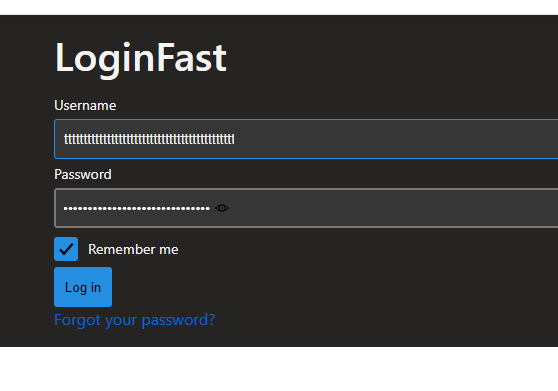
In my css I define that fast-text-fields should span to 100% width. The visual does change, but the area for input doesn't. You can see that very good with the password field where the little eye from the browser is visible. As soon as you reach that point the field starts scrolling.
What are the steps to reproduce the issue?
Example:
ReproductionSample.zip
- start reproduction project and change to login fast
- select the username field and enter values till you see it starts scrolling
- select the password field and see the "show password" indicator in the default, not changed to 100% width position
- enter values till you see it starts scrolling
What behavior did you expect?
The area for input expands too.
If applicable, provide screenshots:
In what environment did you see the issue?
- OS & Device: [e.g. MacOS, iOS, Windows, Linux] on [iPhone 7, PC] Windows
- Browser [e.g. Edge, Chrome, Safari, FireFox] Edge
- Version [e.g. 1.8.0] 1.7 (latest on npm)
Is there any additional context?
 NPadrutt
All 8 comments
I couldn't get the reproductionsample to run just yet, but I believe I have seen the input of the fast-text-field just not having a width prop to make it 100% on some other projects. I'll take a look at that and also see if that's truly what we want.
 SethDonohue
on 3 Aug 2020
SethDonohue
on 3 Aug 2020
@SethDonohue I think this may be related to this issue: https://github.com/microsoft/fast/issues/3269#issuecomment-644322338
@nicholasrice thoughts on if we should provide a better method of accomplishing this without using CSS parts? Perhaps we should have a custom property for the control to set the width of the control?
 chrisdholt
on 3 Aug 2020
chrisdholt
on 3 Aug 2020
@chrisdholt are you saying a custom CSS property or a custom html prop/attr?
Is the intent of the input field to always be the full width? I feel that is definitely what a general user would expect.
Adding a width: 100% to the .control still works with the start and end parts.
SethDonohue
on 3 Aug 2020
@chrisdholt are you saying a custom CSS property or a custom html prop/attr?
Is the intent of the input field to always be the full width? I feel that is definitely what a general user would expect.
Adding awidth: 100%to the.controlstill works with thestartandendparts.
@nicholasrice investigated having this map to the height of the element and had feedback in the comment linked above. I think there are a couple of ways to address this:
- The control defaults to 100% of the parent width. This would solve the issue; anyone looking to do something outside that behavior would need to address it using the CSS part for
control. - We leave the style as it currently is but allow a method aside from CSS parts (were just recently supported in Safari) to easily modify this - CSS Custom Property for the control.
Number 1 above seems reasonable, but would be interested in feedback from @nicholasrice as this seems related to his previous investigation and he likely has good thoughts on why he may not have pursued something similar to 1 above.
chrisdholt
on 3 Aug 2020
I assume if we go with 1 then we'll want to do the same to text-area, it currently has max-width 100% on the :host
SethDonohue
on 4 Aug 2020
I'd be in favor of making the internal control 100%. I think that will result in the most intuitive behavior for consumers of the component when they are integrating it into a layout.
 EisenbergEffect
on 4 Aug 2020
EisenbergEffect
on 4 Aug 2020
https://github.com/microsoft/fast/issues/3269#issuecomment-644322338 mostly concerned setting height - there are two elements contained in a fast-textfield that are stacked vertically by default; the label and the textbox. What should grow when the height of the fast-textfield is adjusted? Is it always the the textbox? Both elements? Spacing between? There is likely an intuitive behavior here but I'm not 100% certain of what it is.
Width is a bit easier I think, at least for the default vertically stacked layout - growing to 100% host width seems intuitive to me.
 nicholasrice
on 4 Aug 2020
nicholasrice
on 4 Aug 2020
Looks like we agree that the width being 100% for the control is the best approach. I can put up a quick PR for text-area and text-field to have their controls be width: 100%
SethDonohue
on 4 Aug 2020
Related issues
 MarcSkovMadsen
·
6Comments
nicholasrice
·
5Comments
MarcSkovMadsen
·
6Comments
nicholasrice
·
5Comments
 eljefe223
·
6Comments
eljefe223
·
6Comments
 bheston
·
3Comments
nicholasrice
·
7Comments
bheston
·
3Comments
nicholasrice
·
7Comments