I try to obtain a name with specific gender in NodeJs, but doesn't work.
what am I doing wrong?
    let genders = [ 'female' , 'male' ];
    let gender = faker.random.arrayElement(gender);
    let name = faker.name.firstName(genre);
 IgnacioYanjari
All 10 comments
Ah, you were close! Line 2 should be:
let gender = faker.random.arrayElement(genders);
(This is because the array you created in line 1 is named genders)
 stoutlabs
on 5 Aug 2018
stoutlabs
on 5 Aug 2018
I'd also make sure to test on master branch.
On Sun, Aug 5, 2018 at 7:59 AM, Daniel Stout notifications@github.com
wrote:
Ah, you were close! Line 2 should be:
let gender = faker.random.arrayElement(genders);
(This is because the array you created in line 1 is named genders)
—
You are receiving this because you are subscribed to this thread.
Reply to this email directly, view it on GitHub
https://github.com/Marak/faker.js/issues/677#issuecomment-410515405, or mute
the thread
https://github.com/notifications/unsubscribe-auth/AAERe_RQAolSTxN46xn_F7vLH57T99_dks5uNt4XgaJpZM4VvI9e
.
 Marak
on 5 Aug 2018
Marak
on 5 Aug 2018
@stoutlabs soo close, but still doesn't work and it was my transcription error. 😢
let genders = [ 'female' , 'male' ];
let gender = faker.random.arrayElement(genders);
let name = faker.name.firstName(gender);
@IgnacioYanjari Hmm, I just tested your corrected code in the console at https://rawgit.com/Marak/faker.js/master/examples/browser/index.html and it worked fine for me.
(Note: Subsequent calls to update gender and name worked as well.)
stoutlabs
on 6 Aug 2018
I tried in the console log at https://rawgit.com/Marak/faker.js/master/examples/browser/index.html and still get a name for male gender with gender set up in 'female'.
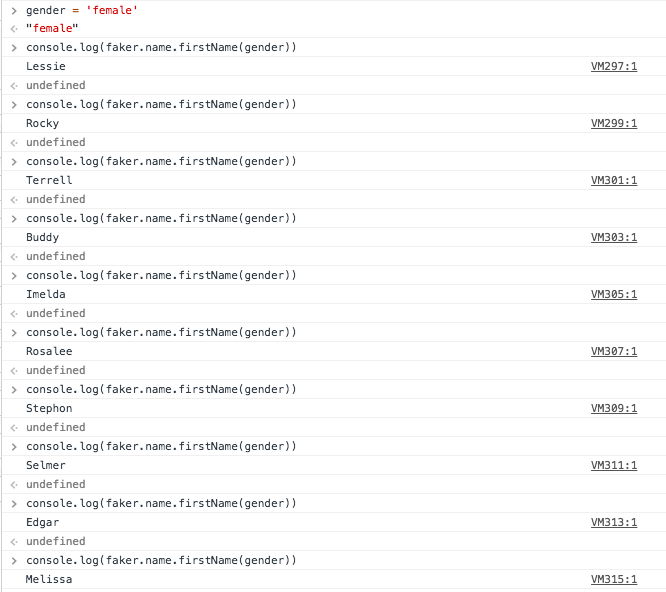
I assume that edgar is a male name 🤔
IgnacioYanjari
on 6 Aug 2018
Haha, you are right - I can confirm this issue too. (I only tried 3 or 4 times previously, and must have gotten lucky!)
After looking at the source (at /lib/name.js) I even tried using numeric values for gender (0 for male, 1 for female) and still receive incorrect gendered names.
Digging further into console logs shows that faker.definitions.name.female_first_name and faker.definitions.name.male_first_name are both undefined... but I see them both defined and exported in the 'en' locales folder.
stoutlabs
on 6 Aug 2018
The male_first_name and female_first_name definitions for the en locale are in the master branch, but they're not in the 4.1.0 release, which is what npm will pull if you run npm install faker.
I'm not sure how actively maintained this project is, it looks like there's a few PRs open that haven't been merged, and there have been a few merges since the last official release.
If you need to use the gendered name functions you can checkout the master branch and build yourself...
 markreid
on 27 Aug 2018
markreid
on 27 Aug 2018
Ahhh, good catch on the NPM version not being the same as the current master branch! (That must be what the author was trying to say above.)
stoutlabs
on 27 Aug 2018
Is there any news? Can't you just publish a release, @Marak?
 rugk
on 26 Sep 2019
rugk
on 26 Sep 2019
It looks like the issue still persists as of 30/07/2020. If you used npm install faker - your package.json file will always point to version 4.1.0. This version does not contain the latest changes (last update ~2017) In order to use gendered names in your faker data-
- Point your
package.jsondependency to the github repository link as such:
  "dependencies": {
    "faker": "https://github.com/Marak/Faker.js"
  }
- Use the following code to generate either female or male names. Note that the
firstName()function accepts the parametergenderof typeinteger. The gender parameter can either be 0 (male) or 1 (female).
// Generate 50 female names
const faker = require('faker');

for (let i = 0; i < 50; i++) {
    let name = faker.name.firstName(1) // female
    console.log(name)
}
 ppanchal97
on 30 Jul 2020
ppanchal97
on 30 Jul 2020
Related issues
 adoyle-h
·
3Comments
adoyle-h
·
3Comments
 pvpshoot
·
4Comments
pvpshoot
·
4Comments
 ghost
·
4Comments
ghost
·
4Comments
 fauzanelka
·
4Comments
fauzanelka
·
4Comments
 aadamsx
·
6Comments
aadamsx
·
6Comments
Most helpful comment
The
male_first_nameandfemale_first_namedefinitions for theenlocale are in the master branch, but they're not in the 4.1.0 release, which is what npm will pull if you runnpm install faker.I'm not sure how actively maintained this project is, it looks like there's a few PRs open that haven't been merged, and there have been a few merges since the last official release.
If you need to use the gendered name functions you can checkout the master branch and build yourself...