Faker.js: TypeScript setLocale and locale probleme
Hey folks!
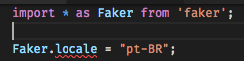
I have a typescript file that use faker, I import module using this code:
import * as Faker from 'faker';
But if I try to set locale, he don't let me do that because he tell me that locale is read only property.
I tried to use setLocale function, but I can't find it in module
 nicolastakashi
All 14 comments
Same... also the typings don't have a faker.setLocale()-Methode as described in the README.md.
EDIT: For importing only a sinlge locale, i found you can just import from import * as faker from 'faker/locale/de_AT' for example... still - seems switching locals on the fly is currently not possible...
 FloNeu
on 27 May 2018
FloNeu
on 27 May 2018
I'm not really using Typescript, so if anyone can help update the Typescript definitions in a PR it would help.
 Marak
on 12 Jul 2018
Marak
on 12 Jul 2018
Actually quite simple:
Go to @types/faker, edit index.d.ts
declare namespace Faker {
    interface FakerStatic {
        setLocale(locale: string): void;
Unfortunatly the method setLocale is currently not in npm, see: https://npm.runkit.com/faker/lib/index.js?t=1533829846415
So you manually have to edit the lib/index.js in your node_modules/faker to include
Faker.prototype.setLocale = function (locale) {
  this.locale = locale;
}
Commit https://github.com/Marak/faker.js/commit/8ea2302b05314b84f7cfd4e90e04ea8a17dc5ecb is not yet applied to npm repository.
 Bomberus
on 9 Aug 2018
Bomberus
on 9 Aug 2018
@Bomberus I did do the same test that you and I got the same result.
I imagine that we need to send a pull request to types repo and the faker repo.
nicolastakashi
on 10 Aug 2018
Commit : https://github.com/Marak/faker.js/commit/8ea2302b05314b84f7cfd4e90e04ea8a17dc5ecb
Created an incident hopefully npm maintainer will adopt.
Bomberus
on 10 Aug 2018
Alt: To use faker with your locale:
var faker = require('../locale/en');
console.log(faker.name.findName());
Doc: here
 strobox
on 19 Sep 2018
strobox
on 19 Sep 2018
This is a Typescript issue.
Require is not recommended. You could use:
import 'faker/locale/de'
Furthermore, in my usecase I need to dynamically choose a language
like so:
faker.setLocale(faker.random.locale())
I could use
import(`faker/locale/${faker.random.locale()}`).then(() => {
  // continue script
})
But this feels more like a hacky workaround and can be easily avoided, if the npm package is updated!!!
Bomberus
on 19 Sep 2018
The easiest way to solve this is like so:
import * as faker from "faker/locale/de";
 gjungb
on 28 Sep 2018
gjungb
on 28 Sep 2018
@gjungb Yes, and I may have to import faker before import the locale:
import 'faker'
import * as faker from 'faker/locale/ja'
 acro5piano
on 25 Nov 2018
acro5piano
on 25 Nov 2018
Is there any solution to dynamically set locale in Typescript?
Import
import * as faker from 'faker';
faker.setLocale(faker.random.locale())
Log
Uncaught TypeError: faker__WEBPACK_IMPORTED_MODULE_1__.setLocale is not a function
 somq
on 19 Jul 2019
somq
on 19 Jul 2019
@somq
This is a little bit strange solution, but does await import work for you?
function fakerFactory(locale = 'en') {
  switch (locale) {
    case 'en':
      return import('faker/locale/en')
    case 'ja':
      return import('faker/locale/ja')
    // ...
  }
}

async function main() {
  const faker = await fakerFactory('en')
  faker.random.locale()

  // ...or
  const faker = await fakerFactory('ja')
  faker.random.locale()
}
Hi @acro5piano
Thanks for your answer, I will implement the import this way.
For note;
In theory it works though it's super tricky imo.
Furthermore the async import forces the whole class to be async.
somq
on 19 Jul 2019
I think all we can do practically is:
- Send a PR to Definitely Typed and wait for its merge
- Use
@ts-ignoreabovefaker.setLocale
acro5piano
on 19 Jul 2019
Well actually apparently @types/faker has the definition for setLocale() but faker doesn't.
I imported the locale in the server file and used this one everywhere.
// in server file
import jaFaker from "faker/locale/ja";

export { jaFaker };

//in some other file
import { jaFaker as faker} from '../../../server';
 musakasim
on 19 May 2020
musakasim
on 19 May 2020
Related issues
 fauzanelka
·
4Comments
fauzanelka
·
4Comments
 ghost
·
4Comments
ghost
·
4Comments
 Deilan
·
3Comments
Deilan
·
3Comments
 AlexMiroshnikov
·
4Comments
AlexMiroshnikov
·
4Comments
 Aleyasen
·
6Comments
Aleyasen
·
6Comments
Most helpful comment
Actually quite simple:
Go to @types/faker, edit index.d.ts
Unfortunatly the method setLocale is currently not in npm, see: https://npm.runkit.com/faker/lib/index.js?t=1533829846415
So you manually have to edit the lib/index.js in your node_modules/faker to include
Commit https://github.com/Marak/faker.js/commit/8ea2302b05314b84f7cfd4e90e04ea8a17dc5ecb is not yet applied to npm repository.