Facebook-ios-sdk: Unable to compile UI test scheme when using SPM dependency
Checklist
- [x] I've updated to the latest released version of the SDK
- [x] I've searched for existing GitHub issues
- [x] I've looked for existing answers on Stack Overflow, the Facebook Developer Community Forum and the Facebook Developers Group
- [x] I've read the Code of Conduct
- [x] This issue is not security related and can safely be disclosed publicly on GitHub
Environment
Describe your dev environment here, giving as many details as possible. If you have them, make sure to include:
- Xcode Version:
11.3.1 - Swift Version:
X.X.X(if issue is Swift related) - Installation Platform & Verison:
[SPM]version5.14.0
Goals
Run test scheme for UI testing for usage by things like Fastlane
Expected Results
Product compiles and runs/tests
Actual Results
Test scheme fails to compile with No such module 'FBSDKCoreKit' exception
Steps to Reproduce
Checkout sample project here and try and run/build/test the 'SPMUITests' scheme
 davidrothera
All 20 comments

davidrothera
on 19 Jan 2020
Also, any of the other Swift packages I use don't cause this, only this one.
davidrothera
on 19 Jan 2020
This is interesting.
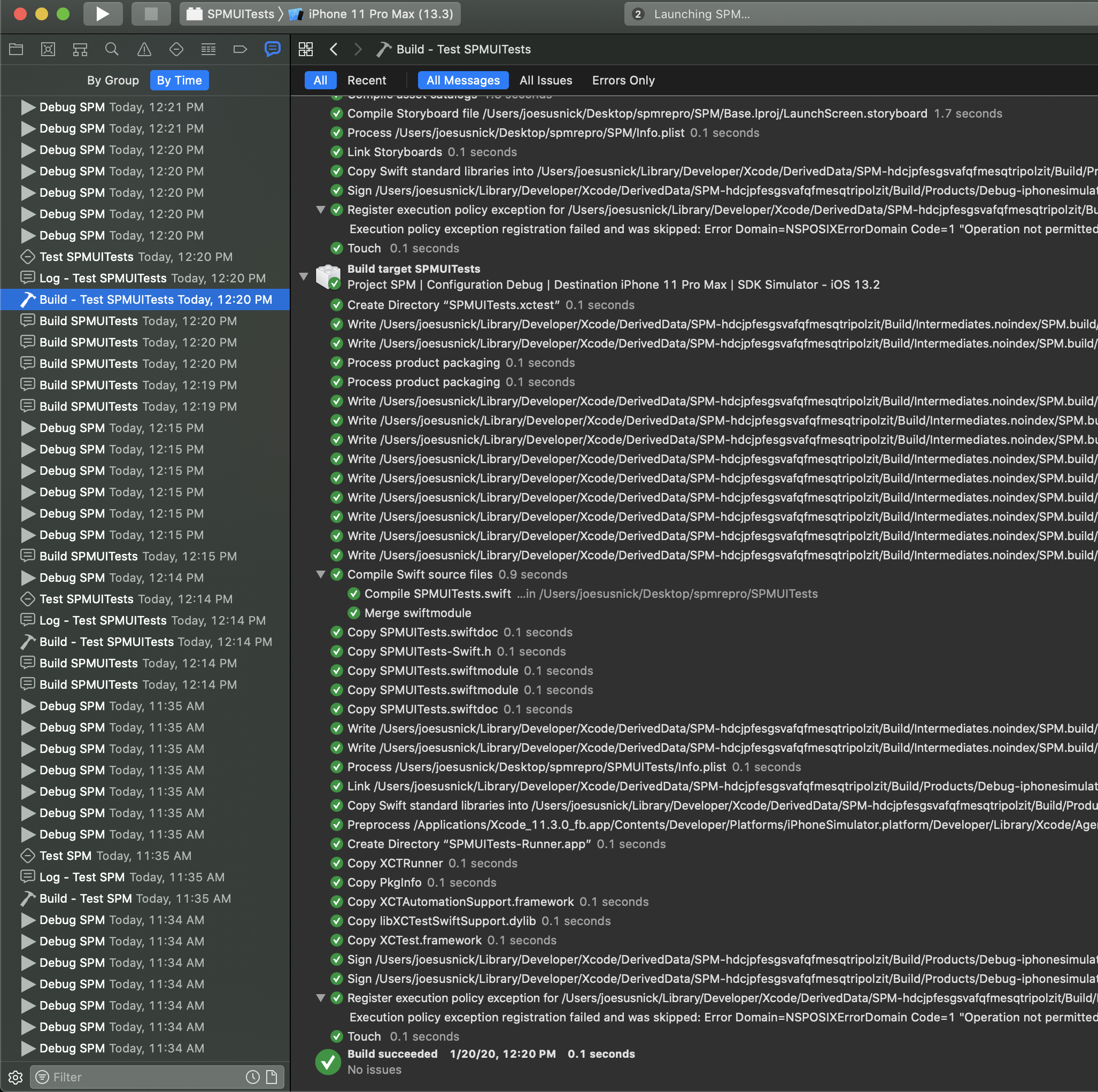
I cloned the sample project and ran it with Xcode 11.3.0. I was able to run the UI Tests without issue.
Looks like the package version it used was 5.14.0 - the specific revision from the package.resolved file is: 5546ad5b77171b0442a2f2d7885556a62cbe91d7 but that shouldn't change as long as the version is 5.14.0.
Steps I took to try and repro:
- cleaned the build folder
- removed derived data
- reset the package caches.
- built for testing (succeeded)
- ran the tests in
SMPUITests.swiftfrom Xcode
I'll double check that this isn't an Xcode 11.3.0 vs 11.3.1 issue.
 joesus
on 20 Jan 2020
joesus
on 20 Jan 2020
Also thank you for the SPM feedback! Really want this to be a first-class experience for all our devs and that totally includes UITests. :D
joesus
on 20 Jan 2020
@joesus running the tests from inside worked ok for me but what broke was when trying to compile/run/test the SPMUITests scheme
davidrothera
on 20 Jan 2020
@joesus running the tests from inside worked ok for me but what broke was when trying to compile/run/test the SPMUITests scheme
That is really strange. I'm seeing it work. My thought is that this must be a difference in our environments. Any ideas on how to get to the bottom of this?
joesus
on 20 Jan 2020
Ok so after rolling back to 11.3 I still had the same issues:
- Cleared Derived data
- Cleaned build folder
- Reset package cache
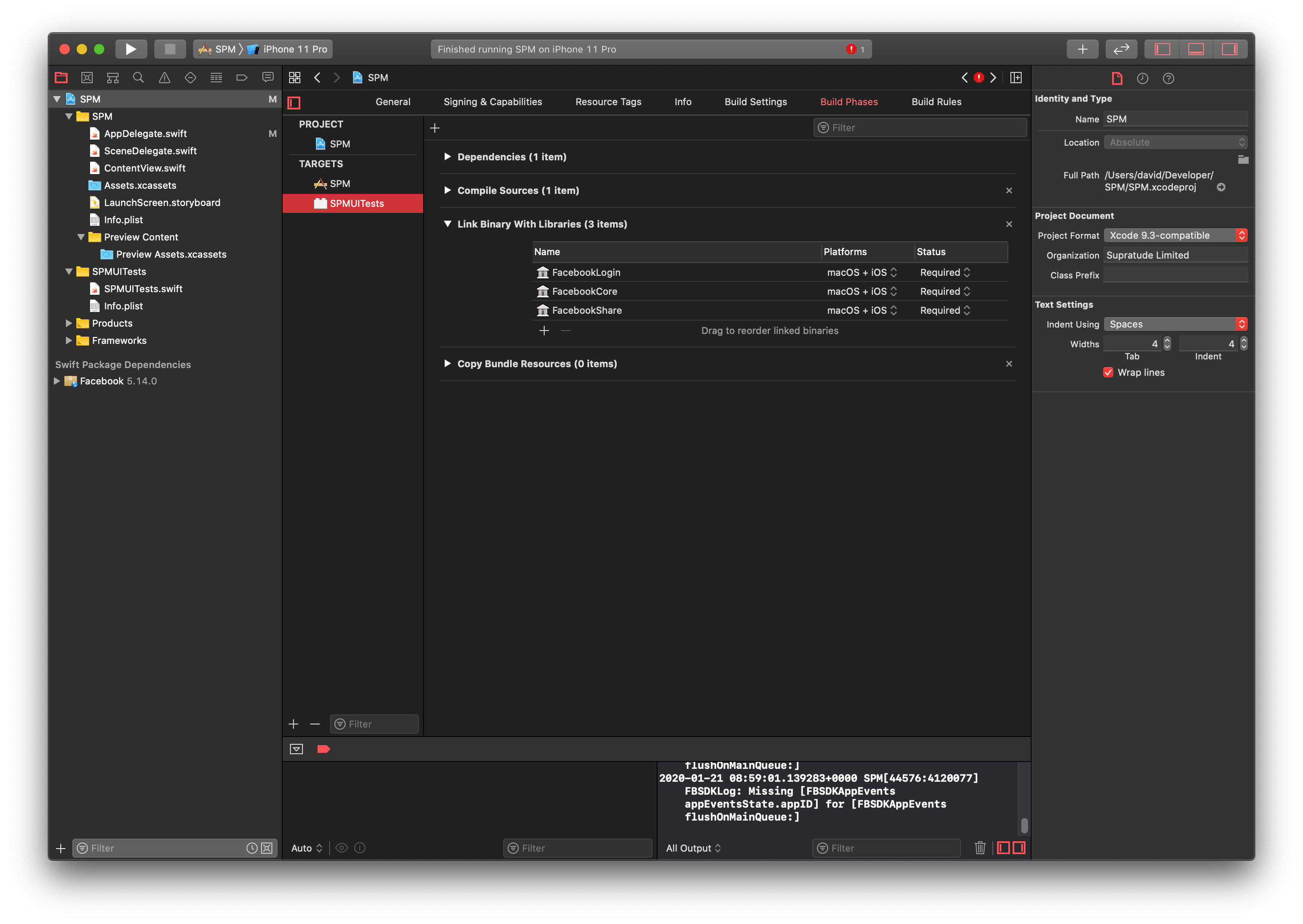
However I do seem to have got it working by manually adding the libraries to the SPMUITests target as per screenshot and now things are working 🙄
davidrothera
on 21 Jan 2020
Strange. I'm going to close for now since I'm not sure what work could be done to make this more consistent. Please feel free to reopen if you have any ideas for actions we could take. Thanks again for keeping an eye on things. :D
joesus
on 21 Jan 2020
@joesus I have the same issue but could figure out that https://github.com/kishikawakatsumi/IBPCollectionViewCompositionalLayout/issues/135 also has the problem. I use 7 other swift packages and all of them are fine. It gotta be something in these packages.
 mrgrauel
on 6 Feb 2020
mrgrauel
on 6 Feb 2020
@joesus I have the same issue but could figure out that kishikawakatsumi/IBPCollectionViewCompositionalLayout#135 also has the problem. I use 7 other swift packages and all of them are fine. It gotta be something in these packages.
Are you able to manually add the libraries to the target like in the post above? If you do that is there an error message that could help us debug this?
joesus
on 6 Feb 2020
I should have followed up earlier but I ended up still having issues after what looked to have been fixed so there was probably something cached which was keeping it on life support.
In the end I ended up reverting to CocoaPods as SPM was eating all of my already limited time :(
davidrothera
on 6 Feb 2020
Apparently definitely still an issue. Will continues to investigate.
joesus
on 6 Feb 2020
@joesus I have the same issue but could figure out that kishikawakatsumi/IBPCollectionViewCompositionalLayout#135 also has the problem. I use 7 other swift packages and all of them are fine. It gotta be something in these packages.
Are you able to manually add the libraries to the target like in the post above? If you do that is there an error message that could help us debug this?
I tried adding the library to the target but got the same issue (no such module) for both for IBPCollectionViewCompositionalLayout and sometimes the issue for FSDKCorekit. Wasn't really reproducible.
All the other pods are 100% Swift. I guess that could be something 🤔
mrgrauel
on 6 Feb 2020
I can't say for sure but testing this morning on #1231 seems to be working... this was with a fresh project. Didn't add the libraries to the test target specifically, just added them with the normal package manager dialog, specified the branch in that pr and everything 'just worked'.
As far as IBPCollectionViewCompositionalLayout goes, that library is unrelated to the Facebook SDK and will likely need separate fixes.
joesus
on 7 Feb 2020
I will check that on Monday morning (European TimeZone). Maybe it's related to old ui-testing target configuration. I'll try to create a new one in the given project and also in a brand new project. That would be awesome if it's only a target configuration issue.
@joesus did you use the stable Xcode 11.3.1 (11C504)?
mrgrauel
on 8 Feb 2020
It's strange. Adding a new Test Target is no problem and run the test, but as soon as you need a schema for Fastlane/Screenshots I get the no such module.
mrgrauel
on 10 Feb 2020
Any updates?
 Bassyouni
on 17 Mar 2020
Bassyouni
on 17 Mar 2020
It's strange. Adding a new Test Target is no problem and run the test, but as soon as you need a schema for Fastlane/Screenshots I get the
no such module.
@mrgrauel you found any solution? currently running into the same problem with needing a scheme for fastlane snapshot and recieving a missing module error ... 👎
 rfldhs
on 30 Apr 2020
rfldhs
on 30 Apr 2020
Hey there, it looks like there has been no activity on this issue recently. Has the issue been fixed, or does it still require the community's attention? This issue may be closed if no further activity occurs. Thank you for your contributions.
![stale[bot] picture](https://avatars.githubusercontent.com/in/1724?v=4&s=40) stale[bot]
on 29 Jul 2020
stale[bot]
on 29 Jul 2020
Closing this issue after a prolonged period of inactivity. If this issue is still present in the latest release, please feel free to create a new issue with up-to-date information.
stale[bot]
on 8 Aug 2020
Related issues
 MusemoDeveloper
·
6Comments
MusemoDeveloper
·
6Comments
 ihsanhusnul
·
4Comments
ihsanhusnul
·
4Comments
 yonqiSong
·
3Comments
yonqiSong
·
3Comments
 alperkayabasi
·
5Comments
alperkayabasi
·
5Comments
 liamnichols
·
6Comments
liamnichols
·
6Comments