Extensions: Routine name "firestoreArray" missing dataset while no default dataset is set in the request.
[REQUIRED] Step 2: Describe your configuration
- Extension name: _ BigQuery Export extension
- Extension version: _ 0.1.5
- Configuration values (redact info where appropriate):
npx @firebaseextensions/fs-bq-schema-views --non-interactive --project=${param:my_project_id} --dataset=${param:my_dataset} --table-name-prefix=${param:my_table_name} --schema-files=./ordenes-schema-view.json
[REQUIRED] Step 3: Describe the problem
Steps to reproduce:
I have tried out the schema-view export but I got an error.
This is my Firebase document schema that I want to generate a view for.
{
    "cart": [{
        "cantidad": 1,
        "descripcion": "Sandwich # 1",
        "nombreProducto": "Sandwich #1",
        "precio": 200,
        "productId": 5,
        "productImage": "img_url"
    }],
    "comentario": "sin lechuga",
    "comercioImagen": "IMG",
    "comercioName": "My awesome shop",
    "comision": 0.03,
    "deliveryPrice": 40,
    "demora": "20-40 min",
    "direccionEntrega": "25 de julio",
    "metodoPago": 0,
    "shopId": "sFzYBG3E2I3XcAju9Cvm",
    "status": 4,
    "statusMsg": "Terminado",
    "timestamp": {
        "_seconds": 1590713690,
        "_nanoseconds": 134000000
    },
    "total": 240,
    "uid": "itCdltn8DFY8dZ1vj2",
    "userName": "Gastón Saillén",
    "userPhone": "phoneNum",
    "userPhoto": "photo",
    "wantDelivery": true
}
Here is how I generated my JSON script Note that I just generate the script for some fields, not all of them. (Which I expect null for the rest of them)
ordenes-schema-view.json
{
    "fields": [
      {
        "name": "uid",
        "type": "string"
      },
      {
        "name":"comercioName",
        "type": "string"
      },
      {
        "name": "timestamp",
        "type": "timestamp"
      },
      {
        "name": "comision",
        "type": "number"
      },
      {
        "name": "metodoPago",
        "type": "number"
      },
      {
        "name": "shopId",
        "type": "string"
      },
      {
        "name": "status",
        "type": "number"
      },
      {
        "name": "total",
        "type": "number"
      },
      {
        "name": "userName",
        "type": "string"
      },
      {
        "name": "userPhone",
        "type": "string"
      },
      {
        "name": "wantDelivery",
        "type": "boolean"
      },
      {
        "name": "cart",
        "type": "array"
      }
    ]
  }
And here is the error it throws when I try to generate this view with the npx command above
{
    "errors": [{
        "reason": "invalid",
        "location": "..firestoreArray",
        "message": "Routine name \"firestoreArray\" missing dataset while no default dataset is set in the request."
    }],
    "response": {
        "kind": "bigquery#job",
        "etag": "ETAG",
        "id": "MY_PROJECT_ID",
        "selfLink": "BQ_LINK",
        "user_email": "MY_EMAIL",
        "configuration": {
            "query": {
                "query": "CREATE FUNCTION IF NOT EXISTS `..firestoreArray`(json STRING) RETURNS ARRAY < STRING > LANGUAGE js AS \"\"\"\n      return json ? JSON.parse(json).map(x => JSON.stringify(x)) : [];\n    \"\"\";",
                "priority": "INTERACTIVE",
                "useLegacySql": false
            },
            "jobType": "QUERY"
        },
        "jobReference": {
            "projectId": "MY_PROJECT_ID",
            "jobId": "d86eff6d-9ff7-4806-8ab5-57c3dfc8ece1",
            "location": "US"
        },
        "statistics": {
            "creationTime": "1590764833465",
            "startTime": "1590764833855",
            "endTime": "1590764833855"
        },
        "status": {
            "errorResult": {
                "reason": "invalid",
                "location": "..firestoreArray",
                "message": "Routine name \"firestoreArray\" missing dataset while no default dataset is set in the request."
            },
            "errors": [{
                "reason": "invalid",
                "location": "..firestoreArray",
                "message": "Routine name \"firestoreArray\" missing dataset while no default dataset is set in the request."
            }],
            "state": "DONE"
        }
    },
    "message": "Routine name \"firestoreArray\" missing dataset while no default dataset is set in the request."
}
I have changed sensitive information in the above error, but the thing is that I cant generate a view for this document json type.
Is there anything wrong from my side ?
Expected result
Generate the view with the current script
Actual result
Error for firebaseArray is thrown, cant find any documentation on it.
 gastsail
All 15 comments
Hey @gastsail, are you sure that the dataset you're referencing exists in your BigQuery console? The error is pretty specific about it missing a dataset. If you're generating a view, the dataset has to already exist.
\"firestoreArray\" missing dataset while no default dataset is set in the request
 russellwheatley
on 1 Jun 2020
russellwheatley
on 1 Jun 2020
Hi @russellwheatley , at my first configuration of npx, I have entered the correct table name, project ID and dataset that I need to provide to generate the view
npx @firebaseextensions/fs-bq-schema-views --non-interactive --project=${param:my_project_id} --dataset=${param:my_dataset} --table-name-prefix=${param:my_table_name} --schema-files=./ordenes-schema-view.json
My --dataset=${param:my_dataset} is the same as the one configured in Firebase extensions
gastsail
on 2 Jun 2020
Now, if I specify right where the schema file is I get this error
No schema files found!
done.
And I'm pointing right to the schema file
gastsail
on 2 Jun 2020
Any update on this last error ? @russellwheatley
gastsail
on 5 Jun 2020
Are you running the command from the directory that contains the schema? i.e.THIS DIRECTORY/ordenes-schema-view.json
russellwheatley
on 8 Jun 2020
yes right, from the directory itself
gastsail
on 8 Jun 2020
I've just copied and pasted the script replacing the values for my test project, and it worked fine.
I think it might be best to double check you've input the values correctly, and you're running from the correct directory.
russellwheatley
on 9 Jun 2020
I have checked, its weird that it does not run, but I will see it again soon
gastsail
on 18 Jun 2020
Hi @gastsail ,
how did you solve the problem "Routine name "firestoreArray" missing dataset while no default dataset is set in the request."
I´m using this:
--dataset=${param:firestore_export}
and the name is the same as in Big Query
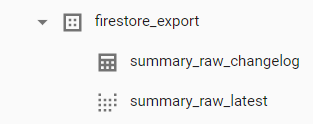
Thanks
 erfabs
on 10 Jul 2020
erfabs
on 10 Jul 2020
Hi @gastsail @russellwheatley @erfabs
I haved checked it in BigQuery and I have found this error:
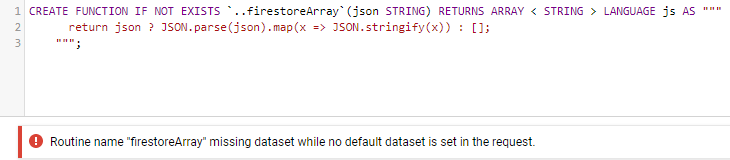
It can be fixed in BigQuery if we put the full path to the dataset, since there is not default dataset:
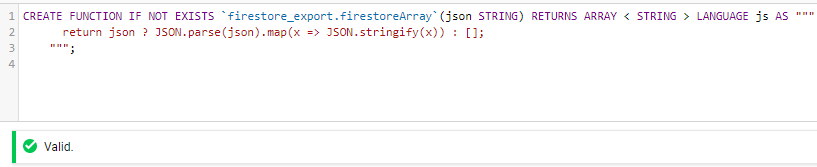
I hope that the developer can fix this. Thanks in advance.
 alek6dj
on 10 Jul 2020
alek6dj
on 10 Jul 2020
Hi again @gastsail @russellwheatley @alek6dj
After verifying what @alek6dj said, I have checked that in the following function of https://github.com/firebase/extensions/blob/next/firestore-bigquery-export/scripts/gen-schema-view/src/udf.ts the dataset is received as param:
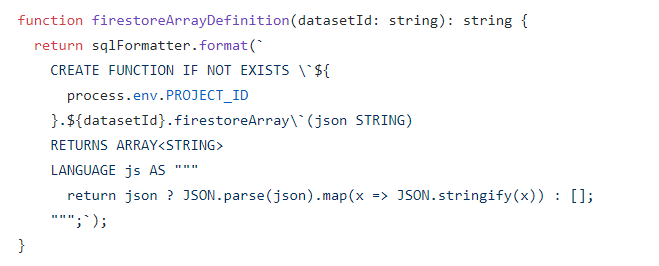
So, it looks like the function is not taking the input param with --dataset=${param:firestore_export} in npx request, and that could be the the reason why the generated query is tryng to create in ..firestoreArray instead of firestore_export.firestoreArray
Is that possible?
I await your response,
Thaks
erfabs
on 14 Jul 2020
I ran this script locally and it printed out the datasetId correctly. I also ran the script using the npx command and it was fine. I'm not sure what the difference is between what I'm doing and what is causing your error. If you can provide a schema and the exact command you're running, I could reproduce and debug.
russellwheatley
on 20 Jul 2020
Thanks @russellwheatley, It was a mistake from my side.
Instead of entering "--dataset=firestore_export", I entered "--dataset=${param:firestore_export}" and ${param:firestore_export} was empty.
alek6dj
on 20 Jul 2020
This doesn't appear to be an issue anymore so I'm going to close for now. Will reopen if there is a reproducible bug.
russellwheatley
on 22 Jul 2020
Hi. try this
npx @firebaseextensions/fs-bq-schema-views
--non-interactive
--project project-test
--dataset dataset-test
--table-name-prefix tables-test
--schema-files=file.json
And replace these variables with those of your project (project-test , dataset-test , tables-test)
 julian0521
on 6 Nov 2020
julian0521
on 6 Nov 2020
Related issues
 diegofhe
·
4Comments
diegofhe
·
4Comments
 jhuleatt
·
3Comments
jhuleatt
·
3Comments
 brunoschuermans
·
4Comments
brunoschuermans
·
4Comments
 dfdgsdfg
·
5Comments
dfdgsdfg
·
5Comments
 dfischer
·
3Comments
dfischer
·
3Comments
Most helpful comment
Thanks @russellwheatley, It was a mistake from my side.
Instead of entering "--dataset=firestore_export", I entered "--dataset=${param:firestore_export}" and ${param:firestore_export} was empty.