Extensions: Resize Image - Callback
This feature request is for extension: _ (storage-resize-images)
It would be great to see a callback included in the extension to be able to get information about the new image that has been created.
For example,
- you have the extension configured on a bucket
- you upload the original image to the bucket and await a callback
- when the new resized image has been created the callback includes information about that new image
This would make the extension more useable and make it a lot easier to know when the image has been created, and easier to go fetch it.
Thanks.
 ltbmedia
All 21 comments
Hey @ltbmedia
Just so I understand correctly, do you mean a data record/list of resized images? So, if I upload an image it gets resized but also a records gets added to a database somewhere?
Thanks!
 Ehesp
on 14 Nov 2019
Ehesp
on 14 Nov 2019
Hi there,
That would be one solution I guess.
But a cleaner approach in what I was asking would be -->
`storageRef.put(ORIGINAL_IMAGE).then((snapshot) => {
  // as this image was uploaded to a bucket with the resize-function configured
  // wait for callback to let us know the resized image(s) have completed
 // include data about the new resized image(s) so we can store & fetch
});`
Hope this helps,
Thanks
ltbmedia
on 14 Nov 2019
Hm I don't know where I need to write, but I agree with you.
Currently I am using React Native app with firebase inside, We added resize images extension to the project and found that when we got resized image we can't get url for it because it don't have access token(download URL) in Firebase Storage, while the parent image (which is not resized) have it.
 AliakseiPaseishvili
on 14 Nov 2019
AliakseiPaseishvili
on 14 Nov 2019
Hi Aliaksei,
You can get the resized image by using ->
let gsReference = this.storage.refFromURL('gs://your-bucket-name/' + filename + '_200x200' + fileExtension)
You can only call this and get the resized image from the bucket once the resize-function has completed, otherwise you get an error because the new resized image does not exist yet - only workaround is using a delay before calling that which isn't a great solution.
This is why we need a callback in the function to let us know that the new image exists, and has been completed. We also need the new image information so that we don't have to string together a reference url!
Hope this helps
ltbmedia
on 14 Nov 2019
@ltbmedia , very strange.
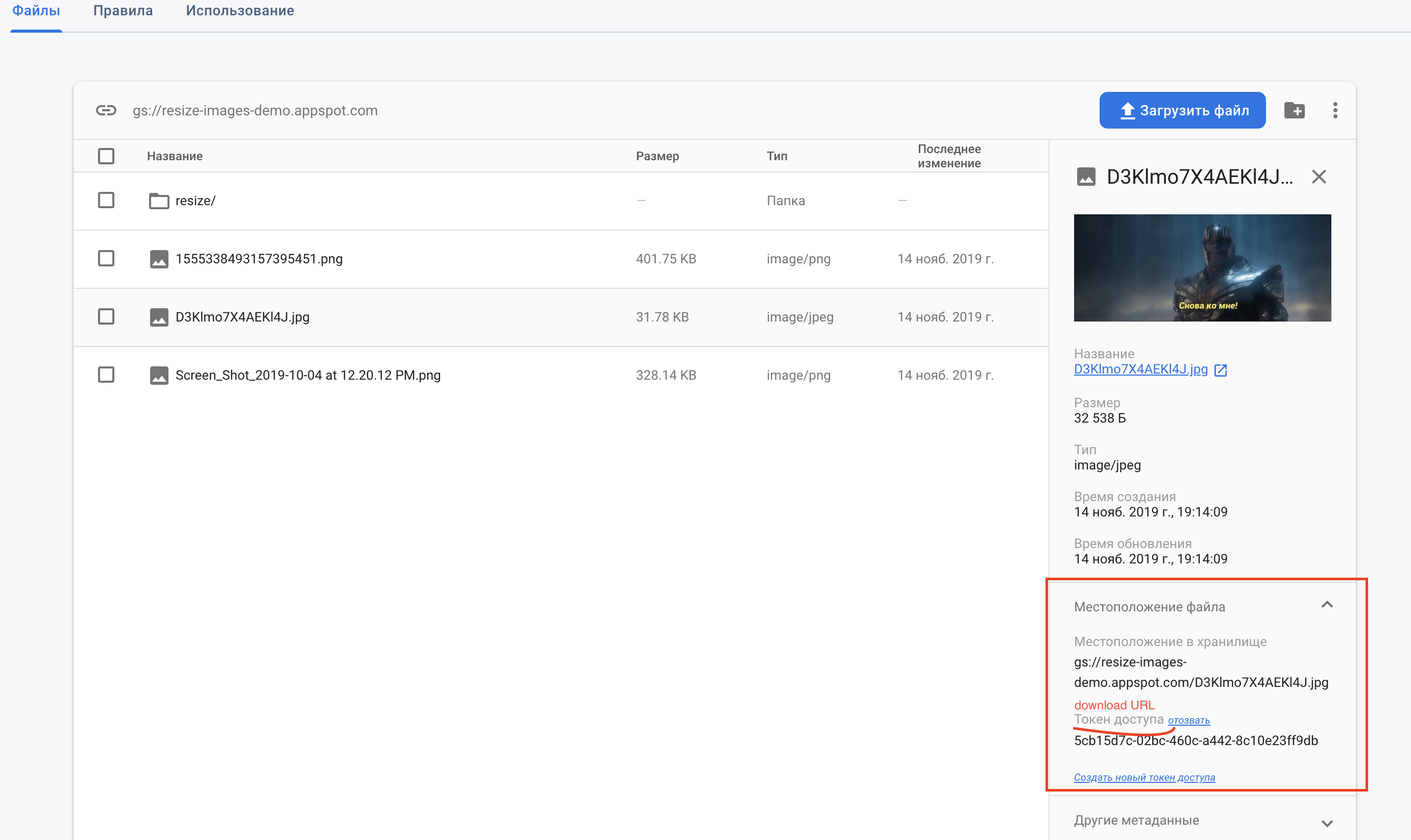

I added image directly to storage for testing resizing... and original image has download url, but resized not...
But on videos here , resized images have donwload URL... https://www.youtube.com/watch?v=zrpydDVFa3I&t=263s , https://www.youtube.com/watch?v=Sx7ijOnob54 , https://www.youtube.com/watch?v=9o8oenmUBYg&t=17s .
I will try to use your workaround, but for me it looks like a bug....
also we can write something like this, but only after we will be sure that resized image is here:
      firebase.storage().ref(refOfResizeImage)
        .getDownloadURL().then(url => console.log(url));
AliakseiPaseishvili
on 14 Nov 2019
@AliakseiPaseishvili the download url is only added after a call to getDownloadUrl() is made, as mentioned here
 rosariopfernandes
on 15 Nov 2019
rosariopfernandes
on 15 Nov 2019
Hi All - this is an interesting topic and is relatable across other Extensions. This is being reviewed internally for now, we'll let you know as soon as possible on how to correctly handle such a use-case. Thanks!
Ehesp
on 21 Nov 2019
A callback would be very useful. I have done this as below but I found sometimes it takes longer to resize than 5 seconds so I increased it to 10 seconds. This is still no guarantee it won't break.
Is there no way to get a notification/callback of some kind?
 setTimeout(() => {
    this.downloadURL = this.storage.ref(thumbPath).getDownloadURL();
}, 5000);
 madmacc
on 26 Nov 2019
madmacc
on 26 Nov 2019
@ltbmedia What if the extension can optionally publish to a PubSub topic after it finishes resizing the image? You can then deploy a custom Cloud Function to listen to that PubSub topic and respond accordingly. Would that solve your use case of having a "callback"?
 laurenzlong
on 26 Nov 2019
laurenzlong
on 26 Nov 2019
Hi @laurenzlong, I guess if that is a way of knowing when the resize has completed then that would solve the initial issue.
Would the published message also contain information about the resized image so that an additional call does not have to be made?
Thanks
ltbmedia
on 26 Nov 2019
@ltbmedia What kind of information would you want?
laurenzlong
on 26 Nov 2019
as a workaround, I used firebase function that works for this case : functions.storage.object().onFinalize(callback) - here I wrote logic, where we check what file is uploaded and if it is an image - I check is it resized or not - if yes - I am calling getSignedUrl(it generates url for download with token) method for our path and then add it to the firestore, where it should be. So with this on next load of app user will download the data from firestore without making a call getDownloadURL(),
++ onFinalize(object => { logic }), where object has full information about the file that is uploaded to storage, it also has accessToken, but it written that it is dangerous for usage, some additional info here :
https://stackoverflow.com/questions/42956250/get-download-url-from-file-uploaded-with-cloud-functions-for-firebase
AliakseiPaseishvili
on 26 Nov 2019
@laurenzlong downloadURL would be ideal or some reference to the image
ltbmedia
on 26 Nov 2019
@ltbmedia If your desire is to simply know how to download the newly resized image, and not do any additional processing, then perhaps https://github.com/firebase/extensions/issues/11 is more suitable. As well, it would not be a good idea for us to auto generate download URLs on the resized image, since you should be in control of the access model of your file, there's a good explanation of the different types of download URLs in this SO comment, and we would not want to be making the decision for you of what kind of a download URL to generate. @AliakseiPaseishvili's solution is great too, especially since resized images now have "resizedImage: true" in its metadata since v0.1.1, so you can easily check which images were resized vs original. @AliakseiPaseishvili would you mind sharing a code snippet of your function?
laurenzlong
on 26 Nov 2019
@laurenzlong I don't think https://github.com/firebase/extensions/issues/11#issue-499273584 would solve this issue as there is still no "notification" of the change. Also I delete the originals.
If @AliakseiPaseishvili's solution works then it would solve the problem for me I think.
It is not on the client so I don't think it is a perfect solution but would still would work.
e.g. I would just have to inform the user that the image is being processed. Then sort it out in the background.
madmacc
on 26 Nov 2019
Hi @laurenzlong, the biggest issue is not knowing when the resized image has completed - that’s why a callback or function as you suggested is needed.
If a downloadURL or other reference cannot be supplied I can use my own method to fetch the file, but at least I would know that it is ready.
ltbmedia
on 26 Nov 2019
Thanks for the additional context @ltbmedia! We'll take this into consideration as we plan out our roadmap.
laurenzlong
on 26 Nov 2019
Hi @ltbmedia thanks so much for this feature request!
We've reviewed this as a team and think that the best solution long term is better lifecycle management for an extension: a way to understand the status of an extension (when it's executing and when it has finished) and a way to trigger an action based on a status change from an extension. We're thinking through this problem long term and to @Ehesp's point, this is a feature that would benefit many extensions.
Unfortunately, in the short-term, there is no easy fix for this. I'm closing this for now but we will be tracking this internally in our long term roadmaps.
Thanks again for the feedback!
Kara
 karayu
on 27 Nov 2019
karayu
on 27 Nov 2019
Hi @karayu, this is great news and look forward to hearing any progress on this 👍
ltbmedia
on 27 Nov 2019
I have found the solution to it like i have to comment out the line which deleting the access token in the cloud function and now i have access to token of image after resizing but there is problem that if i have to change the configurations of extension the code is updated in cloud function so i have to change this line every time i change the configuration.
this solution works for me well but its not a solid solution.
its simple process
- after installing the extension go to functions
- then select view details usage its opens a screen from where you have to select source

- form source find file named FUNCTIONS/LIB/INDEX.JS , Go to line 152 then comment this out
code on line 152 : delete metadata.metadata.firebaseStorageDownloadTokens;

 Mian-Zaid
on 23 Apr 2020
Mian-Zaid
on 23 Apr 2020
@Mian-Zaid You might be interested in tracking this PR which deletes that token: https://github.com/firebase/extensions/pull/279
 russellwheatley
on 23 Apr 2020
russellwheatley
on 23 Apr 2020
Related issues
 ccjernigan
·
4Comments
ccjernigan
·
4Comments
 NLegendre
·
4Comments
NLegendre
·
4Comments
 Polarisation
·
4Comments
Polarisation
·
4Comments
 diegofhe
·
4Comments
diegofhe
·
4Comments
 dfdgsdfg
·
5Comments
dfdgsdfg
·
5Comments
Most helpful comment
Hi @ltbmedia thanks so much for this feature request!
We've reviewed this as a team and think that the best solution long term is better lifecycle management for an extension: a way to understand the status of an extension (when it's executing and when it has finished) and a way to trigger an action based on a status change from an extension. We're thinking through this problem long term and to @Ehesp's point, this is a feature that would benefit many extensions.
Unfortunately, in the short-term, there is no easy fix for this. I'm closing this for now but we will be tracking this internally in our long term roadmaps.
Thanks again for the feedback!
Kara