Express: net::ERR_CONTENT_LENGTH_MISMATCH
I use express.js(version 4.15.3) with node 8.1.2.
I try to print a 10-mb object in json:
import express=require('express');

function handler=async (req,res)=>
{
try{
let largeObject=await someFunctionThatReturnsLargeObject(); //just for the example

message=(JSON.stringify(largeObject));
}
catch(e)
{
//has been debugged, it never gets here. it prints an error.
}
    finally
    {
    res.end(message);
    }
    }
I use typescript 2.3
sometimes when I call for a request from this handler, only part of the content is printed, and I get net::ERR_CONTENT_LENGTH_MISMATCH.
what do I do wrong?
 reactVi
All 19 comments
Hi @reactVi that error in your web browser means that there was a Content-Length header set on the response but the data written didn't match that length. The bit of code you provided is not using any Express.js APIs at all (res.end is not an Express.js API -- it comes from the underlying Node.js) and I don't see you setting Content-Length anywhere. Perhaps can you either (a) provide the complete code we can run to see the issue or (b) maybe try simply using res.json to send the large object directly instead of res.end (res.json(largeObject))?
 dougwilson
on 10 Aug 2017
dougwilson
on 10 Aug 2017
_I've moved to node 8.3.0._
it seems that end collapses during printing, for some reason because only part of the print is made, and it is shorter than the header.
it usually occurs when an output of 8MB is sent.
reactVi
on 10 Aug 2017
by the way, it occurs sometimes and not anytime.
reactVi
on 10 Aug 2017
Hi @reactVi I would like to take a look into your issue. The bit of code you provided is not using any Express.js APIs at all (res.end is not an Express.js API -- it comes from the underlying Node.js) and I don't see you setting Content-Length anywhere. Perhaps can you either (a) provide the complete code we can run to see the issue or (b) maybe try simply using res.json to send the large object directly instead of res.end (res.json(largeObject))?
dougwilson
on 10 Aug 2017
@dougwilson I'm seeing this same problem and trying to resolve an issue with Webpack Dev Server and it's middleware, that @shellscape has referenced. Using wget, large files or files on a slow connection are receiving a 206 - Partial Content. wget will retry them, failing over and over again. Within the browser, Chrome will flag the download as failed with net::ERR_CONTENT_LENGTH_MISMATCH and never retry.
The time for which the get call fails seems to depend on the hostname of the receiver. For localhost, 0.0.0.0, 127.0.0.1, it seems to fail at about 4 minutes. When calling the dev-server application externally, from a completely different IP, it seems to fail at about 5-20 seconds.
To address this as an Express only bug:
Note: I'd like to point out a difference between these tests and Webpack Dev Server. The Dev Server ends with a 206 - Partial Content, but in the examples below, I'm only seeing 200's. Secondly, it seems that the 4 minute mark is passed in the examples below, while Webpack Dev Server is failing exactly at 3 minute 58 seconds (locally). Lastly, using the Streaming approach but setting the Content -Length header seems to work here, but not for Webpack Dev Server...
It seems the Express versions are the same between my tests and their's, so I'm not sure why there are inconsistencies (maybe setting mime type or handing ranges?).
Using Express 4.15, use res.send to ship a file. I'm using wget with rate limiting (--limit-rate=5k) to imply a slow connection or large file that eventually takes too long to download.
var fs = require('fs');
var express = require('express');
var wordsFile = '/usr/share/dict/words';
var app = express();
app.get('/send', (req, res) => res.send(fs.readFileSync(wordsFile)));
app.get('/stream', (req, res) => fs.createReadStream(wordsFile).pipe(res));
app.listen('3000');
Calling Locally (succeeds)
> wget 127.0.0.1:3000/send --limit-rate=3k

--2017-08-16 12:17:30--  http://127.0.0.1:3000/send
Connecting to 127.0.0.1:3000... connected.
HTTP request sent, awaiting response... 200 OK
Length: 938848 (917K) [application/octet-stream]
Saving to: ‘send.3’ --- 916.84K  3.00KB/s    in 5m 6s

2017-08-16 12:22:35 (3.00 KB/s) - ‘send.3’ saved [938848/938848]
Calling Externally (obfuscated IP; fails)
> wget 8.8.8.8:3000/send --limit-rate=5k

--2017-08-16 16:02:50--  http://8.8.8.8:3000/send
Connecting to 8.8.8.8:3000... connected.
HTTP request sent, awaiting response... 200 OK
Length: 938848 (917K) [application/octet-stream]
Saving to: “send.2” --- 64,882      5.00K/s   in 13s

2017-08-16 16:03:03 (5.00 KB/s) - Connection closed at byte 64882. Retrying.

--2017-08-16 16:03:04--  (try: 2)  http://8.8.8.8:3000/send
Connecting to 8.8.8.8:3000... connected.
HTTP request sent, awaiting response... 200 OK
Length: 938848 (917K) [application/octet-stream]
Saving to: “send.2” --- 62,148      5.00K/s   in 12s

2017-08-16 16:03:16 (5.00 KB/s) - Connection closed at byte 64882. Retrying.

--2017-08-16 16:03:18--  (try: 3)  http://8.8.8.8:3000/send
Connecting to 8.8.8.8:3000... connected.
HTTP request sent, awaiting response... 200 OK
Length: 938848 (917K) [application/octet-stream]
Saving to: “send.2” --- 62,148      5.00K/s   in 12s

2017-08-16 16:03:30 (5.00 KB/s) - Connection closed at byte 64882. Retrying.

--2017-08-16 16:03:33--  (try: 4)  http://8.8.8.8:3000/send
Connecting to 8.8.8.8:3000... connected.
HTTP request sent, awaiting response... 200 OK
Length: 938848 (917K) [application/octet-stream]
Saving to: “send.2” --- 64,882      5.00K/s   in 13s

2017-08-16 16:03:46 (5.00 KB/s) - Connection closed at byte 64882. Retrying.
Using a streaming approach seems to work
Using fs.createReadStream and piping that into the response does seem to work, all the time. It's just that the client doesn't know what the Content-Length is.
var fs = require('fs');
var express = require('express');
var wordsFile = '/usr/share/dict/words';
var app = express();
// app.get('/send', (req, res) => res.send(fs.readFileSync(wordsFile)));
app.get('/send', (req, res) => fs.createReadStream(wordsFile).pipe(res));
app.listen('3000');
Calling Externally (obfuscated IP)
> wget 8.8.8.8:3000/send --limit-rate=5k

--2017-08-16 16:24:42--  http://8.8.8.8:3000/send
Connecting to 8.8.8.8:3000... connected.
HTTP request sent, awaiting response... 200 OK
Length: unspecified
Saving to: “send.3” --- 938,848     5.00K/s   in 3m 3s

2017-08-16 16:27:45 (5.00 KB/s) - “send.3” saved [938848]
Using a streaming approach and setting the Content-Length header also seems to work, but it fails for Webpack Dev Server (not sure why)...
var fs = require('fs');
var express = require('express');
var wordsFile = '/usr/share/dict/words';
var wordsFileContentLength = 938848;
var app = express();
// app.get('/send', (req, res) => res.send(fs.readFileSync(wordsFile)));
// app.get('/send', (req, res) => fs.createReadStream(wordsFile).pipe(res));
app.get('/send', (req, res) => {
    res.header('Content-Length', wordsFileContentLength);
    fs.createReadStream(wordsFile).pipe(res);
});
app.listen('3000');
Calling Externally (obfuscated IP)
> wget 8.8.8.8:3000/send --limit-rate=5k
--2017-08-16 16:29:29--  http://8.8.8.8:3000/send
Connecting to 8.8.8.8:3000... connected.
HTTP request sent, awaiting response... 200 OK
Length: 938848 (917K)
Saving to: “send.4” --- 938,848     5.00K/s   in 3m 3s

2017-08-16 16:32:33 (5.00 KB/s) - “send.4” saved [938848/938848]
 mtraynham
on 16 Aug 2017
mtraynham
on 16 Aug 2017
~Hi @mtraynham are you getting a net::ERR_CONTENT_LENGTH_MISMATCH error with that? I don't see that in you responses. If you're not getting a net::ERR_CONTENT_LENGTH_MISMATCH, please file a new issue instead of hijacking this issue, please :)~
~If you are getting a net::ERR_CONTENT_LENGTH_MISMATCH error, I'm not sure if your steps capture how to see that. Can you explain how to get the net::ERR_CONTENT_LENGTH_MISMATCH in your example?~
Nevermind, missed it.
dougwilson
on 16 Aug 2017
@mtraynham I changed the flag to investigate and will take a look in the upcoming weeks unless someone gets to it first.
dougwilson
on 16 Aug 2017
For anyone looking, based on the failing (non-stream) case, you can try to see if this is an Express.js bug or a Node.js core bug by trying out the following server which uses Node.js core directly:
var fs = require('fs');
var http = require('http');
var wordsFile = '/usr/share/dict/words';
function app(req, res) {
  switch (req.url) {
    case '/send':
      var contents = fs.readFileSync(wordsFile);
      res.setHeader('Content-Length', contents.length);
      res.end(contents);
      break;
    case '/stream':
      fs.createReadStream(wordsFile).pipe(res)
      break;
    default:
      res.statusCode = 404;
      res.end();
  }
}
http.createServer(app).listen('3000');
@mtraynham can you list what version of Node.js you are using as well, or are you using 8.1.2 the same as the OP? All the mechanics of the HTTP data handling are done by Node.js core, and knowing the version of Node.js helps a lot in tracking these weird issues down.
dougwilson
on 16 Aug 2017
Node version is 8.4.0 (also have seen this with 8.3.0)
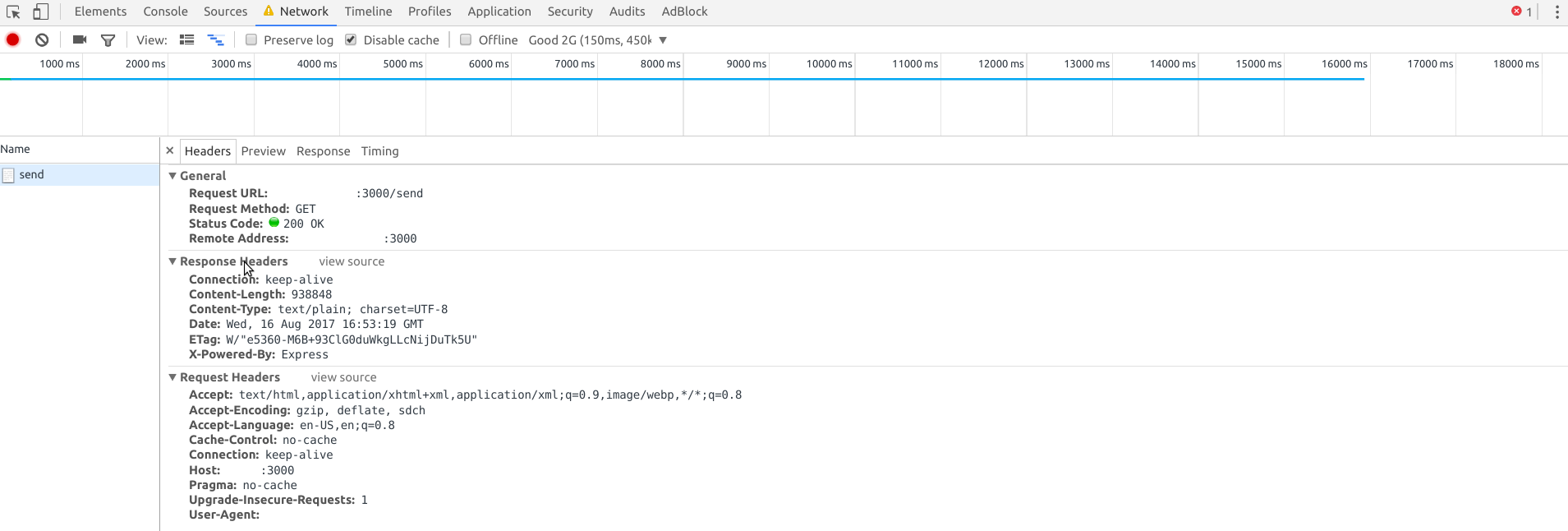
Per the ERR_CONTENT_LENGTH_MISMATCH question, the Webpack Dev Server (and in my response here, Express explicitly) fails to send the full content of a JavaScript file to an external IP address. Using a CLI tool like wget, Webpack Dev Server shows it receives a 206 status code for Partial Content. In the examples I have above, it only shows a 200.
But using a browser, like Chrome, it fails the request completely and spits back that specific error net::ERR_CONTENT_LENGTH_MISMATCH.
I set Chrome to throttle the request to 2G so it slows the download to simulate a large file or slow connection.
var fs = require('fs');
var express = require('express');
var wordsFile = '/usr/share/dict/words';
var app = express();
app.get('/send', (req, res) => {
    res.setHeader("Content-Type", "text/plain; charset=UTF-8");
    res.send(fs.readFileSync(wordsFile));
});
app.listen('3000');


mtraynham
on 16 Aug 2017
Sorry, guess you didn't see my edit to nevermind on that :) I'm not at a computer or would try myself, but can you try the code I posted to see if the issue is there or not? It does most of what Express.js is doing, but just with Node.js directly. If that fails as well, then the bug is in Node.js core HTTP implementation most likely. If it works, need to dig in.
dougwilson
on 16 Aug 2017
Oop will try, thanks!
Edit Mmm, interesting. Seems to fail with NodeJS standalone... Guess I'll be counting back Node versions now.
Edit 2
And it seems to have been introduced in v8.0.0. v7.10.1 works correctly (albeit I hit the default 2 minute timeout, but setting that to something higher worked).
var server = http.createServer(app);
server.timeout = 120000 * 5;
server.listen('3000');
Setting the timeout in v8.0.0 did not work, the request still fails after about 15 seconds.
mtraynham
on 16 Aug 2017
Well @dougwilson, sorry if I hijacked the thread, but thanks for all your help. Going to open a bug with NodeJS and probably downgrade for now.
mtraynham
on 16 Aug 2017
Hi @mtraynham thanks for taking a look. Sorry about the hijack comment; you'd be surprised how often it happens (including posting in issues closed 4+ years ago about an issue in a version of express no longer relevant...). Anyway, your issue did have the same error as the OP and if you tracked it down to a Node.js 8.x regression, then it sounds like it may be the exact same issue @reactVi was having, since 8.x was being used there as well.
@reactVi if you are able to test with Node.js 7.x or lower to see if the issue is still there or not may confirm if your underlying cause is the same @mtraynham was able to track down.
dougwilson
on 16 Aug 2017
@dougwilson I received some feedback on the NodeJS repo and it seems that server.keepAliveTimeout was reduced down to 5 seconds, which can cause that issue. It has been fixed with https://github.com/nodejs/node/issues/13391.
The following will resolve the issue for Node 8.0 - 8.4, as that fix only lives in master at the moment.
const server = http.createServer(app).listen('3000');
server.keepAliveTimeout = 60000 * 2;
or with Express
var app = express();
...
const server = app.listen('3000');
server.keepAliveTimeout = 60000 * 2;
Ok, so it looks like it's not a bug with Express, but rather a change in behavior (or bug?) with Node.js core HTTP server, is that right?
dougwilson
on 22 Sep 2017
I ran into this issue using both Express and Nginx.
This SO post helps me. I fixed the problem by setting
proxy_buffering off;
in nginx conf of my site.
 iplus26
on 27 Dec 2017
iplus26
on 27 Dec 2017
@iplus26 thanks your solution, it save my day.
 clonn
on 7 Jan 2018
clonn
on 7 Jan 2018
@iplus26 Yea, save my day too! thanks
For the record I'd switched from using a TCP port for express (proxied by Nginx) to a unix socket. The issue only arose after this. We are also doing https proxying, so express is running on http and another Nginx server is handling ssl (ie. a 2nd Nginx server).
Also, am using Node v9.3.0
 ssimpo
on 18 Jan 2018
ssimpo
on 18 Jan 2018
Related issues
 gaurav5430
·
3Comments
gaurav5430
·
3Comments
 ZeddYu
·
3Comments
ZeddYu
·
3Comments
 Sunriselegacy
·
3Comments
Sunriselegacy
·
3Comments
 prashantLio
·
3Comments
prashantLio
·
3Comments
 haider0324
·
3Comments
haider0324
·
3Comments
Most helpful comment
I ran into this issue using both Express and Nginx.
This SO post helps me. I fixed the problem by setting
in nginx conf of my site.