Exporters: [3ds Max] KHR Lights Extension is Causing Validation Issue
Hey guys, just noticed that when I take models from this exporter they seem to be throwing errors as per this validator in the sand box

It says
{
  "uri": "1406623.gltf",
  "mimeType": "model/gltf+json",
  "validatorVersion": "2.0.0-dev.2.5",
  "validatedAt": "2018-10-16T17:26:00.293Z",
  "issues": {
    "numErrors": 1,
    "numWarnings": 1,
    "numInfos": 5,
    "numHints": 0,
    "messages": [
      {
        "code": "UNSUPPORTED_EXTENSION",
        "message": "Unsupported extension encountered: 'KHR_lights'.",
        "severity": 1,
        "pointer": "/extensionsUsed/0"
      },
      {
        "code": "UNDECLARED_EXTENSION",
        "message": "Extension was not declared in extensionsUsed.",
        "severity": 0,
        "pointer": "/materials/0/extensions/KHR_materials_unlit"
      },
      {
        "code": "MESH_PRIMITIVE_UNUSED_TEXCOORD",
        "message": "Material does not use texture coordinates sets with indices (0).",
        "severity": 2,
        "pointer": "/meshes/2/primitives/0/material"
      },
      {
        "code": "MESH_PRIMITIVE_UNUSED_TEXCOORD",
        "message": "Material does not use texture coordinates sets with indices (0).",
        "severity": 2,
        "pointer": "/meshes/4/primitives/0/material"
      },
      {
        "code": "NODE_EMPTY",
        "message": "Empty node encountered.",
        "severity": 2,
        "pointer": "/nodes/6"
      },
      {
        "code": "IMAGE_NPOT_DIMENSIONS",
        "message": "Image has non-power-of-two dimensions: 1024x829.",
        "severity": 2,
        "pointer": "/images/2"
      },
      {
        "code": "IMAGE_NPOT_DIMENSIONS",
        "message": "Image has non-power-of-two dimensions: 194x1024.",
        "severity": 2,
        "pointer": "/images/3"
      }
    ],
    "truncated": false
  },
  "info": {
    "version": "2.0",
    "generator": "babylon.js glTF exporter for 3ds max 2018 v1.2.26",
    "extensionsUsed": [
      "KHR_lights"
    ],
    "resources": [
      {
        "pointer": "/buffers/0",
        "mimeType": "application/gltf-buffer",
        "storage": "external",
        "uri": "1406623_data.bin",
        "byteLength": 3783268
      },
      {
        "pointer": "/images/0",
        "mimeType": "image/png",
        "storage": "external",
        "uri": "1406623_img0.png",
        "image": {
          "width": 512,
          "height": 512,
          "format": "RGBA",
          "bits": 8
        }
      },
      {
        "pointer": "/images/1",
        "mimeType": "image/jpeg",
        "storage": "external",
        "uri": "1406623_img1.jpg",
        "image": {
          "width": 1024,
          "height": 1024,
          "format": "RGB",
          "bits": 8
        }
      },
      {
        "pointer": "/images/2",
        "mimeType": "image/jpeg",
        "storage": "external",
        "uri": "1406623_img2.jpg",
        "image": {
          "width": 1024,
          "height": 829,
          "format": "RGB",
          "bits": 8
        }
      },
      {
        "pointer": "/images/3",
        "mimeType": "image/jpeg",
        "storage": "external",
        "uri": "1406623_img3.jpg",
        "image": {
          "width": 194,
          "height": 1024,
          "format": "RGB",
          "bits": 8
        }
      }
    ],
    "hasAnimations": false,
    "hasMaterials": true,
    "hasMorphTargets": false,
    "hasSkins": false,
    "hasTextures": true,
    "hasDefaultScene": true,
    "primitivesCount": 5,
    "maxAttributesUsed": 4
  }
}
Which I think just means that the KHR_Lights extension was not used correctly? the model still loads in babylonjs but if the KHR_Lights extension isn't required would it make more sense to add it as a checkbox like we did for this one https://github.com/BabylonJS/Exporters/issues/292. I'm outright having issues loading models into this viewer https://gltf-viewer.donmccurdy.com. Is it because of the default hemispherical light that gets added?
 johanos
All 40 comments
Hi @johanos , which exporter are you using? And do you have a sample model/scene?
 kcoley
on 16 Oct 2018
kcoley
on 16 Oct 2018
Hi @johanos , which exporter are you using? And do you have a sample model/scene?
@johanos Nvm, I see you are using "babylon.js glTF exporter for 3ds max 2018 v1.2.26",. I recently updated the 3ds Max exporter to use KHR_Lights_punctual. Are you on the latest version?
kcoley
on 16 Oct 2018
I'm using Max2Babylon-1.2.40. I haven't updated past that one but I can try.
Here's the glb that is throwing those errors. Some viewers end up working, just wanna see what the word was on an issue of this kind and maybe making that lights extension optional?
johanos
on 16 Oct 2018
Update: I Updated the exporter to the most current one. Errors were gone and there's only 1 warning.
Here's a file exported using it:
new1406623.glb.zip
https://gltf-viewer.donmccurdy.com <-- This viewer still fails at loading the models from it, which I know is not you guy's viewer but its one that's listed in the Khronos Group Repo and exposed this issue (is it an issue or is it just a faulty implementation of the standard? on their end not yours :)).
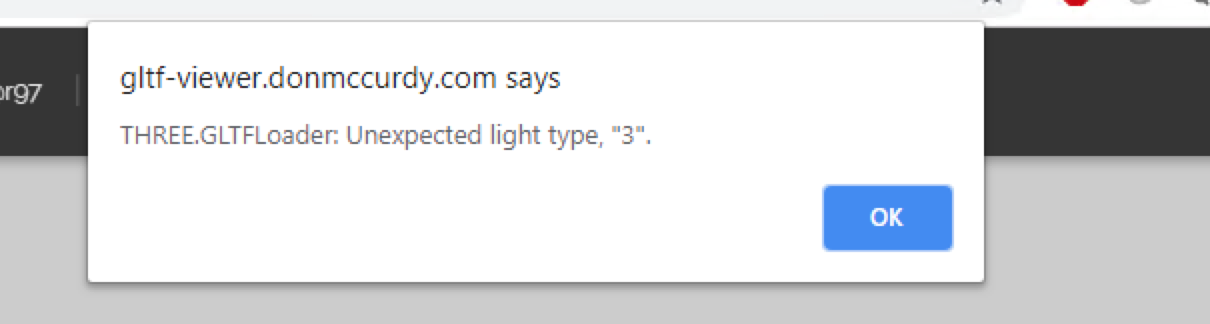
This is the error it gives
johanos
on 16 Oct 2018
@johanos thanks for flagging, looks like another bug in the exporter. I'll work on a fix for that ASAP
kcoley
on 16 Oct 2018
@johanos just merged a fix for this for v1.2.23. Please reopen if the issue still comes up.
kcoley
on 17 Oct 2018
Hey It looks like that's only for Maya, is there a way to add this to the 3ds max version of the exporter too?
johanos
on 18 Oct 2018
@johanos sure thing, I'll put in a fix for 3ds Max ASAP
kcoley
on 18 Oct 2018
Thanks so much!
johanos
on 18 Oct 2018
@johanos I just pushed a fix for 3ds Max for version 1.3.2.
kcoley
on 18 Oct 2018
Hey @kcoley not to beat a dead horse, the errors seem to have gone away. but the models (even a simply cube) wont open in this viewer
https://gltf-viewer.donmccurdy.com/
to my understanding this viewer is endorsed by Khronos group. so if the exporter was conforming to the standard it should still load. I think this is indeed the case and so if the model isn't loading that means the don mccurdy viewer isn't good at passing over extensions It can't use? i know models exported using the plugin have the lights_punctual extension on them.
Or is there a better explanation? is there anything I can do in max to make the models load in this viewer? Trying to see what to trust in the validity of these models. as putting them in here marks them as valid gltf assets
johanos
on 19 Oct 2018
Hey folks the lights extension to glTF was only recently submitted to ratification and as such should still be considered in development across various exporters and engines.
There is a list of in-progress extensions but we probably need to be a better job of explaining what to expect with each extension - https://github.com/KhronosGroup/glTF/tree/master/extensions#in-progress-khronos-and-multi-vendor-extensions
In general - a typical "debug" process should look like first ensuring that the file exported is validator clean. It there are no errors in the validator then there is a good chance that the file is good after that if it fails to load in a specific viewer than the issue is likely in the viewer.
In this particular case though the validator itself does not yet support the lights extension so it cannot tell you whether the file is valid or not - Note the validation error of "Unsupported Extension" is actually the validator saying it doesn't support that specific extension and therefore cannot say whether the file is valid or not. Both Don's viewer and the Babylon.js sandbox hookup to the validator so it might seem like the viewers are complaining but its actually the validator. Will open up a separate issue for improving messaging across validator.
For this issue looks like we need to still dig through the exported file to ensure it is correct (which would have to be manual) and then figure out whether there is an additional issue with Don's viewer.
To unblock you short term @kcoley will add an option to not export the lights at all.
//cc @donmccurdy as FYI
 sbtron
on 19 Oct 2018
sbtron
on 19 Oct 2018
In JSON, the model from https://github.com/BabylonJS/Exporters/issues/340#issuecomment-430390718 shows —
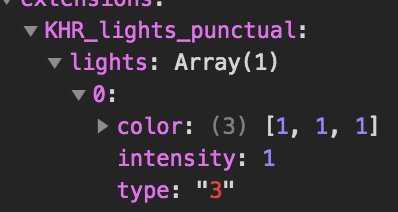
I see you've pushed a fix since then, so maybe this is addressed already, but 3 isn't a light type.
As far as I'm aware my viewer is up to date on the draft extension. Maybe there's something I can do to make the error messages in the viewer easier to read, where extensions are involved. 🤔
 donmccurdy
on 20 Oct 2018
donmccurdy
on 20 Oct 2018
Hi @johanos do you have a version of the model that you have exported since the fix? I want to make sure there are no other issues from the file.
I will push out an update soon for the exporter to give you the ability to toggle off the lights, similar to toggling unlit materials.
kcoley
on 20 Oct 2018
Yeah, the main point of confusion is that we are working with a partner that defined a good gltf as one that loads in Don's viewer, yet all our models that would come out, pass validation in the Khronos validator, and load in babylon would be unable to load in this one. So we were trying to figure out where exactly we were messing up if it was us. Everything above makes sense.
To my understanding the lights extension is still in the process of being ratified like stated above, so it makes sense that all viewers don't fully support it. But is the expectation that if an extension is malformed or not supported, should the viewer just skip it and not choke?
@donmccurdy I'm not sure what the best course of action should be. Like in the example above, it was using a light type that didn't exist so therefore the extension was malformed regardless. Should it print out that an extension has errors but still load the geometry and materials? or should it fully choke out?
Part of me thinks that, at least for this extension, it should continue loading what it can. since some viewers will add their own lighting etc.... If it was doing something more complicated with the mesh or the materials then it should fail out of loading since it wouldn't be what the artist meant to render.
That's getting out of what this exporter is supposed to handle though, so I think adding the option to granularly choose what extensions to add is the best course of action. since people will be able to customize what extensions to add when there's more than a handful of extensions available.
@kcoley I've added this link, it should be a glb that has been exported with the most recent version of the exporter through our process. Our models aren't getting exported with any lights as well, since the viewers we load them in have generic lighting setups for them.
https://secure.img1-fg.wfcdn.com/docresources/0/145/1455997.glb
johanos
on 22 Oct 2018
@johanos interesting, this model still has "3" in the file, which is probably why it is failing on Don's viewer. I think I found the cause for this (the exporter is adding a default ambient light when lights are removed from the scene). I have a fix for that pending, though I'm trying to not have the empty light nodes written out to glTF. I'll make an update later today.
kcoley
on 22 Oct 2018
I can't really guarantee that the viewer will fail gracefully when incomplete or experimental extensions are used and contain errors. Moreover, to some extent I think it's better to be strict so that errors are found and fixed quickly.
In KhronosGroup/glTF-Blender-Exporter we try to keep incomplete extensions disabled behind an "Enable experimental extensions" option. Even once KHR_lights_punctual is ratified, I think it would likely be better to not export lights by default, and make that an opt-in choice.
donmccurdy
on 22 Oct 2018
The KHR_lights_punctual extension can now be toggled on in the exporter, so closing this issue for now.
kcoley
on 23 Oct 2018
Thanks! :)
donmccurdy
on 23 Oct 2018


After installing the lastest version in 3ds max 2018 :(
 angelovancleef
on 26 Oct 2018
angelovancleef
on 26 Oct 2018
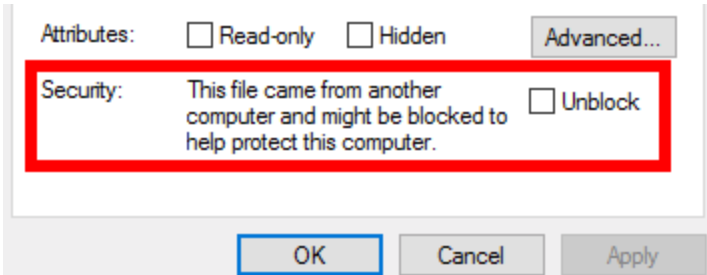
Hi @angelovancleef , to verify, did you unblock the dlls before installing?:
kcoley
on 26 Oct 2018
Unfortunately there is no such option when I go to that menu :(
I am on Windows 10 if that helps ^^
angelovancleef
on 26 Oct 2018
@angelovancleef interesting, which version of 3ds Max are you using?
kcoley
on 26 Oct 2018
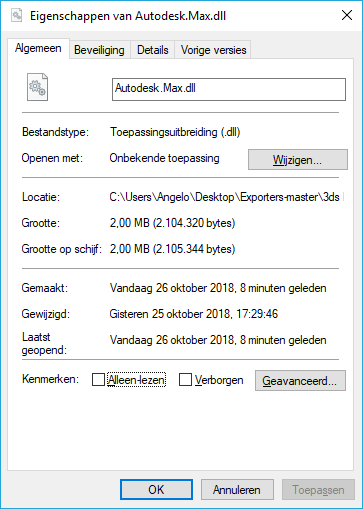
Oh sorry forgot to mention, 3ds Max 2018 atm. Only plug-in installed is Vray 3 :)
angelovancleef
on 26 Oct 2018
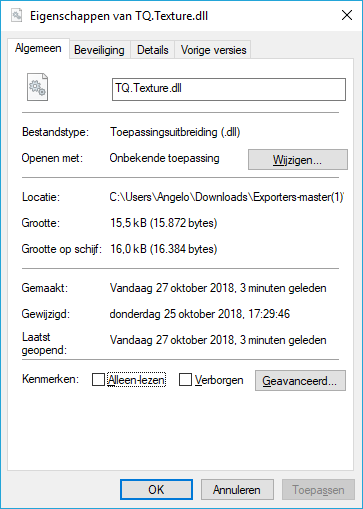
@angelovancleef gotcha. Can you try these steps?:
- re-download the zip archive from GitHub,
- Right-click, go to properties, and then select the unblock checkbox?
It should look like this:

kcoley
on 26 Oct 2018
@angelovancleef Otherwise, you may have to go through each dll and unblock them manually
kcoley
on 26 Oct 2018
Just did that and nothing. Not even when I select each individual file one by one :'(
Is there any other way to "unblock", if that is the issue?
angelovancleef
on 27 Oct 2018
@angelovancleef that is interesting, I will have to get a build of 3ds Max 2018 and verify against it. So far I have tested against 3ds Max 2017 and 2019.
Do older releases work for you?
kcoley
on 27 Oct 2018
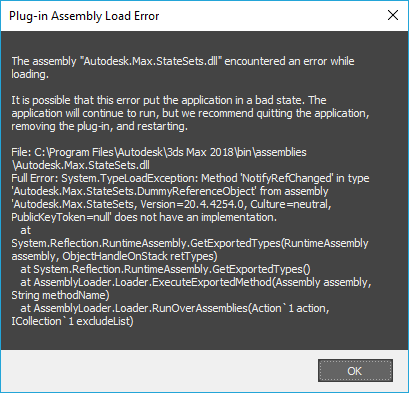
Tried again, that option IS available on the RAR file, not on the individual DLL files.
But still some errors unfortunately. I dont have any older (or newer) Max versions :(


angelovancleef
on 27 Oct 2018
@angelovancleef I see. Were any versions of the Max2Babylon plugin working? For instance v1.2.40?: https://github.com/BabylonJS/Exporters/blob/4784c35638d512a0b4775863b6dcde66a9de35fc/3ds%20Max/Max2Babylon-1.2.40.zip
kcoley
on 27 Oct 2018
The previous version was working flawless, except for the "light, 3" bug haha.
angelovancleef
on 27 Oct 2018
@angelovancleef haha I see. I'll try to do a rebuild of the plugins and reupload the assemblies.
kcoley
on 27 Oct 2018
Oké, many thanks ^^
angelovancleef
on 27 Oct 2018
@angelovancleef Does this work for you?
Max2Babylon-1.3.6Rebuild.zip
kcoley
on 27 Oct 2018
Nope same errors still :(
Is there a way I can make a proper log or something that could help you?
shows when I click on the "babylon" menu.
angelovancleef
on 27 Oct 2018
@angelovancleef very weird :/ Hmm currently there isn’t really a way to log plugin loading errors. I think what I’ll do is try to get an install of 3DS Max 2018 and see if I can repro the issue there.
If you happen to have access to Visual Studio, you can try building the plugins yourself and see if happens to work better for you.
In the short term you can export as glTF and remove the light extension portion of the file to prevent the errors
kcoley
on 27 Oct 2018
No clue how to do stuff like that hahaha. I'll give it a try tomorrow and see what I can come up with ;)
Many thanks so far!
angelovancleef
on 27 Oct 2018
No problem!
kcoley
on 27 Oct 2018
For my stuff I was on Max 2018 using VRay 3.6 if that helps. I had no issue with the new dlls if that helps narrow down what’s wrong with it
johanos
on 27 Oct 2018
Yeah I have the exact same Johanos. Max 2018 with VRay 3.6. Updated till latest version (max).
Windows 10 home 64-bit (full updated).
AMD Ryzen 7 1800x
Nvidia GTX 980 TI Lightning
16GB DDR4 Corsair RAM
Going to reinstall Max and Vray and try again. Weird thing is that after upgrading to the newest version, even the old version is not working anymore :'(
Will let u guys know if the reinstall worked.
EDIT: First reinstall didnt do anything, still the same errors (maybe some old files left).
Trying again now, downloaded CCleaner and RegCleaner to make sure my register is cleared this time as too. Manually deleted (after uninstalling) the Autodesk folder from my Program Files directory too.
EDIT: Second reinstall worked. Seems like a regular reinstall doesnt do the trick. I used CCleaner and RegCleaner to delete my registry. I also manually deleted any data in de AppData folder (hidden folder) et cetera. After that I installed the exporter and e voila, it worked :)
Thanks so much for the support guys!
angelovancleef
on 27 Oct 2018
Related issues
 EtagiBI
·
4Comments
EtagiBI
·
4Comments
 aguaviva
·
8Comments
aguaviva
·
8Comments
 qualmon
·
6Comments
qualmon
·
6Comments
 Selmar
·
7Comments
Selmar
·
7Comments
 total3dx
·
5Comments
total3dx
·
5Comments
Most helpful comment
Yeah I have the exact same Johanos. Max 2018 with VRay 3.6. Updated till latest version (max).
Windows 10 home 64-bit (full updated).
AMD Ryzen 7 1800x
Nvidia GTX 980 TI Lightning
16GB DDR4 Corsair RAM
Going to reinstall Max and Vray and try again. Weird thing is that after upgrading to the newest version, even the old version is not working anymore :'(
Will let u guys know if the reinstall worked.
EDIT: First reinstall didnt do anything, still the same errors (maybe some old files left).
Trying again now, downloaded CCleaner and RegCleaner to make sure my register is cleared this time as too. Manually deleted (after uninstalling) the Autodesk folder from my Program Files directory too.
EDIT: Second reinstall worked. Seems like a regular reinstall doesnt do the trick. I used CCleaner and RegCleaner to delete my registry. I also manually deleted any data in de AppData folder (hidden folder) et cetera. After that I installed the exporter and e voila, it worked :)
Thanks so much for the support guys!