Eui: [EuiColorStops] Allow stepped colors between stops
The great EuiColorStops component allows two modes - fixed and gradient. For the use case of defining dynamic color palettes in Lens, we identified an additional use case: Stepped gradient between user defined stops.
The user would configure their stops and configure a number of steps, the resulting palette would use the defined stops as fixed points and interpolate between them, just like with the gradient type, but with a given number of stops instead of a smooth interpolation.
This is currently not possible to visualize using the EuiColorStops component.
API Suggestion
- Extend
stopType: 'gradient' | 'fixed' | 'stepped'; - New property:
stepNumber?: number(defaults to 10)
 flash1293
All 15 comments
I am interested in working on it @flash1293. I got the idea but can you give me a visual example or explain more so that it will be clear to me. (So that we won't have to rework :\ ).
 git-anurag-hub
on 25 Feb 2021
git-anurag-hub
on 25 Feb 2021
@git-anurag-hub let's figure out some of those details you'll need,
@flash1293 how do you see the steps count working with multiple color stops? If we take our example:

and imagine it with stepNumber=10, is that 10 steps between each color stop (10 between green->red, 10 between red->purple), distributed across all of the steps, or distributed across the entire visualization (0%, 10%, ..., 90%, 100%).
 chandlerprall
on 25 Feb 2021
chandlerprall
on 25 Feb 2021
That's a good question, @chandlerprall - I assumed it would have 10 steps between each color stop. cc @markov00
If we go with a total number of steps, the logic to determine the step width becomes much more complex (what if the stops are not at 0, 10, 20, 30..., 100%? do we extend the step closest to the stop a bit? how do we deal with these non-uniform step widths? What if there are more stops than steps?)
cc @markov00
flash1293
on 25 Feb 2021
Kind of a side note, but it would probably make sense to extend https://elastic.github.io/eui/#/utilities/color-palettes in the same way
flash1293
on 25 Feb 2021
Any update on this @markov00 @flash1293 @chandlerprall
git-anurag-hub
on 2 Mar 2021
If we go with a total number of steps, the logic to determine the step width becomes much more complex (what if the stops are not at 0, 10, 20, 30..., 100%? do we extend the step closest to the stop a bit? how do we deal with these non-uniform step widths? What if there are more stops than steps?)
With a little (temporal) distance to the topic - maybe it's better to find good answers to the edge cases and make "steps" control the total number of steps between all of the user defined stops. Mostly because that's how the pre-defined palettes work today (see https://elastic.github.io/eui/#/utilities/color-palettes#recommended-quantitative-palettes )
What do you think @markov00 ?
flash1293
on 2 Mar 2021
I think you are right @flash1293: the color stops are defined by the user, 2/3 or more as they prefer (hopefully max 3), but the step function, that sample the gradient into a finite set of colors, is applied for the overall created gradient, for example:
- I've defined a 3 steps color gradient
- Independently from where the stops are, I sample the gradient into the X number of equal steps
 markov00
on 2 Mar 2021
markov00
on 2 Mar 2021
@markov00 To make sure I understand correctly - it should just be a best-effort basis? So if there are too little steps or the steps don't line up with the stops, they just get the nearest color.
Seems like this is close to how the quantative palettes work already, maybe we can simply generalize the logic there a bit to make this possible. No matter how we implement this, I think we should expose the logic to get the same palette outside of the color stops component (e.g. in Lens we have to apply it to the chart, so we would have to re-implement that part otherwise)
@chandlerprall Does this sound good to you?
flash1293
on 2 Mar 2021
The thing is: with a gradient you have a continuous interpolation between colors, but with a stepped interpolation, you just simplify the interpolation with a fixed number of steps, is not about taking the nearest color, but sampling the color depending on the interpolation point.
I've written a simple example using d3-scales and the chromatic one:
https://codesandbox.io/s/blissful-rgb-ptpo2?file=/src/index.js
you can change the scale to a different one just to check the result. The example with the scaleLinear is brutal, but expose basically the idea of a scale with multiple color stops (you can change the domain to mimic the various position of the colors stop) the user can use it as it is and render it as a gradient, or samples it dividing it by the number total steps.
markov00
on 2 Mar 2021
@markov00 That's what I meant, thanks for using more precise language and the example.
flash1293
on 2 Mar 2021
I'm still confused as to how you would restrict this on a completely user-defined palette using EuiColorStops or how this is different from EuiPaletteDisplay supporting even color stops with type="fixed".
Perhaps some quick screenshots of flows that you are trying to support?
 cchaos
on 2 Mar 2021
cchaos
on 2 Mar 2021
@cchaos It's actually just a quantization postprocessing of the smoothly interpolated palette.
The top component is using stopType: 'gradient', the second one is using stopType: 'stepped', stepNumber: 10 with everything else being equal.
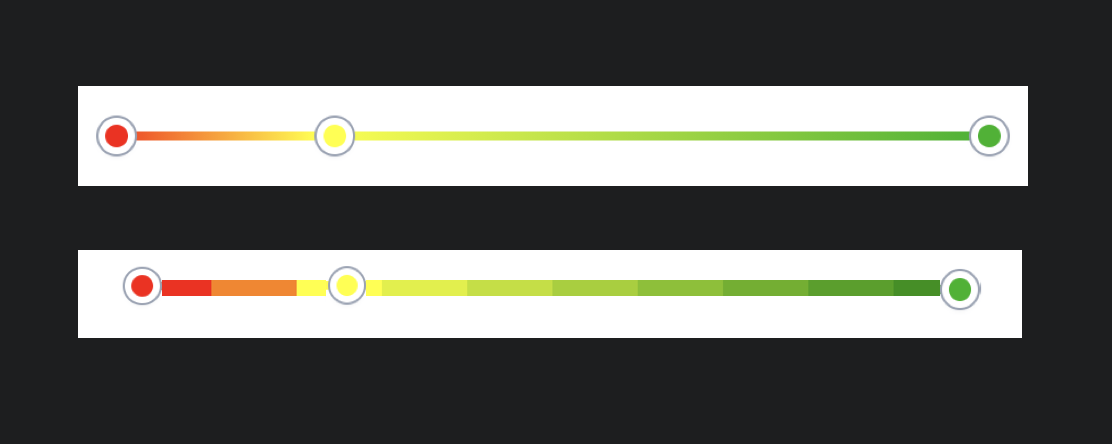
The user can still change the color of each stop, drag them around etc - to calculate the palette out of the current stops and their values and colors, it's simply using a function like in the sandbox Marco linked.
The intended usage is to have the color stop component in a form together with a number slider so the user can control the number of steps (one extreme is using fixed, the other extreme is using gradient, the steps number slider controls the options in between)
flash1293
on 3 Mar 2021
Ahh thank you for that screenshot. It's much clearer to me now. I will say this is further down our list or priorities so if it's something that Lens or Charts needs ASAP, we're happy to review a PR.
cchaos
on 3 Mar 2021
@git-anurag-hub do you still want to work on this? Happy to support where ever I can. My email is in my profile if you want to talk through it.
flash1293
on 3 Mar 2021
Yeah sure @flash1293. Will get to you if I face any problem.
git-anurag-hub
on 3 Mar 2021
Related issues
 j-m
·
3Comments
j-m
·
3Comments
 igoristic
·
4Comments
igoristic
·
4Comments
 peteharverson
·
4Comments
peteharverson
·
4Comments
 sebastienlabine
·
3Comments
sebastienlabine
·
3Comments
 cahna
·
3Comments
cahna
·
3Comments