Eui: Failed CSS bundling(?) with react-boilerplate
Summary
I am consuming eui from a react-boilerplate-based project. When building for release, it appears the CSS is missing (specifically, @elastic/eui/dist/eui_theme_dark.css).
Icons and inline SVG seem to work. I have tried following the instructions in eui/wiki/consuming.md and in react-boilerplate/docs/css without luck.
Is the CSS consumer documentation up-to-date?
Details
Webpack configs are
webpack.base.babel.jsandwebpack.prod.babel.js.- Relevant sections (before trying documented consumer steps):
{
test: /\.css$/,
exclude: /node_modules/,
use: ['style-loader', 'css-loader'],
},
{
test: /\.css$/,
include: /node_modules/,
use: ['style-loader', 'css-loader'],
},
I consume
eui_theme_dark.cssinapp.js:import '@elastic/eui/dist/eui_theme_dark.css'; import * as euiVars from '@elastic/eui/dist/eui_theme_dark.json'; // euiVars passed to ThemeProvider in render()
Examples & Screenshots
md5-51ecb78fb076a64e9a17060f0a16d6aaSteps taken
md5-bf7c3749db2832ce99ea0d19182dafa6{
test: /\.css$/,
exclude: /node_modules/,
use: ['style-loader', 'css-loader'],
},
{
test: /\.css$/,
include: /node_modules/,
use: ['style-loader', 'css-loader', 'postcss-loader'],
}
- Result: Build error
ERROR in ./node_modules/sanitize.css/sanitize.css (./node_modules/css-loader/dist/cjs.js!./node_modules/postcss-loader/src!./node_modules/sanitize.css/sanitize.css)
Module build failed (from ./node_modules/postcss-loader/src/index.js):
SyntaxError

(10:9) Unnecessary curly bracket

   8 | *,
   9 | ::before,
> 10 | ::after {
     |         ^
  11 |   box-sizing: border-box;
  12 | }

 @ ./node_modules/sanitize.css/sanitize.css 2:26-110
 @ ./app/app.js
 @ multi ./node_modules/react-app-polyfill/ie11.js ./app/app.js
- Analysis: It looks like webpack is matching the
sanitize.cssmodule. For second attempt, I create a separate webpack rule to match onlynode_modules/@elasticforpostcss-loader.
Second attempt:
- Update
webpack.base.babel.js:
{
  test: /\.css$/,
  exclude: /node_modules/,
  use: ['style-loader', 'css-loader'],
},
{
  test: /\.css$/,
  exclude: /@elastic/,
  include: /node_modules/,
  use: ['style-loader', 'css-loader'],
},
{ // Handle @elastic/ui CSS separately
  test: /\.css$/,
  include: /node_modules\/@elastic/,
  use: ['style-loader', 'css-loader', 'postcss-loader'],
},
- Result: Build succeeds, but missing CSS (see screenshot, above)
- Analysis: Not sure. Given the docs, it seems this should work.
Third attempt:
Per react-boilerplate/docs/css, CSS Modules may need to be enabled? I don't think this is what I need because it is documented to break stylesheets
- Change
css-loaderto{ loader: 'css-loader', options: { modules: true } } - Result: Build succeeds, but missing CSS (see screenshot, above)
- Analysis: Did not expect this to work.
Fourth attempt:
Some Googling suggests including autoprefixer plugin with postcss-loader
- Update
webpack.base.babel.js:
{
  test: /\.css$/,
  exclude: /node_modules/,
  use: ['style-loader', 'css-loader'],
},
{
  test: /\.css$/,
  exclude: /@elastic/,
  include: /node_modules/,
  use: ['style-loader', 'css-loader'],
},
{ // Handle @elastic/ui CSS separately
  test: /\.css$/,
  include: /node_modules\/@elastic/,
  use: [
    'style-loader',
    'css-loader',
    {
      loader: 'postcss-loader',
      options: {
        plugins: () => [require('autoprefixer')],
      },
    },
  ],
},
- Result: Build succeeds, but missing CSS (see screenshot, above)
- Analysis: Now I am not sure where/what the problem is. The eui docs led me to believe that including
postcss-loaderwill fix this. Additional attempts will be permutations of the above, along with trying something new to see if it works.
Fifth attempt:
Per eui's postcss.config.js, try autoprefixer and postcss-inline-svg plugins:
- Update
webpack.base.babel.js:
{ // Handle @elastic/ui CSS separately
  test: /\.css$/,
  include: /node_modules\/@elastic/,
  use: [
    'style-loader',
    'css-loader',
    {
      loader: 'postcss-loader',
      options: {
        plugins: () => [
          require('autoprefixer')({ browsers: ['last 2 versions'] }),
          require('postcss-inline-svg')({
            relative: true,
            path: __dirname,
          }),
        ],
      },
    },
  ],
},
- Result: Build succeeds, but missing CSS (see screenshot, above)
Sixth attempt:
file-loader instead of css and postcss loaders? I am guessing at this point. My thinking is that the eui css is an on-disk file, so just load it and include as a style...(?)- Update
webpack.base.babel.js:
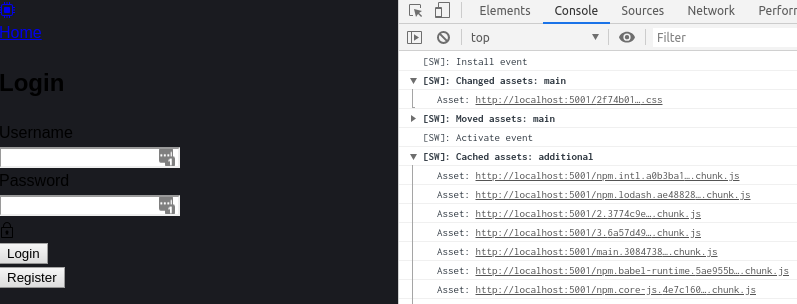
js { // Handle @elastic/ui CSS separately test: /\.css$/, include: /node_modules\/@elastic/, use: ['style-loader', 'file-loader'], }, - Result: Build succeeds, CSS file is now added to the build output, and browser shows the CSS file being downloaded on page load. However, the CSS is not applied to the page.
- Screenshot:
Other
I do not use any components that depend on
momentorhighlight.js, so I have added this in my webpack config to shrink build output:{ // Remove unused transitive deps test: /(moment|highlight\.js)/, use: 'null-loader', },It does not seem relevant, but I always see this error/warning(?) during build:
66% building 667/704 modules 37 active /home/.../src/node_modules/@elastic/eui/lib/components/filter_group/filter_select_item.js
Replace Autoprefixer browsers option to Browserslist config.
Use browserslist key in package.json or .browserslistrc file.

Using browsers option can cause errors. Browserslist config
can be used for Babel, Autoprefixer, postcss-normalize and other tools.

If you really need to use option, rename it to overrideBrowserslist.

Learn more at:
https://github.com/browserslist/browserslist#readme
https://twitter.com/browserslist
From the eui README, I see that
npmis explicitly not supported. I do not think that this constraint should be related to the missing CSS, but I understand if this is closed without a response because of this.
 cahna
cahna
All 3 comments
Thanks for your thorough investigation, @cahna
I believe the problem boils down to the production webpack sideEffects config. EUI specifies sideEffects: false, which after some research _might_ be incorrect when it comes to the dist CSS files.
I'll open an issue in EUI to reconsider our sideEffects designation. For now, you can change sideEffects to false in webpack.prod.babel.js to get around the problem.
Also, you shouldn't need to make any other changes the react-boilerplate webpack configs to use EUI. The stock loader pipeline is sufficient for EUI (assuming you don't use Sass).
 thompsongl
on 28 Apr 2020
thompsongl
on 28 Apr 2020
Another (probably better) option is to alter webpack.base.babel.js to add sideEffects to 3rd-party css:
{
    // Preprocess 3rd party .css files located in node_modules
    test: /\.css$/,
    include: /node_modules/,
    use: ['style-loader', 'css-loader'],
+   sideEffects: true,
},
In this case make no changes to webpack.prod.babel.js
thompsongl
on 28 Apr 2020
Thank you, @thompsongl!!! I can confirm that your solution works!
...now I'm off to read the docs on webpack tree shaking
cahna
on 28 Apr 2020
Related issues
 peteharverson
·
3Comments
peteharverson
·
3Comments
 cedeber
·
4Comments
cedeber
·
4Comments
 wylieconlon
·
3Comments
wylieconlon
·
3Comments
 j-m
·
3Comments
peteharverson
·
4Comments
j-m
·
3Comments
peteharverson
·
4Comments