Eui: Flyout generates two EuiOverlayMask when ownFocus is enabled
Hi,
I'm using the latest version (23.2.0) of elastic UI and was trying the "Small Flyout, own Focus" demo in my own dev environment.
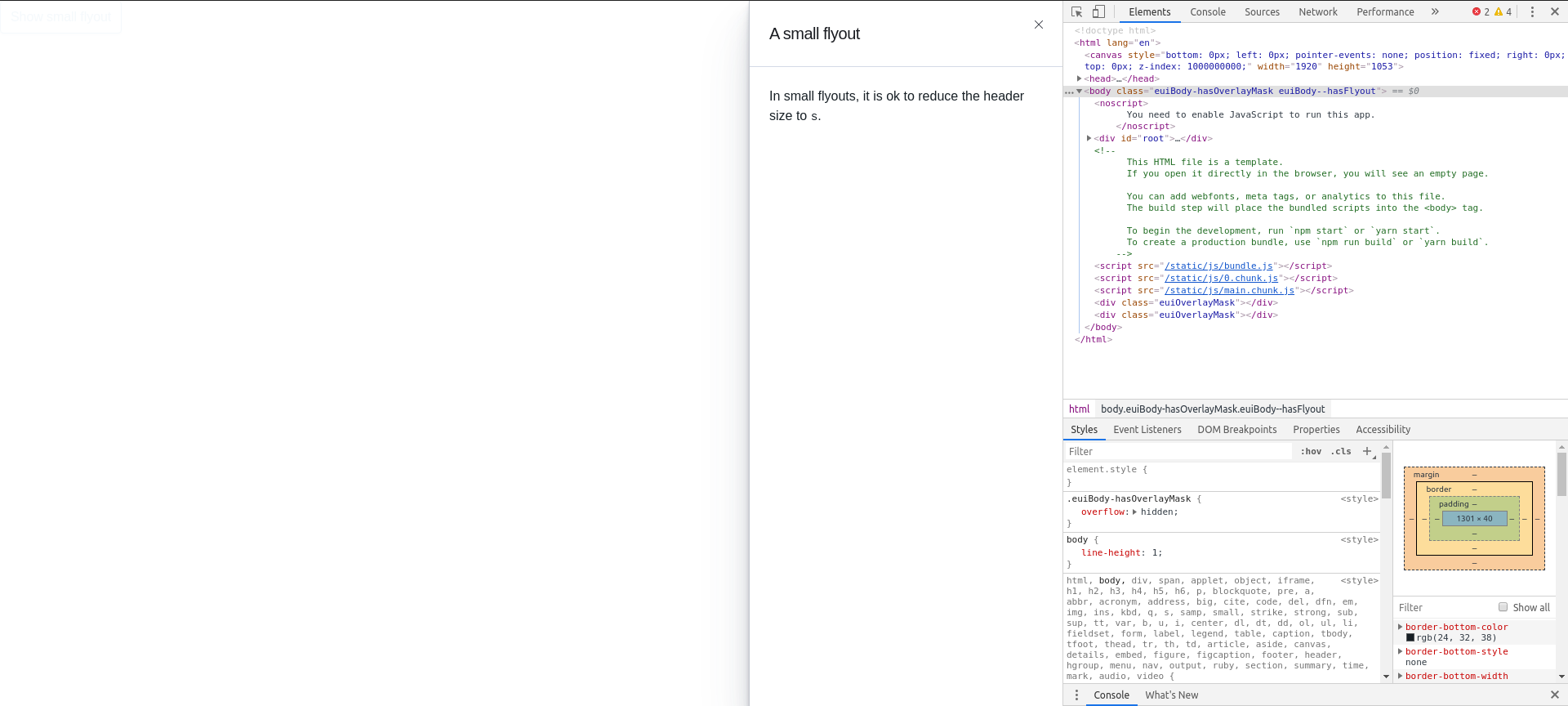
When I click the button, i realize the overlay mask stays on even though the drawer has closed.
On inspecting the browser console, i realize there's two EuiOverLayMask component created when the drawer is open. When the drawer is closed, there's still one remaining in the DOM, causing the issue.
 weiklr
All 6 comments
I'm unable to reproduce a double overlay on https://elastic.github.io/eui/#/layout/flyout (which currently uses v23.2.0). Can you provide the steps you're taking to navigate to and toggle that flyout?
 chandlerprall
on 7 May 2020
chandlerprall
on 7 May 2020
I simply copied the code from the "Small Flyout, Own Focus" demo to its own jsx file, and run it like it's described in the demo.
weiklr
on 8 May 2020
I realize this is because of React's
Btw, I was on development mode when i tried this, but it doesn't seemed to affect production build based on Reactjs' docs. Seems like react team did it on purpose to highlight side effects in improper life cycle methods and constructors.
More details here:
https://reactjs.org/docs/strict-mode.html#detecting-unexpected-side-effects
weiklr
on 8 May 2020
Ahh, now I understand what's going on. Yep, that's a problem. I confirmed moving the overlay's document.body.appendChild(this.overlayMaskNode); from its constructor and into the did mount life cycle fixes this particular issue.
We should enable strict mode in our docs, work on identifying other existing places like this, and fix. /cc @thompsongl for visibility
chandlerprall
on 12 May 2020
This also happens with the new EuiCollapsibleNav
I also removed the <React.StrictMode> tags to fix this
 periabyte
on 26 May 2020
periabyte
on 26 May 2020
Hi, Im suffering also this issue not in a flyout but always. This is the minimum setup where I can see both divs created always staying one after the state change.
function App() {
const closeReleaseNumberModal = () => setIsReleaseNumberModalVisible(false);
const showReleaseNumberModal = () => setIsReleaseNumberModalVisible(true);
const [isReleaseNumberModalVisible, setIsReleaseNumberModalVisible] = useState(false);
const render_release_number_modal = () => {
if (isReleaseNumberModalVisible) {
return (
<EuiOverlayMask>
<EuiConfirmModal
title="You’re about to release a number"
onCancel={closeReleaseNumberModal}
onConfirm={closeReleaseNumberModal}
cancelButtonText="No, don't do it"
confirmButtonText="Yes, do it"
buttonColor="danger"
defaultFocusedButton="confirm">
<p>Are you sure you want to do this?</p>
</EuiConfirmModal>
</EuiOverlayMask>
);
}
}
return (
<Fragment>
{render_release_number_modal()}
</Fragment>
)
}
export default App;

after close the modal

 DavidGOrtega
on 30 May 2020
DavidGOrtega
on 30 May 2020
Related issues
 flash1293
·
3Comments
flash1293
·
3Comments
 cahna
·
3Comments
cahna
·
3Comments
 jen-huang
·
4Comments
jen-huang
·
4Comments
 igoristic
·
4Comments
igoristic
·
4Comments
 stacey-gammon
·
4Comments
stacey-gammon
·
4Comments
Most helpful comment
Ahh, now I understand what's going on. Yep, that's a problem. I confirmed moving the overlay's
document.body.appendChild(this.overlayMaskNode);from its constructor and into the did mount life cycle fixes this particular issue.We should enable strict mode in our docs, work on identifying other existing places like this, and fix. /cc @thompsongl for visibility