Ethminer: Hashrate help! GTX 1060 6 GB
Hi All,
I am quiet newbie in mining. just setup 2 GTX 1060 6 gb DDR5 (Hynix) but when first start hashrate around 15 ~ 17 mhs after overclock 19 ~ 21 mhs.
Never across beyond that hashrate. any of you able to help me what setting i have done wrong?
Overclock setting:
- Power limit 65%
- Memory clock: +750
- Core clock: 0
- Fan: 70%
using ethermine 0.12.0
setx GPU_FORCE_64BIT_PTR 0
setx GPU_MAX_HEAP_SIZE 100
setx GPU_USE_SYNC_OBJECTS 1
setx GPU_MAX_ALLOC_PERCENT 100
setx GPU_SINGLE_ALLOC_PERCENT 100
ethminer.exe -U --farm-recheck 2000 --cl-local-work 256 --cl-global-work 16384 -S asia1.ethermine.org:4444 -FS us1.ethermine.org:4444 -O
I am also change set force P0 to off
 DiazLv
All 32 comments
You use OpenCl to mine with Nvidia cards, On Nvidia GPU's its often better to use CUDA to mine
 MariusVanDerWijden
on 16 Jan 2018
MariusVanDerWijden
on 16 Jan 2018
For Micron and Hynix memories, that's what to expect. My EVGA 1060 has a Micron and can't get past 21 MH without becoming unstable.
Using NVidia Inspector, you'll notice that the MCU never hits 100%, I'm lucky it stays at 93%.
 satori-q3a
on 16 Jan 2018
satori-q3a
on 16 Jan 2018
@MariusVanDerWijden in the setting "-U" mean mining with CUDA instead of OpenGL right?
i did using -G but the hashrate slightly lower 1 mhs
@satori-q3a yea so far for samsung not much people complaint about hashrate. it easily mine with 24mhs. Wonder anyone able to reach 24mhs with micron or hynix.
DiazLv
on 16 Jan 2018
Do you think it's due to the OS?
 ZeddBread
on 16 Jan 2018
ZeddBread
on 16 Jan 2018
I'm running an ASUS GTX1060 6GB with micron memory on windows 10 that does a stable 23.4 23.00 to 23.28 mhs but any more tweakage for a higher hash rate causes problems.
- core voltage 0
- power limit 70%
- core clock -170
- mem clock +610
- fan speed 70%
Start-up is simple:
setx GPU_FORCE_64BIT_PTR 0
setx GPU_USE_SYNC_OBJECTS 1
ethminer.exe -U ...
Note, no need to set the following three environment variables since they're set in the etherminer/main.cpp file:
// Set env vars controlling GPU driver behavior.
setenv("GPU_MAX_HEAP_SIZE", "100");
setenv("GPU_MAX_ALLOC_PERCENT", "100");
setenv("GPU_SINGLE_ALLOC_PERCENT", "100");
 jpoirier
on 16 Jan 2018
jpoirier
on 16 Jan 2018
@ZeddBread i am using windows 10. haven't try linux yet
@jpoirier any reason to under clock core? my one did not have any difference on hashrate
DiazLv
on 17 Jan 2018
@DiazLv to decrease energy usage
jpoirier
on 17 Jan 2018
@jpoirier thx for the info
DiazLv
on 18 Jan 2018
@DiazLv
As I understood so far, the Samsung RAM can be pushed further, but at same speeds it is not faster...
+750 Mem stable @ 1060 is quite nice
You can compare the absolute Mhz below to see
my ASUS GTX1060 6OG gets instable there (Samsung RAM)
with (Win 10) - running since 6 months:
stock voltage
PL 60%
Clock -400 (Afterburner: 1455Mhz)
RAM +723 (Afterburner: 4622Mhz)
Fan typically 40%@43°C (~18°C room temp)
(Fansetting: 30%@35°C + 50%@50°C)
drawing 94Watts (HW Mon)
giving 23mh/s - compared to my 1070 (running PL 70%) it produces "only" 73% of the hashes - sure the power per mh is higher with ~3,75
 DDDanny
on 23 Jan 2018
DDDanny
on 23 Jan 2018
Thx you for sharing @DDDanny
I was tried ver 0.13rc7 its seem like stable. Around 20.7 ~ 21.3 mh/s instead of 19~21
But when i check actual eth I receive same amount. Just information
DiazLv
on 27 Jan 2018
I’m running 6 X ROG-STRIX-GTX1060-O6G-GAMING (Hynix)
Can’t seem to get more than that
Core voltage 0
Power limit 65%
Core clock 100
Memory clock 900
Fan speed AUTO
21.2MH/s per card
 pranash07
on 6 Mar 2018
pranash07
on 6 Mar 2018
@pranash07 do you have any freezing with that oc settings? i have the same card with hynix mem.
 momowchang
on 7 Mar 2018
momowchang
on 7 Mar 2018
Nope no freezing.runs super stable on my current settings
pranash07
on 7 Mar 2018
hi, im new to this im mining with simplemining check my setting to OC, help me i thinks its ok im having no rejected share

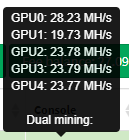
im having this Mh/s
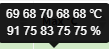
this temp and fan %
gpu0 power color red devil rx580
gpu1 msi 1060 6gb hynix mem
gpu2 gigabyte 1060 3gb
gpu3 gigabyte 1060 3gb
gpu4 gigabyte 1060 3gb
im a little scared because i think i overclock too much but its working good for 3 days now, and the electric bill its no i problem here
at first the gpu was giving me this
gpu0 power color red devil rx580 27mh/s (them i bios modded) the oc setting doesnt affect this but if i put to 0 them the next card go back to 15mh/s
gpu1 msi 1060 6gb hynix mem 15mh/s out of box
gpu2 gigabyte 1060 3gb 17mh/s out of box
gpu3 gigabyte 1060 3gb 17mh/s out of box
gpu4 gigabyte 1060 3gb 17mh/s out of box
im giving this info to help anybody and to be help if im doing something wrong any advice will be much appreciated, thanks
ps: im waiting for some other cards
 oscarn20
on 11 Mar 2018
oscarn20
on 11 Mar 2018
Your temps seem High,do you think your cards will have the life longevity as you would hope for?
pranash07
on 11 Mar 2018
@oscarn20
if you are using simpleminingOS then you cannot never put AMD and NVIDIA together , remove your GPU0 from that rig, things will work afterwards ;)
 invidtiv
on 11 Mar 2018
invidtiv
on 11 Mar 2018
@oscarn20
and put your fan to 100% you will fry quick your grafic cards with those temp.
invidtiv
on 11 Mar 2018
@pranash07 @invidtiv thanks for the obsarvation i will remove the amd card and see what happens, and im going to pu the fan 100%
oscarn20
on 12 Mar 2018
@pranash07 @invidtiv i have a question> what is the recommended temp?
oscarn20
on 12 Mar 2018
Anywhere between 55-65 Degrees Celsius
I wouldn't recommend going pass that especially if you want to get full life out of your cards.
pranash07
on 12 Mar 2018
@pranash07 thanks
oscarn20
on 12 Mar 2018
yes I live in portugal and i try to keep them below 50C for nvidia and below 55C for AMD
anything above that and the cards stop working...
invidtiv
on 12 Mar 2018
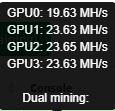
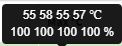
update:
oc settings

gpu MH/s
Temp and fan
oscarn20
on 12 Mar 2018
Hynix memory forever will show less hashrate due timins.
My stable OC for HYNIX is
- core voltage 0
- power limit 70%
- core clock -170
- mem clock +600
- fan speed auto
19.3 MH/s Gigabyte GTX 1060 3GB Version
From @jpoirier
 ghost
on 12 Mar 2018
ghost
on 12 Mar 2018
@venadHD
i tried those settings and get down to 17.3 from 19.7
i guess doenst work equal to diferrent brand because mine are a msi 1060 6gb hynix memory
oscarn20
on 12 Mar 2018
What is your current config for MSI Hynix memory?
El lun., 12 mar. 2018 16:07, oscarn20 notifications@github.com escribió:
@venadHD https://github.com/venadhd
i tried those settings and get down to 17.3 from 19.7
i guess doenst work equal to diferrent brand because mine are a msi 1060
6gb hynix memory—
You are receiving this because you were mentioned.
Reply to this email directly, view it on GitHub
https://github.com/ethereum-mining/ethminer/issues/573#issuecomment-372342605,
or mute the thread
https://github.com/notifications/unsubscribe-auth/AgCedXXJJe8b-XJF-9V6yL6Qf605Djrvks5tdo8rgaJpZM4RfgIf
.
ghost
on 12 Mar 2018
ON good days Cclock -200 Mclock +1350 Power 60%
invidtiv
on 12 Mar 2018
-100/+1300
oscarn20
on 12 Mar 2018
but the hynix memory its a problem i will sell that card and buy another and hopefully not a hynix
oscarn20
on 12 Mar 2018
Cant go up as 1000
El lun., 12 mar. 2018 16:27, oscarn20 notifications@github.com escribió:
-100/+1300
—
You are receiving this because you were mentioned.
Reply to this email directly, view it on GitHub
https://github.com/ethereum-mining/ethminer/issues/573#issuecomment-372350197,
or mute the thread
https://github.com/notifications/unsubscribe-auth/AgCedSNUPtPZMrWUjO5RekTwqO9jxGXsks5tdpP7gaJpZM4RfgIf
.
ghost
on 12 Mar 2018
Is it normal Ethminer starting scripts for ~10min before start really mining works? Mine seems to be in slow motion on the first minutes LOL
 ivanlucci1
on 17 Mar 2018
ivanlucci1
on 17 Mar 2018
Can you post the script?
El sáb., 17 mar. 2018 3:49, ivanlucci1 notifications@github.com escribió:
Is it normal Ethminer starting scripts for ~10min before start really
mining works? Mine seems to be in slow motion on the first minutes LOL—
You are receiving this because you were mentioned.
Reply to this email directly, view it on GitHub
https://github.com/ethereum-mining/ethminer/issues/573#issuecomment-373889055,
or mute the thread
https://github.com/notifications/unsubscribe-auth/AgCedW0OwLySePYVQVCXvUJjxFDwHdMEks5tfHnLgaJpZM4RfgIf
.
ghost
on 17 Mar 2018
Related issues
 phalexo
·
5Comments
phalexo
·
5Comments
 Penziplays
·
5Comments
Penziplays
·
5Comments
 sur1v
·
4Comments
sur1v
·
4Comments
 andreikorchagin
·
5Comments
andreikorchagin
·
5Comments
 rawsh
·
5Comments
rawsh
·
5Comments
Most helpful comment
For Micron and Hynix memories, that's what to expect. My EVGA 1060 has a Micron and can't get past 21 MH without becoming unstable.
Using NVidia Inspector, you'll notice that the MCU never hits 100%, I'm lucky it stays at 93%.