Espeasy: Command to clear/reset plugin (pulse counter)
I have a custom build of 20191028. That means I have removed all controllers and plugins which I don't use. Still is is unstable, rebooting (Reset Reason: | Hardware Watchdog) every few hours.
I can live with this BUT it turns out that the pulse counter is also counting 1 fake pulse after reboot.
I use mode Falling.
Is there a way to skip this "boot pulse"?
 glsf91
All 35 comments
Well, crashing is also not good.
Can you give an estimate on the count frequency?
Not sure (yet) if there is a command to reset the counter. Would that be a working solution, to reset the counter at boot from the rules?
 TD-er
on 3 Nov 2019
TD-er
on 3 Nov 2019
It is counting a water meter, so maybe 20-100 counts a day. Also a DS18B20 temp sensor is there.
When counting it is also sending the delta count to domoticz. So the count should stay at 0 directly after boot.
Interval to domoticz is 60 sec. So a rule setting it back to zero will work I hope. I will give it a try.
edit:
I can used use this ?
On System#Boot do // When the ESP boots, do
TaskValueSet 1,1,0 // To avoid fake pulse
TaskValueSet 1,2,0 // To avoid fake pulse
EndOn
glsf91
on 3 Nov 2019
Not sure if TaskValueSet can be used on something other than the Dummy plugin.
It should either be a command of the plugin itself, or I must add a new command to clear just any plugin. (perhaps calling init ?)
TD-er
on 3 Nov 2019
TaskValueSet is indeed not working.
Is there an example how I can add a command to the plugin which can he called from the rules?
glsf91
on 3 Nov 2019
I think it is most useful for me to add a command which can be used to call the init of a plugin, since that will also help to fix misbehaving plugins.
TD-er
on 3 Nov 2019
I understand it will take some time before this is done. Is there also something I can do temporary to overcome this problem in my own build?
For example can I determine in the plugin the uptime and if it is less then a few seconds just reset the counters.
glsf91
on 6 Nov 2019
I don't know of a way to reset the counters.
TD-er
on 7 Nov 2019
I think have somewhere patch for this stuff or for encoder, need to check ;)
 uzi18
on 7 Nov 2019
uzi18
on 7 Nov 2019
I think have somewhere patch for this stuff or for encoder, need to check ;)
Can you share this with us?
glsf91
on 7 Nov 2019
diff --git a/src/_P003_Pulse.ino b/src/_P003_Pulse.ino
index 9aecb8f3..4db6d080 100644
--- a/src/_P003_Pulse.ino
+++ b/src/_P003_Pulse.ino
@@ -177,6 +177,21 @@ boolean Plugin_003(byte function, struct EventStruct *event, String& string)
         success = true;
         break;
       }
+
+      case PLUGIN_WRITE:
+      {
+        String command = parseString(string, 1);
+        if (command == F("resetpulsecounter"))
+        {
+          String log = "";
+          log = String(F("PULSE: ")) + string;
+          addLog(LOG_LEVEL_INFO, log);
+          Plugin_003_pulseCounter[event->TaskIndex] = 0;
+          Plugin_003_pulseTotalCounter[event->TaskIndex] = 0;
+          success = true; // Command is handled.
+        }
+        break;
+      }
   }
   return success;
 }
I see addLog not needed here :)
uzi18
on 7 Nov 2019
Thanks.
I'am not very familiar with the espeasy code, but from where do I issue the command "resetpulsecounter" ?
glsf91
on 7 Nov 2019
@TD-er I can PR this if needed
from everywhere, usually from rules
uzi18
on 7 Nov 2019
@TD-er I can PR this if needed
from everywhere, usually from rules
Yes please do. Then I can also make a new nightly with the (today) merged PR in the core library to leave out LittleFS from the builds and thus saving quite a bit.
TD-er
on 7 Nov 2019
@TD-er ok PR is ready - have ommited loging
uzi18
on 7 Nov 2019
@uzi18
So adding this will do?
On System#Boot do
resetpulsecounter
EndOn
Edit: doing this, counter will be still 1 after reboot.
But using a timer and doing this after 5 secs reboot works !
Thanks
glsf91
on 7 Nov 2019
@TD-er task values are restored after boot event?
uzi18
on 7 Nov 2019
Not sure, will have to check in the code.
TD-er
on 7 Nov 2019
Nope, readFromRTC is called before sending out the system#boot event.
Also the plugins are initialized before this event.
TD-er
on 7 Nov 2019
so why @glsf91 needs delay?
uzi18
on 8 Nov 2019
so why @glsf91 needs delay?
I have no idea.
TD-er
on 8 Nov 2019
Hi All,
I have 1 node with 2 Pulse counters which I rebooted every day at 00:01u to have daily counter values. Now I replaced the reboot by resetpulsecounter and I noticed only 1 pulsecounter (the first one) is reset, the 2nd one not.
command used: on Clock#Time=All,00:01 do resetpulsecounter endon
For me it looked already strange it's not possible to select the pulse counter you want to reset, now it seems only the first one is reset.
 blb4github
on 10 Nov 2019
blb4github
on 10 Nov 2019
@blb4github Yep, that's something we need to fix.
The task ID must be added to the reset.
TD-er
on 10 Nov 2019
I added the optional taskindex parameter to the resetpulsecounter command.
TD-er
on 11 Nov 2019
thx
uzi18
on 11 Nov 2019
Hi @TD-er ,
I'm sorry to day but for me the resetpulsecounter with task number doesn't work as it should be, still only the first pulse counter is reset. In my rules I have (tested):
on Clock#Time=All,10:30 do
resetpulsecounter,3
resetpulsecounter,4
endon
I've tested with ESP_Easy_mega-20191113_test_core_260_sdk3_alpha_ESP8266_4M1M.bin
blb4github
on 13 Nov 2019
The pulsecounter tasks you have are at position 3 and 4 in the task table list?
TD-er
on 13 Nov 2019
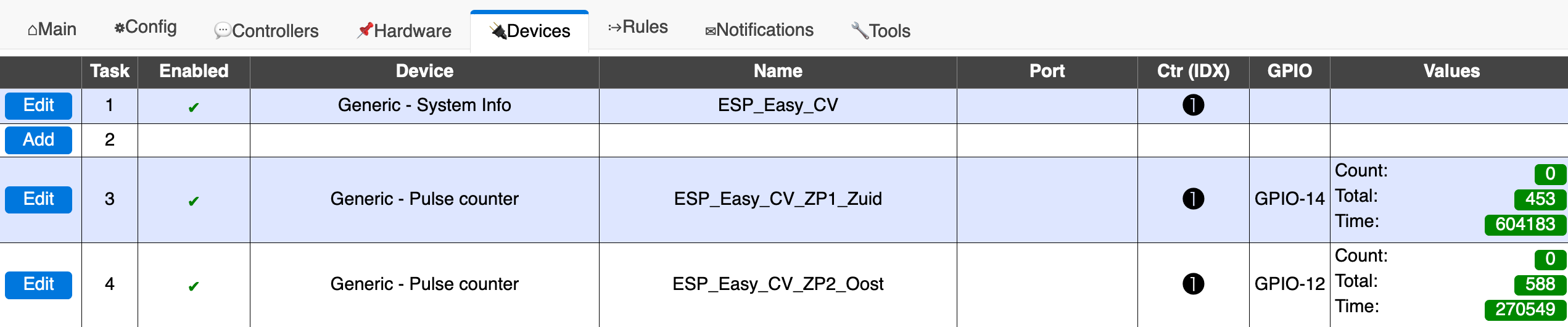
Yes, they are on task 3 and 4.
blb4github
on 13 Nov 2019
Found the bug.
The problem was in the different meaning of the positional argument of the 2 argument parser functions.
I really must change these as I have to check the code of each every time I see them and it was the bug here.
So in the old versions the command should have worked if you add an extra comma before the parameter to mark the task nr.
TD-er
on 19 Mar 2020
Found the bug.
The problem was in the different meaning of the positional argument of the 2 argument parser functions.I really must change these as I have to check the code of each every time I see them and it was the bug here.
So in the old versions the command should have worked if you add an extra comma before the parameter to mark the task nr.
Hi TD-er, I'm a bit confused now. What should be now, for version ESP_Easy_mega-20200310-74-PR_2952_test_beta_ESP8266_4M1M.bin the right command to reset pulscounter on task 4?
I tried resetpulsecounter,4 & resetpulsecounter,,4 and several others but it's not resetting.
blb4github
on 20 Mar 2020
I tried some, it's working with resetpulsecounter,4,4
blb4github
on 23 Mar 2020
I tried some, it's working with resetpulsecounter,4,4
Hmm you need to have the same parameter twice?
TD-er
on 23 Mar 2020
Yes. I tried:
Resetpulsecounter,4 -> didn’t reset
Resetpulsecounter,,4 -> didn’t reset
Resetpulsecounter,4,4 -> Did reset
blb4github
on 23 Mar 2020
OK, so it has not been fixed right...
TD-er
on 23 Mar 2020
I've tested Release mega-20200328 now on my wemos D1 mini (ESP_Easy_mega-20200328_test_beta_ESP8266_4M1M.bin) and it's now working as designed! the total pulsecounter value is kept with a reboot & I can now reset the pulscounter (on task 4) with resetpulsecounter,4. Thanks!!
blb4github
on 28 Mar 2020
Thanks for the update.
TD-er
on 28 Mar 2020
Related issues
 pwassink
·
96Comments
pwassink
·
96Comments
 TheAppService
·
105Comments
TheAppService
·
105Comments
 micropet
·
78Comments
micropet
·
78Comments
 Budman1758
·
83Comments
Budman1758
·
83Comments
 Erd86
·
90Comments
Erd86
·
90Comments