Espeasy: DHT22 not working with ESP Easy on Wemos D1
Hello alltogehter,
I have connected my DHT22 properly to my Wemos D1 but can´t get it to work with ESP Easy. Many "normal" program scripts to output the temperature and humidity to the serial monitor also didn´t work, but this here finally did the trick! : https://chewett.co.uk/blog/1476/using-the-dht22-temperature-sensor-with-a-wemos-d1-mini-esp8266/
There is also a modified library involved, related to the 3,3V limitation of the Wemos D1´s digital GPIOS. The EspEasy displaying me in the webinterface "nan" may be also caused by the "normal" library used by EspEasy, calculating the values with 5V. I´d be very grateful if someone knew how to resolve this problem.
Best regards Daniel
EDIT: I figured out, that "nan" is only displayed when I set the setting "IDX/Variable". Otherwise simply 0.0 is shown.
 TheAppService
All 105 comments
for this sensor none of libraries calculate with 5V or 3V3 because it is a digital sensor, so you receive value from sensor itself
 uzi18
on 26 Aug 2019
uzi18
on 26 Aug 2019
OK, so apparently it is suggested to use this DHTesp library
I have quickly browsed through the code of that library, and some of the code does look familiar, so maybe that library does have some fixes compared to the version we use.
But I don't remember a lot of issues reported with this plugin, so I would also like to know what exact sensor your are running and more info about your board and how it is connected.
 TD-er
on 26 Aug 2019
TD-er
on 26 Aug 2019
will try to compare it with our implementation
uzi18
on 26 Aug 2019
@TheAppService lets start with debug log from reading your sensor under espeasy please
@TD-er I see initial timings are a little bit different, but lest check debug log so. we will know maybe what is realy wrong
We support bunch of DHT like sensors, so maybe just DHT22 is wrong
uzi18
on 26 Aug 2019
I know there was an issue about it about half a year ago (or maybe longer?) that was about changing the timing of some of the DHT sensors, but not all.
TD-er
on 26 Aug 2019
you have added some error logging, so we can use it now =)
uzi18
on 26 Aug 2019
Alright, well I will give you more information about my setup shortly! But first, maybe a suggestion of mine - If the DHT 22 is the only affected one on Wemos Boards, maybe replacing the plugin wouldn´t be a good idea, maybe for testing purposes adding the new plugin especially for Wemos boards or maybe "Updated ESP Compatibility Plugin" would be suitable...
Sensor Type:
"ASAIR AM 2302" - "SN: 180497FD9"
Board is a Wemos D1 Ver. 2015-08
My Circuit is exactly like this here, although I have a Wemos D1 instead of the D1 Mini
3,3V to VCC Pin on Sensor, 3,3V over a 10kOhm resistor into the data- line, Data-line of the sensor to Pin D2, Ground to Ground

DEBUG Log will follow in a nother comment when I have found the feature in ESP Easy


TheAppService
on 27 Aug 2019
In the DEBUG log i can only find this: (Maybe you can give me a hint how I can exactly debug the sensor...
66149 : WD : Uptime 1 ConnectFailures 0 FreeMem 28888
96150 : WD : Uptime 1 ConnectFailures 0 FreeMem 28760
126151 : WD : Uptime 2 ConnectFailures 0 FreeMem 28728
156152 : WD : Uptime 2 ConnectFailures 0 FreeMem 28696
186153 : WD : Uptime 3 ConnectFailures 0 FreeMem 28680
216154 : WD : Uptime 3 ConnectFailures 0 FreeMem 28664
246155 : WD : Uptime 4 ConnectFailures 0 FreeMem 28648
276156 : WD : Uptime 4 ConnectFailures 0 FreeMem 28616
306157 : WD : Uptime 5 ConnectFailures 0 FreeMem 28584
336158 : WD : Uptime 5 ConnectFailures 0 FreeMem 28568
TheAppService
on 27 Aug 2019
If you are using serial connection, than in advenced settings change log level for serial to debug
uzi18
on 27 Aug 2019
Hmm what version of ESPeasy are you running?
This looks rather old.
TD-er
on 27 Aug 2019
Booting Build nr:120 (I thought this was the newest...)
I set the serial log level to 5 (Hope this is high enough) but I´m only getting this output: https://gist.github.com/TheAppService/0d47f76b3462b988c612007afeb3d9e3
TheAppService
on 27 Aug 2019
"please update for latest version, R120 is obsolete." -- So i should youse the mega Versions ? Maybe you should clarify, that the "current stable" on this site here https://www.letscontrolit.com/wiki/index.php/ESPEasy is rather old...
TheAppService
on 27 Aug 2019
yes, try mega build, mega have some problems and is not rocksolid, but has lots of bugs resolved
uzi18
on 27 Aug 2019
Alright, I updated it but the log still "only" says 40797 : DHT : No Reading
60744 : DHT : No Reading
TheAppService
on 27 Aug 2019

Just tested it again with the simple sketch under the exact same conditions and voila ;D
TheAppService
on 27 Aug 2019
My settings should be correct or do you think otherwise?


TheAppService
on 27 Aug 2019
Use 4,7kOhm resistor
 AxelMilb
on 27 Aug 2019
AxelMilb
on 27 Aug 2019
I can try to "build" one out of the resistors I have but I won´t exactly be able to hit 4,7kOhm. Is this really neccessary ? I have one perfectly working sensor on my raspberry with a 10kOhm resistor...
TheAppService
on 27 Aug 2019
I have a DHT22 on a Wemos D1 mini with 4.7kOhm resistor.
The specifications are 4.7k - 10K
https://www.letscontrolit.com/wiki/index.php?title=DHT11_DHT22
DHT22 defect? ESP alright? Cold solder joint?
AxelMilb
on 27 Aug 2019
Just tested it again with the simple sketch under the exact same conditions and voila ;D
Well @AxelMilb as i tested it with the exact same setup using the sketch you see above, it is generally working...
TheAppService
on 27 Aug 2019
The specifications are 4.7k - 10K
Ah, one more question, do you have it connected to 5V or 3,3V?
And I don´t know, maybe something has changed concerning this sensor / there are maybe also different types on the market... Therefore maybe the devs could/ and maybe already had a look over the library to maybe introduce a little compatiblity mode with the other library
TheAppService
on 27 Aug 2019
You can use 2x10kOhm in parallel connection so it will be about 5kOhm
uzi18
on 27 Aug 2019
Assume DHT22 works for you now =)
uzi18
on 27 Aug 2019
@TheAppService "no reading" means no data from sensor, it could be related to initial timing or pullup resistor
This sensor works with 3V3 and 5V.
@TD-er some improvements here #2571
uzi18
on 27 Aug 2019
A Test build for PR #2571.
TD-er
on 27 Aug 2019
@TheAppService please try this test build and give us debug log, thanks
uzi18
on 27 Aug 2019
Good morning, thank you for your big efforts and the test build! Unfortunateley with the flashed build :ESP_Easy_mega-20190827-2-PR_2571_normal_ESP8266_4M.bin The issue still persists- 1335678 : DHT : No Reading
TheAppService
on 28 Aug 2019
try change gpio boot state to default
uzi18
on 28 Aug 2019
try change gpio boot state to default
Did it, but unfortunateley the issue is still the same /:
TheAppService
on 28 Aug 2019
Just to add, I have intermittent problems with the DHT22 on ESP01_1M. Cannot reproduce but sometimes the DHT22 fails with same symptoms as described above. After switching off power for couple of minutes, the function resumes after boot. When I only do a reboot it contineous to have No reading. It is not with all DHT22 on ESP01_1M combinations. I do suspect a critical timing problem, so when Pull #2571 is closed I will deploy and will do some field tests.
 Roos-AID
on 28 Aug 2019
Roos-AID
on 28 Aug 2019
@Roos-AID There is a test build you can try on one of the nodes.
Just to see if you're facing the same issue as well.
TD-er
on 28 Aug 2019
@TD-er if AM2302 is same as DHT22 so I can try to check also on my own :)
uzi18
on 28 Aug 2019
@TD-er I have loaded the test build on a node that regularly fails, it works after cold boot, so that is good. Let's wait and see if it is still getting values tomorrow as it is an intermittent issue.
On this node, GPIO 2 is used for DHT22 and on Serial , GPIO 1 and 3, I have MHZ19 CO2.
Thanks for all the good work !
Roos-AID
on 28 Aug 2019
@Roos-AID please provide debug log so we can have more data
uzi18
on 28 Aug 2019
Just a little comment from me, I assume the timing and hereby the whole issue with the library varies from board to board... If there´d be a general flaw I think you´d already have had more complaints..
@TD-er if AM2302 is same as DHT22 so I can try to check also on my own :)
Therefore, do you @uzi18 maybe also have a Wemos D1 for testing ?
And just out of interest, what about my suggestion of adding a compatibliity version of the other library I mentioned or is this much work / Did you try to migrate something from ESPDHT library in the pull request ?
TheAppService
on 28 Aug 2019
@TheAppService we do not use any lib for DHT sensors, need to check if have such wemos d1 modules.
please consider to paste more lines of log, as @Roos-AID said it sometimes work sometimes no
uzi18
on 28 Aug 2019
@TheAppService we do not use any lib for DHT sensors, need to check if have such wemos d1 modules.
please consider to paste more lines of log, as @Roos-AID said it sometimes work sometimes no
Well I would for sure poste more lines but unfortunateley there is no more to post except the No reading thing.. (Or is my DEBUG level wrong ?) As I just said, I assume the issue varies from board to board and maybe the timing works for @Roos-AID´s ESP01_1M sometimes and on my Wemos D1 there is simply no function..
TheAppService
on 28 Aug 2019
Hi, since happened to see this tread I can just mention that I have a Wemos D1 mini for 2 years and frequently update the build (normal 4M 8266). I have AM2302, DHT22, Dht11 and ds18b20 connected to it. Have not noticed any problems with the reading. I send ro Domoticz every second minute. I use 10k pullup. I connect Vcc to 5V and pullup to 3.3V. I use GPIO 0, 12,13,14.
 toast1234
on 28 Aug 2019
toast1234
on 28 Aug 2019
@toast1234 please try test build if it work for you with your sensors
uzi18
on 28 Aug 2019
Even if there is some timing fluctuation among sensors (or boards, those crystals can be of varying quality) it still should recover from a sensor lockup.
Apparently the sensor should be power cycled to make it work again.
Is the sensor used in somewhat extreme environment? (e.g high humidity)
TD-er
on 28 Aug 2019
OTA upgrade ESP_Easy_mega-20190827-2-PR_2571_normal_ESP8266_4M.bin and still show the readings after 15 min up time.
Dht11 had one miss showing NaN. Dht11 are crap anyway... I must add that I have never had reason to watch close at every reading. But it has never been any flat line or missing values in Domoticz over the past year. Its now bed time in Sweden :-)
toast1234
on 29 Aug 2019
My ds18b20 is in the freezer and the DHT22 is under the house with up to over 90% humidity in the summer depending on the weather.
toast1234
on 29 Aug 2019
@TheAppService please try on other pin like D5 (GPIO14)
@toast1234 thx
uzi18
on 29 Aug 2019
@TD-er my AM2302 (DHT22) works before and after this patch, also tested on GPIO0 (D3), GPIO2 (D4), D5 ... works every time :)
uzi18
on 29 Aug 2019
@TheAppService I see problem, GPIO2 is pin D4 and GPIO4 is D2, please correct your settings or connections (just move wire from D2 to D4).
uzi18
on 29 Aug 2019
@uzi18 , I don't see where that's incorrect in the sceenshots.
It was also D2 on the ArduinoIDE scetch and on the ESPeasy settings page.
But maybe it is already way past my bed time also :)
TD-er
on 29 Aug 2019
@TD-er here it was different https://github.com/letscontrolit/ESPEasy/issues/2569#issuecomment-525151617
some posts later it looks ok.
uzi18
on 29 Aug 2019
@TheAppService please try on other pin like D5 (GPIO14)
Haha, i lose my mind, it works without problems on PIN D5...
(I currently have the test build installed you made for me)
TheAppService
on 29 Aug 2019
Its more than a year ago so I dont remember why but I had a reason for using the high GPIO numbers. I probably looked at the description for the device to find the best suitable pins. I'm quite sure I at that time had issues with the lower numbers. I picked GPIO 0 for one device just because the last high one is broken.
toast1234
on 29 Aug 2019
@uzi18 My node is now running 11 hours, it is still ok. In the syslog I found some occurrences of EspEasy: DHT : Checksum Error, but it recovers from it as the next read is ok.
So , do not see how to reproduce now, it all seems ok for me.
Roos-AID
on 29 Aug 2019
From some time we have "warning" sign added to some problematic gpios, by @TD-er
So we have got happy end :)
@Roos-AID how long is your DHT line? consider to use lower resistor eg. 5k or 3k3 Ohms instead
uzi18
on 29 Aug 2019
You may also want to take a look at this page in the docs: best-pins-to-use-on-esp8266
TD-er
on 29 Aug 2019
@toast1234 please try latest official build with DHT11, we have one report about something is wrong
uzi18
on 30 Aug 2019
I updated my test unit from 20190827 to 20190830 and my DHT11 sensor stopped working (it showed NaN for both temperature and humidity). On the same unit a BMP180 works fine on both builds.
Hardware is a quite old Wemos Lolin which has never shown any [hardware] problems.
I downgraded to 20190827 and everything is fine again.
In both cases I used the 'normal' core 2.6.0 builds as I am looking into the WiFi related reboots.
 georgep56
on 30 Aug 2019
georgep56
on 30 Aug 2019
Since the changes were made based on a report which later appeared to be incorrect configuration, maybe we should just revert the changes to this plugin.
Maybe the change of the return type of the function, which was also found by @uzi18 is enough to fix getting NaN values as supposed valid readings.
TD-er
on 30 Aug 2019
@TD-er prepared some commits for that, please wait a moment for report from @toast1234
maybe you can prepare test build with #2582 , so @georgep56 and others could test it
uzi18
on 30 Aug 2019
Happy to test :-)
On Fri, 30 Aug 2019 at 12:49, Bartłomiej Zimoń notifications@github.com
wrote:
@TD-er https://github.com/TD-er prepared some commits for that, please
wait a moment for report from @toast1234 https://github.com/toast1234
maybe you can prepare test build, so @georgep56
https://github.com/georgep56 could test it—
You are receiving this because you were mentioned.
Reply to this email directly, view it on GitHub
https://github.com/letscontrolit/ESPEasy/issues/2569?email_source=notifications&email_token=AANJSKC7FJ4IFT6KPZWWGSLQHECMPA5CNFSM4IPVFMLKYY3PNVWWK3TUL52HS4DFVREXG43VMVBW63LNMVXHJKTDN5WW2ZLOORPWSZGOD5RNSIY#issuecomment-526571811,
or mute the thread
https://github.com/notifications/unsubscribe-auth/AANJSKC2LCJIFS5HJPMN5CDQHECMPANCNFSM4IPVFMLA
.
georgep56
on 30 Aug 2019
My node is remote and the OTA failed. Will update to latest build this evening an can report back
toast1234
on 30 Aug 2019
I am busy for some of this afternoon but if someone could give a link to
the test build when it is ready I will download and test as soon as I can.
On Fri, 30 Aug 2019 at 12:59, toast1234 notifications@github.com wrote:
My node is remote and the OTA failed. Will update to latest build this
evening an can report back—
You are receiving this because you were mentioned.
Reply to this email directly, view it on GitHub
https://github.com/letscontrolit/ESPEasy/issues/2569?email_source=notifications&email_token=AANJSKDYZIDNRSLHFKURNDDQHEDTFA5CNFSM4IPVFMLKYY3PNVWWK3TUL52HS4DFVREXG43VMVBW63LNMVXHJKTDN5WW2ZLOORPWSZGOD5ROHAY#issuecomment-526574467,
or mute the thread
https://github.com/notifications/unsubscribe-auth/AANJSKC6NL4FOK5S2Y2VDKLQHEDTFANCNFSM4IPVFMLA
.
georgep56
on 30 Aug 2019
If this build not resolve your problem, will use my sealae with dht11
uzi18
on 30 Aug 2019
TD-er
on 30 Aug 2019
DHT11 appears to be working normally again in this test build :-) ...

georgep56
on 30 Aug 2019
Great :)
Now you can also test the core 2.6.0 used in that build, since it is supposed to be the same as the nightly build, only the plugin has changed.
TD-er
on 30 Aug 2019
@TD-er did you saw, have changed digitalwrite into input with pullup
uzi18
on 30 Aug 2019
@TD-er Yeah. I've put the core-2.6.0 build on to two of my units (both sensors only, one DHT11+BMP180. one DS18b20) and I'm monitoring the uptimes closely :-)
georgep56
on 30 Aug 2019
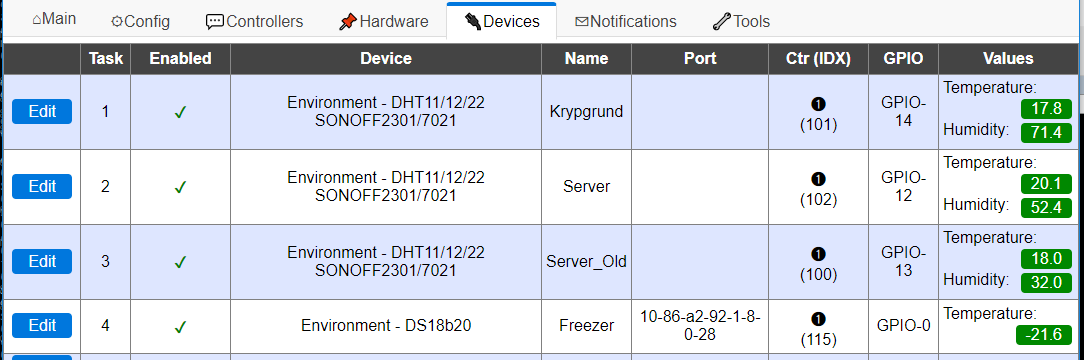
ESP_Easy_mega-20190830_normal_ESP8266_4M.bin:
- DHT11 show NaN
- AM2301 show NaN until I switch setting to Sonoff am2301
- DHT22 was OK
- DS18b20 was OK
ESP_Easy_mega-20190830-4-PR_2582_normal_ESP8266_4M.bin
- All 4 report OK
toast1234
on 30 Aug 2019
With the latest build ESP_Easy_mega-20190830-4-PR_2582_normal_ESP8266_1M.bin, the NaN values returned on my node with DHT22 after couple of minutes with DHT : No Reading in the log. The previous build ESP_Easy_mega-20190827-2-PR_2571_normal_core_241_ESP8266_1M.bin was working flawlessly for 22 hours.
A warm reboot does not fix it, only cold boot gives the first couple of minutes readings.
Roos-AID
on 30 Aug 2019
@Roos-AID how long is your line to dht22, what value of resistor you use?
uzi18
on 30 Aug 2019
I use the Worldchips module DHT22 Wifi shield, with integrated power regulator 5v -> 3,3V, https://www.aliexpress.com/i/32956461021.html . Only the DHT22 AM is removed and with 2 cm wire coupled (to avoid heat from regulator). On my digital scope it is a perfect signal. The resistor is probably 10k, I can check tomorrow.
Again, the build with PR_2582 makes it work without any problem, both with warm boot and cold boot.
Roos-AID
on 30 Aug 2019
ok have misunderstood you, fought pr2582 does not resolve issue for you, thanks for clarification.
uzi18
on 30 Aug 2019
My Wemos Nodemcu with the DHT11 and BMP180 has rebooted twice overnight
since flashing the core 2.6.0 test build but the sensors are working fine.
This seems to be worse (from a reboot viewpoint) than the earlier versions.
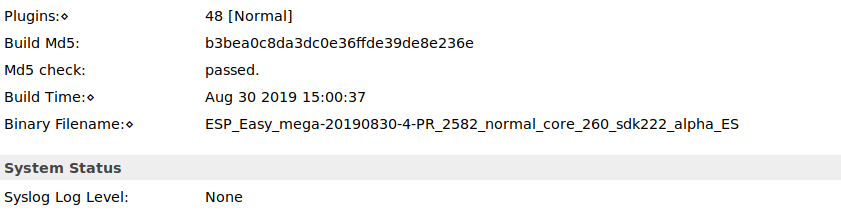
Not related to the DHT11 issue I know but I have noticed that in this test
version the filename is too long to fit in the "Binary Filename" field on
the web i/f page - could it possibly be that this is causing some memory to
be overwritten and thus causing instability?
georgep56
on 31 Aug 2019
About the filename things, there should be a check on it to only use (and overwrite) the max length of the array.
If there is no (proper) check on that, then it is hard to tell what will happen.
One of my nodes running the same PR build has also rebooted at least once last night.
A bit frustrating to see just that node also reboot, since it used to be my "endurance test" node with uptimes over way over 100 days.
The node originally used to prove the "49.7 day bug" was fixed.
TD-er
on 31 Aug 2019
Around an hour ago I reverted one of my test units (running the latest PR test build) to the 20190827 build which has previously seemed stable, and after just over 30 minutes this node has rebooted again!
This seems to confirm my thought, which is that once a node has "failed" and rebooted, some code or memory is overwritten or corrupted and even if a new image is flashed, the corrupt memory remains and this causes any new and otherwise "stable" image to become erratic and unstable.
My suspicion (as yet unproven) is that once a node is in this corrupt state, only completely clearing the node (flashing a blank image or using 'esptool.py erase_flash') can make it behave correctly again; flashing a new .bin file will not fix it.
georgep56
on 31 Aug 2019
Maybe the settingsfile (or RF calibration) got corrupted somehow?
TD-er
on 31 Aug 2019
Sorry for pushing this issue up again, but I'm using a Wemos D1 mini with an DHT22 sensor and tried ESPEasy with the result of getting "Nan" from the sensor. Debugging with a friend today and we found a problem with the adafruit unified sensor lib.
We searched a bit and found https://github.com/RobTillaart/Arduino/tree/master/libraries/DHTstable. Which worked very well in our test. Is it possible, that someone take some time and compile ESPEasy with the DHTstable lib? I'm not an programmer, so I would do this on my own if I know how.
Maybe this helps some people in the future.
 thenightfighter
on 26 Jan 2020
thenightfighter
on 26 Jan 2020
@thenightfighter
Do you have any idea what may be different here between those two libs? (have not yet looked at the code)
TD-er
on 26 Jan 2020
we not use here any lib for dht
in my opinion it is some kind of build issue because dht started to not work correctly in time when no changes in plugin have been made
please try to find last known good build
- how did you wired sensor to esp?
- is it connected to +5V or +3V?
- what kind of cable, how long, what value of pullup resistor?
- do you have any other tasks configured?
uzi18
on 27 Jan 2020
@uzi18 I know we don't use either of those libs, but given one is working fine and the other isn't, it could be useful to see the diff between both.
TD-er
on 27 Jan 2020
@TD-er sadly no :(
@uzi18
Will try different builds later this day.
My sensor is wired to esp with jumper cables on a breadboard. It's connected +5V. Cables are ~10cm long.The sensor is cabled to +5V, GND and D4. Working fine with the DHTStable lib, but having problems with adafruit lib and espeasy.
I don't have any other tasks configured. Just setting up wifi connection on the espeasy webinterface and tried to use the sensor.
thenightfighter
on 27 Jan 2020
D4 (GPIO2) is pulled up, as can be seen here
Not sure if that's good or bad for these sensors, just noting it.
TD-er
on 27 Jan 2020
@thenightfighter as @TD-er suggests, try on other gpio pins.
We also thinked about some timing issues between builds/boards
(if you have selae logic analyzer it could be big help here).
uzi18
on 27 Jan 2020
@uzi18 Tried also D1 yesterday and got still "nan" results.
I don't have an logic analyzer, sry.
thenightfighter
on 27 Jan 2020
Tested D0, D3, D4, D5, D6, D7 and D8 with mega-01022018 receiving "0.00" on temperature and humidity.
Tested D4 with mega-20190106 and it works! Got Temperature at 20.70 C° and Humidity at 49.20%.
Tested D4 with mega-20191208 and it works too... My wifi credentials are also there, is there any persistent space? I can't reproduce the error anymore :(.
thenightfighter
on 27 Jan 2020
Just leave it unpowered for a while (few minutes?) and try again.
As far as I know, the DHT's do not have a persistent memory.
TD-er
on 27 Jan 2020
Tested D0, D3, D4, D5, D6, D7 and D8 with mega-01022018 receiving "0.00"
on temperature and humidity.
Tested D4 with mega-20190106 and it works! Got Temperature at 20.70 C°
and Humidity at 49.20%.
So you have been testing a version of ESP-easy from almost 2 years ago and
getting problems, and now you use a recent version and it works.
Erm .. am I missing something here?
On Mon, 27 Jan 2020 at 17:40, thenightfighter notifications@github.com
wrote:
Tested D0, D3, D4, D5, D6, D7 and D8 with mega-01022018 receiving "0.00"
on temperature and humidity.
Tested D4 with mega-20190106 and it works! Got Temperature at 20.70 C° and
Humidity at 49.20%.
Tested D4 with mega-20191208 and it works too... My wifi credentials are
also there, is there any persistent space? I can't reproduce the error
anymore :(.—
You are receiving this because you were mentioned.
Reply to this email directly, view it on GitHub
https://github.com/letscontrolit/ESPEasy/issues/2569?email_source=notifications&email_token=AANJSKARJ7SPNP77FV77MS3Q74MBFA5CNFSM4IPVFMLKYY3PNVWWK3TUL52HS4DFVREXG43VMVBW63LNMVXHJKTDN5WW2ZLOORPWSZGOEKAMSVY#issuecomment-578865495,
or unsubscribe
https://github.com/notifications/unsubscribe-auth/AANJSKBQ5N4SRK4QSL3ERQDQ74MBFANCNFSM4IPVFMLA
.
georgep56
on 27 Jan 2020
Flashed mega-20191208 first, before I asked here for some help/ideas. A few min ago I tried mega-01022018 with different pins and seeing 0.00. After that I flashed mega-20190106 and it worked. Then I flashed mega-20191208 and it also works.
@TD-er hmm but why does the wemos know my wifi credentials after "flashing" a newer versopm with the esptool?
thenightfighter
on 27 Jan 2020
@TD-er hmm but why does the wemos know my wifi credentials after "flashing" a newer versopm with the esptool?
If you switch between ESPEasy versions, then the settings will still be there.
The flash layout is:
- sketch + OTA update space
- SPIFFS filesystem.
As long as the filesystem area is not erased, the settings will be kept.
TD-er
on 27 Jan 2020
If you are experiencing any problems I would always recommend wiping the
flash completely before flashing a new version.
On Mon, 27 Jan 2020, 18:00 TD-er, notifications@github.com wrote:
@TD-er https://github.com/TD-er hmm but why does the wemos know my wifi
credentials after "flashing" a newer versopm with the esptool?If you switch between ESPEasy versions, then the settings will still be
there.The flash layout is:
- sketch + OTA update space
- SPIFFS filesystem.
As long as the filesystem area is not erased, the settings will be kept.
—
You are receiving this because you were mentioned.
Reply to this email directly, view it on GitHub
https://github.com/letscontrolit/ESPEasy/issues/2569?email_source=notifications&email_token=AANJSKF2RK2VF4MFNUPR6ILQ74ONXA5CNFSM4IPVFMLKYY3PNVWWK3TUL52HS4DFVREXG43VMVBW63LNMVXHJKTDN5WW2ZLOORPWSZGOEKAOXLQ#issuecomment-578874286,
or unsubscribe
https://github.com/notifications/unsubscribe-auth/AANJSKBFBD7Z4ZH4OBRTJLLQ74ONXANCNFSM4IPVFMLA
.
georgep56
on 27 Jan 2020
With ESP_Easy_mega_20200812_normal_ESP8266_4M1M.bin on Wemos D1 mini with DHT Shield (DHT22 on D4) there is the same problem:
Fresh system, never flashed with ESP Easy:
17:42:37.301 -> 2958 : Info : WIFI : Connecting xxx attempt #1
17:42:37.301 -> 2962 : Info : Webserver: start
17:42:37.335 -> 2986 : Info : WIFI : Scan finished, found: 9
17:42:37.335 -> 2988 : Info : WIFI : Selected: xxx CC:CE:1E:E1:B0:F5 Ch:1 (-79dBm) WPA/WPA2/PSK
17:42:37.372 -> 3028 : Info : DHT : Temperature: 27.70
17:42:37.372 -> 3029 : Info : DHT : Humidity: 39.90
17:42:38.672 -> 4320 : Info : WD : Uptime 0 ConnectFailures 0 FreeMem 24144 WiFiStatus WL_DISCONNECTED
17:42:40.420 -> 6094 : Info : WIFI : Connected! AP: xxx (CC:CE:1E:E1:B0:F5) Ch: 1 Duration: 3124 ms
17:42:40.595 -> 6255 : Info : firstLoopConnectionsEstablished
17:42:40.628 -> 6287 : Error : MQTT : Intentional reconnect
17:42:40.662 -> 6336 : Info : MQTT : Connected to broker with client ID: ESP_Easy_0
17:42:40.662 -> 6338 : Info : Subscribed to: M20/XX/XX/ESP-Easy/#
17:42:40.912 -> 6593 : Info : DHT : Temperature: 27.60
17:42:40.946 -> 6594 : Info : DHT : Humidity: 40.60
17:42:50.922 -> 16593 : Info : DHT : Temperature: 27.70
17:42:50.922 -> 16594 : Info : DHT : Humidity: 38.20
17:43:00.919 -> 26593 : Info : DHT : Temperature: 27.60
17:43:00.919 -> 26594 : Info : DHT : Humidity: 38.30
17:43:08.612 -> 34296 : Info : WD : Uptime 1 ConnectFailures 0 FreeMem 22328 WiFiStatus WL_CONNECTED
17:43:10.922 -> 36593 : Info : DHT : Temperature: 27.60
17:43:10.922 -> 36594 : Info : DHT : Humidity: 38.10
17:43:20.926 -> 46593 : Info : DHT : Temperature: 27.60
17:43:20.926 -> 46594 : Info : DHT : Humidity: 38.20
17:43:30.938 -> 56593 : Info : DHT : Temperature: 27.60
17:43:30.938 -> 56593 : Info : DHT : Humidity: 39.00
17:43:38.612 -> 64296 : Info : WD : Uptime 1 ConnectFailures 0 FreeMem 22328 WiFiStatus WL_CONNECTED
17:43:40.938 -> 66593 : Info : DHT : Temperature: 27.60
17:43:40.938 -> 66594 : Info : DHT : Humidity: 38.40
...
then after pressing reset:
17:44:35.218 ->
INIT : Booting version: (ESP82xx Core 5d3af165, NONOS SDK 2.2.2-dev(38a443e), LWIP: 2.1.2 PUYA support)
17:44:35.256 -> 84 : Info : INIT : Free RAM:34896
17:44:35.256 -> 85 : Info : INIT : Warm boot #1 Last Task: Background Task Last systime: 119 - Restart Reason: External System
17:44:35.256 -> 86 : Info : FS : Mounting...
17:44:35.329 -> 110 : Info : FS : Mount successful, used 75802 bytes of 957314
17:44:35.329 -> 184 : Info : FS : Success garbage collection
17:44:35.366 -> 209 : Info : CRC : SecuritySettings CRC ...OK
17:44:35.467 -> 317 : Info : INIT : Free RAM:32176
17:44:35.467 -> 317 : Info : INIT : I2C
17:44:35.467 -> 318 : Info : INIT : SPI not enabled
17:44:35.574 -> 422 : Info : INFO : Plugins: 46 [Normal] (ESP82xx Core 5d3af165, NONOS SDK 2.2.2-dev(38a443e), LWIP: 2.1.2 PUYA support)
17:44:35.678 -> 526 : Info : WIFI : Set WiFi to STA
17:44:35.784 -> 629 : Info : WIFI : Connecting xxx attempt #1
17:44:35.784 -> 634 : Info : Webserver: start
17:44:35.784 -> 635 : Info : Time set to 119.000 Time adjusted by 118365.00 msec. Wander: 32.88 msec/second
17:44:35.784 -> 637 : Info : Current Time Zone: STD time start: 1970-10-25 03:00:00 offset: 0 min
17:44:35.818 -> 639 : Info : Local time: 1970-01-01 00:01:59
17:44:35.854 -> 699 : Info : DHT : No Reading
17:44:36.867 -> 1709 : Info : WIFI : Connected! AP: xxx (CC:CE:1E:E1:B0:F5) Ch: 1 Duration: 1046 ms
17:44:36.935 -> 1777 : Info : firstLoopConnectionsEstablished
17:44:37.039 -> 1896 : Error : MQTT : Intentional reconnect
17:44:37.110 -> 1943 : Info : MQTT : Connected to broker with client ID: ESP_Easy_0
17:44:37.110 -> 1945 : Info : Subscribed to: M20/XX/XX/ESP-Easy/#
17:44:37.110 -> 1973 : Info : WD : Uptime 0 ConnectFailures 0 FreeMem 23408 WiFiStatus WL_CONNECTED
17:44:37.350 -> 2197 : Info : DHT : No Reading
...
Then remove power, wait, boot and press reset after 3rd successful reading:
17:51:34.429 -> ⸮⸮⸮⸮I⸮!҅<⸮⸮⸮99⸮⸮⸮⸮,i⸮⸮=⸮(;⸮9<⸮⸮⸮ق⸮⸮⸮
17:51:36.439 -> 2736 : Info : WIFI : Connecting xxx attempt #1
17:51:36.439 -> 2740 : Info : Webserver: start
17:51:36.476 -> 2764 : Info : WIFI : Scan finished, found: 11
17:51:36.476 -> 2766 : Info : WIFI : Selected: xxx 44:4E:6D:15:B1:5A Ch:11 (-72dBm) WPA/WPA2/PSK
17:51:36.513 -> 2806 : Info : DHT : Temperature: 27.70
17:51:36.513 -> 2806 : Info : DHT : Humidity: 38.30
17:51:37.787 -> 4097 : Info : WD : Uptime 0 ConnectFailures 0 FreeMem 24048 WiFiStatus WL_DISCONNECTED
17:51:39.797 -> 6098 : Info : WIFI : Connected! AP: xxx (CC:CE:1E:E1:AE:4E) Ch: 1 Duration: 3352 ms
17:51:39.906 -> 6190 : Info : firstLoopConnectionsEstablished
17:51:39.941 -> 6254 : Error : MQTT : Intentional reconnect
17:51:40.012 -> 6298 : Info : MQTT : Connected to broker with client ID: ESP_Easy_0
17:51:40.012 -> 6299 : Info : Subscribed to: M20/XX/XX/ESP-Easy/#
17:51:40.259 -> 6554 : Info : DHT : Temperature: 27.70
17:51:40.259 -> 6555 : Info : DHT : Humidity: 39.20
17:51:50.244 -> 16554 : Info : DHT : Temperature: 27.70
17:51:50.244 -> 16554 : Info : DHT : Humidity: 38.80
17:51:55.743 -> {d�d⸮⸮|�⸮d⸮<
⸮
d⸮c|⸮⸮⸮⸮r⸮c⸮c⸮⸮'n⸮lgg⸮⸮⸮c
x⸮⸮drlsdx⸮g⸮
⸮
dĜ
bo⸮|⸮d⸮
⸮c⸮⸮oo⸮�l⸮⸮d`⸮'nl`n{⸮⸮⸮g
cl`s⸮⸮o
cd`⸮⸮
⸮
⸮⸮⸮{rl⸮⸮n⸮⸮U84 : Info :
17:51:55.848 ->
17:51:55.848 ->
INIT : Booting version: (ESP82xx Core 5d3af165, NONOS SDK 2.2.2-dev(38a443e), LWIP: 2.1.2 PUYA support)
17:51:55.848 -> 85 : Info : INIT : Free RAM:34896
17:51:55.884 -> 86 : Info : INIT : Warm boot #1 Last Task: Background Task Last systime: 21 - Restart Reason: External System
17:51:55.884 -> 87 : Info : FS : Mounting...
17:51:55.921 -> 111 : Info : FS : Mount successful, used 75802 bytes of 957314
17:51:55.921 -> 136 : Info : CRC : SecuritySettings CRC ...OK
17:51:56.024 -> 243 : Info : INIT : Free RAM:32272
17:51:56.024 -> 244 : Info : INIT : I2C
17:51:56.024 -> 244 : Info : INIT : SPI not enabled
17:51:56.132 -> 348 : Info : INFO : Plugins: 46 [Normal] (ESP82xx Core 5d3af165, NONOS SDK 2.2.2-dev(38a443e), LWIP: 2.1.2 PUYA support)
17:51:56.238 -> 452 : Info : WIFI : Set WiFi to STA
17:51:56.313 -> 555 : Info : WIFI : Connecting xxx attempt #1
17:51:56.313 -> 560 : Info : Webserver: start
17:51:56.313 -> 561 : Info : Time set to 21.000 Time adjusted by 20439.00 msec. Wander: 5.68 msec/second
17:51:56.346 -> 563 : Info : Current Time Zone: STD time start: 1970-10-25 03:00:00 offset: 0 min
17:51:56.346 -> 565 : Info : Local time: 1970-01-01 00:00:21
17:51:56.380 -> 625 : Info : DHT : No Reading
17:51:57.392 -> 1635 : Info : WIFI : Connected! AP: xxx (CC:CE:1E:E1:AE:4E) Ch: 1 Duration: 1053 ms
17:51:57.464 -> 1710 : Info : firstLoopConnectionsEstablished
17:51:57.535 -> 1776 : Error : MQTT : Intentional reconnect
17:51:57.608 -> 1822 : Info : MQTT : Connected to broker with client ID: ESP_Easy_0
17:51:57.608 -> 1823 : Info : Subscribed to: M20/XX/XX/ESP-Easy/#
17:51:57.679 -> 1899 : Info : WD : Uptime 0 ConnectFailures 0 FreeMem 23448 WiFiStatus WL_CONNECTED
17:51:57.853 -> 2075 : Info : DHT : No Reading
17:52:07.848 -> 12075 : Info : DHT : No Reading
...
This is reproducible!
🙅
Hardware used:

 CONSULitAS
on 7 Sep 2020
CONSULitAS
on 7 Sep 2020
Hmm, @uzi18 made this change in November 2019: https://github.com/letscontrolit/ESPEasy/commit/88c6887946f9ae4414be7376db88d504410947b0#diff-63c481456206c5a2f90a396a7a688f2e
That was already some tweak of the category "hmm if it's that timing critical, we will see more reported issues".
That tweak was for the DHT11 and you're reporting issues with DHT22.
So I guess there will be a similar fix.
TD-er
on 7 Sep 2020
Interesting!
@thenightfighter proposed to use https://github.com/RobTillaart/Arduino/tree/master/libraries/DHTstable
There https://github.com/RobTillaart/Arduino/blob/2b97b8d4beccf1db29de0fb1c77238ce7e21aa3c/libraries/DHTstable/dht.h#L29 we find
const int DHTLIB_DHT_WAKEUP = 1;
int rv = _readSensor(pin, DHTLIB_DHT_WAKEUP);
delay(wakeupDelay);
to wait after setting the pin to low.
[88c6887#diff-63c481456206c5a2f90a396a7a688f2e
gives
case P005_DHT22: delay(2); break; // minimum 1ms
to wait after setting the pin to low.
So: Perhaps 2 ms here are to long? I would refactor the code to find the constants in #defines and try to reduce the delay to 1 ms.
The comment on this line made me curious! Let's look what happened:
Blame for this line
https://github.com/letscontrolit/ESPEasy/blame/88c6887946f9ae4414be7376db88d504410947b0/src/_P005_DHT.ino#L155 gives:

How was the code before this?
https://github.com/letscontrolit/ESPEasy/blame/4a8cfd2d9b1fbfea27fa7b7829cb85a7ffc29301/src/_P005_DHT.ino#L154
case P005_DHT11:
case P005_DHT22:
case P005_DHT12: delay(18); break; // FIXME TD-er: Must this be so long?
Oops! No delay at all! BTW: The change was made to fix this issue. 😁
I think the 2 ms delay was the again breaking change. Depending on the used pullup the needed time may vary.
- 0 ms seems to be to short
- 2 ms seems to be sometimes to long
- 1 ms could fit
- something in between may be
delayMicroseconds(1500);if 1 ms does not fit either
What do you think?
CONSULitAS
on 7 Sep 2020
case P005_DHT11: case P005_DHT22: case P005_DHT12: delay(18); break; // FIXME TD-er: Must this be so long?Oops! No delay at all! BTW: The change was made to fix this issue. 😁
Those case entries just are a fall-through, so they all had the 18 msec delay in that version of the code.
TD-er
on 7 Sep 2020
Those case entries just are a fall-through, so they all had the 18 msec delay in that version of the code.
Right. A bit late in the evening. 😁
CONSULitAS
on 7 Sep 2020
BTW: Thanks for the late support. In NL it's late too (like in D). Tot ziens.
CONSULitAS
on 7 Sep 2020
Graag gedaan :)
TD-er
on 7 Sep 2020
It is minimum time to wake up sensor from datasheet.
How long are your wires and what kind of resistor you use?
Ok See now picture with module attached.
I guess something with configuration reading is wrong.
uzi18
on 8 Sep 2020
As the sensor does respond well initially, but starts acting badly after a reboot, I wonder if it could be the sensor is still in another state compared to what we expect in our code?
Maybe the datasheet has some information about resetting the sensor?
Edit:
The AdaFruit library does have an extra step to put the pin in high impedance first:
https://github.com/adafruit/DHT-sensor-library/blob/13d25e6b9a67b735b2e223300ef92a0ef8df6f19/DHT.cpp#L247-L267
TD-er
on 8 Sep 2020
Solved
Solution:
- D4 (GPIO2) does not work. 👎
- DHT22 crashes by signals not understood while soft reset. 💣
- Use other pin: D5 works fine. 😲
- For Wemos DHT shield it is a hardware bug! 🐞
Findings:
- GPIO2 (D4) is Serial1.TX
- Serial1.TX reports the boot log (besides Serial0) at soft reset (https://github.com/espressif/esptool/wiki/ESP8266-Boot-ROM-Log)
- Switch Arduino console to 74880 baud and press reset button demonstrates the behavior.
A modified DHT22 example sketch (from Arduino DHT library - _change baud rate to 74880_) reproducible shows after soft reset:
15:11:38.191 -> 25.60   49.20   25.50   14.15
15:11:40.216 -> 25.60   49.00   25.49   14.09
15:11:42.228 -> 25.60   48.90   25.49   14.06
15:11:44.218 -> 25.60   48.80   25.49   14.03
15:11:45.089 ->
15:11:45.089 ->  ets Jan  8 2013,rst cause:2, boot mode:(3,6)
15:11:45.089 ->
15:11:45.089 -> load 0x4010f000, len 1392, room 16
15:11:45.089 -> tail 0
15:11:45.089 -> chksum 0xd0
15:11:45.089 -> csum 0xd0
15:11:45.089 -> v3d128e5c
15:11:45.125 -> ~ld
15:11:45.161 -> DHTxx test!
15:11:47.218 -> Failed to read from DHT sensor!
15:11:49.272 -> Failed to read from DHT sensor!
15:11:51.320 -> Failed to read from DHT sensor!
- Only way to reset the DHT is to cycle power. ➡️ Further investigations needed.
- The behavior is not configurable, it is an output of the boot rom.
How to find out
You need a logic analyzer (here: Saleae logic clone with PulseView) to examine.
Working DHT (klick screenshot to zoom)

Timing in detail (looks good)

After soft reset by reset button
- Bursts on TX and D4 in first 50 ms - OOPS!
- See 2 ms signal at 660 ms: No answer from DHT22 any more. It seems to be upset. 😬

UART with 74880 baud shows - We know this stuff!

Hardware patch DHT22 data pin to D5 - Everything is fine, even after soft reset!

How to patch Wemos DHT shield
- Scratch trace from D4 to DHT22
- solder cable from D5 to DHT22
- reconfigure ESP Easy
- I have to admit: A little bit quick and dirty, but it works. 😉

BTW: Others found this, too. https://blog.zs64.net/2018/02/fixing-the-wemos-d1-mini-dht22-shield/
Proposal
- Warning on https://www.letscontrolit.com/wiki/index.php?title=DHT11_DHT22
- Lock D4 in device configuration
- Warning to use D4 in device configuration
Any other ideas?
Thanks for your support!
CONSULitAS
on 8 Sep 2020
Great post explaining your findings and solution and indeed there should be a warning about this on the plugin documentation.
TD-er
on 8 Sep 2020
This issue with burst on Tx when warm boot was also described here for the ESP-01: https://github.com/letscontrolit/ESPEasy/issues/2585#issuecomment-562323603
So indeed a warning in the plugin documentation is a good thing to do.
There are few more pins that show strange behaviour during warm boot as described here : https://rabbithole.wwwdotorg.org/2017/03/28/esp8266-gpio.html
Roos-AID
on 8 Sep 2020
Here is some information about this problem: https://github.com/adafruit/DHT-sensor-library/issues/116
especially those two:
https://github.com/adafruit/DHT-sensor-library/issues/116#issuecomment-504612521
https://github.com/adafruit/DHT-sensor-library/issues/116#issuecomment-515676649
but I agree that changing PIN from D4 to D5 is the easiest solution, and I agree this should be added to the docs and a warning should be shown if someone chooses D4
 Misiu
on 9 Sep 2020
Misiu
on 9 Sep 2020
Great post explaining your findings and solution and indeed there should be a warning about this on the plugin documentation.
Thanks for the feedback. Fun to work with you.
BTW: You never find problems like this without a logic analyzer and its cheap!
- Search eBay for "usb logic analyzer 24khz" and the 6$ stuff is your friend. Really.
- The software you need is "PulseView" (Open Source, https://sigrok.org/wiki/PulseView). Highly recommend!
- There is also "Saleae Logic Pro" but it is not Open Source and may not be used with this cheap clones.
CONSULitAS
on 9 Sep 2020
Just added it to the Wiki to make sure people are not spending lots of hour again.
Will now add it to ReadTheDocs
TD-er
on 9 Sep 2020
Great. Found
The DHT sensor needs to be connected to a configurable GPIO on the ESP module. In case you have a simple ESP-01 module, it's best to use the GPIO-2 pin.
there.
This should be changed, too. Mentioned here: https://github.com/letscontrolit/ESPEasy/issues/2585#issuecomment-562323603
So #2585 and #2569 (this) can be closed.
CONSULitAS
on 9 Sep 2020
As it is now documented, these issues can be closed.
TD-er
on 9 Sep 2020
Related issues
 SANCLA
·
4Comments
SANCLA
·
4Comments
 jobst
·
5Comments
jobst
·
5Comments
 jroux1
·
6Comments
jroux1
·
6Comments
 ronnythomas
·
3Comments
ronnythomas
·
3Comments
 MarceloProjetos
·
4Comments
MarceloProjetos
·
4Comments
Most helpful comment
Solved
Solution:
Findings:
A modified DHT22 example sketch (from Arduino DHT library - _change baud rate to 74880_) reproducible shows after soft reset:
How to find out
You need a logic analyzer (here: Saleae logic clone with PulseView) to examine.
Working DHT (klick screenshot to zoom)

Timing in detail (looks good)

After soft reset by reset button
UART with 74880 baud shows - We know this stuff!

Hardware patch DHT22 data pin to D5 - Everything is fine, even after soft reset!

How to patch Wemos DHT shield
BTW: Others found this, too. https://blog.zs64.net/2018/02/fixing-the-wemos-d1-mini-dht22-shield/
Proposal
Any other ideas?
Thanks for your support!