Esp8266_deauther: Upload problem(failed to send 36 bytes)
What should I do, this is what it says when I try and upload it please respond.
Archiving built core (caching) in: C:\Users\KAIDA~1.KAI\AppData\Local\Temp\arduino_cache_797629\core\core_deauther_esp8266_nodemcuv2_CpuFrequency_80,UploadTool_esptool,FlashFreq_80,FlashMode_dio,UploadSpeed_115200,FlashSize_1M256_d52fae24e609dfb18e59525ff1db9f0a.a
Sketch uses 654666 bytes (85%) of program storage space. Maximum is 761840 bytes.
Global variables use 42120 bytes (51%) of dynamic memory, leaving 39800 bytes for local variables. Maximum is 81920 bytes.
error: failed sending 0xC0
error: failed sending 8 bytes
error: failed sending 36 bytes
error: failed sending 0xC0
error: failed sending 0xC0
error: failed sending 8 bytes
error: failed sending 36 bytes
error: failed sending 0xC0
error: failed sending 0xC0
error: failed sending 8 bytes
error: failed sending 36 bytes
error: failed sending 0xC0
error: failed sending 0xC0
error: failed sending 8 bytes
error: failed sending 36 bytes
error: failed sending 0xC0
error: failed sending 0xC0
error: failed sending 8 bytes
error: failed sending 36 bytes
error: failed sending 0xC0
error: failed sending 0xC0
error: failed sending 8 bytes
error: failed sending 36 bytes
error: failed sending 0xC0
error: failed sending 0xC0
error: failed sending 8 bytes
error: failed sending 36 bytes
error: failed sending 0xC0
error: failed sending 0xC0
error: failed sending 8 bytes
error: failed sending 36 bytes
error: failed sending 0xC0
error: failed sending 0xC0
error: failed sending 8 bytes
error: failed sending 36 bytes
error: failed sending 0xC0
warning: espcomm_sync failed
error: espcomm_open failed
error: espcomm_open failed
This report would have more information with
"Show verbose output during compilation"
option enabled in File -> Preferences.
 MonkeysHack
All 6 comments
This sounds like a bad USB cable but it could also be a generic flashing problem (not deauther related).
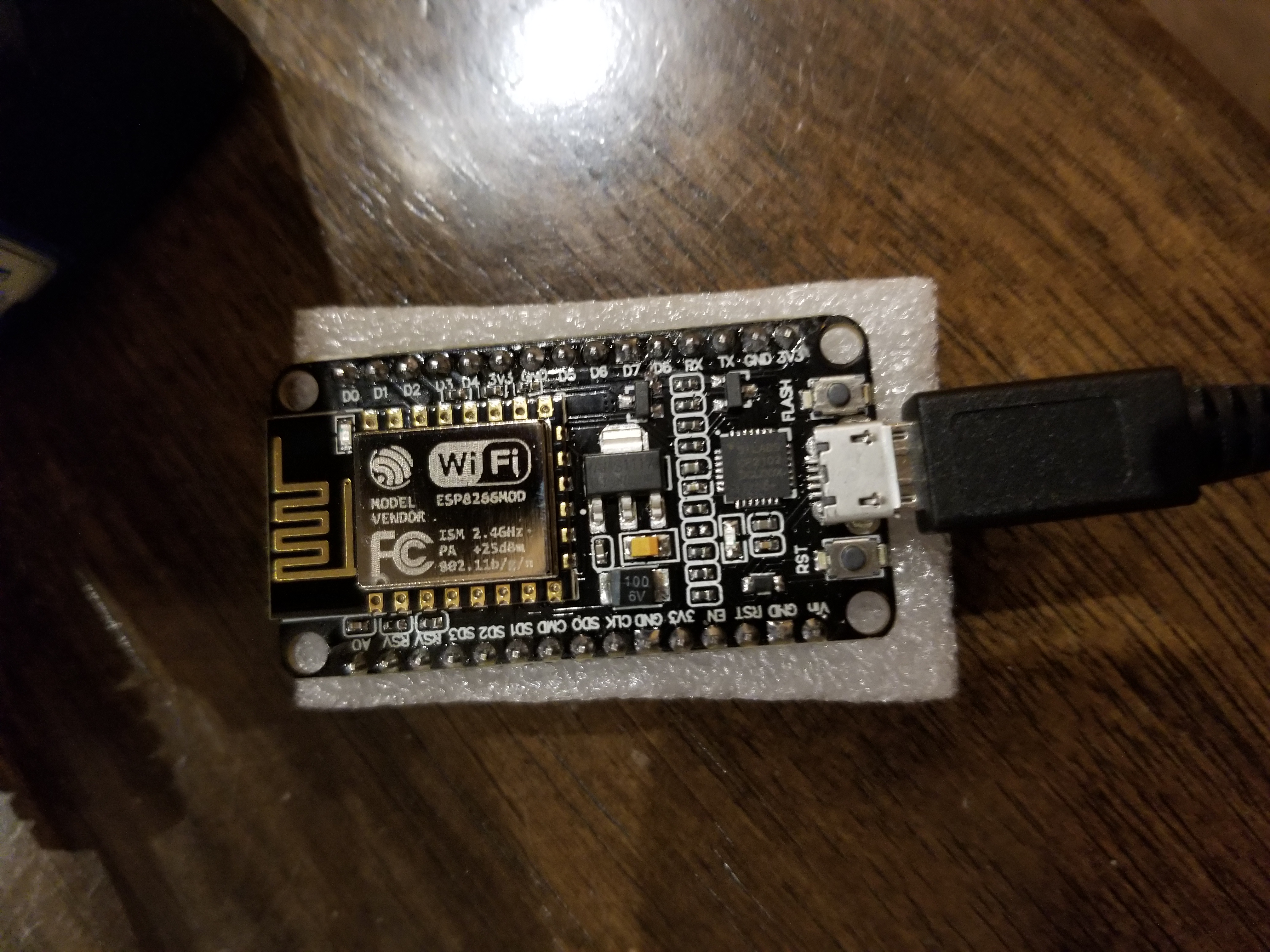
Please specify the device you're using and how it's wired when flashing, eventually post a pic of your build so we can see the wiring.
 tobozo
on 4 Apr 2018
tobozo
on 4 Apr 2018
I'm using a nodemcu not sure which version it is, and I tried two other cable but it still didn't work. And what should I do if it is a generic flashing problem (ps I'm using arduino to upload the program)
MonkeysHack
on 5 Apr 2018
Eventually push the flash button while Arduino is compiling and keep it pushed until you see it's uploading.
On older versions of nodemcu you had to do some ninja thing before flashing:
- push reset (keep it pushed)
- push the flash button (keep it pushed)
- click on "upload" in the Arduino IDE (ninja skill or third hand required)
- release the reset button
tobozo
on 5 Apr 2018
I'm an idiot I realized I didn't have the right drivers downloaded on to my computer but thanks for the help any ways. I successfully uploaded the deauther on to the board.
MonkeysHack
on 6 Apr 2018
closing this as resolved, thanks for reporting the solution!
tobozo
on 6 Apr 2018
error: failed sending 0xC0
error: failed sending 8 bytes
error: failed sending 36 bytes
error: failed sending 0xC0
this is my error and it's repeating. I think my drivers have no problem but i am stuck here. Can you please help me ?
 devimeruva
on 19 Jan 2019
devimeruva
on 19 Jan 2019
Related issues
 dave0111
·
3Comments
dave0111
·
3Comments
 itsik-b
·
4Comments
itsik-b
·
4Comments
 lamkeysing92
·
3Comments
lamkeysing92
·
3Comments
 tobybear
·
4Comments
tobybear
·
4Comments
 ryuk171
·
4Comments
ryuk171
·
4Comments