Esp8266_deauther: BUG New SDK
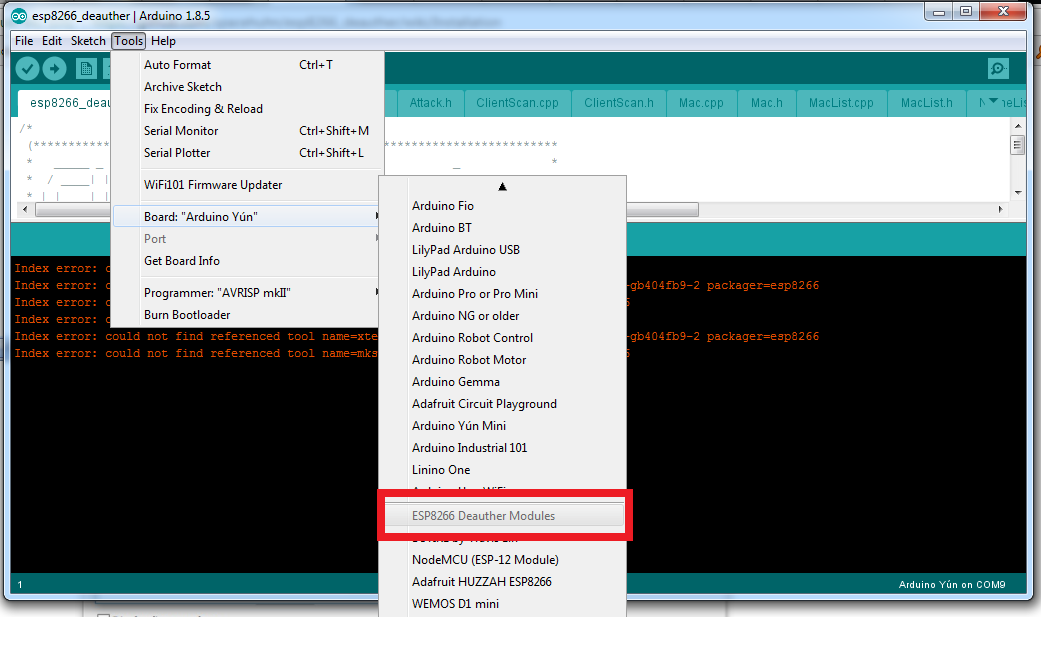
For the latest SDK I found BUG on Arduino IDE 1.8.5.
I have not tried any other version of IDE.
In the near future I will see whether the error is on my computer or from my IDE.
Index error: could not find referenced tool name=esptool version=0.4.6 packager=esp8266
Index error: could not find referenced tool name=xtensa-lx106-elf-gcc version=1.20.0-26-gb404fb9-2 packager=esp8266
Index error: could not find referenced tool name=mkspiffs version=0.1.2 packager=esp8266
 ChandraOrbit
All 11 comments
Have you tried this already?
Sometimes you can get a compiler error that can be fixed by also installing the original ESP8266 Arduino SDK. The steps are similar. Add http://arduino.esp8266.com/stable/package_esp8266com_index.json to the Boards Manager, search for "esp8266" and install the arduino-esp8266 (latest version should be fine). For a more detailed explanation visit github.com/esp8266/Arduino.
Which OS are you using?
 spacehuhn
on 24 Mar 2018
spacehuhn
on 24 Mar 2018
Install the regular esp8266 package first, it has all the tools your IDE is complaining about.
Those tools didn't exist in that version when SDK2.0.0 was released, and they haven't been added to avoid conflicts on deployment.
 tobozo
on 24 Mar 2018
tobozo
on 24 Mar 2018
So far I use windows 7 ultimate 64 bit and it runs fine if using version 2.0.0.
A few moments ago I tried to use the new SDK and found the error.
What I do next:
- Remove version 2.0.0
- Install the latest version
- Install the deauth SDK
The result still finds an error. I've done it 2 times. with the same result.
I'll try again
ChandraOrbit
on 24 Mar 2018
I'll try to replicate that, what version of the IDE are you using? Is that the one from the microsoft store?
tobozo
on 24 Mar 2018
I downloaded Arduino IDE from: https://www.arduino.cc/en/main/software
Last month when I flash my new board. which I bought on Aliexpress.
ChandraOrbit
on 24 Mar 2018
There are three types of install:
1) setup
2) zip
3) microsoft store
which one did you pick ?
tobozo
on 24 Mar 2018
Sorry, my English is bad.
I download it from SETUP
ChandraOrbit
on 24 Mar 2018
Just tried this procedure and it worked flawlessly:
- download & clean install
- add both esp8266 and esp8266_deauther boards in the prefs
- download the esp8266 latest SDK
- download the esp8266_deauther SDK
- run the example sketch
So the only option left is probably in the preferences of your IDE.
Please try to apply this solution: http://forum.arduino.cc/index.php?topic=490285.0
tobozo
on 24 Mar 2018
OK thanks, I will try to follow your instructions.
Update :
Still having an error, even though I installed it with a new Arduino IDE.
I will continue my test tomorrow because now in my country is late at night
Thanks
ChandraOrbit
on 24 Mar 2018
just reproduced the error by installing the SDKs in the wrong order, I'll update the documentation accordingly.
tobozo
on 24 Mar 2018
OK the BUG issue in SDK 2.0 is finished by following the manual on the latest readme. thanks
ChandraOrbit
on 25 Mar 2018
Related issues
 sieuwe1
·
4Comments
sieuwe1
·
4Comments
 manishrd
·
4Comments
manishrd
·
4Comments
 crazyguy830
·
3Comments
crazyguy830
·
3Comments
 ghost
·
3Comments
ghost
·
3Comments
 joneroy
·
3Comments
joneroy
·
3Comments
Most helpful comment
OK the BUG issue in SDK 2.0 is finished by following the manual on the latest readme. thanks