Eshoponcontainers: How to connect to mssql Database in docker container [question]
In appsettings.json of Identity.API project has connection string
ConnectionString": "Server=tcp:127.0.0.1,5433;Database=Microsoft.eShopOnContainers.Services.IdentityDb;User Id=sa;Password=Pass@word;"
When I build eShopContainer in server at IP 192.168.1.9
But I can not connect to mssql DB at 192.168.1.9:5433.
I used Navicat Premium and MS Management Studio, the result is the same

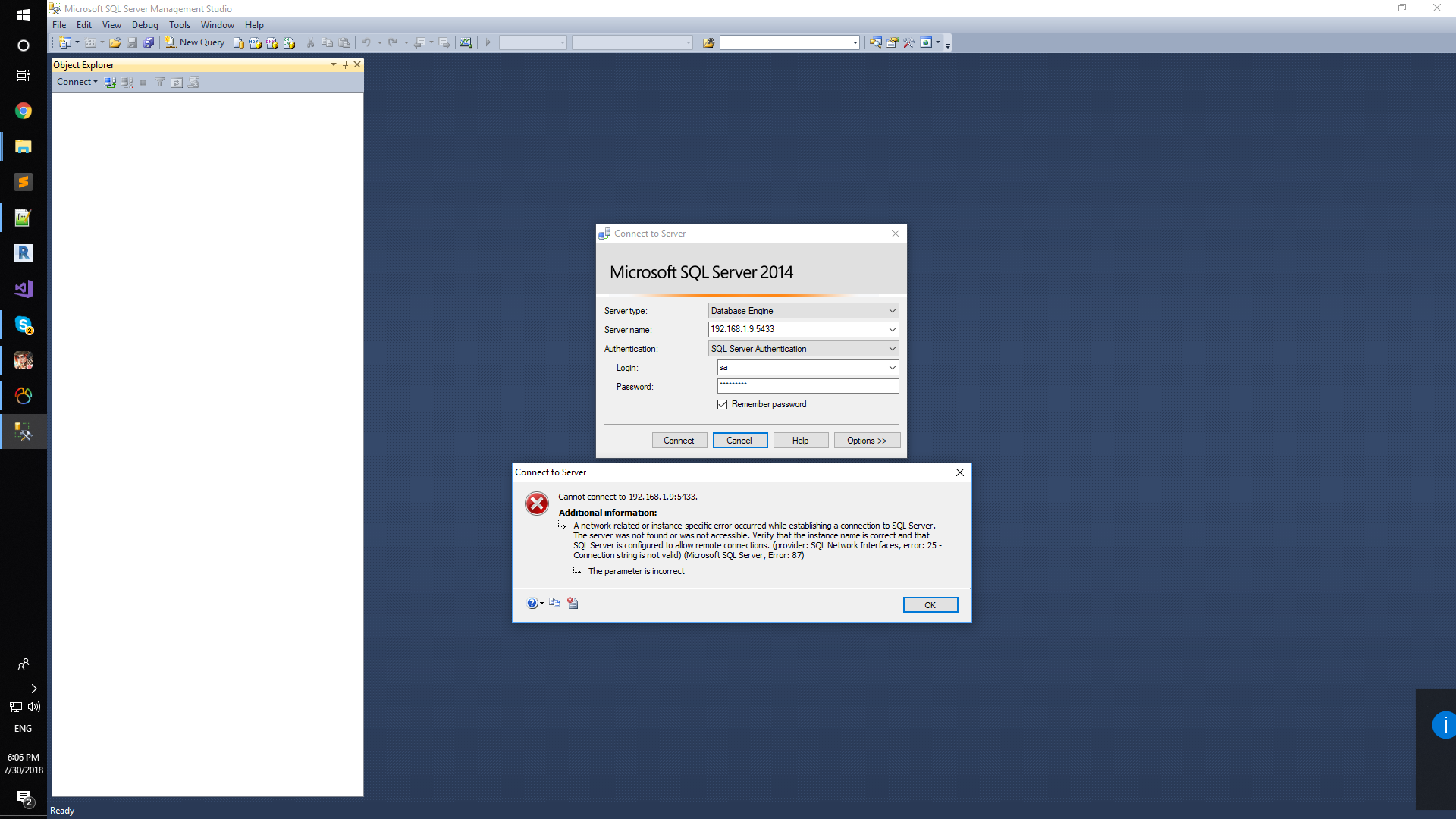
How can I fix it? Thanks
 minhvc
All 8 comments
The way you are providing the port to SQL Server Management Studio is wrong.
It should be like this (USe "," instead of ":"):
192.168.1.9,5433
If the IP and port are right, it should work.
Then, for the connection string from another container, you should not use the external IP but just the container name as specified in the docker-compose.override.yml files, so it uses the internal name resolution provided by Docker without going out of the Docker Host.
Take a look for instance to this file (this is from eShopOnContainers) and the way we compose the connection string:
https://github.com/dotnet-architecture/eShopOnContainers/blob/dev/docker-compose.override.yml
A sample conn string used provided as environment variable is:
"Server=sql.data;Database=Microsoft.eShopOnContainers.Services.CatalogDb;User Id=sa;Password=Pass@word"
Note how the SQL Server name is simply "sql.data" which in our case is the name of the service/container for SQL specified in the docker.compose files.
Hope it helps.
 CESARDELATORRE
on 30 Jul 2018
CESARDELATORRE
on 30 Jul 2018
Thank you,
now I can connect sql.data containner from client in another machine, but user login error ""Unauthorised_client" when I build the solution on Ubuntu machine.
Please help me fix this error
this server log in Identity.API container :
crit: Microsoft.AspNetCore.Server.Kestrel[0]
Unable to start Kestrel.
System.IO.IOException: Failed to bind to address http://0.0.0.0:80: address already in use. ---> Microsoft.AspNetCore.Connections.AddressInUseException: Address already in use ---> System.Net.Sockets.SocketException: Address already in use
at System.Net.Sockets.Socket.UpdateStatusAfterSocketErrorAndThrowException(SocketError error, String callerName)
at System.Net.Sockets.Socket.DoBind(EndPoint endPointSnapshot, SocketAddress socketAddress)
at System.Net.Sockets.Socket.Bind(EndPoint localEP)
at Microsoft.AspNetCore.Server.Kestrel.Transport.Sockets.SocketTransport.BindAsync()
--- End of inner exception stack trace ---
at Microsoft.AspNetCore.Server.Kestrel.Transport.Sockets.SocketTransport.BindAsync()
at Microsoft.AspNetCore.Server.Kestrel.Core.KestrelServer.<>c__DisplayClass22_01.<
at Microsoft.AspNetCore.Server.Kestrel.Core.KestrelServer.StartAsyncTContext
minhvc
on 31 Jul 2018
Hi.
Logs of Identity.API container would be useful.
Could you send them? (Just use docker logs
 eiximenis
on 31 Jul 2018
eiximenis
on 31 Jul 2018
dbug: IdentityServer4.EntityFramework.Stores.ClientStore[0]
mvc found in database: True
dbug: IdentityServer4.EntityFramework.Stores.ClientStore[0]
mvc found in database: True
fail: IdentityServer4.Validation.AuthorizeRequestValidator[0]
Invalid redirect_uri: http://192.168.1.9:5100/signin-oidc
{
"ClientId": "mvc",
"ClientName": "MVC Client",
"AllowedRedirectUris": [
"http://localhost:5100/signin-oidc"
],
"SubjectId": "2b8ff2da-6b05-41bb-84eb-ae1c0f9875ed",
"RequestedScopes": "",
"Raw": {
"client_id": "mvc",
"redirect_uri": "http://192.168.1.9:5100/signin-oidc",
"response_type": "code id_token",
"scope": "openid profile orders basket marketing locations webshoppingagg orders.signalrhub",
"response_mode": "form_post",
"nonce": "636686323912867426.OTc5Nzk0YmUtYjhmYS00MzU5LWEyOTQtMDVlY2JjZWFmZGJhM2Y0Y2JhNWMtZDM5YS00MzAzLTg1YjEtZTIwZTIyYzQyZDIw",
"state": "CfDJ8FeT9P6Ir6xBvAW3BnFGAwRyYjDzDLtQ2rtfoM52HvxhN-MKDszFeq1ochViCV89KrD_4SUITL2JyxulPu6s_4xO4rP2T36R51PDMf7ajEruJk0yatI_BlX7hPPHLlWTungnsSErD6KeI5-cj8UqsQw91lIQVerk4IlSO-JjtbNMoqhCHs4xvQ1FGpESaNP0ms-pOBVMgWg0wS3H_Yggg0ov6cSj1M2vVd3EJgT1RSgIJk09E00C0ZFTzowPw4OjzDuVyULgo7lagvvt8d1_T3_Bina4kDHkxmtCiNH7Tp5QVkkdD-wXF_Kbut4puH8xjuzUDe08Q4SjUTTtsV-xVhs",
"x-client-SKU": "ID_NETSTANDARD1_4",
"x-client-ver": "5.2.0.0"
}
}
fail: IdentityServer4.Validation.AuthorizeRequestValidator[0]
Invalid redirect_uri: http://192.168.1.9:5100/signin-oidc
{
"ClientId": "mvc",
"ClientName": "MVC Client",
"AllowedRedirectUris": [
"http://localhost:5100/signin-oidc"
],
"SubjectId": "2b8ff2da-6b05-41bb-84eb-ae1c0f9875ed",
"RequestedScopes": "",
"Raw": {
"client_id": "mvc",
"redirect_uri": "http://192.168.1.9:5100/signin-oidc",
"response_type": "code id_token",
"scope": "openid profile orders basket marketing locations webshoppingagg orders.signalrhub",
"response_mode": "form_post",
"nonce": "636686323912867426.OTc5Nzk0YmUtYjhmYS00MzU5LWEyOTQtMDVlY2JjZWFmZGJhM2Y0Y2JhNWMtZDM5YS00MzAzLTg1YjEtZTIwZTIyYzQyZDIw",
"state": "CfDJ8FeT9P6Ir6xBvAW3BnFGAwRyYjDzDLtQ2rtfoM52HvxhN-MKDszFeq1ochViCV89KrD_4SUITL2JyxulPu6s_4xO4rP2T36R51PDMf7ajEruJk0yatI_BlX7hPPHLlWTungnsSErD6KeI5-cj8UqsQw91lIQVerk4IlSO-JjtbNMoqhCHs4xvQ1FGpESaNP0ms-pOBVMgWg0wS3H_Yggg0ov6cSj1M2vVd3EJgT1RSgIJk09E00C0ZFTzowPw4OjzDuVyULgo7lagvvt8d1_T3_Bina4kDHkxmtCiNH7Tp5QVkkdD-wXF_Kbut4puH8xjuzUDe08Q4SjUTTtsV-xVhs",
"x-client-SKU": "ID_NETSTANDARD1_4",
"x-client-ver": "5.2.0.0"
}
}
fail: IdentityServer4.Endpoints.AuthorizeEndpoint[0]
Request validation failed
fail: IdentityServer4.Endpoints.AuthorizeEndpoint[0]
Request validation failed
identity.log
minhvc
on 31 Jul 2018
Hi
According to logs it seems that:
- MVC Client is passing http://192.168.1.9:5100/signin-oidc as a callback url
IdSvr is expecting http://localhost:5100/signin-oidc as a callback url
MVC Client uses the env var "IdentityUrl" to call the IdSvr. The issue in MVC is that the URL used in this variable must be accessible from inside the container network and from outside (from a browser).
- IdSvr uses the env var "MvcClient" to build the redirect uri
If you open an interactive session agains Identity server (docker exec -it <id-container-identity> /bin/bash) and type export, what is the value of MvcClient environment variable?
eiximenis
on 31 Jul 2018
Hi @minhvc,
Those addresses are taken from the ClientRedirectUris table in the Identity database and that table is initialized upon startup, taking the initial values from appsettings.json in Identity.API.
So, this should be solved by one of these options:
- Connect to Identity DB and update the values or
- Drop the Identity DB, update appsettings.json and restart Identity.api container.
This would be the records to update:

Hope this helps.
 mvelosop
on 3 Aug 2018
mvelosop
on 3 Aug 2018
Closing this issue, feel free to comment though, will reopen if necessary.
mvelosop
on 10 Aug 2018
The way you are providing the port to SQL Server Management Studio is wrong.
It should be like this (USe "," instead of ":"):192.168.1.9,5433
If the IP and port are right, it should work.
Then, for the connection string from another container, you should not use the external IP but just the container name as specified in the docker-compose.override.yml files, so it uses the internal name resolution provided by Docker without going out of the Docker Host.Take a look for instance to this file (this is from eShopOnContainers) and the way we compose the connection string:
https://github.com/dotnet-architecture/eShopOnContainers/blob/dev/docker-compose.override.ymlA sample conn string used provided as environment variable is:
"Server=sql.data;Database=Microsoft.eShopOnContainers.Services.CatalogDb;User Id=sa;Password=Pass@word"Note how the SQL Server name is simply "sql.data" which in our case is the name of the service/container for SQL specified in the docker.compose files.
Hope it helps.
I tried to log in for an hour.
I was trying to log in with a dot instead of a comma.
I already thought it was a problem with my computer haha.
thanks for you help!
 francomacri17
on 24 Jul 2020
francomacri17
on 24 Jul 2020
Related issues
 Diggzinc
·
5Comments
Diggzinc
·
5Comments
 arindams621
·
5Comments
arindams621
·
5Comments
 bakbuz
·
4Comments
bakbuz
·
4Comments
 andriyankrastevv
·
3Comments
andriyankrastevv
·
3Comments
 adahhane
·
4Comments
adahhane
·
4Comments
Most helpful comment
The way you are providing the port to SQL Server Management Studio is wrong.
It should be like this (USe "," instead of ":"):
192.168.1.9,5433
If the IP and port are right, it should work.
Then, for the connection string from another container, you should not use the external IP but just the container name as specified in the docker-compose.override.yml files, so it uses the internal name resolution provided by Docker without going out of the Docker Host.
Take a look for instance to this file (this is from eShopOnContainers) and the way we compose the connection string:
https://github.com/dotnet-architecture/eShopOnContainers/blob/dev/docker-compose.override.yml
A sample conn string used provided as environment variable is:
"Server=sql.data;Database=Microsoft.eShopOnContainers.Services.CatalogDb;User Id=sa;Password=Pass@word"
Note how the SQL Server name is simply "sql.data" which in our case is the name of the service/container for SQL specified in the docker.compose files.
Hope it helps.