Erpnext: Impossible to delete a newly created employee, InternalError: 1054, "Unknown column"
Hello.
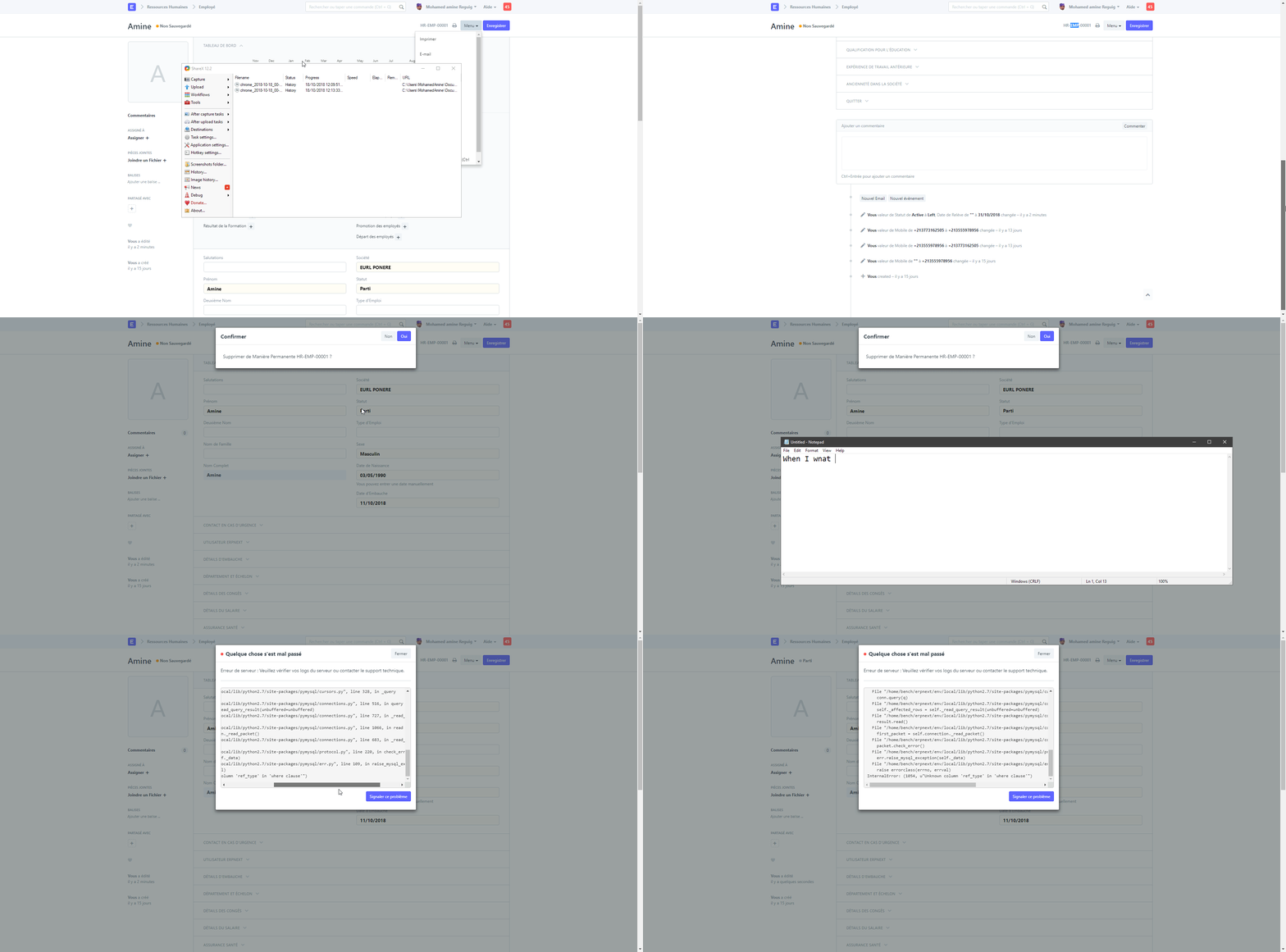
When trying to delete an employee I'm getting this error:
Traceback (most recent call last):
  File "/home/bench/erpnext/apps/frappe/frappe/app.py", line 55, in application
    response = frappe.handler.handle()
  File "/home/bench/erpnext/apps/frappe/frappe/handler.py", line 20, in handle
    data = execute_cmd(cmd)
  File "/home/bench/erpnext/apps/frappe/frappe/handler.py", line 55, in execute_cmd
    return frappe.call(method, **frappe.form_dict)
  File "/home/bench/erpnext/apps/frappe/frappe/__init__.py", line 1007, in call
    return fn(*args, **newargs)
  File "/home/bench/erpnext/apps/frappe/frappe/client.py", line 228, in delete
    frappe.delete_doc(doctype, name, ignore_missing=False)
  File "/home/bench/erpnext/apps/frappe/frappe/__init__.py", line 752, in delete_doc
    ignore_permissions, flags, ignore_on_trash, ignore_missing)
  File "/home/bench/erpnext/apps/frappe/frappe/model/delete_doc.py", line 78, in delete_doc
    doc.run_method("on_trash")
  File "/home/bench/erpnext/apps/frappe/frappe/model/document.py", line 780, in run_method
    out = Document.hook(fn)(self, *args, **kwargs)
  File "/home/bench/erpnext/apps/frappe/frappe/model/document.py", line 1058, in composer
    return composed(self, method, *args, **kwargs)
  File "/home/bench/erpnext/apps/frappe/frappe/model/document.py", line 1041, in runner
    add_to_return_value(self, fn(self, *args, **kwargs))
  File "/home/bench/erpnext/apps/frappe/frappe/model/document.py", line 774, in <lambda>
    fn = lambda self, *args, **kwargs: getattr(self, method)(*args, **kwargs)
  File "/home/bench/erpnext/apps/erpnext/erpnext/hr/doctype/employee/employee.py", line 175, in on_trash
    delete_events(self.doctype, self.name)
  File "/home/bench/erpnext/apps/erpnext/erpnext/utilities/transaction_base.py", line 150, in delete_events
    where ref_type=%s and ref_name=%s""", (ref_type, ref_name)), for_reload=True)
  File "/home/bench/erpnext/apps/frappe/frappe/database/database.py", line 221, in sql_list
    return [r[0] for r in self.sql(query, values, debug=debug)]
  File "/home/bench/erpnext/apps/frappe/frappe/database/database.py", line 154, in sql
    self._cursor.execute(query, values)
  File "/home/bench/erpnext/env/local/lib/python2.7/site-packages/pymysql/cursors.py", line 170, in execute
    result = self._query(query)
  File "/home/bench/erpnext/env/local/lib/python2.7/site-packages/pymysql/cursors.py", line 328, in _query
    conn.query(q)
  File "/home/bench/erpnext/env/local/lib/python2.7/site-packages/pymysql/connections.py", line 516, in query
    self._affected_rows = self._read_query_result(unbuffered=unbuffered)
  File "/home/bench/erpnext/env/local/lib/python2.7/site-packages/pymysql/connections.py", line 727, in _read_query_result
    result.read()
  File "/home/bench/erpnext/env/local/lib/python2.7/site-packages/pymysql/connections.py", line 1066, in read
    first_packet = self.connection._read_packet()
  File "/home/bench/erpnext/env/local/lib/python2.7/site-packages/pymysql/connections.py", line 683, in _read_packet
    packet.check_error()
  File "/home/bench/erpnext/env/local/lib/python2.7/site-packages/pymysql/protocol.py", line 220, in check_error
    err.raise_mysql_exception(self._data)
  File "/home/bench/erpnext/env/local/lib/python2.7/site-packages/pymysql/err.py", line 109, in raise_mysql_exception
    raise errorclass(errno, errval)
InternalError: (1054, u"Unknown column 'ref_type' in 'where clause'")
Screenshot :
Versions :
erpnext 12.x.x-develop
foundation 0.0.1
frappe 12.x.x-develop
To reproduce:
Go to Desk, Open Employee menu, click on an employee and delete it.
Expected Behavior :
Employee deletion.
Thank you !
 beeriz
All 5 comments
Hi @nabinhait , I am new to this open source and was looking forward to contribute some to this community, Can you please help me out in solving this issue?
As I have locally solved out the bug but made some changes in query.
Since these 2 columns ref_type and ref_name are not defined in tabEmployee table as well as not defined in tabEvent table, So the existing query will definitely raise an issue that it has not find these 2 columns. Also there is no column in tabEmployee table that specifies the type of user i.e. Employee, So I think the existing query need to be change, to make it work.
 KVGarg
on 1 Nov 2018
KVGarg
on 1 Nov 2018
It is fixed by #15854
 Anurag810
on 9 Nov 2018
Anurag810
on 9 Nov 2018
will be merged soon
Anurag810
on 9 Nov 2018
ok
KVGarg
on 9 Nov 2018
is it merged ? I am facing same issue
 chaibialaa
on 27 Nov 2018
chaibialaa
on 27 Nov 2018
Related issues
 deantheiceman
·
4Comments
deantheiceman
·
4Comments
 Fredoluka
·
3Comments
Fredoluka
·
3Comments
 setsero71
·
3Comments
setsero71
·
3Comments
 nabinhait
·
4Comments
nabinhait
·
4Comments
 ioweb-gr
·
4Comments
ioweb-gr
·
4Comments
Most helpful comment
ok