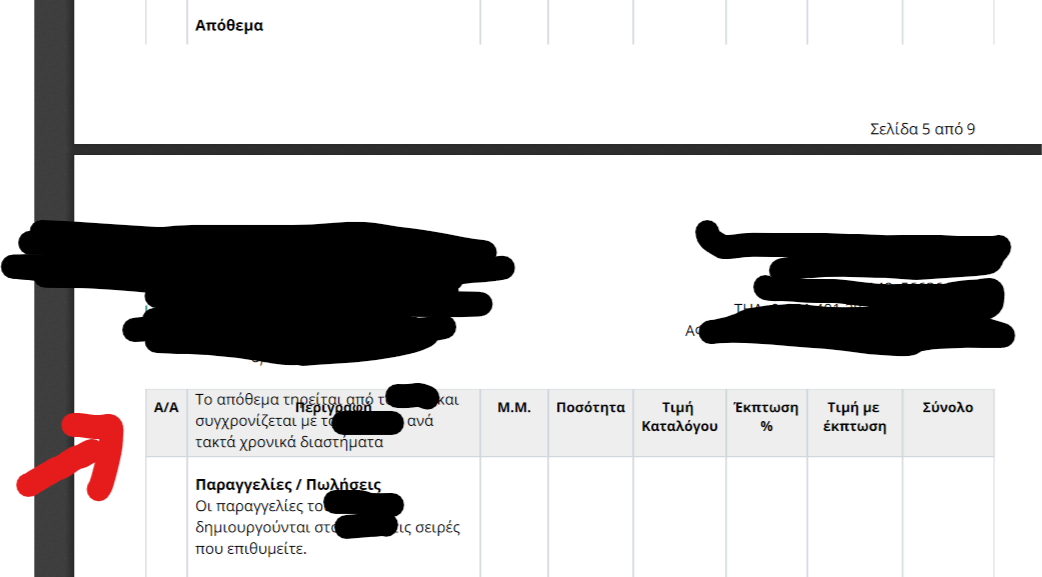
Erpnext: [bug] overlapping table headers with content from the above row when creating pdf
Hi,
I'm again facing the issue with overlapping content in table headings when creating a pdf from a quotation. I haven't been able to resolve it with styles.
 ioweb-gr
All 4 comments
I have tracked this to be a bug with wkhtmltopdf tracing back to 2014. I think if it hasn't been solved after 5 years it will never be solved https://github.com/wkhtmltopdf/wkhtmltopdf/issues/1524. This in turn seems to be traced back to a core third party component from webkit and a relevant issue is here https://bugs.chromium.org/p/chromium/issues/detail?id=24826 from 2009.
Proper formatting of pdf documents is an important issue for any company that requires repeating headers in invoices and the invoices need to show detailed descriptions as they can span many lines.
I personally wouldn't consider a company that sends documents like this a serious company and I haven't seen it in any local competitor ERPs obviously using other libraries. I mean in simple terms I would think, "these guys can't fix their own system, how can they fix mine?"
Perhaps it's possible to consider adding another alternative library for PDF creation instead of wkhtmltopdf.
ioweb-gr
on 6 Jun 2019
Adding the below code to print format custom css resolved it for me
@media print {
    .print-format [data-fieldtype="Table"] {
        overflow: visible !important;
    }
}
 hadishakir
on 3 Sep 2019
hadishakir
on 3 Sep 2019
@hadishakir Was this ".print-format" class on the body? Table? Containing Element?
 earljessee
on 1 Apr 2020
earljessee
on 1 Apr 2020
@earljessee html body div.print-format-gutter div.print-format
hadishakir
on 1 Apr 2020
Related issues
 cradford
·
4Comments
cradford
·
4Comments
 rmehta
·
3Comments
rmehta
·
3Comments
 neilLasrado
·
4Comments
neilLasrado
·
4Comments
 GSLabIt
·
4Comments
GSLabIt
·
4Comments
 setsero71
·
3Comments
setsero71
·
3Comments
Most helpful comment
I have tracked this to be a bug with wkhtmltopdf tracing back to 2014. I think if it hasn't been solved after 5 years it will never be solved https://github.com/wkhtmltopdf/wkhtmltopdf/issues/1524. This in turn seems to be traced back to a core third party component from webkit and a relevant issue is here https://bugs.chromium.org/p/chromium/issues/detail?id=24826 from 2009.
Proper formatting of pdf documents is an important issue for any company that requires repeating headers in invoices and the invoices need to show detailed descriptions as they can span many lines.
I personally wouldn't consider a company that sends documents like this a serious company and I haven't seen it in any local competitor ERPs obviously using other libraries. I mean in simple terms I would think, "these guys can't fix their own system, how can they fix mine?"
Perhaps it's possible to consider adding another alternative library for PDF creation instead of wkhtmltopdf.