Eqmac: Bug: There is no audio after Installed the App on Mac Catalina
Disclaimer:
Please go through existing issues to avoid creating duplicates. If you found a similar issue please post a comment there. If you are uncertain your issue is related to others then create the issue. Obvious ignorance of this rule might get you blocked from posting new issues. Please tick the box below to show that you have followed the guideline.
- [x] I have checked for a similar issue and sure it hasn't been reported before.
Describe the bug
The bug is about that I installed the App on the Mac Catalina and no sound come ups from headphones or speaker. I restarted the mac several times and reinstalled the app but the sound is not coming through.
Steps to Reproduce
Steps to reproduce the behaviour (feel free to change the placeholder as you need):
- Use a Mac Catalina OSX 10.15.4 (19E287)
- install the app
- launch an audio from youtube or mp3 or other sound resources
- No audio is coming out
Expected behaviour
Expected to hear the sound of the audio resource I'm listening
Setup information:
- Audio device used for playback: Mac Catalina OSX 10.15.4 (19E287)
- Audio transmission interface: 3.5mm Jack / speakers of the mac
- macOS Version: OSX 10.15.4 (19E287)
- eqMac Version 0.1.0 (if audio related issue)
- eqMac UI Version 0.1.0 (if UI related issue)
Screenshots or Console.app logs
Need a guide to understand what I should show as I add filter "eqMac" but there are many logs lines and don't know about what to screenshot.
Please provide help if you need to see this
In case those are errors I saw with filter:

Additional information
No more information to add
 Jakub41
All 45 comments
same here after upgrading to 0.1.0
also, app crashes with the following logs:
Apr 29 07:47:19 Andreys-MBP com.apple.xpc.launchd[1] (com.bitgapp.eqmac.8972[54136]): Service exited due to SIGILL | sent by exc handler[54136]
Apr 29 08:10:38 Andreys-MBP com.apple.xpc.launchd[1] (com.bitgapp.eqmac.8972[54401]): Service exited due to SIGILL | sent by exc handler[54401]
Apr 29 08:11:17 Andreys-MBP com.apple.xpc.launchd[1] (com.bitgapp.eqmac.8972[54417]): Service exited due to SIGILL | sent by exc handler[54417]
while toggling between macbook pro speakers and external headphones
 aol-nnov
on 29 Apr 2020
aol-nnov
on 29 Apr 2020
@aol-nnov how is this related to this issue?
 nodeful
on 29 Apr 2020
nodeful
on 29 Apr 2020
What's the matter, @nodeful ? I've experienced the same issue (no sound in v0.1.0). Tried switching inputs (it, kinda helped in previous version) and pasted some logs.
Now, you're wondering how is it related..
Are you against of adding more details into existing similar issue or what? I can flood the tracker with similar tickets - it's not that hard...
aol-nnov
on 29 Apr 2020
@aol-nnov I just don't understand the connection between the app crashing and having "no audio".
I would assume "No audio" means the app is still running, just not production any audio, wheres you're saying it crashes. Quite a conflicting report.
And please don't try to threaten me with flooding with issues 😄 that will just get you blocked unfortunately. Just report descriptive crash logs (you should see "Show details") when the app crashes and I will point you to the right issue if it's not related
nodeful
on 29 Apr 2020
Hi, @nodeful I would like to confirm that form me the app is running and not crashing, It is just I cannot hear any audio. I also shared a screenshot of the logs signed as an error for eeqMac but not sure if that enough :) By the way I'm looking forward for a solution and if any extra details from my side need it I will share :)
Jakub41
on 29 Apr 2020
Hi @nodeful I can confirm I am having no audio as well. It started with update 1.0. I just installed 1.1 a few minutes ago but still, there is no audio
I am running MacOS Catalina 10.15.4
 sakwads
on 30 Apr 2020
sakwads
on 30 Apr 2020
Hi again I would like to confirm that I downloaded the new version but audio still missing from Mac speakers and from headphones via jack or other source. My issue on Mac catalina still persist 😊
Jakub41
on 30 Apr 2020
I'm having the same problem of no audio after updating to the latest version. With the old version the audio worked, but would cause the speakers to crackle after a few minutes or so.
 davidroot8
on 1 May 2020
davidroot8
on 1 May 2020
Same issue here. 10.15.3 (didn't install the latest update yet). Used eqmac for a long time but when it started having issues with Catalina I switched back to Boom, which is garbage itself. Eqmac is great, hopefully this is resolved soon :)
 agiorlando
on 5 May 2020
agiorlando
on 5 May 2020
So I installed the updated version on my T2 MBP and initially there was no sound. Changing the sample rate to 44100 Hz in Audio MIDI Setup restored sound. However there is still horrible static after a few minutes of play.
On my non-T2 MBP (without touch bar) I can select 48000 Hz and sound still plays.
 advicepyro
on 5 May 2020
advicepyro
on 5 May 2020
I'm having the same issue on MacOS Catalina 10.15.4. Any update on resolving this?
 krzysztofp
on 7 May 2020
krzysztofp
on 7 May 2020
I just installed the app today and I also ran into the same issue. I cannot hear anything when the app is turned on....quite disappointed now that I can no longer switch back to eqmac2....
 Sowlinyin
on 8 May 2020
Sowlinyin
on 8 May 2020
Ok guys I'm looking into this right now but it's very frustrating because I don't have this happening to me at all, no matter what I do. I need more information from as many of your as possible:
- What audio protocol is used (Bluetooth, 3.5mm Jack, USB etc.)
- What Sample Rate is set on the output device that you are trying to output to.
- What Sample Rate is set on the eqMac device when it's active?
The sooner I can get this info the sooner I can try and debug the problem. Thanks
nodeful
on 8 May 2020
Also does pressing "Reset playback" to the left of the output select box help at all?
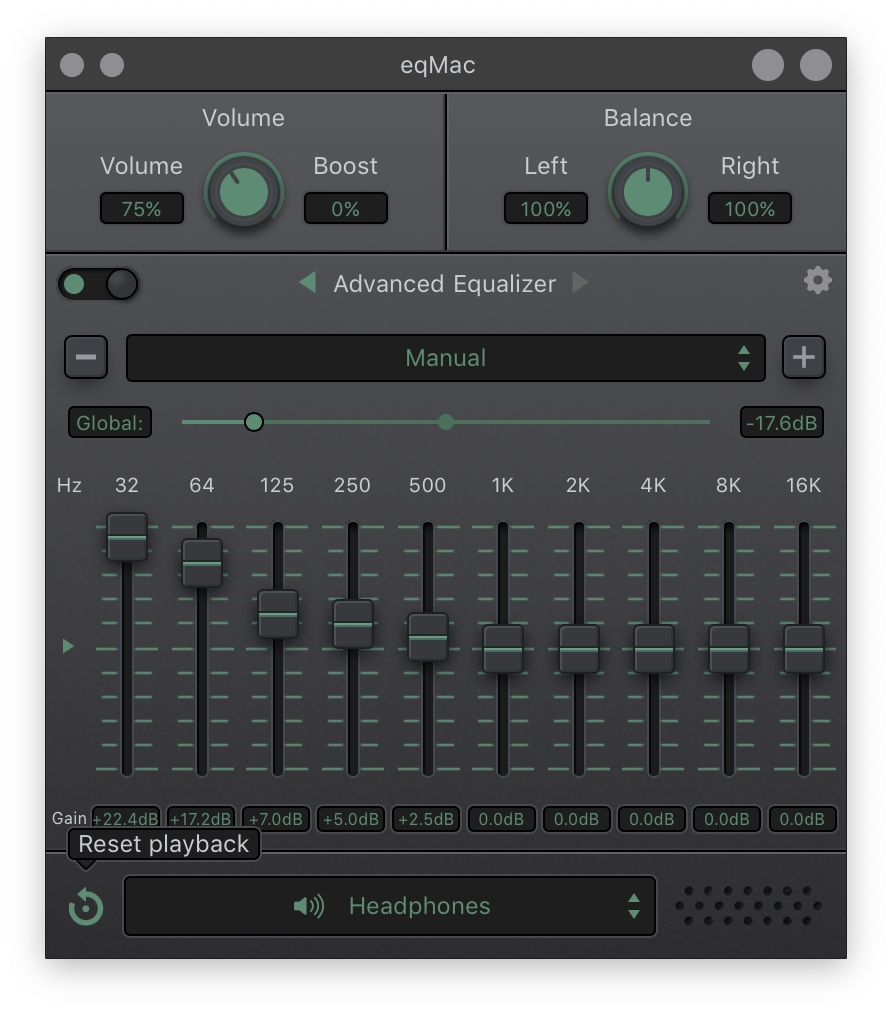
nodeful
on 8 May 2020
Hello @nodeful per myself
- I just not hear any audio from my mac speakers and my Headset via jack 3.5mm.
- I'm listening to the audio from Youtube and online radios but the rate I didn't modify any of the original and I don't know how those are from Youtube.
- Pressing reset playback has no effect on me
- I tried to play with MIDI frequencies rates on my Mac but no Audio was given out
If you need more info please tell me I will be happy to assist :)
Jakub41
on 8 May 2020
Also does pressing "Reset playback" to the left of the output select box help at all?
Did not work at all.
I cannot hear anything from my speaker / headphone jack. I am currently using 16in mbp.
I am also listening to audio from youtube.
I have had the eqmac2 installed on my system before. It could be a driver conflict?
Sowlinyin
on 8 May 2020
I was having the same issue as described in the bug report above on Mojave 10.14.6 using 3.5mm Jack headphone output.
Changing the 3.5mm Jack output sample rate from 48000 to 44100 (matching that of eqMac) in Audio Midi Setup.app like @advicepyro suggested solved the issue for me.
 Proper-Job
on 11 May 2020
Proper-Job
on 11 May 2020
I was having the same issue as described in the bug report above on Mojave 10.14.6 using 3.5mm Jack headphone output.
Changing the 3.5mm Jack output sample rate from 48000 to 44100 (matching that of eqMac) in Audio Midi Setup.app like @advicepyro suggested solved the issue for me.
Oh, yeah! I did this and also solved this issue for me.
Thank you! I hadn't tried this before. So, let's see if the audio will crack after some minutes or keep normal.
 ScrollLocker
on 11 May 2020
ScrollLocker
on 11 May 2020
I had to change both eqMac and 3.5mm Jack output to 44100. By default, both were on 48000 and even tho they were matching, there was no sound
 aldulea
on 12 May 2020
aldulea
on 12 May 2020
I was having the same issue as described in the bug report above on Mojave 10.14.6 using 3.5mm Jack headphone output.
Changing the 3.5mm Jack output sample rate from 48000 to 44100 (matching that of eqMac) in Audio Midi Setup.app like @advicepyro suggested solved the issue for me.Oh, yeah! I did this and also solved this issue for me.
Thank you! I hadn't tried this before. So, let's see if the audio will crack after some minutes or keep normal.
This is what worked for me too!!
 tannerchung
on 12 May 2020
tannerchung
on 12 May 2020
amazing it works for me too now.....never knew this was actually the case....maybe this was causing all the problems with eqmac2
Sowlinyin
on 12 May 2020
Had no sound at all through eqMac, tried solving it with restarting eq and plugging in and out my headphones. At the end I just restarted my iMac and that solved it 😆
 hillop
on 12 May 2020
hillop
on 12 May 2020
I tried that with midi but no audio to me instead doing the change crashing the app. Restarting my Mac no change a thing.
Maybe is an issue with late 2018 version?
Jakub41
on 12 May 2020
I was having the same issue as described in the bug report above on Mojave 10.14.6 using 3.5mm Jack headphone output.
Changing the 3.5mm Jack output sample rate from 48000 to 44100 (matching that of eqMac) in Audio Midi Setup.app like @advicepyro suggested solved the issue for me.Oh, yeah! I did this and also solved this issue for me.
Thank you! I hadn't tried this before. So, let's see if the audio will crack after some minutes or keep normal.
Unfortunately, the audio is crackling before some minutes, even the jack and eqmac in 44000 of sample rate.
ScrollLocker
on 13 May 2020
@ScrollLocker that is a known issue: https://github.com/bitgapp/eqMac/issues/224
Please stay on topic.
Proper-Job
on 13 May 2020
I had the same issue, but after a restart, it started working. And it's set to 44100
 joaoaraujo
on 14 May 2020
joaoaraujo
on 14 May 2020
I had to change both eqMac and 3.5mm Jack output to 44100. By default, both were on 48000 and even tho they were matching, there was no sound
Same issue here, OSX 10.15.3, latest MBP 16".
Had to switch both Mac speakers output and eqmac 44100 and it works after restarting eqmac.
 colin-extend
on 15 May 2020
colin-extend
on 15 May 2020
Yes, I also switched the sample rate to 44100 and it now works. For those with catalina, here is the article of how to change the sample rate -> https://support.apple.com/en-ke/guide/audio-midi-setup/ams094c7edb4/mac
Basically in the launchpad, search for 'Audio Midi', click on it and in the resulting interface, select the sample rate 44100
Remember you'll have to change the sample rate for all your output devices

sakwads
on 16 May 2020
Just released v0.2.0
Please check if the issue still persists!
To update either download from website, GitHub release or update from within the app directly :)
nodeful
on 18 May 2020
For some reason this problem just came up for me after 0.2.0 update. Tried reinstalling the app without luck, and was able to resolve my audio issue only after discovering this github issue
 HitLuca
on 18 May 2020
HitLuca
on 18 May 2020
I updated to the new version and I have audio but having all MIDI with 44Hz
but after some time the audio starts cracking and when I press the refresh button seems helping but time to time the app crashes
Jakub41
on 19 May 2020
Same happens to me ☝️
joaoaraujo
on 19 May 2020
Again that is a known issue: #224
Please stay on topic.
Proper-Job
on 19 May 2020
Wanted to chime in that the issue still persists on 0.2.1, only if the frequency rate is set to 48000 Hz. Lowering to 44100 Hz for all audio devices restores sound.
advicepyro
on 3 Jun 2020
I'm still experiencing this issue. It works perfectly when output set to:
- Bluetooth headphones
- External speakers on HDMI
But it doesn't with output set to "MacBook Pro Speakers" and even crash time to time, when I set it to this internal output.
Switching to 44.1 KHz doesn't make any difference for me. On 48 KHz work all devices except of internal output.
I will investigate this issue and try to fix it.
 virtustilus
on 3 Jun 2020
virtustilus
on 3 Jun 2020
From what I managed to find today:
- it reads audio stream in outputRenderCallback correctly
- device "MacBook Pro Speakers" was set in outputEngine.setOutputDevice
- everything looks the same as for external audio devices that work
I will try to check more on the weekend.
virtustilus
on 3 Jun 2020
Looks like I fixed it locally, will test it more and send pull request.
virtustilus
on 9 Jun 2020
Sorry didn't mean to close the issue just yet.
Here's the Signed Pre-release candidate v0.2.2 with the fix from @virtustilus :
https://github.com/bitgapp/eqMac/releases/tag/v0.2.2
Please download, install and report back if this issue is resolved now.
Thanks
nodeful
on 11 Jun 2020
Just got 0.2.2.
Works for me, issue solved.
Thank you, guys!
 artem-kobets-qa
on 11 Jun 2020
artem-kobets-qa
on 11 Jun 2020
Thanks @artem-kobets-qa
Can other people please confirm that this issue is now resolved?
nodeful
on 11 Jun 2020
Got an issue
Steps:
- Listening to Google Play music from Chrome.
- Got Chrome notification from google calendar.
Result: In couple seconds sound in headphones become very noisy.
Workaround: restart eqMac
artem-kobets-qa
on 11 Jun 2020
@artem-kobets-qa this is not related to this issue. Perhaps #224
nodeful
on 11 Jun 2020
@artem-kobets-qa could you post to #224 your hardware details, MacOS version and also information for devices from "Audio Midi Setup" application (Sample rate, 44.1 or 48)?
virtustilus
on 11 Jun 2020
@virtustilus done
artem-kobets-qa
on 11 Jun 2020
This issue should be resolved in v0.3.1.
Please update the app and let me know if this issue is still relevant. Thank you
nodeful
on 22 Jun 2020
Related issues
 marco-brandizi
·
8Comments
marco-brandizi
·
8Comments
 realies
·
4Comments
realies
·
4Comments
 MaLub
·
4Comments
MaLub
·
4Comments
 alexkreidler
·
7Comments
nodeful
·
6Comments
alexkreidler
·
7Comments
nodeful
·
6Comments
Most helpful comment
I was having the same issue as described in the bug report above on Mojave 10.14.6 using 3.5mm Jack headphone output.
Changing the 3.5mm Jack output sample rate from 48000 to 44100 (matching that of eqMac) in Audio Midi Setup.app like @advicepyro suggested solved the issue for me.