Eqmac: System Sound Effects Extremely Loud, Other Sounds Much Softer
With Build 2.1, the system sound effects (alert sound effects, warning sound effects, etc.) are extremely loud while non-system sounds (music from a music player, sound from a video, etc.) are much quieter relative to the system's native sound levels (i.e. with eqMac turned off)
One reliable way to replicate the bug is by hitting the backspace key on an empty line in terminal, thus triggering a built-in sound effect. The sound effect is extremely loud.
This issue does not go away with a restart of the eqMac app, and only occurs when eqMac is active.
 JustinMi
All 12 comments
Here is why #103
 psxcode
on 28 Nov 2017
psxcode
on 28 Nov 2017
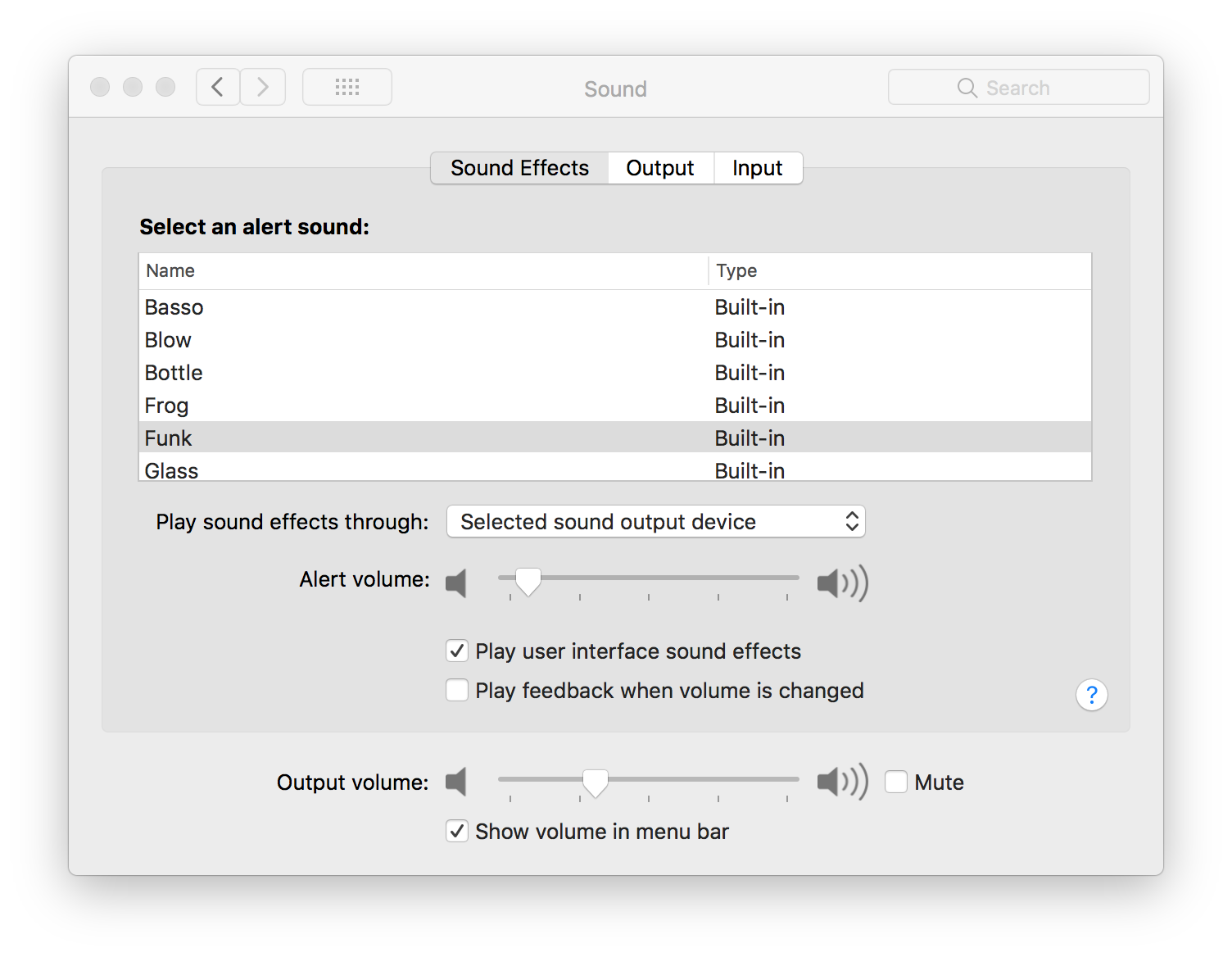
Make sure the Sound Effects go through the selected sound output device
 nodeful
on 28 Nov 2017
nodeful
on 28 Nov 2017
But the problem is that eqMac2 changes it from the "Selected output device" to whatever is first in the list of output choices.
So before I launch eqMac2, this is what I have:
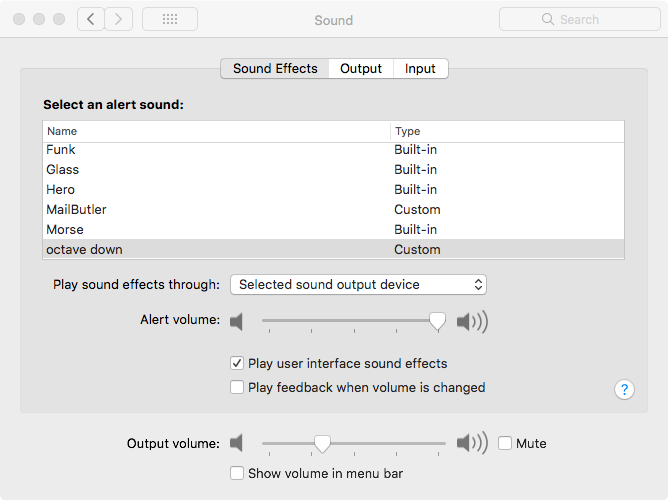
Then immediately after launching the app, I can watch the setting change right before my eyes to:
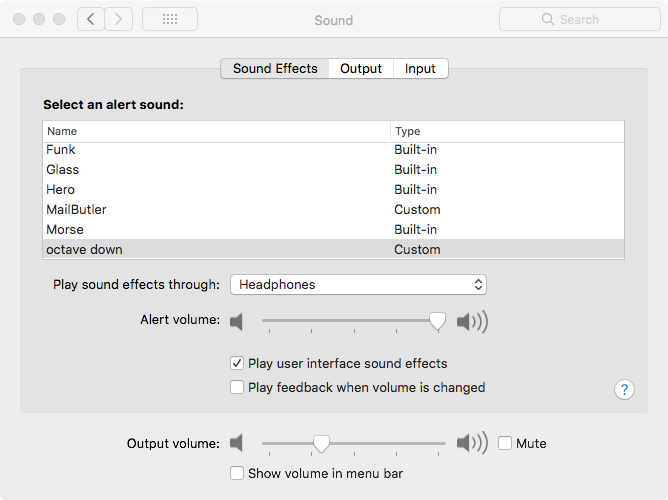
As soon as I manually change it back to "Selected output device" (or to "eqMac2"), I am back to enjoying my new, richer, ridiculously better sounding sounds at the expected volume. Love this app, so it's worth manually changing each time, but it does seem like a bug somewhere in the app or in macOS.
 uner
on 28 Nov 2017
uner
on 28 Nov 2017
Had the same issue, thanks guys for the letting me know what to do... It does really seem like a bug as it scared sh** out of me as I was listening music at work and then notification almost made me deaf.
 ernestas-convertize
on 30 Nov 2017
ernestas-convertize
on 30 Nov 2017
I do have the same issue. The sounds are okay as long as "Selected output device" is set. After Restart of Mac / the app the sounds are again on headphone or whatever i did select as output from sound-menu in taskbar.
Incoming Mails do constantly give me an heartattak now.
 masseelch
on 30 Nov 2017
masseelch
on 30 Nov 2017
FYI this is being solved here. Temporary workaround here.
NOTE: _Before installing the 2.0.6 .dmg file, uninstall the existing version (2.1) using the right-click menu -> "Uninstall" button otherwise the kext driver won't be uninstalled properly and 2.0.6 will fail to install it's own driver and won't load._
 mitochondrion
on 1 Dec 2017
mitochondrion
on 1 Dec 2017
For the new version, one workaround is to launch the app with an AppleScript instead of directly. I saved the script as an app, and launched it as a login item. The code comes from: http://protips.maxmasnick.com/os-x-set-the-output-device-for-sound-effects-with-applescript
tell application "eqMac2"
   activate
   tell application "System Preferences"
      activate
      set current pane to pane "com.apple.preference.sound"
   end tell

   tell application "System Events"
      tell application process "System Preferences"
         -- Fix for El Capitan:
         -- http://apple.stackexchange.com/questions/209352/applescript-cant-get-tab-group-1-of-window-el-capitan
         repeat until exists tab group 1 of window "Sound"
         end repeat
         -- End El Cap fix
         tell tab group 1 of window "Sound"
            click radio button "Sound Effects"
            set thePopUp to pop up button 1
            click thePopUp
            click menu item "Selected sound output device" of menu 1 of thePopUp
         end tell
      end tell
   end tell
   tell application "System Preferences" to quit
end tell
I have released an update (Build 2.2) Please update and tell me if the issue is still relevant. Thanks
nodeful
on 3 Dec 2017
This build fixed the issue for me. I tested various configurations of using the built-in output with and without headphones, the display audio, and various combos thereof for sound effects. Rock solid as far as I can tell - thank you!!!
uner
on 3 Dec 2017
First of all, I would like to apologize for the lack of communication and responses to the current issue and all other issues in general.
I have made a conscious decision to focus most of my free time and focus on developing a more modern and new version of "eqMac". This means that I can't spend too much time looking back at old codebase and trying to make every user happy. This was the main reason I made this repository open-source, in hopes that other developers might help to sort out some issues and iron out all the bugs. Unfortunately, there are very few developers that are proficient in Core Audio and Objective-C or maybe they are just not interested in this repo, which I can understand.
I promise that the next version will be much more polished and I will make some sort of a mainstream system were solving issues will be very easy and quick. Just sit tight and wait for a new release this coming summer.
Thank you to everyone who gave "eqMac2" a try and I hope I won't disappoint you next time :)
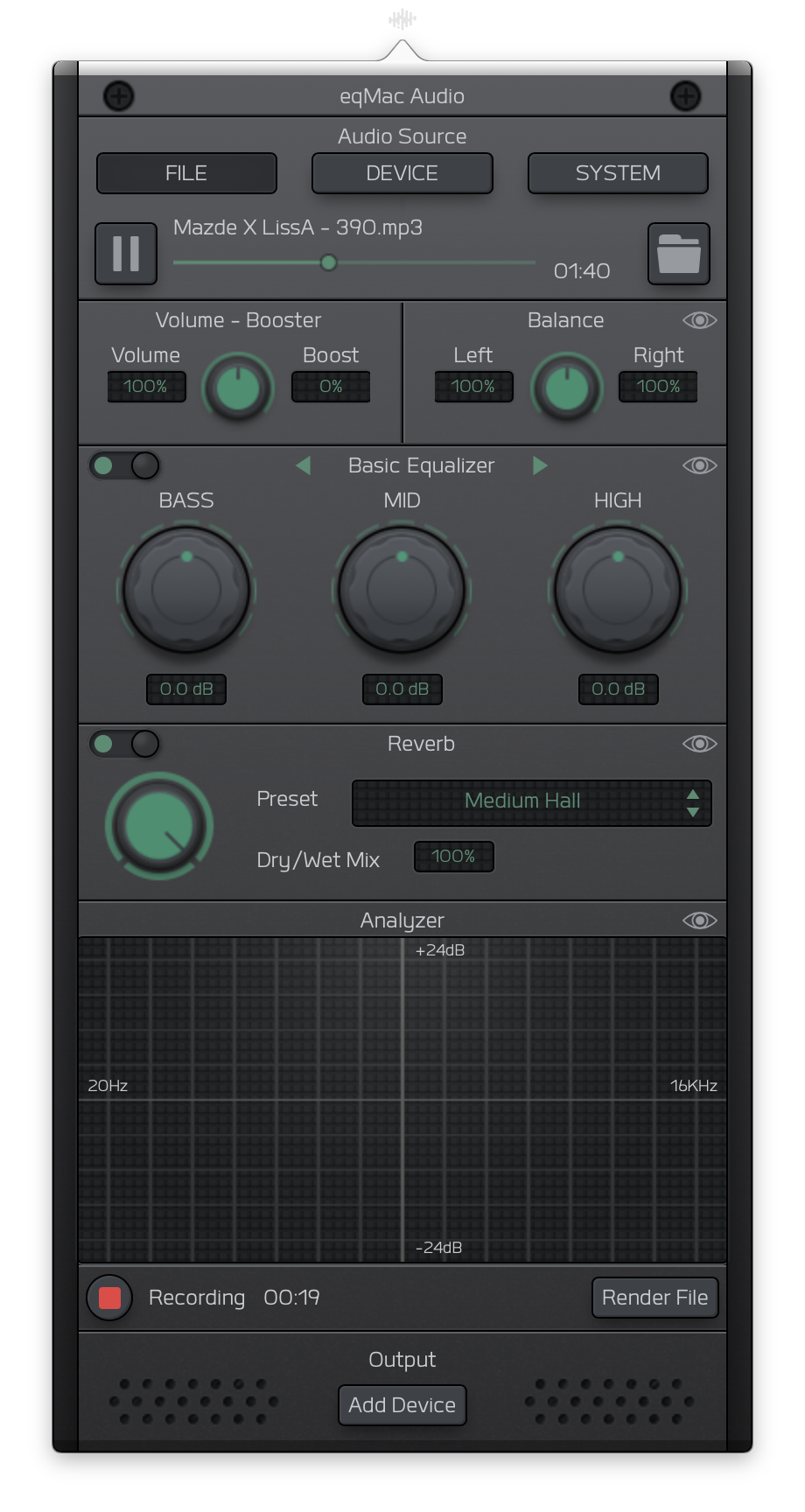
Heres a sneak peak of the UI I am currently working on:
nodeful
on 8 May 2018
Hey everyone. Excuse me for the lack of updates. I have been really busy on the new version of eqMac. I am happy to announce an open beta release.
You can download it here: https://eqmac.app
There are a lot of known bugs that I could not fix just yet:
- Driver not installing from the first try. Sometimes need to restart eqMac a couple times.
- Complex Device switching logic is not perfect (for example when switching off the device that's currently playing, plugging in new device etc.)
- UI takes long to load (a lot can be done to improve that)
- UI dimensions are not synching properly
- There's a noticeable audio delay in the playback, so not suitable for video yet (I know where the problem lies just haven't had the time to fix yet)
- Sometimes the playback doesn't start, in that case please try to switch the output to the device you want and eqMac should try and build the audio pipeline again.
So as you can see there's still some work to be done but at least it's a completely modern tech stack that I am fully willing to work on: 100% Swift, User Space driver and a Web UI, instead of C++, Kernel Drivers. As I said, should work on Catalina and should not have any pesky ear drum blasting volume bugs (at least I didn't come across any).
I'm open to feedback and issue reports here: https://github.com/bitgapp/eqmac
That repo will become the main repo for eqMac and this repo will be archived eventually.
And yes it's called just eqMac, not eqMac3 :) And it will stay that way forever.
nodeful
on 8 Jan 2020
Hey everyone 👋
I will be open sourcing the new version of eqMac, therefore, I am closing this issue and repository as I will be transfering nodeful/eqMac2 repo to bitgapp/eqMac
Please bear with me for the next couple of days as I setup that new repo. The eqMac2 code will be living in the old-eqMac2 branch if anyone is interested in referencing it for whatever reason.
Please try out the new version and report bugs to the new repo.
Thanks for using eqMac.
nodeful
on 4 Apr 2020
Related issues
 MaLub
·
4Comments
MaLub
·
4Comments
 lbibass
·
7Comments
lbibass
·
7Comments
 brian-lamb-software-engineer
·
4Comments
brian-lamb-software-engineer
·
4Comments
 alexkreidler
·
7Comments
nodeful
·
6Comments
alexkreidler
·
7Comments
nodeful
·
6Comments
Most helpful comment
This build fixed the issue for me. I tested various configurations of using the built-in output with and without headphones, the display audio, and various combos thereof for sound effects. Rock solid as far as I can tell - thank you!!!