Entitas-csharp: New Code Generator available in the Asset Store
New Code Generator available in the Unity Asset Store
Hi guys, I've just got an Email from Unity. The new Entitas version is available in the Unity Asset Store including the first public beta of the new Code Generator!
Here's a quick guide to get started. Better docs + Video Tutorials are coming very soon.
This version was uploaded with Unity 2017.2, older version will be available soon!
First Steps
- Open Unity
- Ceate a new project
- Create a new folder called Libraries (or update the default paths in Entitas.properties later)
- Download Entitas from the Asset Store
- Move the downloaded package into the libraries folder you just created
- Create a new Component : IComponent
using Entitas;

public class IdComponent : IComponent {
    public string value;
}
- In Unity select the menu item Assets -> Open C# project
- Open the the Entitas Preferences and enable all Plugins
- Check the searchPaths in Entitas.properties if you're on windows (the default ones are for Mac)
- Press the green generate Button
- You'll find the generated code in Sources/Generated
Using the new code generator
- Move Libraries/Entitas/CodeGenerator.zip to your project root (one folder above the Assets folder)
- Unzip it (on Windows make sure to right click -> Properties -> Unlock to safely unzip)
- Open Entitas.properties (located in the project root folder)
- Add
CodeGenerator/Plugins/Entitas.Roslynto the searchPaths - Add
Entitas.Roslyn.CodeGeneration.Pluginsto the plugins - Find the DataProvider called
Entitas.CodeGeneration.Plugins.ComponentDataProviderand add.RoslynafterEntitas->Entitas.Roslyn.CodeGeneration.Plugins.ComponentDataProvider - Do the same for
Entitas.CodeGeneration.Plugins.EntityIndexDataProvider->Entitas.Roslyn.CodeGeneration.Plugins.EntityIndexDataProvider - We just plugged in the Roslyn Code Generator Plugin and are using the DataProviders
- Open the terminal and
cdinto your project root - run
CodeGenerator/entitas.exe doctor - on a mac run
mono CodeGenerator/entitas.exe doctor - You should see
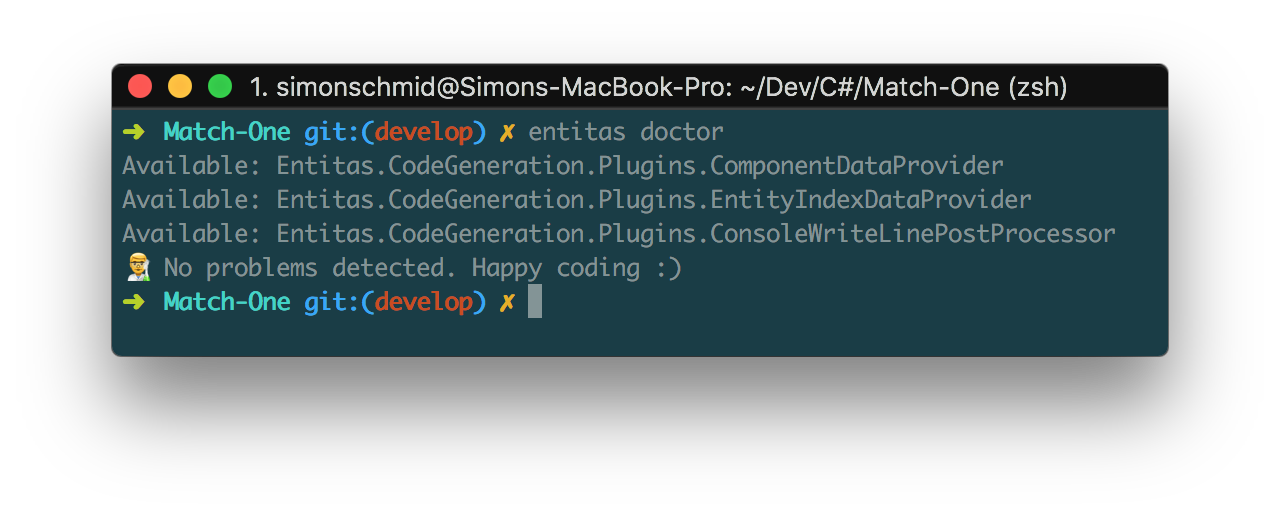
No problems detected. Happy coding :) - If not, check your searchPaths, especially if the point to the correct Unity location
- run
CodeGenerator/entitas.exe gen -a(prepend mono when on a mac) - It will generate using the new code generator.
-awill ask youAgain ? (y / n) - Press
yif you want to generate again (e.g. after adding more components) - Press
nto terminate the programm
What you should try
The new code generator will be able to generate the latest changes in your code even when there compile erros. Try it yourself!
using Entitas;

public class IdComponent : IComponent {
    public string value;
}
After generating change the field type from string to int which will result in errors. Switch to the terminal and hit y to generate again. Open the generated file GameIdComponent to verify and see for yourself.
The errors are all gone. You can switch the type back to string and intentionally add more compiler errors by smashing the keys on your keyboard
using Entitas;

// more compiler errors
fdsf         dh aksjhdgk sh
  fsdf

  sdfkjhgaskfjhg

public class IdComponent : IComponent {
    public string value;
}
Switch to the terminal and hit y to generate again. The new code generator will be able to generate anyway.
Add more components, rename them, delete them, add and remove fields, it should all work seamlessly!
Happy coding :)
 sschmid
All 30 comments
Having to hand edit the entitas.proprties file is really not fun. Why can't this be in the GUI preferences?
I'm still trying to get this hooked up and I think I've messed up something, as I am getting a ton of errors when I run entitas.exe doctor
jwvan@gamebox MINGW64 /d/Unity Projects/SETI
$ CodeGenerator/entitas.exe doctor
Unused key: Entitas.VisualDebugging.Unity.Editor.SystemWarningThreshold
Unused key: Entitas.VisualDebugging.Unity.Editor.DefaultInstanceCreatorFolderPat                                                                              h
Unused key: Entitas.VisualDebugging.Unity.Editor.TypeDrawerFolderPath
Unused key: Entitas.CodeGeneration.Plugins.Assemblies
Available: Entitas.CodeGeneration.Plugins.ComponentDataProvider
Available: Entitas.CodeGeneration.Plugins.EntityIndexDataProvider
    - Could not resolve: Microsoft.CodeAnalysis.Features.dll
    - Could not resolve: Microsoft.CodeAnalysis.Features.dll
    - Could not resolve: Microsoft.CodeAnalysis.CSharp.Features.dll
    - Could not resolve: Microsoft.CodeAnalysis.CSharp.Features.dll
    - Could not resolve: Microsoft.CodeAnalysis.VisualBasic.Features.dll
    - Could not resolve: Microsoft.CodeAnalysis.VisualBasic.Features.dll
    - Could not resolve: Microsoft.Build.resources.dll
    - Could not resolve: Microsoft.Build.resources.dll
    - Could not resolve: Microsoft.Build.resources.dll
    - Could not resolve: Microsoft.Build.resources.dll
    - Could not resolve: Microsoft.Build.resources.dll
    - Could not resolve: Microsoft.Build.resources.dll
    - Could not resolve: Microsoft.Build.resources.dll
    - Could not resolve: Microsoft.Build.resources.dll
    - Could not resolve: Microsoft.Build.Tasks.Core.resources.dll
    - Could not resolve: Microsoft.Build.Tasks.Core.resources.dll
    - Could not resolve: Microsoft.Build.Tasks.Core.resources.dll
    - Could not resolve: Microsoft.Build.Tasks.Core.resources.dll
    - Could not resolve: Microsoft.Build.Tasks.Core.resources.dll
    - Could not resolve: Microsoft.Build.Tasks.Core.resources.dll
    - Could not resolve: Microsoft.Build.Tasks.Core.resources.dll
    - Could not resolve: Microsoft.Build.Tasks.Core.resources.dll
    - Could not resolve: System.IO.MemoryMappedFiles.dll
    - Could not resolve: System.IO.MemoryMappedFiles.dll
    - Could not resolve: System.IO.MemoryMappedFiles.dll
    - Could not resolve: System.IO.MemoryMappedFiles.dll
    - Could not resolve: System.IO.MemoryMappedFiles.dll
    - Could not resolve: System.IO.MemoryMappedFiles.dll
    - Could not resolve: System.IO.MemoryMappedFiles.dll
    - Could not resolve: System.IO.MemoryMappedFiles.dll
    - Could not resolve: System.IO.MemoryMappedFiles.dll
    - Could not resolve: System.IO.MemoryMappedFiles.dll
    - Could not resolve: System.IO.MemoryMappedFiles.dll
    - Could not resolve: System.IO.MemoryMappedFiles.dll
    - Could not resolve: System.IO.MemoryMappedFiles.dll
    - Could not resolve: System.IO.MemoryMappedFiles.dll
    - Could not resolve: System.IO.MemoryMappedFiles.dll
    - Could not resolve: System.IO.MemoryMappedFiles.dll
    - Could not resolve: Microsoft.CodeAnalysis.Workspaces.Desktop.resources.dll
    - Could not resolve: Microsoft.CodeAnalysis.Workspaces.Desktop.resources.dll
    - Could not resolve: Microsoft.CodeAnalysis.Workspaces.Desktop.resources.dll
    - Could not resolve: Microsoft.CodeAnalysis.Workspaces.Desktop.resources.dll
    - Could not resolve: Microsoft.CodeAnalysis.Workspaces.Desktop.resources.dll
    - Could not resolve: Microsoft.CodeAnalysis.Workspaces.Desktop.resources.dll
    - Could not resolve: Microsoft.CodeAnalysis.Workspaces.Desktop.resources.dll
    - Could not resolve: Microsoft.CodeAnalysis.Workspaces.Desktop.resources.dll
    - Could not resolve: Microsoft.CodeAnalysis.resources.dll
    - Could not resolve: Microsoft.CodeAnalysis.resources.dll
    - Could not resolve: Microsoft.CodeAnalysis.resources.dll
    - Could not resolve: Microsoft.CodeAnalysis.resources.dll
    - Could not resolve: Microsoft.CodeAnalysis.resources.dll
    - Could not resolve: Microsoft.CodeAnalysis.resources.dll
    - Could not resolve: Microsoft.CodeAnalysis.resources.dll
    - Could not resolve: Microsoft.CodeAnalysis.resources.dll
One or more errors occurred.
This is what my properties file looks like:
Entitas.CodeGeneration.CodeGenerator.SearchPaths = Assets/Plugins/Entitas, \
                                                   Assets/Plugins/Entitas/Editor, \
                                                   D:\Program Files\Unity 2017.3.0b3\Editor\Data\Managed, \
                                                   D:\Program Files\Unity 2017.3.0b3\Editor\Data\Mono\lib\mono\unity, \
                                                   D:\Program Files\Unity 2017.3.0b3\Editor\Data\UnityExtensions\Unity\GUISystem, \
                                                   CodeGenerator/Plugins/Roslyn

Entitas.CodeGeneration.CodeGenerator.Plugins = Entitas.CodeGeneration.Plugins, \
                                               Entitas.VisualDebugging.CodeGeneration.Plugins, \
                                               Entitas.CodeGeneration.Roslyn

Entitas.CodeGeneration.CodeGenerator.DataProviders = Entitas.CodeGeneration.Roslyn.ComponentDataProvider, \
                                                     Entitas.CodeGeneration.Plugins.ContextDataProvider, \
                                                     Entitas.CodeGeneration.Roslyn.EntityIndexDataProvider

Entitas.CodeGeneration.CodeGenerator.CodeGenerators = Entitas.CodeGeneration.Plugins.ComponentContextGenerator, \
                                                      Entitas.CodeGeneration.Plugins.ComponentEntityGenerator, \
                                                      Entitas.CodeGeneration.Plugins.ComponentEntityInterfaceGenerator, \
                                                      Entitas.CodeGeneration.Plugins.ComponentGenerator, \
                                                      Entitas.CodeGeneration.Plugins.ComponentMatcherGenerator, \
                                                      Entitas.CodeGeneration.Plugins.ComponentsLookupGenerator, \
                                                      Entitas.CodeGeneration.Plugins.ContextAttributeGenerator, \
                                                      Entitas.CodeGeneration.Plugins.ContextGenerator, \
                                                      Entitas.CodeGeneration.Plugins.ContextMatcherGenerator, \
                                                      Entitas.CodeGeneration.Plugins.ContextsGenerator, \
                                                      Entitas.CodeGeneration.Plugins.EntityGenerator, \
                                                      Entitas.CodeGeneration.Plugins.EntityIndexGenerator, \
                                                      Entitas.VisualDebugging.CodeGeneration.Plugins.ContextObserverGenerator, \
                                                      Entitas.VisualDebugging.CodeGeneration.Plugins.FeatureClassGenerator

Entitas.CodeGeneration.CodeGenerator.PostProcessors = Entitas.CodeGeneration.Plugins.AddFileHeaderPostProcessor, \
                                                      Entitas.CodeGeneration.Plugins.CleanTargetDirectoryPostProcessor, \
                                                      Entitas.CodeGeneration.Plugins.MergeFilesPostProcessor, \
                                                      Entitas.CodeGeneration.Plugins.NewLinePostProcessor, \
                                                      Entitas.CodeGeneration.Plugins.UpdateCSProjPostProcessor, \
                                                      Entitas.CodeGeneration.Plugins.WriteToDiskPostProcessor, \
                                                      Entitas.CodeGeneration.Plugins.ConsoleWriteLinePostProcessor

Entitas.VisualDebugging.Unity.Editor.SystemWarningThreshold = 5
Entitas.VisualDebugging.Unity.Editor.DefaultInstanceCreatorFolderPath = Assets/Editor/DefaultInstanceCreator
Entitas.VisualDebugging.Unity.Editor.TypeDrawerFolderPath = Assets/Editor/TypeDrawer
Entitas.CodeGeneration.Plugins.Assemblies = Library/ScriptAssemblies/Assembly-CSharp.dll
Entitas.CodeGeneration.Plugins.Contexts = Game, \
                                          Input, \
                                          Econ

Entitas.CodeGeneration.Plugins.IgnoreNamespaces = false
Entitas.CodeGeneration.Plugins.TargetDirectory = Assets/Source/SETI/Entitas
Entitas.CodeGeneration.Plugins.ProjectPath = SETI.csproj
 jwvanderbeck
on 3 Nov 2017
jwvanderbeck
on 3 Nov 2017
similar issue here, using windows 10 pro 64bit.
Also a bit disappointed on it not just working out of the box.
(maybe an entitas.exe upgrade_properties_for_roslyn )?
```Unused key: Entitas.VisualDebugging.Unity.Editor.SystemWarningThreshold
Unused key: Entitas.VisualDebugging.Unity.Editor.DefaultInstanceCreatorFolderPath
Unused key: Entitas.VisualDebugging.Unity.Editor.TypeDrawerFolderPath
Unused key: Entitas.CodeGeneration.Plugins.Assemblies
Available: Entitas.CodeGeneration.Plugins.ComponentDataProvider
Available: Entitas.CodeGeneration.Plugins.EntityIndexDataProvider
- Could not resolve: Microsoft.CodeAnalysis.Features.dll
- Could not resolve: Microsoft.CodeAnalysis.Features.dll
- Could not resolve: Microsoft.CodeAnalysis.CSharp.Features.dll
- Could not resolve: Microsoft.CodeAnalysis.CSharp.Features.dll
- Could not resolve: Microsoft.CodeAnalysis.VisualBasic.Features.dll
- Could not resolve: Microsoft.CodeAnalysis.VisualBasic.Features.dll
- Could not resolve: Microsoft.Build.resources.dll
- Could not resolve: Microsoft.Build.resources.dll
- Could not resolve: Microsoft.Build.resources.dll
- Could not resolve: Microsoft.Build.resources.dll
- Could not resolve: Microsoft.Build.resources.dll
- Could not resolve: Microsoft.Build.resources.dll
- Could not resolve: Microsoft.Build.resources.dll
- Could not resolve: Microsoft.Build.resources.dll
- Could not resolve: Microsoft.Build.Tasks.Core.resources.dll
- Could not resolve: Microsoft.Build.Tasks.Core.resources.dll
- Could not resolve: Microsoft.Build.Tasks.Core.resources.dll
- Could not resolve: Microsoft.Build.Tasks.Core.resources.dll
- Could not resolve: Microsoft.Build.Tasks.Core.resources.dll
- Could not resolve: Microsoft.Build.Tasks.Core.resources.dll
- Could not resolve: Microsoft.Build.Tasks.Core.resources.dll
- Could not resolve: Microsoft.Build.Tasks.Core.resources.dll
- Could not resolve: Microsoft.CodeAnalysis.Workspaces.Desktop.resources.dll
- Could not resolve: Microsoft.CodeAnalysis.Workspaces.Desktop.resources.dll
- Could not resolve: Microsoft.CodeAnalysis.Workspaces.Desktop.resources.dll
- Could not resolve: Microsoft.CodeAnalysis.Workspaces.Desktop.resources.dll
- Could not resolve: Microsoft.CodeAnalysis.Workspaces.Desktop.resources.dll
- Could not resolve: Microsoft.CodeAnalysis.Workspaces.Desktop.resources.dll
- Could not resolve: Microsoft.CodeAnalysis.Workspaces.Desktop.resources.dll
- Could not resolve: Microsoft.CodeAnalysis.Workspaces.Desktop.resources.dll
- Could not resolve: Microsoft.CodeAnalysis.Workspaces.resources.dll
- Could not resolve: Microsoft.CodeAnalysis.Workspaces.resources.dll
- Could not resolve: Microsoft.CodeAnalysis.Workspaces.resources.dll
- Could not resolve: Microsoft.CodeAnalysis.Workspaces.resources.dll
- Could not resolve: Microsoft.CodeAnalysis.Workspaces.resources.dll
- Could not resolve: Microsoft.CodeAnalysis.Workspaces.resources.dll
- Could not resolve: Microsoft.CodeAnalysis.Workspaces.resources.dll
- Could not resolve: Microsoft.CodeAnalysis.Workspaces.resources.dll
Object reference not set to an instance of an object.
Entitas.CodeGeneration.CodeGenerator.SearchPaths = Assets/Libraries/Entitas,
Assets/Libraries/Entitas/Editor,
Assets/Plugins/Entitas,
Assets/Plugins/Entitas/Editor,
CodeGenerator/Plugins/Roslyn,
/Applications/Unity/Unity.app/Contents/Managed,
/Applications/Unity/Unity.app/Contents/Mono/lib/mono/unity,
/Applications/Unity/Unity.app/Contents/UnityExtensions/Unity/GUISystem
Entitas.CodeGeneration.CodeGenerator.Plugins = Entitas.CodeGeneration.Plugins,
Entitas.VisualDebugging.CodeGeneration.Plugins,
Entitas.CodeGeneration.Roslyn
Entitas.CodeGeneration.CodeGenerator.DataProviders = Entitas.CodeGeneration.Roslyn.ComponentDataProvider,
Entitas.CodeGeneration.Plugins.ContextDataProvider,
Entitas.CodeGeneration.Roslyn.EntityIndexDataProvider
Entitas.CodeGeneration.CodeGenerator.CodeGenerators = Entitas.CodeGeneration.Plugins.ComponentContextGenerator,
Entitas.CodeGeneration.Plugins.ComponentEntityGenerator,
Entitas.CodeGeneration.Plugins.ComponentEntityInterfaceGenerator,
Entitas.CodeGeneration.Plugins.ComponentGenerator,
Entitas.CodeGeneration.Plugins.ComponentMatcherGenerator,
Entitas.CodeGeneration.Plugins.ComponentsLookupGenerator,
Entitas.CodeGeneration.Plugins.ContextAttributeGenerator,
Entitas.CodeGeneration.Plugins.ContextGenerator,
Entitas.CodeGeneration.Plugins.ContextMatcherGenerator,
Entitas.CodeGeneration.Plugins.ContextsGenerator,
Entitas.CodeGeneration.Plugins.EntityGenerator,
Entitas.CodeGeneration.Plugins.EntityIndexGenerator,
Entitas.VisualDebugging.CodeGeneration.Plugins.ContextObserverGenerator,
Entitas.VisualDebugging.CodeGeneration.Plugins.FeatureClassGenerator
Entitas.CodeGeneration.CodeGenerator.PostProcessors = Entitas.CodeGeneration.Plugins.AddFileHeaderPostProcessor,
Entitas.CodeGeneration.Plugins.CleanTargetDirectoryPostProcessor,
Entitas.CodeGeneration.Plugins.MergeFilesPostProcessor,
Entitas.CodeGeneration.Plugins.NewLinePostProcessor,
Entitas.CodeGeneration.Plugins.UpdateCSProjPostProcessor,
Entitas.CodeGeneration.Plugins.WriteToDiskPostProcessor,
Entitas.CodeGeneration.Plugins.ConsoleWriteLinePostProcessor
Entitas.VisualDebugging.Unity.Editor.SystemWarningThreshold = 5
Entitas.VisualDebugging.Unity.Editor.DefaultInstanceCreatorFolderPath = Assets/Editor/DefaultInstanceCreator
Entitas.VisualDebugging.Unity.Editor.TypeDrawerFolderPath = Assets/Editor/TypeDrawer
Entitas.CodeGeneration.Plugins.Assemblies = Library/ScriptAssemblies/Assembly-CSharp.dll
Entitas.CodeGeneration.Plugins.Contexts = Game, Input
Entitas.CodeGeneration.Plugins.IgnoreNamespaces = false
Entitas.CodeGeneration.Plugins.TargetDirectory = Assets/Sources/Generated
Entitas.CodeGeneration.Plugins.ProjectPath = MyProject.csproj
```
Might it have to do with the Entitas folder being in Assets/Plugins folder instead of Assets/Libraries ?
happens regardless of the folder
 CCludts
on 3 Nov 2017
CCludts
on 3 Nov 2017
similar issue here. Also a bit disappointed on having to struggle through issues after buying it.
These issues should only be with the new generator which is to be fair considered beta. If you use the old generator (IE don't apply the changes here) then it should just work out of the box.
jwvanderbeck
on 3 Nov 2017
Still tracking this down, but while digging through the code for AssemblyResolver I noticed the path handling is rather messy. I would highly suggest making more use of System.IO.Path as it would better handle paths cross platform.
Just a suggestion.
jwvanderbeck
on 3 Nov 2017
I'm pretty sure this isn't an issue with the searchPaths, which was my first guess. I can see assemblies it is trying to load in the paths, and if I intentionally mess up the path then I get different errors.
jwvanderbeck
on 3 Nov 2017
I will be available on the weekend again and try to reproduce and help out.
sschmid
on 3 Nov 2017
@jwvanderbeck I'd be happy to learn more about your suggestion. If you want to create a PR that might help a lot
sschmid
on 3 Nov 2017
I've just imported and setup this new generator in an empty project and tested the generator with compile errors.
The process took me less than I expected from the feedback of previous people, but it still has paint points in it:
- I see no apparent reason for making three additional steps of creating a Libraries folder, downloading Entitas folder separately and then moving it to Libraries by hand. The package can be uploaded directly inside the Libraries/Entitas folder and it doesn't require extra work really.
- It would be nice to have all "plugins/data providers/etc" things set to "Everything" by default.
- As for the generator itself - it would also be nice to have automatic search paths replacement as at the point of extracting the code generation archive we already have a project path anchor and it can possibly be automated
- When using
doctorandgencommands it gave me a whole lot of- Could not resolve: Microsoft.CodeAnalysis.Features.dllwarnings, as well as about "unused keys" and it bothers me a bit.
And while using command line to generate is relatively easy, it would be a nice consistency to be able to generate inside Unity with Ctrl + Shift + G with the new Roslyn Generator instead of an old one.
 KumoKairo
on 3 Nov 2017
KumoKairo
on 3 Nov 2017
Also getting the same Microsoft.{etc}.dll errors.
I also want to log here the errors I was getting about the Unity.{etc.}.dll too. I needed to add the following to my entitas.properties:
${user.unity}/Managed, \
${user.unity}/Managed/UnityEngine, \
${user.unity}/Mono/lib/mono/unity, \
${user.unity}/UnityExtensions/Unity/GUISystem, \
where ${user.unity} is specified in the separate file user.properties and points to the _specific install_ of Unity that I'm using for the project, e.g. C:/Program Files/Unity_2017.2/Editor/Data and also notice that this is both not a default path for a Unity install and that the relative path to the .dll files is different on Windows than on OS X.
I'm also wondering whether it matters whether the specific version of Unity matters or if it just matters that it's the same one that you're developing the project with. (The install at the default */Unity path is 2017.1.1 on this machine.)
(Also yes I know it's mentioned as a bullet point but I also think the solution isn't obvious so I wrote it out here for others.)
There's some potential gotchas that may or may not cause issues:
- It's really common to have multiple installs of Unity
- Need to remind users that the generator is going to try to use the Unity version at the default system install path unless you specify otherwise
- What happens on machines with multiple drives? e.g. project and Unity are on different drives
Additionally, the generator is complaining about resolving .dll's from other plugins in the project I'm trying this on, which seems odd.
 aefreedman
on 3 Nov 2017
aefreedman
on 3 Nov 2017
I'd suggest Plugins/ rather than Libraries/ for the Entitas default path for a couple reasons:
1) It is more common among other assets to use Plugins/
2) My understanding is that Unity treats the Plugins folder in a special way which is beneficial to these types of assets (though since Entitas is pre-compiled that might not apply here)
jwvanderbeck
on 3 Nov 2017
Also we should probably cross-reference this tutorial with an instruction on how user.properties works, since that's also new, and you might not know you can use it to fix some stuff.
aefreedman
on 3 Nov 2017
@jwvanderbeck Plugins folder is a good idea (doc page on special folders for others that aren't aware)
I think instructions should also be super super clear that if you put Entitas anywhere other than the "default" location that you need to fix your properties file. The fact that it's not already in the expected folder in the .unitypackage means it's easy to put it somewhere else.
aefreedman
on 3 Nov 2017
Running Generate from inside of Unity freezes the Editor.
jwvanderbeck
on 4 Nov 2017
I just did that :(
 WoLfulus
on 4 Nov 2017
WoLfulus
on 4 Nov 2017
Hi, thanks for already trying the roslyn beta and thanks for your feedback. Here are my answers to your questions:
Having to hand edit the entitas.proprties file is really not fun. Why can't this be in the GUI preferences?
Most of the keys from the Entitas.properties are exposed in the Unity Entitas Preferences. I didn't add the searchPaths yet as they will most likely be based on User.properties because each user's path might be different. Editing those keys would override potential placeholdes like user.unity. I think it's safer to set the searchPath manually for now once you set up the initial project.
My suggestion:
- Change the default searchPaths to also include the CodeGenerator folder and the roslyn plugin by default
- Find a way for default values on windows (currently only mac paths)
Also a bit disappointed on it not just working out of the box.
Atm Roslyn is opt-in because you cannot simply run it within Unity for technical reasons like it requiring .NET 4.6.1. This is why I have to deploy it in a zip because having the assemblies in the Unity Assets folder would cause problems. But I will repeatedly check if it's possible as Unity might upgrade to newer .NET versions.
I know that the current workflow was to always go back to Unity and hit generate, but personally and what I've seen from other teams using it, you will probably change this workflow anyway, because it's just way faster to generate either out of the IDE or the terminal. If you think about, when you change code, why would you want to switch to Unity to press some buttons in the first place. Again, I know this has been the workflow and we kind of learned it this way, but actually I see it as an improvement to skip this step of switching to Unity. But of course anyone might have a different taste of doing things, so I'm sure someone will share a solution like a new generate menu item that invokes the entitas gen command from within Unity. Personally, I recommend trying to use the CLI for a while, because I'm convinced you gonna love for its speed and improved productivity.
the code for AssemblyResolver I noticed the path handling is rather messy.
Great that you checked the code! If you have suggestions how to implement this in a better way I'd be happy to accept PRs.
I see no apparent reason for making three additional steps of creating a Libraries folder
Totally! This was just my step by step guide recommendation. You can put the Entitas folder where ever it makes the most sense for you. No Library folder is required. I think you don't even need that path in the searchPaths, I just added it in case people have their own custom code generator plugins, so they can be detected.
When using doctor and gen commands it gave me a whole lot of - Could not resolve: Microsoft.CodeAnalysis.Features.dll warnings
Yup, currently the are some Microsoft.[...] dll warnings. Let's see what I can do about them. Lazy answer:
If the doctor says it's all good, just don't mind them ;)
as well as about "unused keys" and it bothers me a bit.
I think you're talking about the VisualDebugging keys. Yes, the doctor doesn't know about them, because they are keys from VisualDebugging and have nothing to with Code Generation itself. This will happen with all custom keys that are to required for code generation. The doctor will give you a hint, you can decide. But I agree, it might be confusing.
Suggestion: Add an option to ignore certain warnings like, unused keys and dlls that cannot be resolved. This will fix both of your issues.
I just followed my own instructions on windows. Short story: I got it work by following all the steps, but not quite sure if it's a windows thing, but unzipping the CodeGenerator.zip resulted in a CodeGenerator folder + a _MACOSX folder which is definitely not the content of the zip! How does Windows add imaginary files to the zip? Anyway, make sure to extract the CodeGenertor folder to the root of your project, ignore the _MACOSX folder. As far as I'm concerned I'd say this folder doesn't exist anyway ;)
Thanks again for testing. I wanted to release this feature to you as soon as possible to get feedback as soon as possible and because I think it's awesome and will increase your productivity. It's not perfect yet, the initial experience can be improved, I'm working on it! Getting roslyn to work in the first place was a huge task for me. There where so many challenges but I'm happy that we can finally use it.
sschmid
on 4 Nov 2017
Running Generate from inside of Unity freezes the Editor
Roslyn + executing it within Unity = ;(
Suggestion:
I will add the possibility to
$ entitas gen MyOtherEntitas.properties
Unity will continue to use the default properties but in the CLI you can choose a different file with roslyn enabled. This is useful if you wrote your own plugins that actually require Unity APIs and have to be executed with our old friend the green Generate button but you also want to use roslyn in the terminal
sschmid
on 4 Nov 2017
Find a way for default values on windows (currently only mac paths)
I'm on windows and I didn't touch any of those "only mac" paths at all, it works out of the box
Atm Roslyn is opt-in because you cannot simply run it within Unity for technical reasons like it requiring .NET 4.6.1.
Facebook plugin solved this problem by making platform dependent code execution. It doesn't run CLI commands directly "in unity" it runs them by creating a separate CMD process and issuing commands with it. I was making an in-Unity Roslyn generator call, but didn't make it yet. I will write here if it will be successful on Windows
a _MACOSX folder which is definitely not the content of the zip! How does Windows add imaginary files to the zip? Anyway, make sure to extract the CodeGenerator folder to the root of your project, ignore the _MACOSX folder. As far as I'm concerned I'd say this folder doesn't exist anyway ;)
There are _MACOSX folders everywhere on Mac, they are just invisible. They show up a lot on windows if you're sharing any files or folders between a Mac and a PC. I bet the solution can be googled, but at the very least these _MACOSX folders can be removed by hand using a Windows machine for now
As for the additional CodeGenerator folder - it's solved by using an "Extract here" unzip option instead of "Extract to CodeGenerator".
KumoKairo
on 4 Nov 2017
Yup, currently the are some Microsoft.[...] dll warnings. Let's see what I can do about them. Lazy answer:
If the doctor says it's all good, just don't mind them ;)
Wait are you saying those are just warnings? My CLI is treating them like errors, not warnings and it still wont' generate even if I ignore them.
a _MACOSX folder which is definitely not the content of the zip! How does Windows add imaginary files to the zip?
It didn't. Those folders are all over your mac just hidden by default. It stores file metadata.
Atm Roslyn is opt-in because you cannot simply run it within Unity for technical reasons like it requiring .NET 4.6.1.
Specifically 4.6.1? So using the new 4.6 support in Unity isn't good enough?
Personally, I recommend trying to use the CLI for a while, because I'm convinced you gonna love for its speed and improved productivity.
Here are my reasons for not liking this workflow. First of all, you are speaking from the perspective of someone who normally uses a Mac, where shell usage is quite common. It is not on Windows. In fact it is quite painful on Windows unless you install third party utilities. Secondly, it disrupts a standard two-application workflow. If you are developing for Unity you will for sure be switching between Unity and an IDE. Now with two applications you can quickly alt-tab/cmd-tab between them. Introducing the CLI though adds a third application. Now I have to sometimes switch from IDE to Terminal, sometimes from IDE to Unity. That starts the Alt-Tab dance where you end up tabbing to the wrong thing often. You have to know what I'm talking about :)
I'm not saying it is the end of the world, it is just annoying. I was hoping this new generator would just work like it did before, with the exception that it would still work after refactors. This is definitely a whole new experience and a whole new workflow. I'm sure once we get used to it it won't be an issue, but it definitely isn't as smooth a workflow as Entitas was originally.
jwvanderbeck
on 4 Nov 2017
Here is a full -v output if its helpful
jwvan@gamebox MINGW64 /d/Unity Projects/SETI
$ CodeGenerator/entitas.exe dry -v
AppDomain load: Entitas.CodeGeneration.Plugins
  - Loading: Entitas.CodeGeneration.Plugins
    - Resolved: Assets/Plugins/Entitas/Editor\Entitas.CodeGeneration.Plugins.dll
AppDomain load: Entitas.VisualDebugging.CodeGeneration.Plugins
  - Loading: Entitas.VisualDebugging.CodeGeneration.Plugins
    - Resolved: Assets/Plugins/Entitas/Editor\Entitas.VisualDebugging.CodeGeneration.Plugins.dll
AppDomain load: Entitas.CodeGeneration.Roslyn
  - Loading: Entitas.CodeGeneration.Roslyn
    - Resolved: CodeGenerator\Plugins\Roslyn\Entitas.CodeGeneration.Roslyn.dll
[Dry Run] Creating model: Context (4%)
[Dry Run] Creating model: Component (Roslyn) (9%)
Opening SETI.csproj
  - Loading: Microsoft.CodeAnalysis.Features, Version=2.0.0.0, Culture=neutral, PublicKeyToken=31bf3856ad364e35
    - Could not resolve: Microsoft.CodeAnalysis.Features.dll
  - Loading: Microsoft.CodeAnalysis.CSharp.Features, Version=2.0.0.0, Culture=neutral, PublicKeyToken=31bf3856ad364e35
    - Could not resolve: Microsoft.CodeAnalysis.CSharp.Features.dll
  - Loading: Microsoft.CodeAnalysis.VisualBasic.Features, Version=2.0.0.0, Culture=neutral, PublicKeyToken=31bf3856ad364e35
    - Could not resolve: Microsoft.CodeAnalysis.VisualBasic.Features.dll
  - Loading: System.Composition.TypedParts, Version=1.0.27.0, Culture=neutral, PublicKeyToken=b03f5f7f11d50a3a
    - Resolved: CodeGenerator\Plugins\Roslyn\System.Composition.TypedParts.dll
  - Loading: System.Composition.Hosting, Version=1.0.27.0, Culture=neutral, PublicKeyToken=b03f5f7f11d50a3a
    - Resolved: CodeGenerator\Plugins\Roslyn\System.Composition.Hosting.dll
  - Loading: System.Composition.Runtime, Version=1.0.27.0, Culture=neutral, PublicKeyToken=b03f5f7f11d50a3a
    - Resolved: CodeGenerator\Plugins\Roslyn\System.Composition.Runtime.dll
  - Loading: System.Composition.AttributedModel, Version=1.0.27.0, Culture=neutral, PublicKeyToken=b03f5f7f11d50a3a
    - Resolved: CodeGenerator\Plugins\Roslyn\System.Composition.AttributedModel.dll
  - Loading: System.Collections.Immutable, Version=1.2.0.0, Culture=neutral, PublicKeyToken=b03f5f7f11d50a3a
    - Resolved: CodeGenerator\Plugins\Roslyn\System.Collections.Immutable.dll
  - Loading: Microsoft.Build, Version=15.1.0.0, Culture=neutral, PublicKeyToken=b03f5f7f11d50a3a
    - Resolved: CodeGenerator\Plugins\Roslyn\Microsoft.Build.dll
  - Loading: Microsoft.Build.Tasks.Core, Version=15.1.0.0, Culture=neutral, PublicKeyToken=b03f5f7f11d50a3a
    - Resolved: CodeGenerator\Plugins\Roslyn\Microsoft.Build.Tasks.Core.dll
  - Loading: Microsoft.Build.Framework, Version=15.1.0.0, Culture=neutral, PublicKeyToken=b03f5f7f11d50a3a
    - Resolved: CodeGenerator\Plugins\Roslyn\Microsoft.Build.Framework.dll
  - Loading: System.IO.FileSystem, Version=4.0.1.0, Culture=neutral, PublicKeyToken=b03f5f7f11d50a3a
    - Resolved: CodeGenerator\Plugins\Roslyn\System.IO.FileSystem.dll
  - Loading: System.IO.FileSystem.Primitives, Version=4.0.1.0, Culture=neutral, PublicKeyToken=b03f5f7f11d50a3a
    - Resolved: CodeGenerator\Plugins\Roslyn\System.IO.FileSystem.Primitives.dll
  - Loading: Microsoft.Build, Version=14.1.0.0, Culture=neutral
    - Resolved: CodeGenerator\Plugins\Roslyn\Microsoft.Build.dll
  - Loading: Microsoft.Build.resources, Version=14.1.0.0, Culture=en-US, PublicKeyToken=b03f5f7f11d50a3a
    - Could not resolve: Microsoft.Build.resources.dll
  - Loading: Microsoft.Build.resources, Version=14.1.0.0, Culture=en-US, PublicKeyToken=b03f5f7f11d50a3a
    - Could not resolve: Microsoft.Build.resources.dll
  - Loading: Microsoft.Build.resources, Version=14.1.0.0, Culture=en, PublicKeyToken=b03f5f7f11d50a3a
    - Could not resolve: Microsoft.Build.resources.dll
  - Loading: Microsoft.Build.resources, Version=14.1.0.0, Culture=en, PublicKeyToken=b03f5f7f11d50a3a
    - Could not resolve: Microsoft.Build.resources.dll
  - Loading: Microsoft.Build.Tasks.Core.resources, Version=14.1.0.0, Culture=en-US, PublicKeyToken=b03f5f7f11d50a3a
    - Could not resolve: Microsoft.Build.Tasks.Core.resources.dll
  - Loading: Microsoft.Build.Tasks.Core.resources, Version=14.1.0.0, Culture=en-US, PublicKeyToken=b03f5f7f11d50a3a
    - Could not resolve: Microsoft.Build.Tasks.Core.resources.dll
  - Loading: Microsoft.Build.Tasks.Core.resources, Version=14.1.0.0, Culture=en, PublicKeyToken=b03f5f7f11d50a3a
    - Could not resolve: Microsoft.Build.Tasks.Core.resources.dll
  - Loading: Microsoft.Build.Tasks.Core.resources, Version=14.1.0.0, Culture=en, PublicKeyToken=b03f5f7f11d50a3a
    - Could not resolve: Microsoft.Build.Tasks.Core.resources.dll
  - Loading: System.Reflection.Metadata, Version=1.1.0.0, Culture=neutral, PublicKeyToken=b03f5f7f11d50a3a
    - Resolved: CodeGenerator\Plugins\Roslyn\System.Reflection.Metadata.dll
  - Loading: System.IO.FileSystem, Version=4.0.0.0, Culture=neutral, PublicKeyToken=b03f5f7f11d50a3a
    - Resolved: CodeGenerator\Plugins\Roslyn\System.IO.FileSystem.dll
  - Loading: System.IO.FileSystem, Version=4.0.0.0, Culture=neutral, PublicKeyToken=b03f5f7f11d50a3a
    - Resolved: CodeGenerator\Plugins\Roslyn\System.IO.FileSystem.dll
  - Loading: System.IO.MemoryMappedFiles, Version=4.0.0.0, Culture=neutral, PublicKeyToken=b03f5f7f11d50a3a
    - Could not resolve: System.IO.MemoryMappedFiles.dll
  - Loading: System.IO.MemoryMappedFiles, Version=4.0.0.0, Culture=neutral, PublicKeyToken=b03f5f7f11d50a3a
    - Could not resolve: System.IO.MemoryMappedFiles.dll
  - Loading: System.IO.MemoryMappedFiles, Version=4.0.0.0, Culture=neutral, PublicKeyToken=b03f5f7f11d50a3a
    - Could not resolve: System.IO.MemoryMappedFiles.dll
  - Loading: System.IO.MemoryMappedFiles, Version=4.0.0.0, Culture=neutral, PublicKeyToken=b03f5f7f11d50a3a
    - Could not resolve: System.IO.MemoryMappedFiles.dll
  - Loading: System.IO.MemoryMappedFiles, Version=4.0.0.0, Culture=neutral, PublicKeyToken=b03f5f7f11d50a3a
    - Could not resolve: System.IO.MemoryMappedFiles.dll
  - Loading: System.IO.MemoryMappedFiles, Version=4.0.0.0, Culture=neutral, PublicKeyToken=b03f5f7f11d50a3a
    - Could not resolve: System.IO.MemoryMappedFiles.dll
  - Loading: System.IO.MemoryMappedFiles, Version=4.0.0.0, Culture=neutral, PublicKeyToken=b03f5f7f11d50a3a
    - Could not resolve: System.IO.MemoryMappedFiles.dll
  - Loading: System.IO.MemoryMappedFiles, Version=4.0.0.0, Culture=neutral, PublicKeyToken=b03f5f7f11d50a3a
    - Could not resolve: System.IO.MemoryMappedFiles.dll
  - Loading: Microsoft.CodeAnalysis.Workspaces.Desktop.resources, Version=2.0.0.0, Culture=en-US, PublicKeyToken=31bf3856ad364e35
    - Could not resolve: Microsoft.CodeAnalysis.Workspaces.Desktop.resources.dll
  - Loading: Microsoft.CodeAnalysis.Workspaces.Desktop.resources, Version=2.0.0.0, Culture=en-US, PublicKeyToken=31bf3856ad364e35
    - Could not resolve: Microsoft.CodeAnalysis.Workspaces.Desktop.resources.dll
  - Loading: Microsoft.CodeAnalysis.Workspaces.Desktop.resources, Version=2.0.0.0, Culture=en, PublicKeyToken=31bf3856ad364e35
    - Could not resolve: Microsoft.CodeAnalysis.Workspaces.Desktop.resources.dll
  - Loading: Microsoft.CodeAnalysis.Workspaces.Desktop.resources, Version=2.0.0.0, Culture=en, PublicKeyToken=31bf3856ad364e35
    - Could not resolve: Microsoft.CodeAnalysis.Workspaces.Desktop.resources.dll
Opened SETI
Parsing SETI
  - Loading: System.Security.Cryptography.Primitives, Version=4.0.0.0, Culture=neutral, PublicKeyToken=b03f5f7f11d50a3a
    - Resolved: CodeGenerator\Plugins\Roslyn\System.Security.Cryptography.Primitives.dll
  - Loading: System.Security.Cryptography.Algorithms, Version=4.0.0.0, Culture=neutral, PublicKeyToken=b03f5f7f11d50a3a
    - Resolved: CodeGenerator\Plugins\Roslyn\System.Security.Cryptography.Algorithms.dll
  - Loading: Microsoft.CodeAnalysis.resources, Version=2.0.0.0, Culture=en-US, PublicKeyToken=31bf3856ad364e35
    - Could not resolve: Microsoft.CodeAnalysis.resources.dll
  - Loading: Microsoft.CodeAnalysis.resources, Version=2.0.0.0, Culture=en-US, PublicKeyToken=31bf3856ad364e35
    - Could not resolve: Microsoft.CodeAnalysis.resources.dll
  - Loading: Microsoft.CodeAnalysis.resources, Version=2.0.0.0, Culture=en, PublicKeyToken=31bf3856ad364e35
    - Could not resolve: Microsoft.CodeAnalysis.resources.dll
  - Loading: Microsoft.CodeAnalysis.resources, Version=2.0.0.0, Culture=en, PublicKeyToken=31bf3856ad364e35
    - Could not resolve: Microsoft.CodeAnalysis.resources.dll
System.AggregateException: One or more errors occurred. ---> System.Threading.Tasks.TaskCanceledException: A task was canceled.
   --- End of inner exception stack trace ---
   at System.Threading.Tasks.Task`1.GetResultCore(Boolean waitCompletionNotification)
   at Entitas.CodeGeneration.Roslyn.ProjectParser.parseProject(Project project)
   at Entitas.CodeGeneration.Roslyn.ProjectParser.GetTypes()
   at Entitas.CodeGeneration.Roslyn.ComponentDataProvider.GetData()
   at Entitas.CodeGeneration.CodeGenerator.CodeGenerator.generate(String messagePrefix, ICodeGeneratorDataProvider[] dataProviders, ICodeGenerator[] codeGenerators, ICodeGenFilePostProcessor[] postProcessors)
   at Entitas.CodeGeneration.CodeGenerator.CodeGenerator.DryRun()
   at Entitas.CodeGeneration.CodeGenerator.CLI.DryRun.Run(String[] args)
   at Entitas.CodeGeneration.CodeGenerator.CLI.MainClass.Main(String[] args)
---> (Inner Exception #0) System.Threading.Tasks.TaskCanceledException: A task was canceled.<---
After hunting down some really obscure paths and adding them to the searchPaths I have srunk my list of missing DLLS way down but it still errors out. Also I'm not sure why I have to add all these really obscure paths to find the assemblies when on one else has :(
But I added:
D:Program FilesUnity 2017.3.0b3EditorDataMonoBleedingEdgelibmonounityaotFacades, C:Program Files (x86)MSBuild14.0Binde
And now my error list looks like:
jwvan@gamebox MINGW64 /d/Unity Projects/SETI
$ CodeGenerator/entitas.exe dry
- Could not resolve: Microsoft.CodeAnalysis.Features.dll
- Could not resolve: Microsoft.CodeAnalysis.CSharp.Features.dll
- Could not resolve: Microsoft.CodeAnalysis.VisualBasic.Features.dll
- Could not resolve: Microsoft.CodeAnalysis.Workspaces.Desktop.resources.dll
- Could not resolve: Microsoft.CodeAnalysis.Workspaces.Desktop.resources.dll
- Could not resolve: Microsoft.CodeAnalysis.Workspaces.Desktop.resources.dll
- Could not resolve: Microsoft.CodeAnalysis.Workspaces.Desktop.resources.dll
One or more errors occurred.
jwvanderbeck
on 4 Nov 2017
A few updates:
- got rid of all warnings like
Could not resolve: Microsoft.CodeAnalysis.Features.dlletc
- downgraded roslyn projects to .NET 4.6 and updated all packages to the latest version
- added support for multiple properties files, e.g the default Entitas.properties for Unity and an optional My.properties where you can test roslyn,
$ entitas gen My.properties. Generating with CLI could use roslyn, generating from Unity could still use the previous code generator version - even with .NET 4.6 you cannot natively run it from within Unity, seems to be a know issue
https://issuetracker.unity3d.com/issues/unity-fails-to-load-net-4-dot-6-assemblies-with-typeloadexception - added a Edit Button to the Entitas Preferences in Unity to open Entitas.properties with one click in case you have to update the searchPaths

I will submit this version tomorrow and will keep working on it to make it a better experience!
sschmid
on 6 Nov 2017
@WoLfulus thanks for sharing the snippet. I updated it to work on Windows and Mac, works great! I integrated it into Entitas. We can now trigger the CLI code generator from within Unity.

For this to work, I added 2 new keys to Entitas.properties
Entitas.CodeGeneration.CodeGenerator.Mono = /Applications/Unity/Unity.app/Contents/MonoBleedingEdge/bin/mono
Entitas.CodeGeneration.CodeGenerator.CLI = CodeGenerator/entitas.exe
Entitas 0.43.0 available to address most of the initial feedback! Asset Store version should be available in 2-4 days
sschmid
on 6 Nov 2017
I've added Roslyn.properties to Match One. You can download the latest Match One version from develop and drop your Entitas.Roslyn Plugin from the Unity Asset Store into CodeGenerator/Plugins of the Match One project.
entitas gen Roslyn.properties -a
I added a better solution for everyone who prefers a Unity menu item or shortcut to activate the external code generator. We have multiple different ways of generating code now, I hope there's a way that fits everyones favorite workflow
Summary:
Using the normal code generator works in Unity as always, just press the green generate button or use the shortcut. Edit the preferences visually in the Entitas Preferences Window (so nothing new)
If you use plugins that are not supported by Unity and cannot be recognized by Unity (e.g. the Roslyn Plugin) you have to run the Code Generator externally as previously explained in the terminal with
entitas genIf you prefer to use a menu item or shortcut in Unity instead of the terminal you can now do that. There is a new shortcut that connects to the external code generator and makes it generate. In order to this to work the only thing you have to do is start the code generator once in the beginning of the day with
entitas server
sschmid
on 6 Nov 2017
I will probably include an executable for mac and windows, so no terminal is required to start the server. Only double clicking :)
sschmid
on 6 Nov 2017
glad it helped :)
WoLfulus
on 6 Nov 2017
@sschmid Can you make it even awesome that it will automatically runs Entitas server when opening Unity and close the server when closing Unity? I think hook the Unity editor API should make it works. Something like EditorApplication.delayCall.
 optimisez
on 7 Nov 2017
optimisez
on 7 Nov 2017
Yeah, that would be very convenient. Is EditorApplication.delayCall guaranteed to be only called once in the beginning? Or also after changing play mode?
sschmid
on 7 Nov 2017
Yup. It's called only once. For detecting close Unity I still haven find the API.
optimisez
on 7 Nov 2017
Related issues
 sdarkwell
·
5Comments
sdarkwell
·
5Comments
 CuriousHub
·
5Comments
CuriousHub
·
5Comments
 angelotadres
·
5Comments
angelotadres
·
5Comments
 FNGgames
·
5Comments
FNGgames
·
5Comments
 xkyii
·
3Comments
xkyii
·
3Comments
Most helpful comment
Entitas 0.43.0 available to address most of the initial feedback! Asset Store version should be available in 2-4 days