Enterprise: Tabs Counts: Design doesn't comply with translation requirements
KPI issue: Design doesn't comply with translation requirements
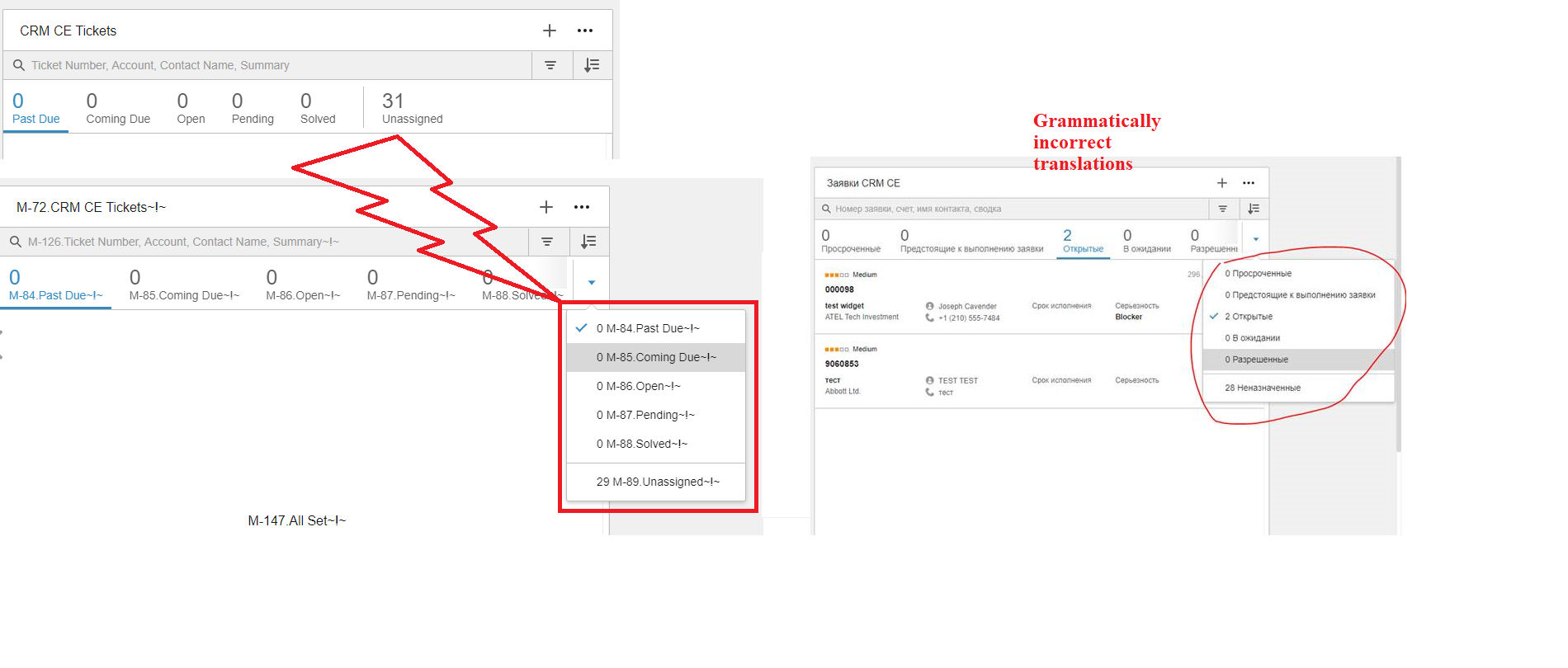
Screenshot attached
Scenario:
- KPIs can be displayed vertically and / or horizontally
- Two sets of labels are required for translation, one set for the ones that are displayed vertically and one set for the horizontal view
Example:
Label used for Vertical KPI display
e.g.
"id": "XXX",
"string": "Past Due",
Label used for Horizontal KPI display with floatable variables
e.g.
"id": "YYY",
"string": "{0} Past Due",
- This approach is not supported. Result: Grammatically incorrect translations are displayed in most languages
CRM MT developer:
"Upon checking the soho component configuration used to display both horizontal and vertical(pop up) navigation don't support 2 label versions. The current setup *automatically *converts the original horizontal KPI items to Vertical view when the max display length is reached. Note that the component also automatically hides the remaining pass the max display length, and the vertical navigation is the only way to view all items."
 cpinatel7
All 8 comments
I can easily see what your saying on https://main-enterprise.demo.design.infor.com/components/tabs/example-counts.html if you resize the page so the overflow shows.
What would be grammatically correct? Maybe it would be better if we dropped the counts from the overflow menu entirely? Or what do you think we should do about it from a translation point of view?
 tmcconechy
on 2 Jun 2021
tmcconechy
on 2 Jun 2021
Thanks Tim. I see what you mean. Dropping the counts from the overflow menu entirely is the easiest / quickest solution
From a translation point of view, we need 2 sets of strings i.e. one set of strings for the vertical view and one set of strings for the horizontal (overflow) view. Currently, the same set is used in both cases. Overall your solution is the best option.
Another question, not mentioned in my initial ticket:
The following layout (i.e. Number on the first row and Text/label on the second row) is problematic:
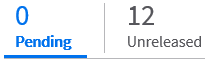
It looks ok in English but for some languages, it's more logical to display the Text/label on the first row and the Number on the second row. Do you think that we could add some configuration settings e.g. for en (US), display Number on the first row and Text/label on the second row. For language XXX, display Text/label on the first row, for language YYY, display...., etc. I'll create a separate issue for this. Thanks for your help
cpinatel7
on 2 Jun 2021
I think this issue should cover the cases of the order on the tabs and the order in the overflow menu so no need for a separate issue. I guess we could:
- add a way to make the count on top or bottom
- reflect that order in the menu as well? Or should we drop them out of the menu part?
tmcconechy
on 2 Jun 2021
- For "add a way to make the count on top or bottom", I guess we (translation team) will have to give you a list of languages and whether counts should be on top or bottom
- Drop it please as it's the easiest / best option
Thanks again
cpinatel7
on 2 Jun 2021
Ok if you want to give a list we can do that.
tmcconechy
on 2 Jun 2021
I'll compile a list (will take at least a week as several languages are translated externally)
cpinatel7
on 2 Jun 2021
re: list of languages and whether counts should be on top or bottom
Counts should be on top:
English locales
Chinese Simplified
Chinese Traditional
German
Japanese
Counts should be on bottom:
Other languages
Thanks
cpinatel7
on 8 Jul 2021
In addition i would add we should do this on Tabs Counts and actual counts as well.
https://main-enterprise.demo.design.infor.com/components/counts/example-index
And in WC and EP.
tmcconechy
on 8 Jul 2021
Related issues
 pwpatton
·
3Comments
pwpatton
·
3Comments
 fitzorama
·
3Comments
fitzorama
·
3Comments
 CindyMercadoReyes
·
3Comments
CindyMercadoReyes
·
3Comments
 SofiK
·
3Comments
SofiK
·
3Comments
 jbrcna
·
3Comments
jbrcna
·
3Comments