Enterprise: Locale: Colour names in Page Colour field are truncated in Thai
External Thai contractor for CRM CE:
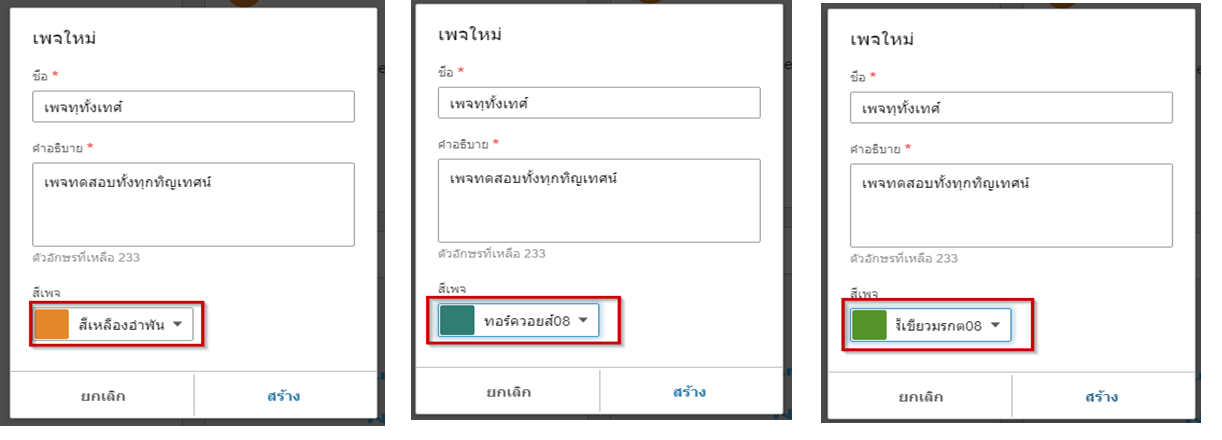
"Some colour names in Page Colour field are truncated. Truncated colour are - Amber08, Turquoise08, Emerald08, Slate07 etc. I am also not sure why we need the number after the name of the colour"
Screenshot attached
Issue raised as part of https://jira.infor.com/browse/LIME-6218
Emma Eriksson on 17/Aug/20 7:57 AM -> This is an issue with the IDS components, not Homepages
 cpinatel7
All 10 comments
I think this is a Homepages issue because we do not own the dialog and dropdown code in question. You will have to change it. Generally we are using the ... menu on the top of the form in our examples but the settings dialog is also acceptable.
My suggestion would be to.
- Remove the number from the dialog we have an example here https://master-enterprise.demo.design.infor.com/components/personalize/example-color-theme-api.html?colors=db7726 and https://master-enterprise.demo.design.infor.com/components/personalize/example-color-theme-api.html?colors=5c5c5c&locale=th-TH that is not showing this issue
- Make the dropdown bigger (wider)... on your dialog. Not sure why yours is only 150px the default is 300px. But for this dialog you could make it the same width as all the other fields.
Similar to https://master-enterprise.demo.design.infor.com/components/modal/example-validation.html
Cant see anything we can fix on our end. So closing for now
 tmcconechy
on 27 Aug 2020
tmcconechy
on 27 Aug 2020
Hi Tim,
This is an issue within the colorpicker field, which we use in New Page dialog in Homepages. I think that specific colorpicker variant is refered to as "Colorpicker with labels" in your example library.
I'm able to reproduce the issue here: https://master-enterprise.demo.design.infor.com/components/colorpicker/example-show-label.html?locale=th-TH.
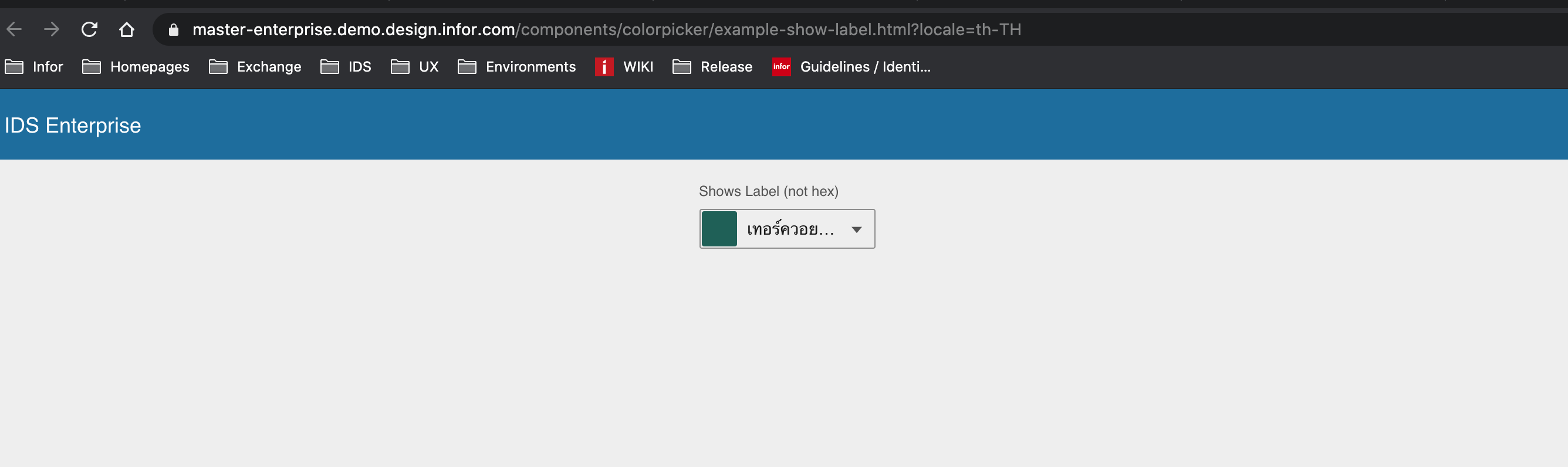
The default width of that colorpicker variant seems to be 150px.
 eeriksson429
on 28 Aug 2020
eeriksson429
on 28 Aug 2020
Ok my mistake that looks like a dropdown. So you can change the width of colorpicker too (even tho the default is 150)
- https://master-enterprise.demo.design.infor.com/components/colorpicker/example-sizes.html - various sizes
- Can also wrap it in a responsive form to make it 100% https://master-enterprise.demo.design.infor.com/components/form/example-inputs-simple.html
<div class="row form-responsive">
  <div class="twelve columns">

    <div class="field colorpicker-min-width">
      <label for="show-label">Default</label>
      <input class="colorpicker" id="show-label" type="text" value="#0E5B52"
        data-options="{'showLabel': true, 'editable': false}" />
    </div>
    <div class="field">
      <label class="required" for="last-name">Last Name</label>
      <input type="text" id="last-name" aria-required="true" name="last-name" data-validate="required"/>
    </div>
Thanks Tim, I'll pass that information on to the developers.
eeriksson429
on 31 Aug 2020
Hi Tim,
None of those options seem to work really.
- No width is matching the standard input width of 300px. Small - Medium is the closest, but it's 283px.
- Doesn't work, since the full width is only applied when modal enters fullscreen mode? It also just increases the container width, not the width of the colorpicker input (see the picker arrow)
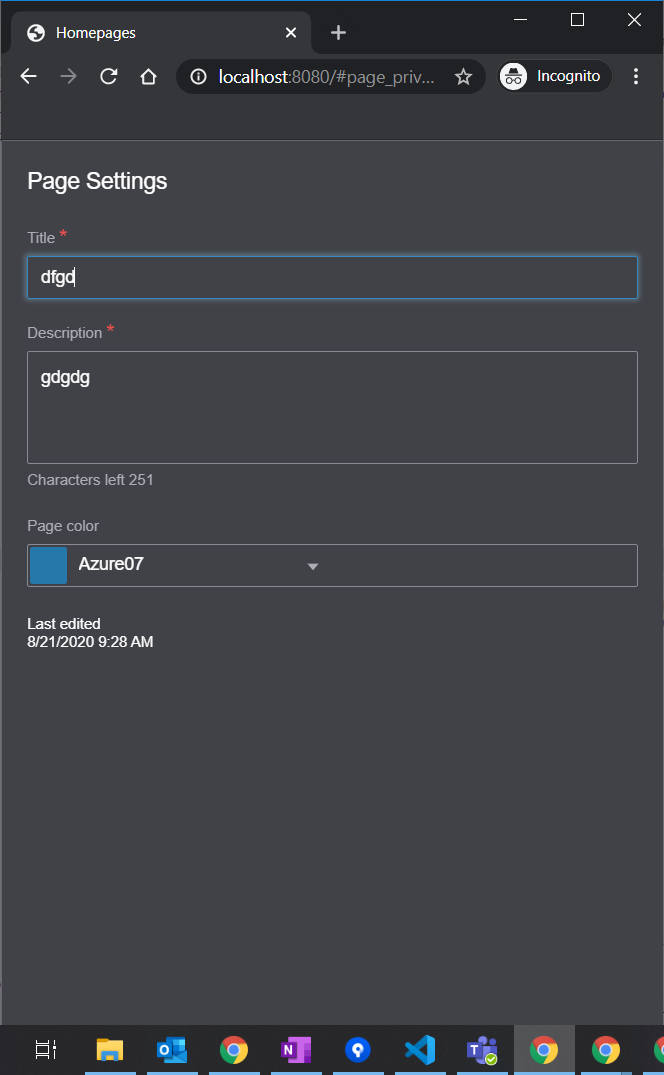
Since the default width of a colorpicker is 150px, shouldn't something be done to make sure all the page color names fit? Either by ellipsis or tooltip. It would also be good to have a standard width class that matches other default inputs (300).
For now, we'll use colorpicker-input-sm to increase the width slightly.
 volante007
on 31 Aug 2020
volante007
on 31 Aug 2020
I think its a bug that the the sizes dont line up between
https://master-enterprise.demo.design.infor.com/components/colorpicker/example-sizes.html
and
https://master-enterprise.demo.design.infor.com/components/components/input/example-sizes.html
I'll push a fix for that. But the ellipsis does work as evident on that page. Just not when selecting as it is scrolled over to the right in the input. But there is plenty of room here so making it the same size as the others makes sense.
Workarounds:
Also i think you can make the modal + responsive class work if you set a default width on the modal. Other wise its 100% of something unknown.
Or alternatively use the dropdown like the examples? How many colors do you allow in the colorpicker? We decided to just give access to the one range of colors since it looked OK. So we don't need the number and can then use the dropdown. https://master-enterprise.demo.design.infor.com/components/personalize/example-color-theme-api.html?colors=db7726
tmcconechy
on 31 Aug 2020
Pushed size adjustments so medium is 300px as expected
tmcconechy
on 31 Aug 2020
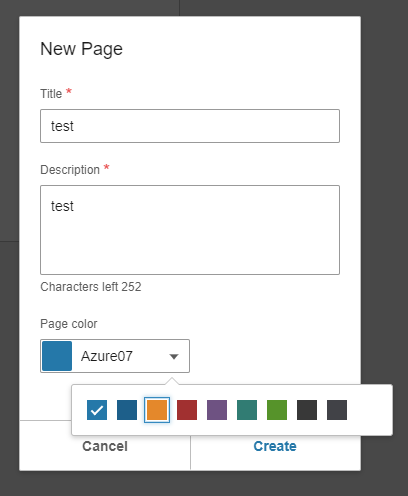
The dropdown version looks nice! Unfortunately, we allow two different shades of Azure and Slate as header color, so we need the names to differentiate them. But might work OK with the dropdown anyway
volante007
on 31 Aug 2020
ok that makes sense also. Well with the fix i pushed you can make it 300px - or you can try setting the modal width and using the responsive class or wait for the release with the size fix.
tmcconechy
on 31 Aug 2020
QA Passed
v4.32.0-beta0
https://4320-beta0-enterprise.demo.design.infor.com/components/colorpicker/example-sizes.html
https://4320-beta0-enterprise.demo.design.infor.com/components/dropdown/test-sizes.html
I'm not sure if this is a bug but upon testing in responsive/mobile view I see this
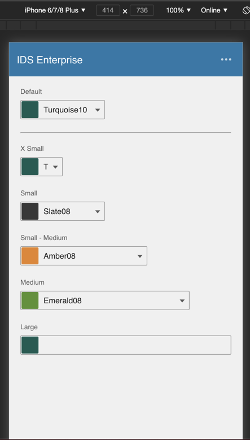
 jbrcna
on 2 Sep 2020
jbrcna
on 2 Sep 2020
Related issues
 brianjuan
·
3Comments
jbrcna
·
3Comments
brianjuan
·
3Comments
jbrcna
·
3Comments
 dubde
·
4Comments
dubde
·
4Comments
 EdwardCoyle
·
4Comments
jbrcna
·
3Comments
EdwardCoyle
·
4Comments
jbrcna
·
3Comments