Enterprise: Calendar: In week view, clicking "Today" changes the start of the week to day today
Describe the bug
Calendar: In week view, clicking "Today" changes the start of the week to day today.
To Reproduce
Steps to reproduce the behavior:
- Go to http://4230-beta0-enterprise.demo.design.infor.com/components/calendar/example-index.html
- Select "Week" on the dropdown at the top-right of the Calendar
- The Calendar will update to week view
- Click "Today" in the Calendar or inside the date picker
- See issue: The week view will now start at the day today instead of Sunday
Expected behavior
In week view, week should always start at Sunday regardless of day today.
Version
- ids-enterprise: v4.23.0-beta0
Screenshots
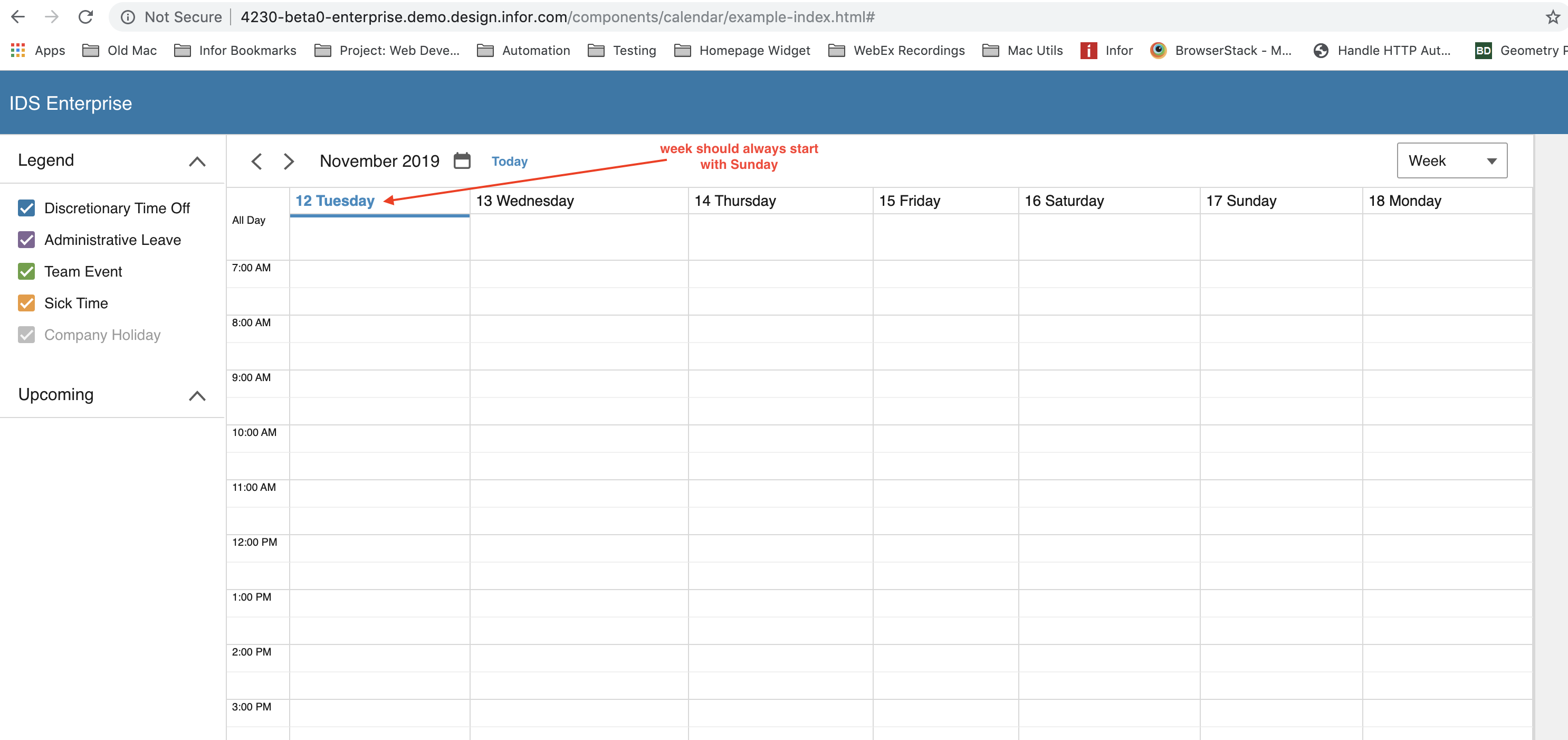
Platform
- All OS and devices.
Additional context
N/A.
 brianjuan
All 4 comments
Also encountered in http://4230-beta0-enterprise.demo.design.infor.com/components/week-view/example-two-weeks.html#
brianjuan
on 14 Nov 2019
👍1
The pending fix should fix that case as well
 tmcconechy
on 14 Nov 2019
tmcconechy
on 14 Nov 2019
QA FAILED
The issue persists.
Verified in
http://4230-rc0-enterprise.demo.design.infor.com/components/calendar/example-index.html?
http://4230-rc0-enterprise.demo.design.infor.com/components/week-view/example-two-weeks.html?#
Steps to replicate
- Go to http://4230-rc0-enterprise.demo.design.infor.com/components/calendar/example-index.html
- Select "Day" on the dropdown at the top-right of the Calendar
- The Calendar will update to Day view
- Go to Future Date. Alternatively, just click the ">" button twice
- Switch to "Week" view
- The Calendar will update to Week view
- Click "Today" in the Calendar or inside the date picker
- _See issue:_ The week view will start at the day today instead of Sunday
 jbrcna
on 15 Nov 2019
jbrcna
on 15 Nov 2019
👍2
This issue is now resolved.
 CindyMercadoReyes
on 19 Nov 2019
CindyMercadoReyes
on 19 Nov 2019
Was this page helpful?
0 / 5 - 0 ratings
Related issues
CindyMercadoReyes
·
3Comments
 swetteinfor
·
3Comments
swetteinfor
·
3Comments
 awbuboltz
·
3Comments
jbrcna
·
3Comments
awbuboltz
·
3Comments
jbrcna
·
3Comments
 SofiK
·
3Comments
SofiK
·
3Comments
Most helpful comment
QA FAILED
The issue persists.
Verified in
http://4230-rc0-enterprise.demo.design.infor.com/components/calendar/example-index.html?
http://4230-rc0-enterprise.demo.design.infor.com/components/week-view/example-two-weeks.html?#
Steps to replicate