Enterprise: Autocomplete: Selected event not fired when partially overflowing its parent
Describe the bug
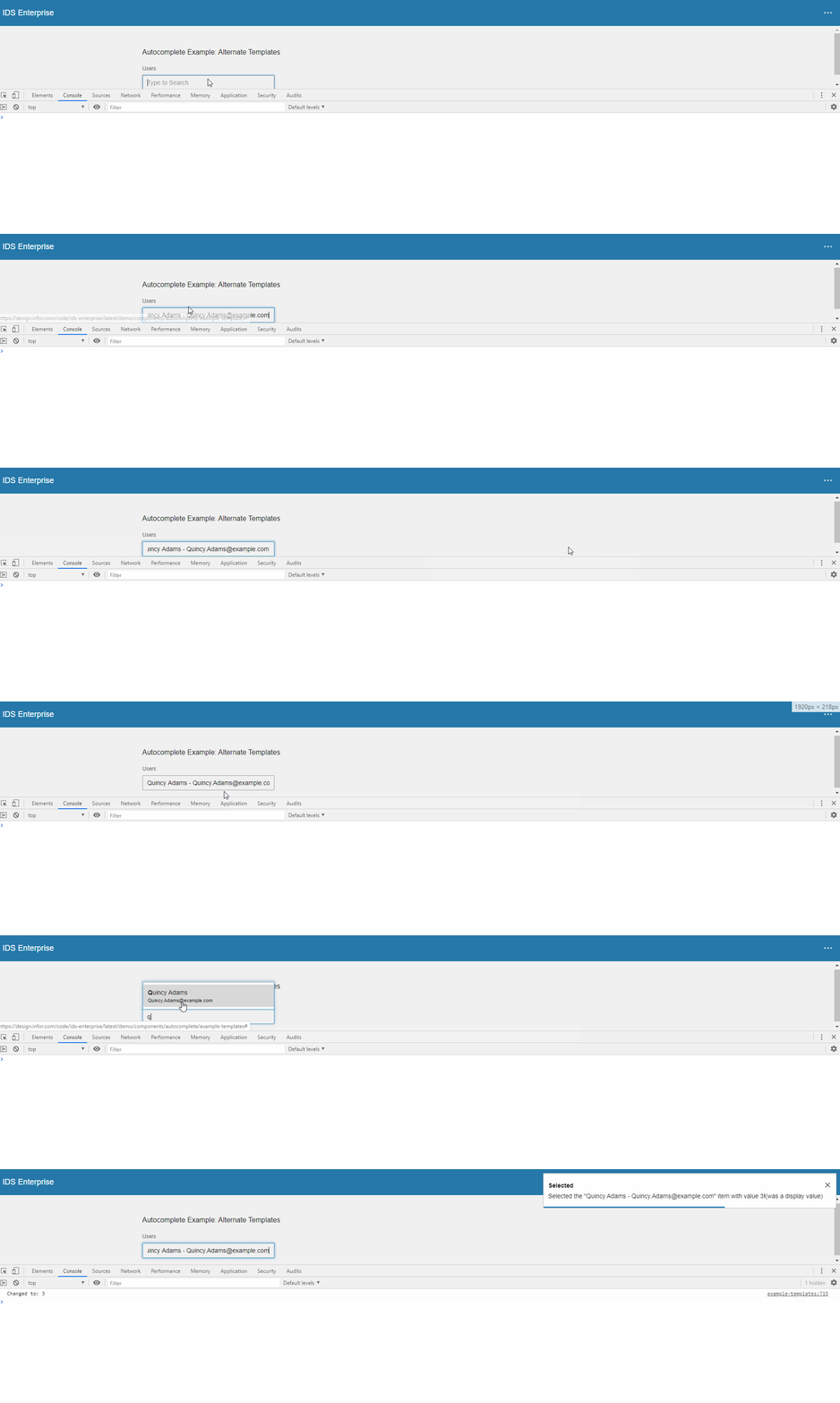
If an autocomplete input element is partially overflowing its parent, the selected event will not fire when selecting an item from the list. Gif below demonstrates the issue:
To Reproduce
Steps to reproduce the behavior:
- Go to https://design.infor.com/code/ids-enterprise/latest/demo/components/autocomplete/example-templates
- Open dev tools
- Enlarge dev tools so that the autocomplete demo view is very small and scroll appears
- Adjust scroll position so that the autocomplete is not fully visible
- Search for "q" and select the option
Result: Nothing happens
The scenario above is not very likely, but it will occur anytime the autocomplete parent has vertical scroll and the autocomplete is not 100% within the view.
Expected behavior
The selected event is fired with the selected item.
Version
- ids-enterprise: 4.22.1
 volante007
All 13 comments
QA Passed. Will now move do Done. Thanks!
Tested in http://master-enterprise.demo.design.infor.com/components/autocomplete/example-templates.html?theme=uplift&variant=light
 janahintal
on 14 Jan 2020
janahintal
on 14 Jan 2020
We still see this issue in 4.27.4. Can be reproduced in above QA page
volante007
on 30 Apr 2020
@volante007 im not seeing it. everytime i try it i se the toast message indicating that the selected event fires.
Tried on: http://master-enterprise.demo.design.infor.com/components/autocomplete/example-templates.html (4.28)
And: https://design.infor.com/code/ids-enterprise/latest/demo/components/autocomplete/example-templates (4.27.4)
Video: https://drive.google.com/file/d/1Uv_6hU85o7uzIIpKIbREN2zu9s5LMoju/view
 tmcconechy
on 30 Apr 2020
tmcconechy
on 30 Apr 2020
Hi Tim,
It seems from your video that the autocomplete input isn't partially hidden / scrolled out of view, so the issue will not be seen. See GIF & description in original post (even as small as 1 pixel overflow will show the issue).
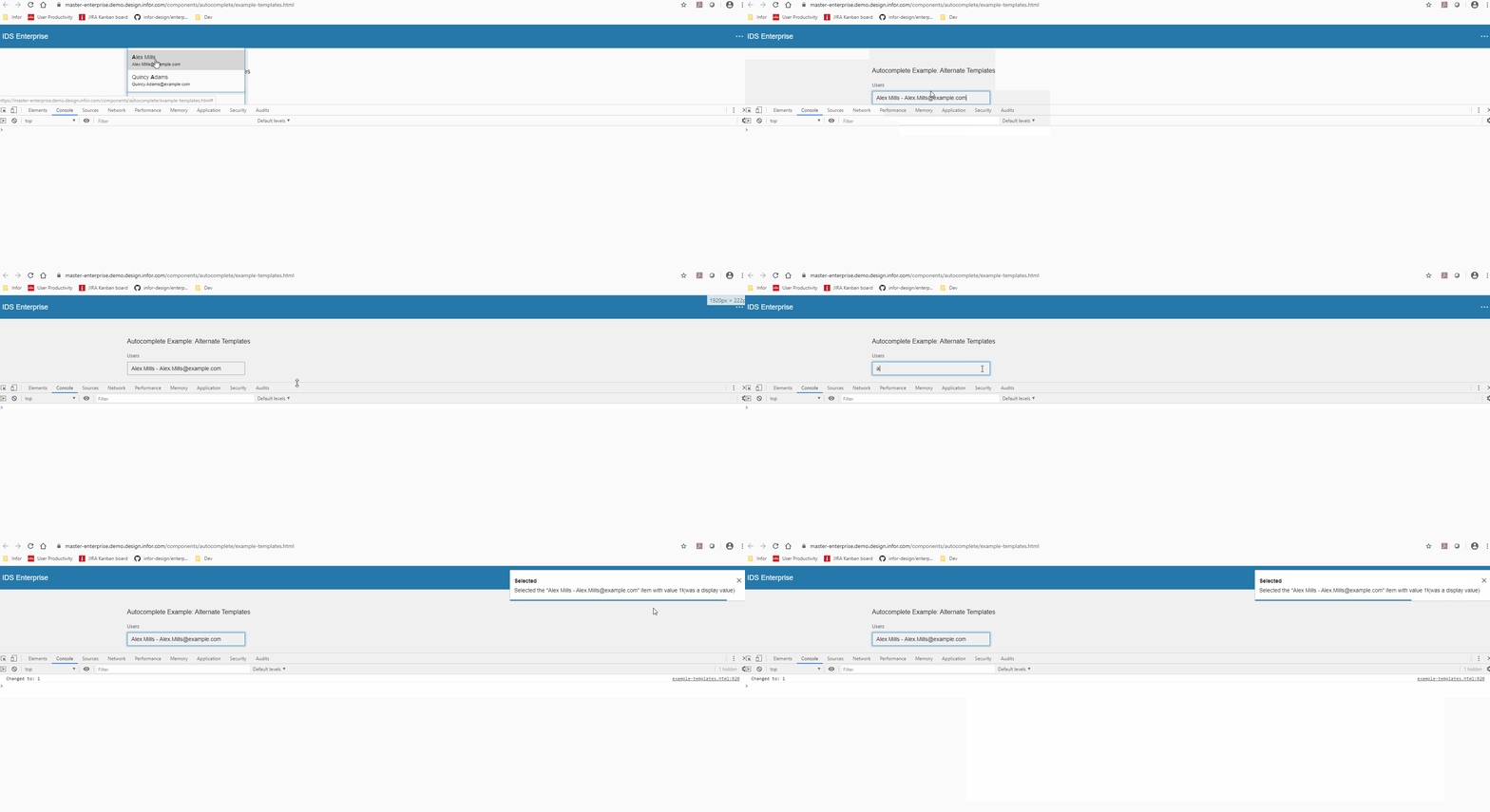
Edit: It works fine on second link (design.infor.com @ latest), but not on master. So I assume the problem occured again after 4.26.2?
GIF from master:
volante007
on 30 Apr 2020
I tried this on https://4274-enterprise.demo.design.infor.com/components/autocomplete/example-templates.html (which is running 4.27.4) and I wasn't able to reproduce any errors - seemed ok to me:

My screen recording tool got in the way a bit on this GIF but I was seeing the same results without it present.
 EdwardCoyle
on 30 Apr 2020
EdwardCoyle
on 30 Apr 2020
However... confirmed that doing the same on https://master-enterprise.demo.design.infor.com/components/autocomplete/example-templates.html reproduces the bug:

EdwardCoyle
on 30 Apr 2020
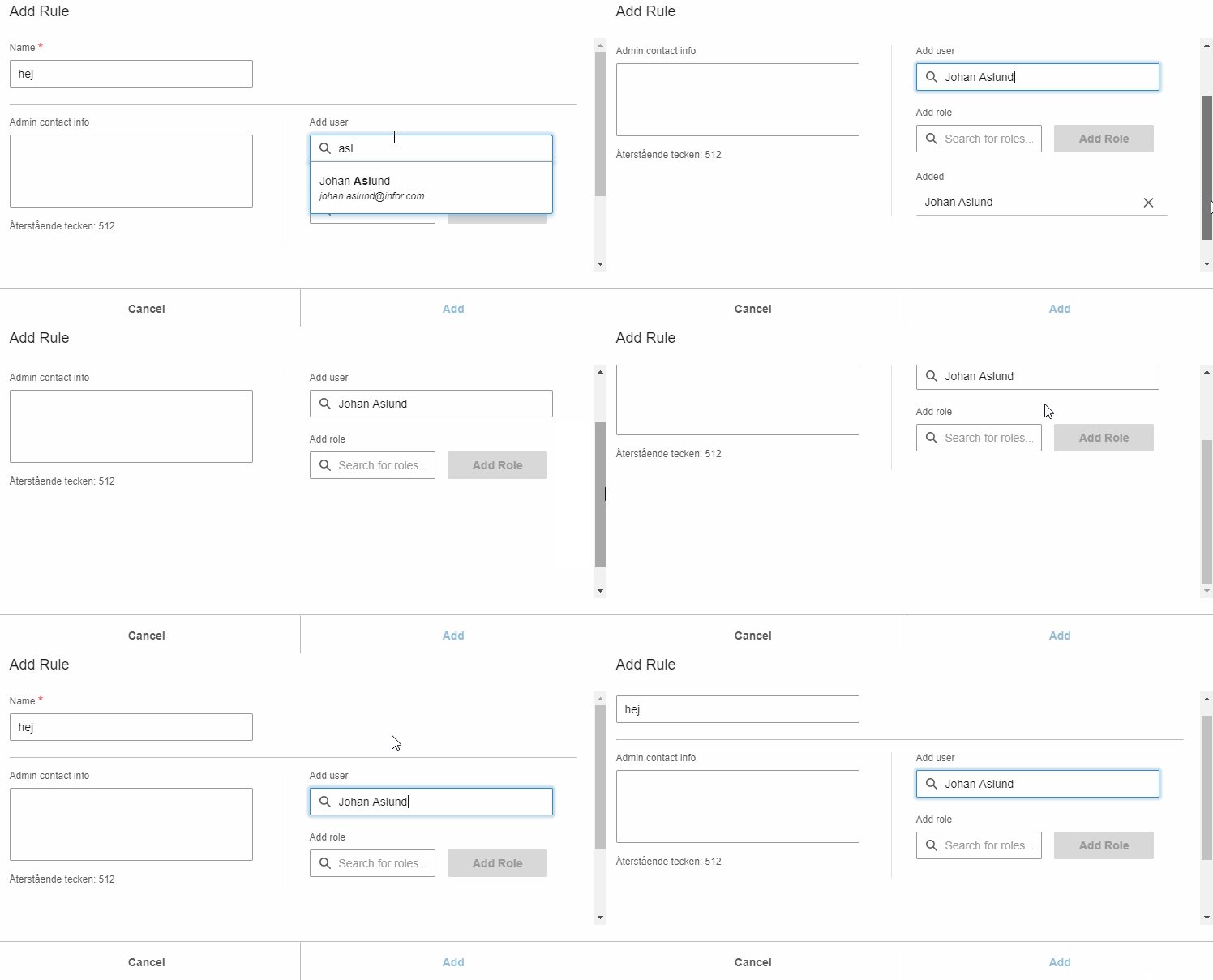
@EdwardCoyle Hm, right, seems to work fine on 4.27.4 on that link, but not on master. Very strange, we see this with 4.27.4. Our cases are all in modals though, not sure if that can differ somehow?
One of our examples in a modal @ 4.27.4:
- Fully visible input -> event + adds
- Partially visible input -> nothing (scrolls to top?)
I
volante007
on 30 Apr 2020
Yeah i see it now on master which is most important to fix it... If i open the chrome tools and cover the autocomplete bottom border.
Also only the first time
tmcconechy
on 30 Apr 2020
Added a GIF to previous post for one of our scenarios.
"Also only the first time"
I think that's because when you select, it will actually auto. scroll into view fully. So for issue to appear again, need to make it "hidden" again.
volante007
on 30 Apr 2020
As part of the fix, it would be great if a test page could be added with an autocomplete used in a modal as well! I couldn't find any test page for that.
Similar to:
https://design.infor.com/code/ids-enterprise/latest/demo/components/dropdown/test-in-modal-content.html
volante007
on 30 Apr 2020
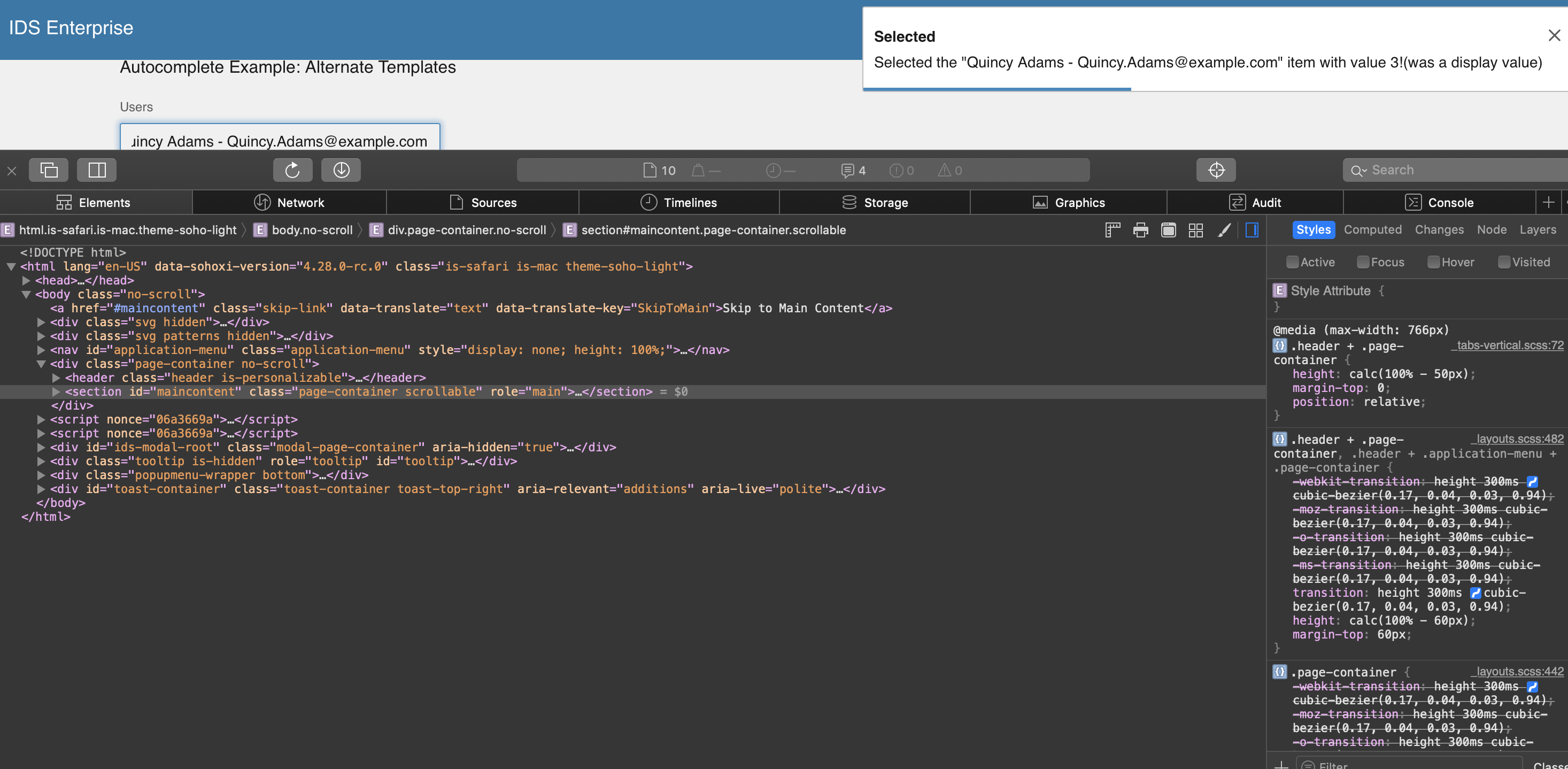
This issue is now resolved. moving this ticket to Done. please see screenshot for reference
v4.28.0-rc0
https://4280-rc0-enterprise.demo.design.infor.com/components/autocomplete/example-templates.html
 jbrcna
on 4 May 2020
jbrcna
on 4 May 2020
just some observation with the other test page.
https://4280-rc0-enterprise.demo.design.infor.com/components/autocomplete/test-in-modal-content.html
Expected behavior:
Scrolling inside of this Modal component should cause the Autocomplete list to close, if the list is open when attempting to scroll.
Actual Result:
In test-content (scrollable-y section)
after you scroll, Autocomplete list does not close
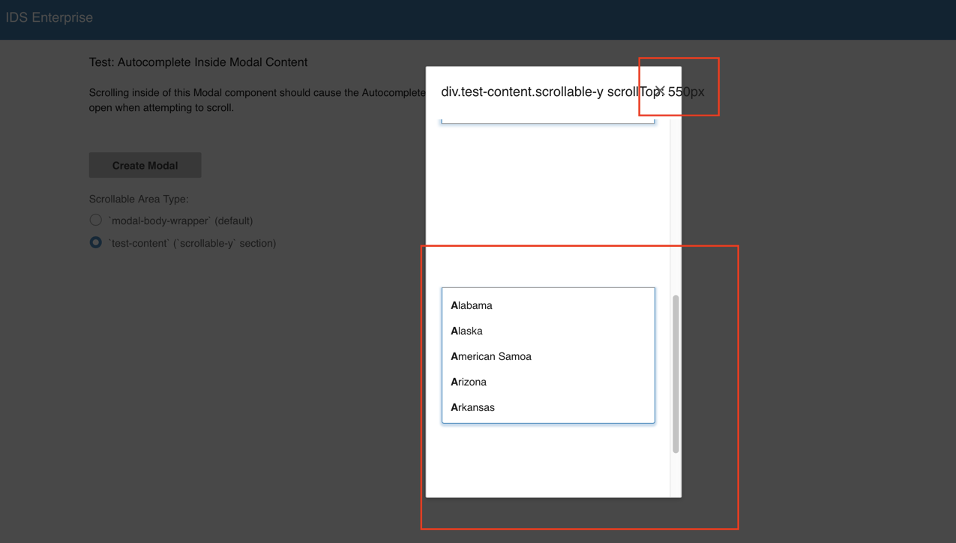
_screenshot from Safari browser_
jbrcna
on 4 May 2020
The point about it not closing is worth an issue i think. @jbrcna
tmcconechy
on 4 May 2020
Related issues
 pwpatton
·
3Comments
pwpatton
·
3Comments
 guoliang
·
3Comments
guoliang
·
3Comments
 CindyMercadoReyes
·
3Comments
pwpatton
·
3Comments
CindyMercadoReyes
·
3Comments
pwpatton
·
3Comments
 fitzorama
·
3Comments
fitzorama
·
3Comments
Most helpful comment
As part of the fix, it would be great if a test page could be added with an autocomplete used in a modal as well! I couldn't find any test page for that.
Similar to:
https://design.infor.com/code/ids-enterprise/latest/demo/components/dropdown/test-in-modal-content.html